AR glasses can give engineers a portable screen for drawings, documentation, and remote collaboration, but not every pair offers the same kind of workspace. Some primarily mirror a connected device; others add head tracking that can make a virtual display feel more stable.
Our 2026 shortlist spans compact display glasses and models with native 3DoF or advertised 6DoF capabilities. Start with your workflow and device compatibility, then weigh image clarity, comfort, and the accessories needed to make each pair useful.
Best 10 Ar Glasses for Engineers Picks for 2026
Best for Spatial Workflows

- Sharp 1200p-per-eye display
- SpaceWalker multi-screen on Mac and Windows
- 6DoF requires Pro Neckband
Best For: Readable virtual monitors with optional spatial interaction
Best Plug-and-Play 3DoF

- Native 3DoF without an app
- 32:9 and 21:9 ultrawide modes
- Optional XREAL Eye for 6DoF
Best For: Fast setup with a stable, flexible virtual screen
Best Wide-View Display

- 58° field of view
- Built-in 3DoF and 32:9 mode
- Nine-level dimming
Best For: A wide virtual workspace with onboard controls
Best Fit Options

- Two IPD size ranges
- 57° field of view with native 3DoF
- Optional XREAL Eye for 6DoF
Best For: Wide-screen viewing with more fit choices
Spatial Workspace Pick
- 1200p Sony Micro-OLED display
- Mac and Windows multi-screen support
- 6DoF support depends on setup
Best For: Portable multi-screen work with optional spatial interaction
Anchored Display Pick

- Wide 59° field of view
- Native 3DoF without a computing box
- Three IPD size options
Best For: A portable, head-anchored virtual display
Multi-Screen Productivity Pick

- 1200p virtual display
- Up to three SpaceWalker screens
- Code mode on Mac or PC
Best For: Portable multi-screen coding and reference work
Best for Anchored Screens

- Native 3DoF screen positioning
- 68 g glasses; 120 Hz display
- Dolby Vision requires Pocket TV Pro
Best For: Head-tracked viewing from compatible devices
Best for Display Comfort

- 1080p Micro-OLED; 120 Hz
- 20 brightness settings
- Prescription lenses need an optician
Best For: Adjustable portable screen viewing
Best for Plug-and-Play HDR

- USB-C setup without Wi-Fi or apps
- HDR10 and 120 Hz display
- No internal battery
Best For: Cable-connected HDR viewing
Best for Spatial Workflows – VITURE Luma Ultra
For engineers comparing AR glasses for engineers, the VITURE Luma Ultra combines a sharp 1200p-per-eye display with SpaceWalker multi-screen support on Mac and Windows. Its cameras also enable more advanced spatial interaction when paired with the VITURE Pro Neckband.
Best For: Engineers who want readable virtual monitors and the option to explore tracked spatial interfaces.
Pros:
- 1200p Sony Micro-OLED displays and a 52° field of view support detailed on-screen work.
- SpaceWalker supports multiple virtual screens on Mac and Windows.
- Front RGB and dual depth cameras support 6DoF tracking and hand gestures with the Pro Neckband.
Cons:
- 6DoF and hand gestures require the separately paired Pro Neckband.
- SpaceWalker features vary by platform, app, and connection method.
Choose these if screen clarity and multi-window productivity matter most, but check your device and accessory requirements before planning a 6DoF workflow.
Best Plug-and-Play 3DoF – XREAL 1S
The XREAL 1S is a straightforward choice among AR glasses for engineers who want an anchored virtual display without setting up an app. Its onboard X1 chip provides native 3DoF when connected to a USB-C DisplayPort-capable device.
Best For: Engineers who prioritize quick setup, a stable virtual screen, and flexible viewing modes.
Pros:
- Native 3DoF works without an app on compatible USB-C video-output devices.
- Ultrawide 32:9 and 21:9 modes offer room for wide layouts.
- On-glasses controls adjust brightness, tint, color temperature, and screen distance.
Cons:
- 6DoF spatial anchoring requires the optional XREAL Eye.
- Direct plug-and-play use depends on a USB-C DisplayPort-capable source.
Its built-in tracking makes it appealing for a portable workstation; confirm your laptop or other source supports USB-C video output before buying.
Best Wide-View Display – VITURE Beast
Among AR glasses for engineers, the VITURE Beast stands out for its 58° field of view and built-in screen controls. Its 1200p-per-eye display, native 3DoF, and ultrawide mode make it worth considering for a large portable workspace.
Best For: Engineers who want a wide virtual display with positioning and dimming controls built into the glasses.
Pros:
- 58° field of view and 1200p-per-eye Sony Micro-OLED panels.
- Built-in 3DoF offers anchored, smooth-follow, side, and 32:9 ultrawide modes without software.
- Nine-level electrochromic dimming and Auto Transparency help adjust visibility.
Cons:
- Multi-screen work through SpaceWalker depends on supported devices and software.
- The supplied notes describe built-in 3DoF, not built-in 6DoF tracking.
This is the pick for screen width and convenient onboard controls, rather than a choice based on claims of full positional tracking.
Best Fit Options – XREAL One Pro
The XREAL One Pro suits engineers shopping for AR glasses for engineers who need a broad view but also want to choose a frame size for their interpupillary distance. It pairs a 57° field of view with native 3DoF tracking and two IPD size ranges.
Best For: Engineers who value fit adjustment, a wide virtual screen, and optional 6DoF anchoring.
Pros:
- M and L sizes cover stated IPD ranges of 57–66 mm and 66–75 mm.
- Native 3DoF and a 57° field of view support an anchored, expansive display.
- Adjustable arms, three nose-pad sizes, and software IPD adjustment provide fit options.
Cons:
- Full 6DoF anchoring requires the optional XREAL Eye.
- HDMI sources may require an additional Beam or adapter.
Check your IPD and device’s video-output connection first; those details will determine whether its optics and tracking are practical for your setup.
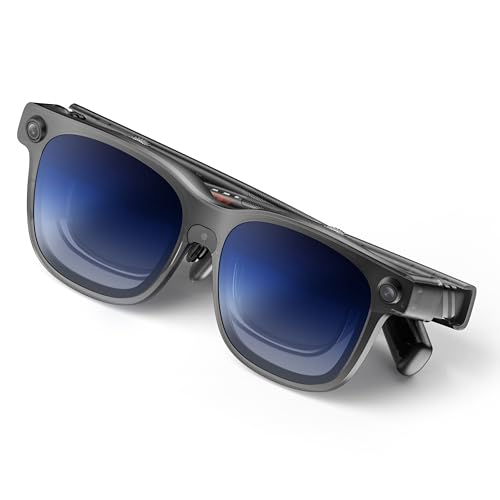
Spatial Workspace Pick – VITURE Luma Ultra XR Glasses
For shoppers comparing AR glasses for engineers, the VITURE Luma Ultra stands out for its 1200p display and spatial features. SpaceWalker supports multiple virtual screens on Mac and Windows, making it useful for keeping code, documentation, and chat visible together on supported setups.
Best For: Engineers who want a portable multi-screen workspace and are willing to check platform requirements for spatial controls.
Pros:
- 1200p Sony Micro-OLED display, 52° field of view, and up to 120Hz refresh rate.
- SpaceWalker offers multi-screen and ultra-wide layouts on supported platforms.
- Front RGB and dual depth cameras enable 6DoF features on supported setups.
Cons:
- Hand gesture control requires the VITURE Pro Neckband; support varies by platform.
- SpaceWalker for iOS and Android does not support 6DoF or gesture tracking.
Choose the Luma Ultra if spatial interaction matters alongside screen space. Confirm your device, OS, app, and connection method before buying for 6DoF or gestures.
Anchored Display Pick – RayNeo GT Max AR/XR Glasses
Among AR glasses for engineers, the RayNeo GT Max is worth considering when a stable, wide virtual display matters more than a documented multi-screen workflow. Its native 3DoF tracking can keep the screen anchored as you turn your head without an external computing box.
Best For: Engineers who want a portable single-display experience with built-in 3DoF tracking.
Pros:
- 59° field of view and adjustable virtual screen sizes.
- Native 3DoF offers Steady, Pinned, and Follow screen modes.
- Up to 38 PPD, 120Hz refresh rate, and three IPD size options.
Cons:
- Supplied features emphasize a virtual display rather than a multi-screen coding workspace.
- Devices without USB-C DisplayPort output may need an adapter.
The GT Max makes the strongest case here for a wide, head-anchored screen. Check your device’s video-output compatibility and choose the appropriate IPD size before ordering.
Multi-Screen Productivity Pick – VITURE Luma Pro XR/AR Glasses
The VITURE Luma Pro is a practical option among AR glasses for engineers who primarily want more screen space from a Mac or PC. Through SpaceWalker, it supports up to three virtual screens and includes a code mode for arranging a work-focused display.
Best For: Engineers who want a portable, up-to-three-screen workspace without prioritizing 6DoF controls.
Pros:
- 1200p display, 52° field of view, and up to 120Hz refresh rate.
- SpaceWalker supports up to three virtual screens on Mac or PC.
- Two IPD size options, flexible arms, and tilt-adjustable temples help tailor the fit.
Cons:
- Multi-screen work requires SpaceWalker on a supported Mac or PC.
- Connected devices need compatible USB-C video and power output.
If your priority is arranging code and reference windows rather than spatial gestures, the Luma Pro has a clearly stated productivity feature set. Verify your computer’s connection support before buying.
Best for Anchored Screens – RayNeo GT AR/XR Glasses
Among ar glasses for engineers, the RayNeo GT stands out if you want a virtual screen that stays positioned while you move your head. Its native 3DoF tracking runs on the glasses, with Steady, Pinned, and Follow modes for different viewing preferences.
Best For: Engineers who want a head-tracked display for viewing content from a compatible laptop, phone, or handheld device.
Pros:
- Native, low-latency 3DoF tracking needs no external computing box.
- 68 g glasses with a 120 Hz display and up to 49 pixels per degree.
- Connects by cable to compatible phones, tablets, PCs, and consoles.
Cons:
- Devices without USB-C DisplayPort output may need an adapter.
- Dolby Vision requires a RayNeo Pocket TV Pro.
The GT is the strongest fit here when screen positioning matters more than a simple plug-in display. Check your source device’s video-output support before buying.
Best for Display Comfort – RayNeo Air 3s Pro
If you are comparing ar glasses for engineers for extended screen viewing, the RayNeo Air 3s Pro puts display adjustment front and center. It pairs a 1080p Micro-OLED display with 20 brightness levels, 120 Hz refresh, and stated low-blue-light and flicker-free certifications.
Best For: Engineers who prioritize adjustable brightness and display-comfort features in a portable virtual screen.
Pros:
- Up to 1,200 nits of stated to-eye brightness.
- 20 brightness levels and 3,840 Hz PWM dimming.
- Includes a prescription lens sample for an optician to use as a fitting reference.
Cons:
- Prescription lenses require a separate visit to an optician.
- Not water resistant.
This is a practical choice if brightness control and vision-correction setup are priorities. It is a wearable display rather than a stated engineering-specific tool, so assess it against the apps and source devices you actually use.
Best for Plug-and-Play HDR – RayNeo Air 4 Pro
For engineers shopping for ar glasses for engineers that also serve as an entertainment display, the RayNeo Air 4 Pro offers straightforward USB-C connectivity and HDR10 viewing. Its Vision 4000 chip adds SDR-to-HDR processing, while the display supports a 120 Hz refresh rate.
Best For: Engineers who want a cable-connected personal screen for compatible devices and HDR video after work.
Pros:
- USB-C plug-and-play connection requires no Wi-Fi or apps.
- HDR10 display with SDR-to-HDR processing and 120 Hz refresh.
- Supports native 3D playback and 2D-to-3D conversion.
Cons:
- No internal battery; it relies on a connected device.
- Optional Sound Tube accessory is sold separately.
The Air 4 Pro makes sense when simple setup and video features outweigh the GT’s native screen anchoring. Verify that your intended device can provide a compatible USB-C video connection.
How We Picked These Ar Glasses for Engineers
We focused on 10 listed models with features relevant to technical work: readable virtual displays, tracking options, portable connectivity, and specifications that help distinguish one pair from another. This is a buying shortlist, not a claim that every model has been lab-tested or certified for engineering use. Advertised screen sizes, brightness, and tracking features are starting points; their usefulness depends on the source device, software, lighting, and fit.
Quick Comparison: Match the Glasses to the Task
For a portable monitor, prioritize a sharp image, comfortable fit, and straightforward connection over the largest advertised virtual screen. If you want a display that stays in place as you turn your head, look at models listing native 3DoF, including the XREAL 1S, XREAL One Pro, RayNeo GT, and RayNeo GT Max. The VITURE Luma Ultra listings advertise 6DoF; check the required accessories and supported apps before treating that as a ready-to-use spatial workspace. The Luma Pro, RayNeo Air 3s Pro, and Air 4 Pro may suit buyers whose main need is viewing content rather than spatial interaction.
Key Buying Factors for Ar Glasses for Engineers
Compatibility and Workflow
Confirm that your laptop, tablet, or phone can output video to the glasses, and check whether an adapter, power source, or companion device is needed. For CAD, schematics, and terminals, verify that your actual software remains legible at the resolution and scaling you use. Glasses that mirror a desktop are not automatically a multi-monitor setup.
Tracking and Workspace Behavior
3DoF generally tracks head rotation; 6DoF also accounts for movement through space when the full system supports it. Neither specification alone guarantees pinned windows, hand controls, or compatibility with professional AR applications. Check what works natively, what requires extra hardware, and whether the feature is supported on your operating system.
Image Quality, Fit, and Safety
Consider resolution, field of view, refresh rate, text clarity, and how the image sits within your view—not just the quoted screen size. Prescription options, nose-pad fit, weight, cable routing, and heat matter during long sessions. For site visits, confirm your employer’s PPE rules: consumer AR glasses should not be assumed to replace certified safety eyewear.
Who Should Buy Which Ar Glasses for Engineers?
Desk-based engineers should start with device compatibility and text readability, then consider tracked displays if keeping a screen fixed in view matters. Frequent travelers may prefer a simpler display-first pair with fewer accessories. Spatial-computing experimenters should investigate the Luma Ultra’s advertised 6DoF setup and supported software before paying for that capability. Field engineers should prioritize secure fit, visibility in their working conditions, and safety requirements over entertainment-focused features. Whenever possible, buy from a seller with a clear return policy so you can test fit and readability with your own tools.