Vertical computer mice can reduce wrist rotation while giving gamers more control over sensitivity, buttons, and grip comfort. The right model depends on whether you prioritize fast aim, programmable inputs, wireless freedom, or long-session ergonomics.
We’ve selected 10 vertical gaming and ergonomic mice spanning budget-friendly wired designs, premium wireless models, large-hand options, and feature-rich choices with joysticks or rocker controls.
Best 10 Vertical Computer Mice for Gaming Picks for 2026
Most Feature-Packed
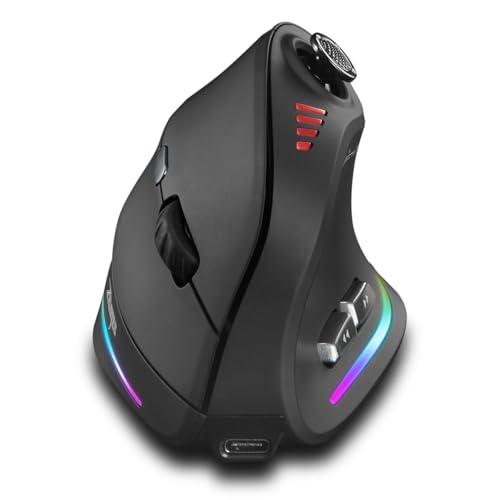
- 5-way joystick plus 12 programmable buttons
- Bluetooth, 2.4GHz, and USB-C connectivity
- Adjustable up to 24,000 DPI with rechargeable RGB design
Best For: Gamers seeking extensive controls and wireless flexibility
Best Ergonomic Classic

- 57-degree angle supports a natural wrist posture
- 4,000 DPI sensor with cursor-speed switch
- Textured grip, thumb rest, and rechargeable wireless design
Best For: Comfort-focused users who also play casually
Best Wired Gaming Controls

- 5-direction rocker acts as five additional inputs
- 11 programmable buttons with onboard memory
- Wired design with five DPI levels and LED effects
Best For: PC gamers who favor macros and a stable wired connection
Best for Small-to-Medium Hands

- 57-degree shape with a softly textured grip
- Quiet clicks, SmartWheel, and customizable buttons
- Bluetooth or Logi Bolt with up to two years of battery life
Best For: Right-handed users balancing productivity and casual gaming
Joystick Control Pick
ZEER Ergonomic Vertical Gaming Mouse

- 11 programmable buttons with macro support
- Five-way thumb joystick for game movement
- Wired 10,000 DPI sensor with five DPI levels
Best For: FPS, MOBA, and MMO players wanting extensive thumb controls
Most Flexible Connectivity
Wireless 24,000 DPI Vertical Gaming Mouse

- Bluetooth, 2.4GHz wireless, and USB-C wired modes
- 12 programmable buttons with saved settings
- Five-direction rocker and up to 24,000 DPI
Best For: Right-handed gamers needing multi-device flexibility
RGB Comfort Pick
Nulea Ergonomic Vertical Mouse

- 57-degree grip supports a more natural forearm position
- Four DPI settings up to 3200 DPI
- Wired plug-and-play design with RGB underglow
Best For: Right-handed users seeking simple ergonomic control with RGB lighting
Adjustable Support Choice
J-Tech Digital V628 Vertical Mouse

- Removable palm rest adds hand support
- Seven-button right-handed design
- Three sensitivity settings from 600 to 1600 DPI
Best For: Users prioritizing palm support and extra controls over high DPI
Feature-Heavy Gaming Pick
Attoe 10000 DPI Vertical Gaming Mouse
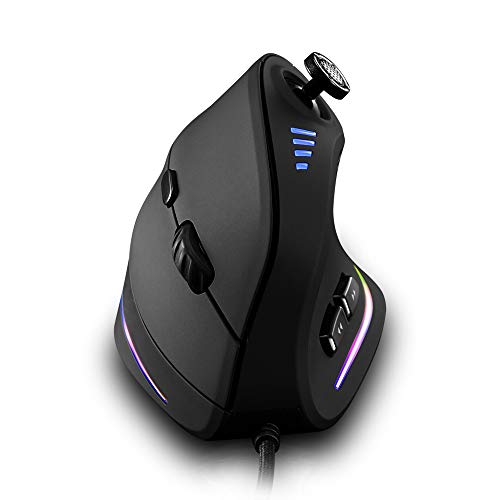
- 10,000 DPI PAW3325 gaming sensor
- 11 programmable buttons with macro editing
- Five-direction thumb rocker for game controls
Best For: Right-handed gamers needing extensive customization and high sensitivity
Most Feature-Packed – TKMARS Vertical Gaming Mouse
If you want vertical computer mice for gaming with extensive customization, the TKMARS combines a natural-grip design with wireless flexibility, a built-in joystick, 12 programmable buttons, and sensitivity settings up to 24,000 DPI. Its Bluetooth and 2.4GHz connections also make it practical for switching between compatible devices.
Best For: Gamers who want a feature-rich vertical mouse with joystick control, wireless connectivity, and extensive button customization.
Pros:
- Built-in 5-way joystick supports directional and press inputs.
- Offers 12 programmable buttons and adjustable sensitivity up to 24,000 DPI.
- Supports Bluetooth, 2.4GHz wireless, and USB-C wired use.
- Rechargeable 800mAh battery, RGB lighting, and a Teflon base add convenience.
Cons:
- Its right-handed vertical design may not suit left-handed users.
- The numerous controls may require time to configure effectively.
- At about 0.3 kg, it is heavier than some conventional mice.
The TKMARS is a strong choice when gaming controls and connectivity matter as much as ergonomic positioning. It is especially appealing to users who can make practical use of the joystick and programmable inputs.
Best Ergonomic Classic – Logitech MX Vertical
The Logitech MX Vertical is a straightforward option among vertical computer mice for gaming, prioritizing wrist posture and everyday comfort over gaming-specific controls. Its 57-degree angle, textured grip, and 4,000 DPI sensor make it suitable for users who want a polished ergonomic mouse for general computing and lighter gaming.
Best For: Right-handed users who prioritize tested ergonomic comfort and precise everyday tracking.
Pros:
- 57-degree vertical angle encourages a more natural wrist position.
- Ergonomist-approved design includes a thumb rest and textured rubber surface.
- 4,000 DPI sensor and cursor-speed switch support controlled tracking.
- Wireless operation includes a USB receiver and rechargeable USB-C cable.
Cons:
- With four buttons, it offers fewer programmable controls than gaming-focused alternatives.
- Its 4,000 DPI maximum may be limiting for high-sensitivity gaming preferences.
- The right-handed shape is not designed for left-handed users.
MX Vertical is best viewed as an ergonomic productivity mouse that can also handle casual gaming. Choose it when reducing hand movement and maintaining a comfortable grip are more important than macros or RGB features.
Best Wired Gaming Controls – TRELC 5D Rocker Mouse
The TRELC puts gaming controls at the center of its vertical design. This wired option among vertical computer mice for gaming includes a 5-direction rocker that functions like five inputs, 11 programmable buttons, onboard memory, and adjustable DPI settings for FPS, MOBA, and MMO play.
Best For: PC gamers who want a wired vertical mouse with a directional rocker and saved button configurations.
Pros:
- 5D rocker provides front, rear, left, right, and press actions through thumb control.
- All 11 buttons can be customized using the included software.
- Onboard memory saves programmed settings for use on another computer.
- Wired operation, five DPI levels, and customizable lighting suit desktop gaming.
Cons:
- The wired connection limits movement compared with wireless alternatives.
- Configuration software is required for button customization.
- The right-handed vertical shape may not fit every user.
For gamers who prefer a consistent wired connection and lots of dedicated inputs, the TRELC is one of the more purpose-built choices here. Its onboard memory is particularly useful for moving between compatible PCs without resetting macros.
Best for Small-to-Medium Hands – Logitech Lift Vertical Mouse
The Logitech Lift is a compact, comfort-focused choice among vertical computer mice for gaming, designed for small to medium right hands. Its 57-degree shape, softly textured grip, quiet clicks, customizable buttons, and Bluetooth or Logi Bolt connectivity make it well suited to long desktop sessions and casual gaming.
Best For: Small-to-medium right-handed users who want a quiet vertical mouse for work, browsing, and lighter gaming.
Pros:
- 57-degree vertical shape promotes a more natural forearm posture.
- Softly textured grip and snug thumb rest support extended use.
- Whisper-quiet clicks, customizable buttons, and SmartWheel scrolling improve everyday usability.
- Bluetooth and Logi Bolt connectivity support multiple compatible platforms.
Cons:
- Its 4,000 DPI maximum is less gaming-oriented than higher-DPI options.
- The design is intended for right-handed users with small to medium hands.
- It has fewer gaming controls than dedicated programmable gaming mice.
Lift is a sensible pick when comfort, quiet operation, and long battery life matter more than competitive gaming features. It handles everyday productivity well while remaining capable of casual gaming.
Joystick Control Pick – ZEER Ergonomic Vertical Gaming Mouse
If you want vertical computer mice for gaming with extensive controls, the ZEER combines a handshake-style design with a thumb joystick, programmable buttons, and adjustable sensitivity. Its wired connection suits PC gamers who prioritize consistent performance without charging.
Best For: FPS, MOBA, and MMO players who want joystick-based thumb control and many customizable inputs.
Pros:
- 11 programmable buttons support macro editing.
- Five-way thumb joystick can handle forward, backward, left, right, and down inputs.
- PAW3325 optical sensor offers up to 10,000 DPI, with five selectable DPI levels.
- RGB lighting adds a gaming-focused look.
Cons:
- Wired-only operation limits placement flexibility.
- Listed as a left-handed mouse, so it may not suit right-handed users.
- Button customization requires the included programming software.
The ZEER is a specialized vertical gaming mouse for players who can make use of its joystick and 11-button layout. Choose it when direct wired connectivity and game-specific customization matter more than wireless convenience.
Large-Hand Comfort Pick – DELUX M618PLUS RGB Vertical Mouse
Among vertical computer mice for gaming, the DELUX M618PLUS emphasizes fit and wrist support over a heavily gaming-focused control layout. It is a wired, right-handed model designed for large hands, with a removable wrist rest, RGB lighting, and adjustable DPI.
Best For: Right-handed users with large hands who want one vertical mouse for work, everyday use, and occasional gaming.
Pros:
- Designed for hand lengths of 6.7–7.5 inches and widths of 3.1–3.9 inches.
- Removable wrist rest supports the forearm and helps reduce table friction.
- Six programmable buttons and DPI adjustment provide customization.
- Silent primary clicks reduce button noise by more than 90%, according to the supplied notes.
Cons:
- Its large-hand design may not fit smaller hands comfortably.
- It uses a wired USB connection rather than wireless connectivity.
- Mac users do not get side-button or driver support.
The DELUX is a practical choice if comfort, hand fit, and quiet operation are priorities. Its six-button layout is less specialized than the joystick-equipped options, but the wrist rest and broad DPI range make it versatile for mixed work and gaming use.
Most Flexible Connectivity – Wireless 24,000 DPI Vertical Gaming Mouse
For shoppers comparing vertical computer mice for gaming, this model stands out for combining a vertical grip with wireless, Bluetooth, and USB-C wired modes. It also includes 12 programmable buttons, a five-direction rocker, RGB lighting, and a claimed maximum sensitivity of 24,000 DPI.
Best For: Right-handed gamers who want multi-device connectivity, extensive button customization, and a thumb rocker for fast movement inputs.
Pros:
- Tri-mode connectivity supports Bluetooth 5.0, 2.4GHz wireless, and USB-C wired use.
- 12 programmable buttons support macros, with settings saved in the mouse.
- Five-direction rocker provides forward, backward, left, right, and click controls.
- Rechargeable design offers wireless operation up to 33 feet, according to the supplied notes.
Cons:
- Advanced customization requires installing the included software.
- Only five listed DPI presets are available despite the 24,000 DPI maximum.
- The vertical shape is specified for right-handed users.
This is the most versatile option of the three for users moving between a PC, laptop, and tablet. Its connectivity and control count are strong advantages, while buyers should be comfortable with software setup and a right-handed ergonomic shape.
RGB Comfort Pick – Nulea Ergonomic Vertical Mouse
For shoppers comparing vertical computer mice for gaming, the Nulea M504 offers a straightforward wired design with a 57-degree grip, four DPI settings, and RGB underglow. Its 3,200 DPI maximum is better suited to casual gaming and everyday PC use than highly demanding competitive play.
Best For: Right-handed users who want an ergonomic wired mouse with RGB lighting and simple sensitivity adjustment.
Pros:
- 57-degree vertical grip is designed to keep the forearm in a more natural position.
- Four selectable DPI levels: 800, 1200, 2400, and 3200.
- Plug-and-play USB connection with a 5.9-foot cable and adjustable RGB underglow.
- Includes forward and backward buttons plus a metal non-slip scroll wheel.
Cons:
- The vertical shape may take a few days to feel familiar.
- Buttons are not programmable.
- Forward and backward buttons are not compatible with Mac OS.
The Nulea is a practical entry point for users who prioritize wrist-oriented ergonomics and visual style over advanced gaming customization. Its wired, driver-free setup keeps installation simple, while the limited DPI range and non-programmable buttons make it less flexible for serious gaming.
Adjustable Support Choice – J-Tech Digital V628 Vertical Mouse
Among vertical computer mice for gaming, the J-Tech Digital V628 emphasizes hand support and adjustable sensitivity rather than high-end gaming specifications. It is a wired, right-handed USB mouse with seven buttons, three DPI options, a removable palm rest, and thumb buttons.
Best For: Right-handed PC users who want a supported palm position and extra buttons for general computing or lighter gaming.
Pros:
- Removable palm rest provides additional hand support and lets users customize the setup.
- Seven-button layout includes thumb buttons for added control.
- Adjustable sensitivity settings of 600, 1000, and 1600 DPI.
- Wired USB connection avoids battery charging.
Cons:
- Its 1600 DPI maximum is modest for fast-paced gaming.
- Designed for right-handed use only.
- The supplied details do not indicate programmable buttons or macro support.
The V628 makes sense when palm support and a vertical posture matter more than gaming-grade speed. Its removable rest is a useful differentiator, but players who need high sensitivity or extensive button customization may want a more specialized model.
Feature-Heavy Gaming Pick – Attoe 10000 DPI Vertical Gaming Mouse
For buyers specifically seeking vertical computer mice for gaming, the Attoe AT-C18 is the most gaming-focused option here. It combines a 10,000 DPI PAW3325 sensor with 11 programmable buttons, macro editing, and a five-direction thumb rocker for FPS, MOBA, and MMO control.
Best For: Right-handed PC gamers who want extensive button mapping, macro support, and high adjustable sensitivity in a vertical design.
Pros:
- PAW3325 sensor reaches 10,000 DPI with listed 100 IPS, 20G acceleration, and 5000 FPS specifications.
- Eleven programmable buttons support customized functions and macro editing.
- Five-direction rocker provides additional thumb-based directional inputs.
- Designed for FPS, MOBA, MMO, and other game types.
Cons:
- Right-handed design limits compatibility for left-handed users.
- Wired USB operation may be less convenient than wireless play.
- The larger number of controls may require setup time and software configuration.
The AT-C18 is the strongest match for gaming in this group because it offers the highest DPI specification and the most extensive control layout. Its vertical shape and dense button arrangement will appeal to players who value customization, though it may be more mouse than casual users need.
How We Picked These Vertical Computer Mice for Gaming
We focused on the features that matter most during extended gaming and everyday computer use: hand position, sensor sensitivity, button layout, connection type, customization, and overall practicality. The roundup includes both purpose-built gaming mice and ergonomic vertical models that may suit strategy, MMO, productivity, or mixed-use setups.
Because comfort is highly personal, we also considered hand size and grip style. A vertical shell can help reduce forearm rotation, but it may require an adjustment period, especially for fast flicks or low-sensitivity aiming.
Quick Comparison
| Best For | Look For | Typical Advantage |
|---|---|---|
| Competitive gaming | High DPI, responsive sensor, stable shape | Faster tracking and aiming adjustment |
| MMO and shortcut-heavy games | Many programmable buttons or a rocker | More actions without reaching for the keyboard |
| Long work and gaming sessions | Supportive thumb rest and vertical grip | Less wrist rotation and hand fatigue |
| Flexible desk setups | Bluetooth or 2.4GHz wireless | Fewer cables and easier repositioning |
| Budget-conscious buyers | Wired USB connection | Reliable performance without charging |
Key Buying Factors for Vertical Computer Mice for Gaming
Shape and Hand Fit
Check the listed size and intended hand range before buying. Larger vertical mice can provide better palm support, while compact designs may be easier to control for smaller hands. A thumb rest, textured sides, and a secure pinky position can matter more than extra lighting.
Buttons and Controls
Programmable side buttons are useful for MMOs, productivity shortcuts, and accessibility. A 5D rocker or joystick can add directional inputs, but it may take time to learn and can be less useful for players who prefer a conventional layout.
DPI and Sensor Behavior
High maximum DPI offers flexibility, but it does not automatically mean better accuracy. Look for adjustable sensitivity and consistent tracking. For most games, practical control at your preferred DPI matters more than the headline maximum.
Wired Versus Wireless
Wired models avoid battery management and are often the simplest choice for a fixed desk. Wireless mice offer cleaner setups and movement freedom; prioritize a dependable 2.4GHz connection for gaming, with Bluetooth as a useful secondary option.
Software and Compatibility
Verify that button remapping, lighting, and onboard profiles work with your operating system. Onboard memory is especially useful when moving between computers or when you do not want background configuration software running.
Who Should Buy Which Vertical Computer Mice for Gaming?
Choose a high-button rocker or joystick model if you play MMOs, simulations, strategy games, or use many shortcuts. Pick a wired vertical gaming mouse if you want consistent plug-and-play performance and do not need desk mobility. Wireless ergonomic models are better for mixed work-and-gaming setups where cable-free movement matters.
For long sessions, prioritize fit, palm support, and a natural wrist angle over RGB lighting or extreme DPI claims. If you play fast-paced shooters, test your grip and sensitivity gradually: vertical designs can be comfortable and precise, but they may not feel as immediately agile as a traditional low-profile gaming mouse.