A thoughtful productivity gift can make planning, focused work, or a home-office setup easier. The right choice depends on how the recipient works and what would fit their space and routines.
Productivity gifts for work, focus, and organization
1. Large Rolling Double-Sided Whiteboard
A Mobile Space for Big Ideas
Large Rolling Double-Sided Whiteboard

- Double-sided 72-by-40-inch writing area supports shared brainstorming.
- Locking wheels help secure the board while writing.
- Includes markers, an eraser, magnets, and a long marker tray.
Best For: Teams, teachers, and visual planners
2. Adjustable Mesh Ergonomic Office Chair
A More Adjustable Desk Seat
Adjustable Mesh Ergonomic Office Chair

- Lumbar support adjusts up and down, forward and backward.
- Three-dimensional armrests can be adjusted for arm and shoulder support.
- Mesh chair has three recline positions from 90 to 120 degrees.
Best For: Remote workers and students who spend long hours at a desk
3. 55-Inch Electric Height-Adjustable Desk
A Flexible Home-Office Hub
55-Inch Electric Height-Adjustable Desk

- Motorized lift moves the desk between sitting and standing heights.
- 55-by-28-inch surface provides room for monitors and office equipment.
- Built-in drawer, cable tray, and hooks help organize desk essentials.
Best For: People building a dedicated home office
4. CHERRY KC 200 MX Mechanical Keyboard
A Quieter Typing Companion
CHERRY KC 200 MX Mechanical Keyboard

- MX2A Silent Red switches are described as smooth and quiet, without a click.
- Four extra keys provide quick access to calculator and volume controls.
- USB-A wired keyboard includes fold-out feet and laser-etched keycaps.
Best For: Writers, programmers, and frequent typists
5. Anker Prime 14-in-1 USB-C Dock
A One-Connection Workstation
Anker Prime 14-in-1 USB-C Dock

- Provides 14-in-1 connectivity, including dual HDMI display ports.
- Supports USB-C, USB4, and Thunderbolt connections on compatible devices.
- Includes a USB-C cable and supports charging multiple devices.
Best For: Laptop users connecting to a home or office workstation
6. EMEET C960 4K Autofocus Webcam
A Clearer Meeting Setup
EMEET C960 4K Autofocus Webcam

- 4K-capable CMOS camera uses PDAF autofocus and automatic light correction.
- Built-in dual omnidirectional microphones capture voice audio.
- USB-A plug-and-play connection and a privacy cover are included.
Best For: People who join video meetings or record tutorials
7. 36-Inch Under-Desk Cable Tray
A Tidy Desk Upgrade

- 36-inch fabric tray holds and hides cables and power adapters beneath a desk.
- Can be installed with clamps or screws; check desk dimensions and clearance first.
- Built-in ties help secure items, and the tray unfolds for access.
Best For: People setting up or tidying a home office
8. ZealSound K66 USB Podcast Microphone
A Voice-Recording Starter
ZealSound K66 USB Podcast Microphone

- USB microphone has noise reduction and volume, mute, and echo controls.
- A 3.5 mm headphone jack supports real-time audio monitoring.
- Includes USB-C and Lightning adapters for compatible devices.
Best For: Remote workers, podcasters, and frequent video-call participants
9. YEELIGHT Monitor Light Bar with Remote
Focused Light for a Desk
YEELIGHT Monitor Light Bar with Remote
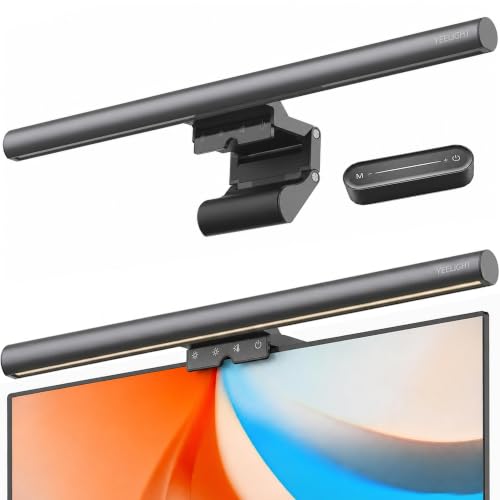
- Offers adjustable brightness and color temperature from 2700K to 6500K.
- Clip fits monitors from 0.3 to 1.1 inches thick, including flat and curved screens.
- USB-powered light bar includes remote control and touch control.
Best For: People working at a computer in the evening or in dim rooms
10. LOXP Adjustable 360-Degree Laptop Stand
A Flexible Laptop Viewing Angle
LOXP Adjustable 360-Degree Laptop Stand

- Height and angle adjust to position a laptop at eye level.
- Rotating base turns through 360 degrees.
- Foldable stand is compatible with laptops from 10 to 16 inches.
Best For: Laptop users who work at a desk or move between workspaces
11. Rotating 5/25 Productivity Timer Cube
A Simple Focus-Session Prompt
Rotating 5/25 Productivity Timer Cube

- Gravity-sensing presets include 5, 25, 10, and 50 minutes.
- Custom countdowns and stopwatch mode are also available.
- Choose silent vibration, high volume, or low volume alerts.
Best For: People who like simple, screen-free focus sessions
12. Undated Weekly and Monthly Planner
A Paper Plan with Room to Restart
Undated Weekly and Monthly Planner

- Undated monthly and weekly pages let the user start at any time.
- Includes goal, to-do list, and habit-tracking sections.
- Hardcover planner has a back pocket, pen loop, and elastic closure.
Best For: People who prefer planning on paper or want a flexible routine
13. ScanSnap iX2500 Document Scanner
A Paperwork-Organizing Tool
ScanSnap iX2500 Document Scanner

- Scans double-sided pages at up to 45 pages per minute, according to the listing.
- 100-sheet feeder and touchscreen support document scanning workflows.
- Wi-Fi and USB connections support sending files to devices and cloud services.
Best For: People organizing receipts, forms, and paper records
14. LG 34-Inch UltraWide Curved Monitor
A Wider Workspace View
LG 34-Inch UltraWide Curved Monitor

- 34-inch curved display has a 3440-by-1440 resolution and 21:9 aspect ratio.
- Picture-by-Picture can show content from two input sources at once.
- Connections include USB-C, two HDMI ports, DisplayPort, and a headphone jack.
Best For: Multitaskers, researchers, and spreadsheet-heavy workers
15. Penstar eNote 2 E-Ink Digital Notebook
A Digital Home for Handwritten Notes
Penstar eNote 2 E-Ink Digital Notebook

- 10.3-inch E-Ink screen supports reading and writing on books and PDFs.
- Stylus supports handwriting, while listed tools include handwriting-to-text and voice-to-text.
- Bundle includes a folio cover, two pens, spare nibs, and charging cable.
Best For: Meeting-heavy professionals and people who prefer handwritten notes
16. SanDisk 2TB Extreme Portable SSD
Portable Space for Working Files
SanDisk 2TB Extreme Portable SSD

- 2TB portable SSD connects by USB and lists read speeds up to 1050MB/s.
- IP65 water and dust resistance and up to 3-meter drop protection are listed.
- Includes password protection with 256-bit AES hardware encryption.
Best For: Photographers, creators, and people moving large files between devices
17. VIVO 32-Inch Standing Desk Converter
A Sit-to-Stand Desk Refresh
VIVO 32-Inch Standing Desk Converter

- Raises an existing desk setup between sitting and standing positions.
- 31.5-by-15.7-inch top surface and a keyboard tray move together.
- Height adjusts from about 4.5 to 20 inches using a touch height lock.
Best For: Desk workers who want the option to alternate between sitting and standing
Choosing productivity Christmas gifts for this recipient
Start with the workday friction the recipient mentions most. Someone who loses track of tasks may appreciate the undated planner or rotating timer. A person managing paper records could benefit from the scanner, while a remote worker who takes calls all day may get more use from a webcam or microphone. For visual planning with colleagues, the rolling whiteboard offers a shared surface. A gift is most useful when it fits an existing routine, so consider how they already plan, take meetings, and organize files before choosing a tool.
Think about the recipient’s workspace, too. A large desk, monitor, or whiteboard can make a meaningful upgrade, but only if there is room for it. Smaller additions such as a laptop stand, monitor light, cable tray, keyboard, or portable SSD can suit an established setup without reworking the whole office. If you are unsure about furniture, measure the desk area and check what the person already owns. A thoughtful note explaining why you chose the item can make even a practical gift feel personal.
Match the gift to budget and impact
Productivity gifts span small desk accessories to major equipment. A timer, planner, or cable tray can address a specific habit or clutter problem without becoming the centerpiece of a room. A chair, standing desk, monitor, or scanner is a larger commitment with a bigger footprint; these make sense when you know the recipient wants that kind of upgrade. Set a comfortable budget first, then compare how frequently the gift is likely to be used and whether it solves a clear problem.
For larger purchases, ask a trusted family member or colleague for context if appropriate. This can help avoid duplicating equipment or selecting something that does not match the recipient’s setup. For a lower-cost option, pairing a planner with a handwritten message about a goal or new project can make the gift feel considered without adding more gear.
Check compatibility and personalization
Technology gifts need a quick compatibility check. The docking station depends on a laptop’s USB-C, USB4, or Thunderbolt capabilities and video support; the listing also notes that macOS mirrors the displays and Linux is unsupported. The webcam and microphone have their own device and connection requirements, while the monitor connects by USB-C, HDMI, or DisplayPort. Confirm the recipient’s computer ports and operating system if you can do so discreetly.
For workspace items, check dimensions and the surface they will use. The cable tray needs room for its clamps and clearance beneath the desk, and the laptop stand is listed for laptops up to 16 inches. A desk or monitor may require rearranging furniture. Personalization can be practical: choose a planner color they like, or include a short note suggesting a first project for the whiteboard or e-ink notebook. Avoid assuming that every productivity style is the same; some people prefer a paper list, while others want a digital workflow.
Plan timing and last-minute choices
Order timing can change during the holiday season, so check the current product listing and shipping details before placing an order. Large equipment may take extra time to assemble or set up; consider whether the recipient will have space and time to use it after Christmas. A planner, timer, stand, or portable drive may be simpler to wrap and introduce, but still confirm the item fits the intended setup.
If you are choosing close to Christmas, favor a gift you can verify locally or through the seller’s current availability information. For a product that depends on compatibility, a printed note explaining the intended gift and offering to confirm the setup together can preserve the surprise while avoiding a mismatch. Productivity Christmas gift ideas work best when they support the recipient’s own way of working, whether that means fewer cables, clearer calls, more focused sessions, or a workspace that feels easier to use.