Stable humidity helps offices feel more comfortable and can support better protection for electronics, paper records, furniture, and other sensitive materials. A digital hygrometer makes it easier to spot overly dry or damp conditions before they become persistent problems.
We compared 10 office-friendly options across display clarity, monitoring features, placement flexibility, battery practicality, and value. Whether you need one monitor for a desk or several for meeting rooms and storage areas, this roundup highlights the features that matter most.
Best 10 Digital Hygrometers for Offices Picks for 2026
Best Overall

- ±2–3%RH and ±1°F accuracy
- Refreshes every 10 seconds
- Stand and magnetic back
Best For: Simple office humidity monitoring
Best Smart Pick
Govee H5075 Bluetooth Hygrometer
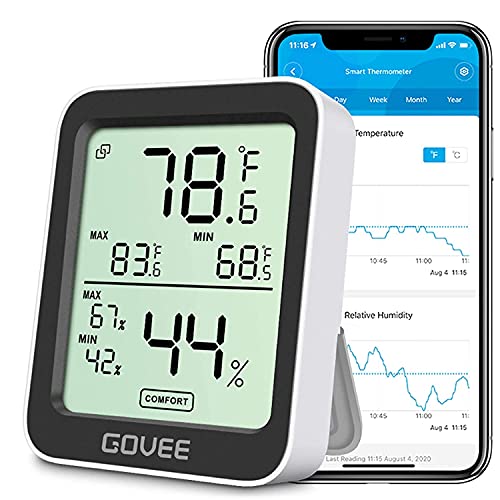
- Bluetooth remote monitoring
- Alerts and historical graphs
- Exports up to two years of data
Best For: Connected offices tracking humidity trends
Best for Accuracy
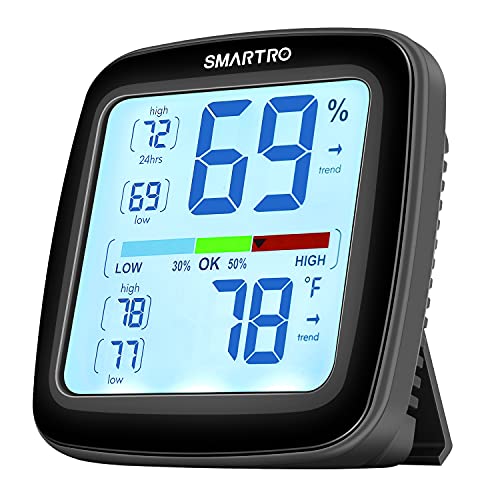
- ±2%RH humidity tolerance
- Manual calibration supported
- Large display with flexible mounting
Best For: Standalone office monitoring with precise readings
Best Value

- Two monitors in one package
- Large easy-to-read displays
- Includes batteries and flexible mounts
Best For: Monitoring two office areas on a budget
Best Multipack Value
JEDEW 2-Pack Digital Hygrometers

- Two units for monitoring separate office areas
- 10-second refresh rate
- Fahrenheit/Celsius display with spare batteries
Best For: Offices needing simple humidity coverage in multiple rooms
Best for Easy Readability
TempPro TP49 3-Pack Hygrometers

- Three monitors for broad office coverage
- Large digits and dry/comfort/wet icons
- Tabletop, magnetic, or hanging placement
Best For: Offices wanting quick, glanceable readings in several areas
Best for Trend Tracking

- Records maximum and minimum readings
- 10-second refresh rate
- Stand, magnet, or wall-mount installation
Best For: Offices monitoring changing humidity and temperature patterns
Best All-Around Monitor

- ±2 to 3%RH and ±1°F accuracy
- DRY/COMFORT/WET air indicator
- High/low records with magnetic or tabletop placement
Best For: Offices wanting clear alerts and useful reading history
Best Compact Choice

- Five-second reading refresh
- 2.3-inch LCD with comfort icons
- Hanging, tabletop, and magnetic mounting
Best For: Small workstations needing flexible placement
Best Multi-Room Value

- Six monitors for distributed coverage
- 10-second automatic refresh
- -58°F to 158°F temperature range
Best For: Offices monitoring multiple rooms or zones
Best Overall – TempPro TP50 Hygrometer
The TempPro TP50 is a practical choice among digital hygrometers for offices, combining quick updates with a compact design that works on a desk, counter, or magnetic surface. Its comfort indicator and high/low records make routine humidity checks easy.
Best For: Office users who want a simple, accurate desktop or magnetic humidity monitor.
Pros:
- Measures humidity within ±2–3%RH and temperature within ±1°F.
- Refreshes readings every 10 seconds.
- Shows dry, comfort, and wet conditions plus high/low records.
- Includes a tabletop stand, magnetic back, and AAA battery.
Cons:
- Indoor use only.
- Uses a relatively small display compared with larger-screen models.
Choose this model when you want dependable at-a-glance readings without app connectivity or complicated controls. It is especially convenient for shared office spaces where flexible placement matters.
Best Smart Pick – Govee H5075 Bluetooth Hygrometer
The Govee H5075 stands out among digital hygrometers for offices when remote monitoring and historical data are useful. Its Bluetooth app tracks temperature and humidity, provides alerts, and supports data export for longer-term comparisons.
Best For: Offices that need app-based monitoring, alerts, and humidity history.
Pros:
- Supports remote monitoring within a 164-foot Bluetooth connection.
- Offers alerts when temperature or humidity leaves a preset range.
- Stores 20-day graph views and allows export of up to two years of data.
- Provides a bright 3-inch display and fast two-second refreshes.
Cons:
- Bluetooth range is limited to 164 feet.
- App functionality requires using a connected device.
This is the strongest fit for workplaces that want more than a spot reading. The app-based records and alerts can help identify recurring comfort changes, though it is more feature-heavy than a basic desktop monitor.
Best for Accuracy – SMARTRO SC42 Hygrometer
The SMARTRO SC42 is a strong option among digital hygrometers for offices where precise readings and flexible placement are priorities. Its Swiss sensors, calibration support, large display, and multiple mounting options suit both individual workstations and shared rooms.
Best For: Office users who prioritize accuracy, calibration, and a large readable display.
Pros:
- Offers temperature accuracy of ±0.5°F and humidity tolerance of ±2%RH.
- Supports manual calibration when placement affects readings.
- Records 24-hour and all-time high/low readings.
- Includes a stand, two magnets, and a wall-mount hole.
Cons:
- Does not connect to phones.
- AAA batteries are not included.
- Backlight activates temporarily rather than remaining on continuously.
The SC42 is a sensible choice for a more deliberate monitoring setup. It delivers detailed readings and mounting flexibility without app dependence, making it well suited to offices that prefer a standalone instrument.
Best Value – Antonki 2-Pack Hygrometers
The Antonki two-pack offers a cost-effective way to monitor multiple areas with digital hygrometers for offices. Each unit has a readable display, magnetic back, kickstand, and hanging hole, so one can stay at a desk while another monitors a nearby room.
Best For: Budget-conscious offices that need two basic monitors in separate locations.
Pros:
- Includes two hygrometer-thermometer units.
- Provides temperature and humidity readings in real time.
- Offers large digital numbers for easier viewing.
- Includes CR2032 batteries and multiple placement options.
Cons:
- Humidity accuracy is ±5%RH, less precise than the other listed options.
- Temperature accuracy is ±2°F.
- Readings may fluctuate for three to five minutes after startup.
This set makes sense when coverage matters more than advanced features or tighter accuracy. It is a convenient value pick for monitoring two office zones, but users needing precise trend data may prefer a higher-accuracy model.
Best Multipack Value – JEDEW 2-Pack Digital Hygrometers
For offices that need readings in more than one room, the JEDEW 2-pack offers a practical way to monitor temperature and humidity. Its sensor refreshes every 10 seconds, and the display can switch between Fahrenheit and Celsius.
Best For: Offices, storage areas, classrooms, or other spaces that need two compact monitors.
Pros:
- Includes two hygrometer thermometers for monitoring separate areas.
- Refreshes temperature and humidity readings every 10 seconds.
- Measures 10%–99% RH and temperatures from 32°F to 158°F.
- Supports Fahrenheit and Celsius readings and includes a spare LR44 battery for each unit.
Cons:
- Accuracy is rated at ±3% RH and ±1°F, so it is better suited to general monitoring than precision measurement.
- The small 1.78-inch-wide body may be less convenient to read from across a large office.
The JEDEW is a straightforward choice when coverage matters more than advanced data logging. Its two-unit format and broad operating range make it useful for everyday office climate checks.
Best for Easy Readability – TempPro TP49 3-Pack Hygrometers
The TempPro TP49 is a useful option for offices that want several digital hygrometers with quick-to-read displays. Large digits, a dry/comfort/wet face indicator, and three placement methods make these monitors easy to position around a workplace.
Best For: Multi-room offices that want visual comfort guidance and flexible placement.
Pros:
- Three-pack provides monitors for multiple rooms or work areas.
- Large, bold digits are designed for convenient viewing.
- Refreshes temperature and humidity readings every 10 seconds.
- Can stand on a tabletop, attach magnetically, or hang on a wall.
Cons:
- The comfort icons provide general dry, comfort, and wet guidance rather than detailed air-quality information.
- Its compact display may show less information at once than a larger wall monitor.
With three units and multiple mounting options, the TP49 is well suited to distributed office monitoring. Choose it when quick visual checks and flexible placement are priorities.
Best for Trend Tracking – SECRUI KR-TH1 Hygrometer
The SECRUI KR-TH1 stands out among digital hygrometers for offices because it records the highest and lowest readings, helping you see how conditions change over time. It also combines a comfort indicator with three installation choices.
Best For: Office managers who want simple historical high/low context alongside current readings.
Pros:
- Displays maximum and minimum temperature and humidity values for tracking changes.
- Refreshes readings every 10 seconds.
- Rated for ±2–3% RH and ±1°F accuracy.
- Works on a flat surface, attaches magnetically, or mounts on a wall.
Cons:
- This listing provides two units, but the product title itself describes a singular indoor hygrometer.
- It has a stated operating humidity range of 2%–97% RH, narrower than some alternatives.
The KR-TH1 is a strong fit when current readings alone are not enough. Its high/low records can help identify changing office conditions before adjusting humidifiers or dehumidifiers.
Best All-Around Monitor – TempAir Digital Hygrometer
For offices seeking digital hygrometers for offices with clear status feedback and useful history, the TempPro TempAir combines temperature and humidity readings with DRY/COMFORT/WET indicators. Its tabletop stand and magnetic back make it easy to position on a desk, filing cabinet, or other metal surface.
Best For: Office users who want accurate readings, comfort alerts, and high/low records in one compact monitor.
Pros:
- Humidity accuracy of +/-2 to 3%RH and temperature accuracy of +/-1°F.
- Refreshes readings every 10 seconds.
- Stores high and low temperature and humidity levels.
- Includes a tabletop stand, magnetic back, and three AAA batteries.
Cons:
- Requires three AAA batteries.
- Designed for indoor use rather than outdoor monitoring.
The TempAir is a practical choice when an office needs more than a basic reading. Its comfort icon and recorded highs and lows make routine climate checks quick, while the flexible placement options suit shared workspaces.
Best Compact Choice – DOQAUS Mini Hygrometer
The DOQAUS is a compact option for offices that need digital hygrometers for offices without taking up much desk or wall space. Its 2.3-inch LCD uses large numbers, while the three mounting methods allow it to hang, stand, or attach magnetically.
Best For: Small desks, workstations, and office areas where fast updates and flexible placement matter.
Pros:
- Refreshes temperature and humidity readings every five seconds.
- Temperature accuracy is ±1°F, with humidity accuracy of ±5%RH.
- Large, easy-to-read LCD display with DRY/COMFORT/WET icons.
- Supports hanging, tabletop, and magnetic mounting.
Cons:
- Humidity accuracy is less precise than the stated temperature accuracy.
- Its compact display may show less information at once than larger monitors.
Choose the DOQAUS when quick visual checks and a small footprint are priorities. It is especially convenient for employees who may want to move the monitor between office areas or attach it to a metal surface.
Best Multi-Room Value – Six-Pack Mini Hygrometers
This six-pack is a practical way to equip several rooms or office zones with digital hygrometers for offices. Each small unit measures temperature and humidity, refreshes every 10 seconds, and uses a tabletop design that fits discreetly on desks, shelves, cabinets, or other indoor surfaces.
Best For: Offices that want simultaneous monitoring across multiple rooms, work areas, storage spaces, or equipment zones.
Pros:
- Six individual temperature and humidity monitors are included.
- Measures temperatures from -58°F to 158°F and humidity from 10% to 99%RH.
- Readings update automatically every 10 seconds.
- Compact tabletop format is easy to place in multiple areas.
Cons:
- Temperature accuracy is ±2°F and humidity accuracy is ±5%RH.
- No hanging or magnetic mounting is specified in the supplied details.
- Small displays may be less convenient for viewing from a distance.
The six-unit format offers broad coverage at once, making it useful for offices with differing climate conditions from room to room. It is a sensible pick when quantity and discreet placement are more important than advanced display features.
How We Picked the Best Digital Hygrometers for Offices
We focused on practical performance in shared workspaces rather than specialist laboratory equipment. Our selection includes compact standalone meters, multipacks for monitoring several rooms, and connected models with app-based tracking. We considered readability, humidity and temperature measurement, placement options, portability, alert or history features, battery convenience, and overall value.
For office use, a good hygrometer should provide information at a glance and remain easy to position near desks, printers, storage cabinets, server areas, or supply rooms. Products with broader placement flexibility earned extra consideration because office layouts vary widely.
Quick Comparison
- Best for straightforward desk monitoring: TempPro TP50, TempPro TempAir, and DOQAUS models.
- Best for connected tracking: Govee H5075 with Bluetooth app control.
- Best for covering multiple rooms: Antonki 2 Pack, JEDEW 2 Pack, TempPro TP49 3 Pack, and the 6-Pack Mini Hygrometers.
- Best for a more professional-style display: SMARTRO SC42.
Key Buying Factors for Digital Hygrometers for Offices
Readability and Placement
Choose a large, high-contrast display if employees need to check readings from a short distance. Stands, magnets, and wall-mount options make it easier to place a unit where it will not be blocked by monitors, documents, or equipment.
Coverage and Quantity
One sensor may be enough for a small private office, but humidity can differ between an open-plan workspace, supply closet, conference room, and server-adjacent area. Multipacks are often more practical when you want comparable readings across several locations.
Monitoring Features
Basic meters show current temperature and relative humidity, while connected models may add historical data, notifications, or remote checking. App features are useful for facilities teams, but they may be unnecessary if someone can inspect the display each day.
Accuracy, Range, and Upkeep
Check the stated humidity range, temperature range, refresh behavior, and accuracy tolerances before buying. No household hygrometer should be treated as a compliance instrument without verification. Keep sensors away from direct sunlight, vents, radiators, windows, and humidifiers for more representative readings.
Power and Operating Cost
Battery-powered units are simple to deploy, but consider battery type, replacement frequency, and whether the display remains easy to read as power declines. A low-cost multipack may be preferable when replacing batteries across many rooms.
Who Should Buy Which Digital Hygrometers for Offices?
Choose a basic single unit if you need an affordable reading for one desk, office, or small workspace. Choose a Bluetooth model if you want app history or easier oversight without walking between rooms. Choose a two-, three-, or six-pack for larger offices, records storage, classrooms, or facilities that need multiple reference points. Choose a feature-rich professional-style meter when a clearer display and more detailed at-a-glance information are worth prioritizing.
For the most useful results, place each monitor at breathing height, away from obvious drafts and heat sources, and compare readings over several days rather than reacting to a single change.