A dependable overhead mount can make live streams, craft demonstrations, unboxings, and product tutorials easier to frame and more professional. The right rig keeps your camera or phone steady while leaving valuable desk space available for your work.
We selected 10 overhead camera rigs for live streaming across clamp, magic-arm, boom, and dual-arm designs. Use the guide below to compare load capacity, adjustment range, compatibility, and the type of setup each mount suits best.
Best 10 Overhead Camera Rigs for Live Streaming Picks for 2026
Heavy-Duty Tabletop Rig
NEEWER ST100 Overhead Camera Mount

- 10-pound steel load capacity
- 24- to 39-inch height range
- 12 crossbar mounting points
Best For: Dedicated top-down tabletop streaming stations
Flexible C-Clamp Arm
JEBUTU Overhead Desk Camera Mount

- Desk clamp fits 10-50mm surfaces
- 360-degree ball head
- Supports cameras, phones, and lights
Best For: Compact streaming desks and lighter gear
High-Capacity Dual-Head Rig
NEEWER NK002 Overhead Camera Mount

- 26.5-pound stand capacity
- Adjustable height and width
- Includes phone holder and dual ball-head clamp
Best For: Multi-device tabletop streaming and lighting
Modular Desk Support
SMALLRIG DTCK001 Overhead Camera Arm

- 30-73cm adjustable main pole
- 360-degree movable extension arm
- 2kg load capacity with dual-device support
Best For: Compact indoor streaming and tabletop shooting
Best Heavy-Duty Pick
EMART Adjustable Overhead Camera Rig

- 26.5-pound maximum load
- Height and width are telescopically adjustable
- Works with cameras, phones, webcams, and accessories
Best For: Larger cameras and expandable overhead studio setups
Best Compact Arm
NEEWER UA057 22-Inch Magic Arm

- 22-inch articulating arm
- Supports devices up to 500 grams
- Clamp fits flat or cylindrical surfaces
Best For: Lightweight cameras, phones, webcams, microphones, and compact desks
Best Multi-Device Setup
NEEWER ST008 Dual-Arm Overhead Rig

- Center column plus two boom arms
- Supports cameras, lights, mics, and phones
- Includes multiple thread adapters and cable ties
Best For: Organized streaming desks with several mounted devices
Most Stable Desktop Pick
SMALLRIG Triangle Camera Desk Mount

- Triangular structure supports up to 3 kg
- Includes phone holder and camera ball head
- Adjusts for top-down desktop shooting
Best For: Stable live-streaming and product-shoot setups
Best Long-Reach Option
ULANZI Flexible Arm Overhead Mount

- 29.53-inch three-stage extending arm
- Center shaft reaches 27.56 inches
- 360-degree ball head for flexible angles
Best For: Wide-angle overhead demonstrations and lessons
Most Versatile Mounting Kit
Ailight Adjustable Camera Desk Mount
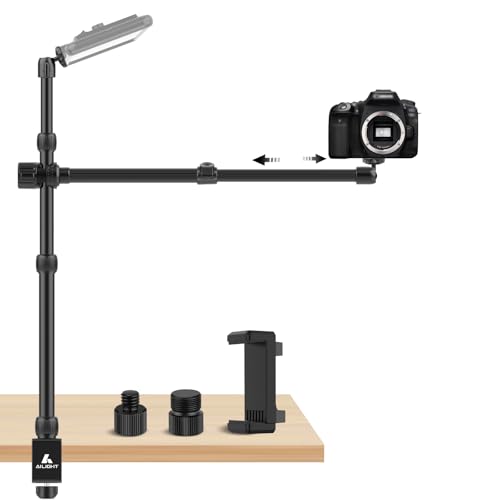
- Adjustable height and telescoping horizontal arm
- Includes multiple screw adapters and phone holder
- Supports cameras, microphones, lights, and phones
Best For: Multi-device streaming and compact desk rigs
Heavy-Duty Tabletop Rig – NEEWER ST100 Overhead Camera Mount
For creators who need a stable platform for overhead camera rigs for live streaming, the NEEWER ST100 offers a steel tabletop design with a 10-pound load capacity. Its adjustable columns and accessory mounting points make it useful for cooking, drawing, unboxing, tutorials, and flat-lay demonstrations.
Best For: Stable top-down streaming and tabletop content on desks at least 39.4 inches wide.
Pros:
- Supports up to 10 pounds with durable steel construction.
- Height adjusts from 24 to 39 inches using spring-loaded positioning points.
- Includes multiple crossbar mounting points and backdrop brackets.
- Rubberized bases help stabilize the stand and protect desk surfaces.
Cons:
- Requires a wide, flat desk or floor space for setup.
- Super clamps, phone clamp, backdrop, and other accessories are sold separately.
The ST100 is a strong choice when stability and expansion matter more than portability. Its larger footprint makes it better suited to a dedicated tabletop streaming station than a compact desk setup.
Flexible C-Clamp Arm – JEBUTU Overhead Desk Camera Mount
This JEBUTU mount is a space-saving option among overhead camera rigs for live streaming, using a C-clamp to secure directly to a desk. Its adjustable boom arm and 360-degree ball head support flexible camera, phone, and lighting angles for broadcasts, product shots, and overhead demonstrations.
Best For: Compact desks and creators who need adjustable camera, phone, or light positioning.
Pros:
- C-clamp attaches to tabletops 10 to 50mm thick without a large round base.
- Two-section stand adjusts from 12 to 22.4 inches, with a 14.5-inch overhead arm.
- 360-degree ball head supports multi-angle positioning.
- Phone holder includes a cold shoe and 1/4-inch mounting options.
Cons:
- Maximum load is 4.4 pounds for the desk stand and 1.1 to 2.2 pounds for the overhead phone arm, depending on angle.
- Devices should be held while adjusting the arm to prevent drops.
The JEBUTU is a practical pick when desk space is limited and versatility is more important than carrying heavier camera setups. Its load limits make it best for lighter cameras, phones, webcams, and lights.
High-Capacity Dual-Head Rig – NEEWER NK002 Overhead Camera Mount
The NEEWER NK002 is built for creators who want a high-capacity solution for overhead camera rigs for live streaming. Its C-clamp stands, adjustable crossbar, dual ball-head super clamp, and included phone holder create a flexible platform for cameras, phones, microphones, monitors, and lights.
Best For: Multi-device tabletop streaming setups that need substantial support and adjustable coverage.
Pros:
- Supports up to 26.5 pounds across its robust aluminum alloy stand.
- Height adjusts from 27.2 to 48 inches and width from 25.2 to 47.2 inches.
- Includes a dual ball-head super clamp, phone holder, mini ball head, and adapters.
- C-clamps use nonslip rubber pads for secure desktop mounting.
Cons:
- The dual ball-head super clamp itself has a maximum load of 3.3 pounds.
- Optional crossarms and additional mounting accessories are not included.
- The larger adjustable frame may be more than needed for simple single-camera setups.
The NK002 stands out for expandability and overall capacity, particularly when a stream uses multiple devices or accessories. Check the load rating of the specific arm or clamp used, rather than relying only on the stand’s total capacity.
Modular Desk Support – SMALLRIG DTCK001 Overhead Camera Arm
The SMALLRIG DTCK001 provides a compact, modular approach to overhead camera rigs for live streaming. Its adjustable main pole, movable extension arm, and 360-degree ball head support cameras, phones, lights, and microphones for desktop broadcasts, video conferences, and tabletop photography.
Best For: Indoor creators who want quick height and angle adjustments in a compact desk-mounted system.
Pros:
- Main pole adjusts from 30 to 73cm, while the secondary arm extends from 30 to 50cm.
- Extension arm offers 360-degree angle adjustment and can move along the main pole.
- Supports up to 2kg with thickened tubing, a widened base, and geared construction.
- Provides 1/4-20 and 3/8-16 threaded holes and can accommodate two devices.
Cons:
- Base fits surfaces only 1 to 6cm thick.
- Its 2kg capacity is intended for lighter desktop equipment rather than heavy camera combinations.
- It is designed for indoor use and is not water resistant.
The DTCK001 is a sensible choice for a clean, adaptable desktop station. Its moving extension arm and multiple thread options make repositioning straightforward, though heavier rigs will need a higher-capacity alternative.
Best Heavy-Duty Pick – EMART Adjustable Overhead Camera Rig
If you need overhead camera rigs for live streaming that can support more than a phone or compact webcam, the EMART mount offers a broad, adjustable frame and a 26.5-pound load capacity. Its telescoping height and width make it suitable for top-down demonstrations, studio setups, and larger desktop arrangements.
Best For: Creators who need a stable, highly adjustable overhead rig for cameras, lights, reflectors, or multi-device setups.
Pros:
- Adjusts from 27.2 to 48 inches in height and 25.2 to 47.2 inches in width.
- Supports up to 26.5 pounds with an aluminum alloy structure.
- Includes a phone holder, dual 1/4-inch screws, and a 5/8-inch stud.
- C-clamp fits desks up to 3.5 inches thick and includes protective rubber pads.
Cons:
- Its larger frame may take more desk and storage space than a compact arm.
- Additional magic arms and tablet holders are sold separately.
- Not water resistant.
The EMART is the strongest choice here for heavier cameras and expandable studio gear. Choose it when stability, reach, and customization matter more than having the smallest possible desktop footprint.
Best Compact Arm – NEEWER UA057 22-Inch Magic Arm
For overhead camera rigs for live streaming in a compact workspace, the NEEWER UA057 combines a 22-inch articulating arm with a desk clamp and phone holder. Its ball-head joints provide flexible positioning for lightweight cameras, webcams, microphones, and phones.
Best For: Streamers, podcasters, and remote workers using lightweight devices on a desk or other flat or tubular surface.
Pros:
- 22-inch arm includes three sets of 360-degree dual ball-head adapters.
- Supports devices up to 500 grams or 17.6 ounces.
- Clamp mounts flat surfaces up to 2 inches thick or cylindrical objects up to 1.6 inches in diameter.
- Anti-twist pins and nonslip pads help reduce wobbling and protect surfaces.
Cons:
- Its 500-gram capacity limits use with heavier DSLR setups.
- Offers less reach and framing area than a full overhead frame.
- Not water resistant.
The UA057 is a practical, space-conscious option for lightweight streaming equipment. Its articulating joints are useful when you frequently change angles, but heavier cameras will require a higher-capacity rig.
Best Multi-Device Setup – NEEWER ST008 Dual-Arm Overhead Rig
The NEEWER ST008 is one of the more flexible overhead camera rigs for live streaming because it combines a center column with two boom arms. It can hold a camera, phone, webcam, microphone, or lighting accessory while giving you multiple adjustment points for a more organized desktop studio.
Best For: Live-streaming desks that need to position a camera alongside lights, microphones, or other accessories.
Pros:
- Center column adjusts from 13.2 to 37.6 inches, with two adjustable cross arms.
- Supports up to 11 pounds on the center column and 5.5 pounds per arm.
- Provides 360-degree swivel and multiple tilt adjustments.
- Includes adapters for 1/4-inch, 3/8-inch, and 5/8-inch connections plus cable ties.
Cons:
- Multiple joints and components may require more setup than a single arm.
- Total joint load should not exceed 11 pounds when using multiple devices.
- Its multi-arm layout may be more equipment than a simple camera-only setup needs.
The ST008 stands out for creators building a multi-device streaming station. It offers more mounting flexibility than a single arm, while its folding components and included cable ties help keep the workspace manageable.
Most Stable Desktop Pick – SMALLRIG Triangle Camera Desk Mount
For creators who want overhead camera rigs for live streaming with a stability-focused design, the SMALLRIG Triangle Camera Desk Mount is a strong desktop option. Its reinforced triangular structure supports up to 3 kg, while the adjustable horizontal rod and ball head allow flexible top-down positioning.
Best For: Live streams, product unboxings, food videos, beauty content, and other indoor desktop shoots where stability matters.
Pros:
- Triangular support structure and multiple locking knobs improve stability.
- Supports cameras, action cameras, webcams, lights, and phones with the included holder.
- Adjustable horizontal rod extends from 42 cm to 68.5 cm.
- Fits desks up to 7 cm thick.
Cons:
- The supplied notes list a 3 kg maximum load but do not specify the included phone holder’s adjustment range.
- Its desktop clamp design is intended for indoor table-based setups rather than portable floor use.
The SMALLRIG stands out when a secure, reinforced base is more important than the simplest setup. It is a practical choice for heavier camera or light combinations and repeatable overhead framing.
Best Long-Reach Option – ULANZI Flexible Arm Overhead Mount
The ULANZI Aluminum Camera Desk Stand is one of the more versatile overhead camera rigs for live streaming when you need extra reach. Its 29.53-inch extending arm and adjustable center shaft support a wide range of shooting angles, while the aluminum construction is rated for up to 2 kg.
Best For: Live broadcasts, baking and crafting demonstrations, online lessons, document displays, and top-down video recording.
Pros:
- 29.53-inch arm offers three-stage length adjustment.
- Center shaft reaches up to 27.56 inches for flexible camera placement.
- 360-degree ball head supports angle adjustments.
- Compatible with cameras, lights, and other 1/4-inch-mounted equipment.
Cons:
- Phone clamp, webcam, camera, and lights are not included.
- The desk clamp fits surfaces up to 5 cm thick, which is narrower than some competing mounts.
- Maximum load is 2 kg.
Choose this mount if reach and positioning flexibility are your priorities. You will need to budget for a phone clamp or other accessories if you plan to stream with a smartphone.
Most Versatile Mounting Kit – Ailight Adjustable Camera Desk Mount
The Ailight Adjustable Camera Desk Mount suits overhead camera rigs for live streaming that need multiple device connections and fine height adjustment. Its vertical support adjusts from 15.75 to 33.45 inches, while the telescoping horizontal arm extends from 11.8 to 20 inches and supports up to 2.2 pounds.
Best For: Streamers using cameras, phones, microphones, projectors, or video lights in compact desk-mounted setups.
Pros:
- Height-adjustable vertical arm and continuously adjustable horizontal arm.
- Includes 1/4-inch, 3/8-inch, and 5/8-inch screw adapters.
- 360-degree ball heads support cameras, phones, webcams, lights, and microphones.
- Detachable padded C-clamp fits desks from 0.2 to 1.97 inches thick.
Cons:
- Maximum recommended payload is 2 pounds, limiting heavier camera setups.
- The smaller desk-thickness range may not suit thicker desktops.
- More adjustment components may require additional setup time.
This is the most adaptable choice of the three for creators combining video and audio gear. Its included adapters and phone holder make it especially useful for mixed streaming setups, provided your equipment stays within the 2-pound limit.
How We Picked These Overhead Camera Rigs for Live Streaming
We focused on practical features that affect real-world streaming: mounting stability, arm reach, adjustment flexibility, supported equipment, desk compatibility, and ease of repositioning. The selection includes compact mounts for webcams and phones, heavier-duty rigs for DSLR or mirrorless cameras, and multi-arm options for lights, microphones, or secondary devices.
Because a top-down setup transfers leverage into the desk clamp, we also considered how securely each style can be anchored. Stated load limits are useful, but they depend on arm extension, camera balance, clamp placement, and the strength of the desk itself.
Quick Comparison
| Rig style | Best suited for | Main advantage | Potential limitation |
|---|---|---|---|
| Single boom or magic arm | Phones, webcams, compact cameras | Simple positioning and lower cost | Can sag when fully extended |
| Heavy-duty overhead frame | DSLR and mirrorless cameras | Greater stability and capacity | Uses more desk space |
| Dual-arm rig | Camera plus lights, microphone, or phone | Supports a more complete setup | More weight and adjustment complexity |
| Triangle or compact desk mount | Small workspaces and mobile streaming | Compact footprint | Usually less reach and capacity |
Key Buying Factors for Overhead Camera Rigs for Live Streaming
Camera and Accessory Weight
Check the combined weight of the camera, lens, cage, dummy battery, and any attached accessories. Choose a mount with meaningful capacity beyond your current setup, especially if you plan to add a microphone or light. A mount rated for a phone may not safely support a mirrorless camera.
Clamp Strength and Desk Compatibility
Measure your desktop thickness and inspect its construction. A wide, padded clamp is preferable for heavy equipment, while a thin or hollow desk may flex under an extended arm. Tighten the clamp firmly without crushing fragile surfaces.
Reach, Height, and Positioning
Look for enough vertical clearance to frame the entire work area without placing the arm at its maximum extension. Ball heads and articulating joints make angle changes easier, but more joints can also introduce vibration or gradual drift.
Mounting Thread and Device Support
Most camera accessories use 1/4-inch-20 threads, while some microphone or light hardware uses 3/8-inch or 5/8-inch fittings. Confirm whether the rig includes a phone holder, ball head, adapters, or separate attachment points.
Cable Management and Workflow
For long streams, route power and video cables along the arm so they do not pull the camera out of position. If you frequently switch between overhead and front-facing views, prioritize quick-release hardware and easy-to-lock adjustments.
Who Should Buy Which Overhead Camera Rigs for Live Streaming?
Choose a heavy-duty frame if you use a DSLR or mirrorless camera with a substantial lens and want the most stable top-down view. Choose a single magic arm or compact clamp for a webcam, phone, action camera, or lightweight creator setup. Choose a dual-arm rig if your stream also needs a light, microphone, or second device. Choose a triangle-style or flexible-arm stand when desk space is limited and portability matters more than maximum capacity.
Before buying, verify the clamp range, load rating, mounting hardware, and required clearance against your actual desk and camera. The best Overhead Camera Rigs for Live Streaming are not necessarily the largest; they are the ones that remain stable, adjust smoothly, and fit your complete streaming workflow.