The Insta360 Mic Pro Transmitter review for 2026 is straightforward: this is a compact wireless mic made for creators who want cleaner audio without a bulky setup.
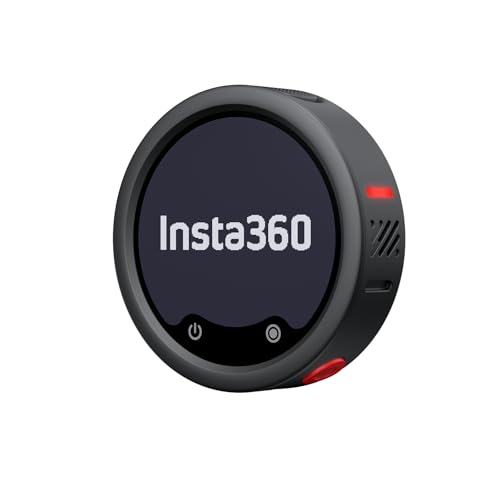
It stands out most for its E-Ink display, directional pickup options, and internal 32-bit float recording.
Mic Pro Transmitter Review Summary
The Insta360 Mic Pro Transmitter makes the most sense for people who want a small, flexible mic/transmitter that can move between phone, camera, and Insta360 workflows without adding a lot of friction.
It is especially appealing for solo creators, mobile shooters, and anyone who values quick setup, backup recording, and a tidy on-device control surface.
Verdict: this is a strong fit if you want a modern wireless mic with creator-friendly extras, but it is not the simplest pick for someone who only needs basic voice capture.
Review Scorecard
| Category | Score | Why it matters |
|---|---|---|
| Wireless flexibility | 9/10 | Direct phone and camera connectivity plus receiver support makes it adaptable. |
| Audio safety | 9/10 | 32-bit float internal recording lowers the risk of clipped takes. |
| Ease of use | 8/10 | Auto gain and direct connection features reduce setup steps. |
| Creator features | 9/10 | The customizable E-Ink display is useful for branding and identification. |
| Pickup versatility | 8/10 | Three built-in mics and directional modes help with different recording situations. |
| Battery practicality | 8/10 | Up to 10 hours is solid for a compact transmitter. |
| Value for serious use | 8/10 | The feature set is aimed at users who will actually use the extras. |
Key Features and Specifications of Mic Pro Transmitter
The headline feature set is unusually dense for a mini transmitter.
Insta360 lists a customizable E-Ink display, three built-in microphones, three directional pickup modes, AI noise canceling, auto gain control, 32-bit float internal recording, and up to 10 hours of battery life.
The product is also designed to fit into more than one shooting style.
It can connect directly to phones and Insta360 cameras by Bluetooth, and the listing says it supports direct transmitter-to-camera audio with Insta360 X5, Insta360 Ace Pro 2, and GO Ultra without needing a receiver.
It also supports up to 2 TX + 4 RX capability, which matters if you want to route one transmitter to multiple receivers in a more complex setup.
Key listed points:
- Customizable E-Ink display for images, logos, or graphics through the app
- Three built-in microphones with directional pickup modes
- AI noise canceling powered by an NPU chip
- Direct connection to supported Insta360 cameras
- Bluetooth connection to phones and Insta360 cameras
- 2 TX + 4 RX capability
- Auto gain control with two gain modes
- 32-bit float internal recording as backup
- Up to 10 hours of battery life
What matters most is not the feature count by itself, but how the features work together.
This is built for people who need fewer weak points between speaking and recording, especially when a take needs to survive real-world handling, movement, and changing environments.
Pros and Cons of Mic Pro Transmitter
Pros
- Strong backup protection. Internal 32-bit float recording is the kind of feature that matters when you cannot afford to lose a take.
- More flexible than a basic lav. Three mics, directional modes, and AI noise canceling give it more range than a minimal transmitter.
- Easy to identify and brand. The E-Ink display is not just cosmetic; it can help with on-set organization and custom labeling.
- Designed for streamlined workflows. Direct camera and phone connectivity reduces the number of steps in a typical creator setup.
- Useful battery life for its size. Ten hours is practical for filming sessions, interviews, and event coverage.
Cons
- Not the cheapest way to get audio. The feature set is clearly aimed above the entry level.
- Some benefits depend on the ecosystem. The smoothest experience appears to come with supported Insta360 devices.
- It may be more mic than casual users need. If you only want a simple lavalier for occasional voice notes, the extras may be unnecessary.
Who Should Buy Mic Pro Transmitter?
Buy this if you make short-form video, interviews, tutorials, or mobile content and want a transmitter that can handle more than one kind of workflow.
It is a good fit for solo creators who need compact hardware, for teams that want backup recording safety, and for users who like the idea of a display that can be customized for fast identification.
It also makes sense if you already use Insta360 cameras or plan to.
The listing’s direct connection claims suggest the product is meant to feel less like a generic accessory and more like part of a connected system.
Skip it if you only need the most basic wireless mic for occasional speaking.
In that case, many of the strengths here, like internal recording, advanced pickup modes, and app-driven display customization, will not pay off.
How the Mic Pro Transmitter Fits Creator Workflows
Direct-to-Camera Convenience
The strongest workflow advantage is the direct transmitter-to-camera connection on supported Insta360 devices.
That reduces clutter and helps when you want to move quickly between shots without rebuilding your setup each time.
Backup Recording Confidence
32-bit float internal recording is one of the clearest reasons to choose this model over a simpler transmitter.
It gives you a safety net when audio levels change suddenly, which is common in interviews, travel videos, and handheld shooting.
Directional Pickup and Noise Control
The three built-in microphones, directional pickup modes, and AI noise canceling together suggest a product that is trying to be forgiving in imperfect environments.
That does not replace good mic placement, but it does make the transmitter more adaptable than a single-purpose solution.
Display and Workflow Organization
The customizable E-Ink display is a practical differentiator, not just a novelty.
For creators who move between shoots, it can help distinguish gear, reinforce branding, or simply make the device easier to manage in a bag or on a busy set.
Alternatives to Mic Pro Transmitter
If you want a broader wireless ecosystem, the DJI Mic 2 is the most obvious alternative to compare because it targets similar creator use cases.
If you want a more established compact option, the Rode Wireless GO II remains a relevant rival for mobile video and interview workflows.
If you want an easier path into creator audio with strong brand recognition, the Hollyland Lark series is also worth looking at on Amazon.
If your main priority is simple voice capture rather than advanced ecosystem features, a basic wireless lavalier microphone search may surface cheaper options that cover the essentials.
Is Mic Pro Transmitter Worth It?
Yes, the Insta360 Mic Pro Transmitter is worth it if you care about compact design, built-in recording safety, and flexible creator-focused features.
It is strongest for users who will benefit from the E-Ink display, directional pickup modes, and direct Insta360 workflow support.
If you only need an inexpensive mic for casual use, it is probably more feature-rich than necessary.
If you want a serious small transmitter that is built for modern content creation, though, this looks like a sensible buy.