If you need a straightforward VHS to digital converter review, this 3.3 feet capture device is aimed at people who want to digitize analog tapes without building a complicated setup.
It is best understood as a compact RCA and S-Video capture card for Windows and Mac users who value simple connections over extra features.
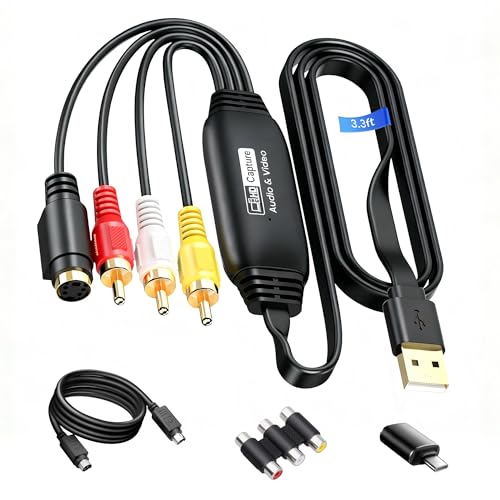
3.3 Feet VHS to Digital Converter Review Summary
This 3.3 Feet VHS to Digital Converter makes sense for buyers who want a basic, flexible path from old analog sources to a USB-connected computer.
The listing points to a wide compatibility target, included adapters, and support for common capture software, which is exactly what matters if your goal is tape conversion rather than a studio workflow.
It suits practical users who want to turn VHS, VCR, DVD, camcorder, or other composite video sources into digital files with minimal setup friction.
Review Scorecard
| Category | Score | Buyer-focused rationale |
|---|---|---|
| Analog source compatibility | 8/10 | Supports RCA composite and S-Video inputs, plus common legacy devices like VHS, VCR, DVD, and camcorders. |
| Computer compatibility | 8/10 | The listing calls out Windows and macOS support, which broadens the audience beyond one platform. |
| Setup flexibility | 7/10 | Includes a USB A to Type-C converter and a 3.3 ft cable, which helps on modern laptops. |
| Capture quality potential | 7/10 | The product claims up to 1920×1080@30Hz output, enough for archival digitizing of analog sources. |
| Workflow convenience | 7/10 | Works with software such as OBS and Potplayer, making it easier to fit into existing capture workflows. |
| Included accessories | 8/10 | The bundle includes S-Video cable, RCA converter, manual, and CD, reducing the chance of missing basics. |
| Best-value fit | 7/10 | It looks best for users who need function and compatibility more than premium capture extras. |
Bottom line: this is a sensible option if your priority is converting analog video to USB with the least amount of setup guesswork.
Key Features and Specifications of 3.3 Feet VHS to Digital Converter
The core appeal of this capture device is its focus on legacy video inputs and broad consumer compatibility.
The listing describes it as an RCA to USB converter that can accept analog composite input and output up to 1920×1080 at 30Hz.
It also supports S-Video input, which matters for some older gear that performs better through that connection than through composite RCA.
The included 3.3 ft USB cable is a small but meaningful design choice.
Short capture leads can make a desk setup awkward, especially when you are connecting a laptop, a VCR, and possibly an external display or capture software window at the same time.
A longer built-in cable gives more placement flexibility, and the package also adds a USB A to Type-C converter for newer computers.
In practical terms, the package is built around convenience:
- RCA composite to USB capture for analog video sources
- S-Video input support for legacy devices that use that connector
- USB 2.0 and Type-C capture compatibility
- Compatibility listed for Windows and MacOS
- Support for capture software such as OBS and Potplayer
- Included accessories: RCA&S-Video to USB capture card, USB A to Type-C converter, CD, 5 ft S-Video cable, RCA converter, and user manual
The listing also says it works with camcorders, set-top boxes, DVD players, VHS, VCD, VCR, DVR, and similar devices.
That makes the product positioning clear: this is a general-purpose analog capture tool rather than a niche recorder for one device family.
Pros and Cons of 3.3 Feet VHS to Digital Converter
Pros
- Broad legacy-device support helps if you are moving between VHS, VCR, camcorder, and DVD sources.
- RCA and S-Video support gives you more than one path for old equipment.
- Windows and MacOS compatibility increases the odds that it will fit an existing home setup.
- The included USB A to Type-C adapter is useful for newer laptops that no longer have USB-A built in.
- The 3.3 ft cable helps with desk layout and reduces dependence on very short leads.
- Support for OBS and Potplayer should make it easier to integrate into familiar software.
Cons
- The listing is focused on compatibility and packaging, not on advanced capture controls or professional-grade feature depth.
- The product description is light on detailed image-processing specifications, so buyers wanting a more specialized workflow may want more documentation.
- It is built around analog capture use cases, so it is not the right choice if you want a modern HDMI-only solution.
- The name and listing copy are a little inconsistent in places, which may make buyers work harder to confirm the exact included parts.
For most shoppers, the strengths are clear enough: it is a practical capture adapter with the right legacy inputs and enough included pieces to start digitizing.
Who Should Buy 3.3 Feet VHS to Digital Converter?
This product is a good fit for anyone trying to preserve old home video content without switching to a more complex capture stack.
If you have VHS tapes, a VCR, an older camcorder, or a DVD source with RCA or S-Video output, the listing shows the right kinds of connections.
It is also a reasonable option if you use a Windows or Mac laptop and want a simple USB-based path into capture software.
It may also appeal to buyers who want one affordable, all-in-one bundle rather than assembling separate cables and adapters.
The included RCA converter, S-Video cable, and USB A to Type-C adapter reduce the chance that you will need to place a second order just to make the hardware work.
Skip it if you want a premium editing workflow, a highly detailed pro spec sheet, or a capture device that centers on HDMI rather than analog inputs. It is not positioned as a broadcast-grade product.
It is positioned as a convenient converter for common legacy video jobs.
If your decision depends on simple digitizing rather than advanced production features, this product is in the right lane.
VHS Capture Workflow and Buyer Fit
Legacy Inputs First
The strongest part of this product is its input focus.
RCA composite and S-Video cover the most common analog video paths, which is exactly what many tape-conversion buyers need.
For old consumer gear, that matters more than flashy marketing language.
Laptop-Friendly Connection
The USB 2.0 and Type-C support, plus the included USB A to Type-C converter, make it easier to use with newer laptops.
That matters because many buyers doing archival work are using whatever computer they already own, not building a dedicated capture machine.
Software and Workflow Compatibility
The listing mentions OBS and Potplayer, which suggests the device is intended to fit into standard consumer capture workflows.
That is a useful signal for buyers who want familiar software rather than a closed app.
Included Bundle Value
The package list is a genuine part of the appeal.
The extra S-Video cable, RCA converter, manual, and CD mean the box is trying to cover the common setup gaps.
For many buyers, that lowers friction more than any technical spec would.
Alternatives to 3.3 Feet VHS to Digital Converter
If you want a broader ecosystem or a better-known capture brand, consider these Amazon search alternatives:
- Elgato video capture for buyers who want a widely recognized capture line.
- Paxcess video capture if you are comparing other consumer USB capture adapters.
- DIGITNOW video capture for another common legacy-video-to-USB option.
- ClearClick video converter if you prefer a brand often associated with straightforward analog conversion gear.
These alternatives are worth checking if you want to compare package contents, software approach, or brand familiarity before choosing a capture device.
For most buyers, the decision will come down to connector support, bundled accessories, and whether the device matches their computer ports.
Is 3.3 Feet VHS to Digital Converter Worth It?
Yes, if your job is converting old analog video to a computer and you want a simple, compatible, cable-complete package.
The product’s strengths are clear: RCA and S-Video support, USB and Type-C flexibility, Windows and MacOS compatibility, and a bundle that includes the basic accessories many buyers need.
It is not the most specialized or feature-dense option, and the listing does not present it as one.
But that is also the point.
For buyers who want a practical VHS to digital converter review outcome, this looks like a sensible utility purchase rather than an overbuilt one.
If you need a dependable analog capture adapter for home archiving, it is worth considering.