Desktop charging stations make it easier to power laptops, phones, tablets, and accessories from one tidy spot. The best options combine fast USB-C output, enough ports for your setup, and smart safety features.
In this roundup, we focus on practical choices for desks, home offices, and shared workspaces so you can find a charging station that fits your devices and your space.
Best 10 Desktop Charging Stations Picks for 2026
High-Power Desktop Hub
Anker Prime 200W 6-Port GaN Charger

- 200W total output for up to 6 devices
- Up to 100W from each USB-C port in dual use
- Compact, stable design with temperature monitoring
Best For: busy desks with laptops and multiple high-power devices
Vertical Space Saver

- 12 AC outlets and 4 USB ports for 16 devices
- Compact vertical design keeps desks organized
- 1800J surge and overload protection
Best For: clutter-free desks, dorms, and rooms needing many outlets
Compact Multi-Port Charger
Anker 112W 6-Port Desktop Charger

- 112W total across 3 USB-C and 3 USB-A ports
- Compact size with included cable organizer
- Good fit for mixed-device desk charging
Best For: small desks with a mix of USB-C and USB-A gear
Travel-Friendly Power Strip
One Beat 3-Outlets 4-USB Strip

- 3 AC outlets plus 4 USB ports
- No surge protection for cruise compatibility
- Compact body with 6ft braided cord
Best For: travel, cruise use, and lightweight desk charging
Modular Power Hub
Gitryin 12-in-1 Desktop Charging Station

- Four retractable 40W USB-C chargers
- Compact 1.1-inch space-saving design
- ETL-certified with 1020J surge protection
Best For: Home offices and clutter-free USB-C setups
Clamp-On Charging Dock
Jgstkcity Desk Clamp Power Strip USB C

- Clamp-on design keeps the strip secured to your desk
- 4 USB-C ports, 2 USB-A ports, and 5 outlets
- 1200J surge protection with fireproof plastic
Best For: Fixed desk setups that need tidy, mounted power access
High-Power Desk Charger

- Up to 140W total output for laptops and devices
- Dual retractable USB-C cables with 5ft power cord
- 180° rotatable body with LCD display
Best For: Power users who need a fast, flexible desktop charger
Space-Saving Desktop Charging Tower
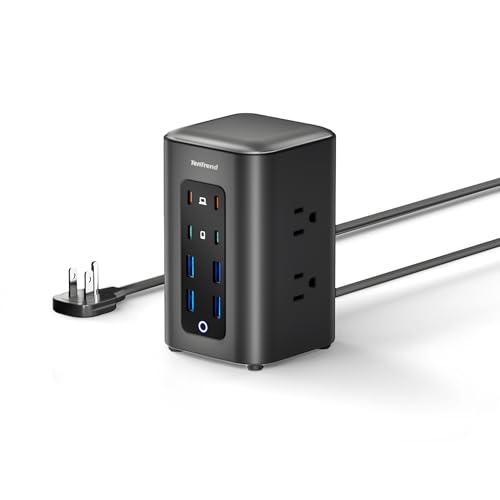
- 6 AC outlets plus 8 USB ports
- Two 65W USB-C ports for faster charging
- Compact tower with flat plug and 5 ft cord
Best For: desks, dorms, and clutter-free multi-device charging
Retractable Multi-Device Hub

- Charges up to 8 devices with 105W max output
- Four retractable 80 cm cables reduce clutter
- Includes USB-C, Lightning, and USB-A options
Best For: organized desks with mixed Apple and USB-C devices
High-Power Desk Hub

- 3 AC outlets plus 6 USB ports
- Two USB-C ports deliver up to 100W each
- Includes 300J surge protection and 8-point safety
Best For: stable laptop-and-accessory desk charging
High-Power Desktop Hub – Anker Prime 200W 6-Port GaN Charger
If you want one of the strongest desktop charging stations for a busy setup, this Anker Prime model is built to handle multiple high-demand devices at once. With 200W total output and up to 100W from each USB-C port when using two USB-C ports simultaneously, it is a practical choice for laptops, tablets, phones, and other everyday gear at a single desk.
Best For: Users who want a compact, desk-stable charger for powering several devices, including high-wattage laptops.
Pros:
- 200W total output supports charging up to 6 devices at once.
- Each USB-C port can deliver up to 100W when two are used simultaneously.
- Compact desk-friendly design with a sturdy, stable build.
- Built-in safety features continuously monitor temperature during charging.
Cons:
- Not intended for travel.
- Heavier than a typical portable charger at 1.24 lb.
For a desktop setup that needs serious power without spreading chargers across the desk, this Anker option stands out. It is especially appealing if you charge multiple premium devices and want one central, stable station.
Vertical Space Saver – 16-in-1 Power Strip Tower
This tower-style desktop charging station is designed to turn one wall socket into a large charging and power center. With 12 AC outlets and 4 USB ports, it is a strong pick when you need to organize many devices in one compact vertical footprint for a home office, dorm, or shared desk.
Best For: People who need lots of outlets in a compact tower for a clutter-free desk or room.
Pros:
- 12 AC outlets plus 4 USB ports support up to 16 devices.
- Vertical tower design saves desk and floor space.
- 1800J surge protection and overload protection help protect connected gear.
- 6ft cord and flat plug improve placement flexibility in tight spots.
Cons:
- USB output is useful, but not as powerful as a dedicated high-wattage charger.
- The tower format may not suit setups that prefer a low-profile desktop unit.
If your main goal is density and organization, this tower does the job well. It is less about fast laptop charging and more about consolidating a lot of devices into one neat, protected power center.
Compact Multi-Port Charger – Anker 112W 6-Port Desktop Charger
For buyers comparing desktop charging stations that balance power and size, this Anker 6-port charger is a clean, practical option. It offers 112W total output across 3 USB-C and 3 USB-A ports, making it a convenient way to charge a laptop, phone, and accessories from one compact unit.
Best For: Desk setups that need a compact charger for mixed USB-C and USB-A devices.
Pros:
- 112W total output across 6 ports supports multiple devices.
- One USB-C port can deliver up to 30W for faster charging.
- Includes a silicone cable organizer to help reduce desk clutter.
- Compact and lightweight enough to fit easily on smaller desks.
Cons:
- Charging cables are not included.
- Only one USB-C port reaches the listed 30W maximum.
This model makes sense if you want a tidy all-in-one charger without going oversized. It is especially useful when you have a mix of newer USB-C devices and older USB-A accessories on the same desk.
Travel-Friendly Power Strip – One Beat 3-Outlets 4-USB Strip
This compact power strip is a practical pick when you need a lightweight desktop charging station with both AC outlets and USB ports. It includes 3 AC outlets plus 4 USB ports, and its flat plug with 6ft braided cord makes it easy to place on a desk, bedside table, or travel setup without adding much bulk.
Best For: Travelers and light desktop users who need a compact, cruise-friendly power strip without surge protection.
Pros:
- 3 AC outlets and 4 USB ports provide convenient all-in-one charging.
- No surge protection, which is required for many cruise ship setups.
- Compact and lightweight for easy packing and travel use.
- 6ft braided cord and low-profile plug help with placement.
Cons:
- AC outlets are rated for 125V only.
- Lower power output is better for phones and tablets than heavy-duty charging.
As a simple desktop or travel power strip, this One Beat unit focuses on convenience and portability. It is a better fit for smaller electronics and trips than for powering a demanding laptop-heavy workstation.
Modular Power Hub – Gitryin 12-in-1 Desktop Charging Station
This desktop charging station is built for busy setups that need to power multiple devices without turning the desk into a cable mess. With four retractable 40W USB-C chargers, a compact footprint, and modular design, it aims to simplify everyday charging for laptops, phones, tablets, and more.
Best For: Home offices, shared desks, and users who want a space-saving charging hub with retractable cables.
Pros:
- 4 retractable 40W USB-C chargers help reduce cable clutter.
- Compact 1.1-inch design saves desk space and fits tight areas.
- ETL-certified with 1020J surge protection for added safety.
- 45° angled plug is useful behind furniture or in cramped outlets.
Cons:
- Not intended for low-power devices like flashlights or toy drones.
- USB-C ports may not wake very light-load devices.
- Best suited to USB-C-heavy setups rather than mixed legacy charging.
Overall, this is a practical pick if you want desktop charging stations that emphasize organization, modularity, and modern USB-C convenience. It looks especially appealing for users who value a cleaner desk and the option to replace components instead of the whole unit.
Clamp-On Charging Dock – Jgstkcity Desk Clamp Power Strip USB C
If you want desktop charging stations that stay put and keep outlets close to hand, this clamp-on model is designed for desk-edge mounting. It combines USB-C fast charging, multiple outlets, and surge protection in a semi-permanent format that helps reduce cable chaos.
Best For: Desks and work areas where a mounted power strip is more useful than a loose tabletop charger.
Pros:
- Clamps to desk edges for a secure, organized setup.
- Includes 4 USB-C ports, 2 USB-A ports, and 5 outlets.
- 40W total fast charging with 20W max per USB-C port.
- 1200J surge protection and fireproof plastic add peace of mind.
Cons:
- Requires a desk thickness up to 1.96 inches.
- The table needs clearance from the wall for the clamp to fit properly.
- Total USB output is shared, so it is not a high-wattage laptop-first charger.
This is a smart choice if your priority is desk organization over portability. The clamp mount, wide outlet spacing, and mix of USB-C and USB-A make it a practical desktop charging station for everyday office use.
High-Power Desk Charger – JOYROOM 140W Charging Station
For users shopping desktop charging stations with more laptop-focused power, this JOYROOM model pushes up to 140W total output and includes dual retractable USB-C cables. It is built to handle modern laptops, tablets, and phones while keeping the desk cleaner and the charging reach flexible.
Best For: Power users who want a fast desktop charger with retractable cables and broad device support.
Pros:
- Up to 140W total output for high-performance charging.
- Dual 2.6ft retractable USB-C cables reduce clutter.
- 5ft power cord gives more placement flexibility than many retractable chargers.
- 180° rotatable design and LCD display add desk-friendly convenience.
Cons:
- The feature set may be more than casual charging needs require.
- Built-in display and rotating design add complexity compared with simpler docks.
- Best value depends on whether you need the extra laptop-grade output.
This model stands out if you want a desktop charging station that feels closer to a premium power hub than a basic charger. Its retractable cables, strong output, and device compatibility make it well suited to modern workstations.
Space-Saving Desktop Charging Tower – TenTrend 14-in-1 Power Tower
If you want desktop charging stations that can handle a crowded workspace, this TenTrend tower keeps power and cables in one upright footprint. It combines AC outlets and fast USB charging in a compact tower, making it a practical fit for desks, nightstands, dorm rooms, and other spots where outlet space is tight.
Best For: Users who want a compact multi-device charging tower for desks, bedrooms, dorms, or shared workspaces.
Pros:
- 14-in-1 design with 6 AC outlets and 8 USB ports for charging multiple devices at once
- Two 65W USB-C ports support faster laptop charging
- Flat plug and 5 ft flat cord help keep the setup neat and low-profile
- Compact tower shape is built to save desk space and reduce clutter
Cons:
- Maximum current is 10A, so it may not suit heavy-duty power needs
- Best suited to tidy desktop setups rather than highly portable use
- AC capacity is limited to the stated 1250W/125V rating
This is a strong pick if your main goal is to organize everyday charging without spreading multiple adapters across the desk. It offers a good balance of USB-C speed, outlet count, and compact design for routine home or office use.
Retractable Multi-Device Hub – 8-in-1 GaN Desktop Charger
Among desktop charging stations, this retractable GaN model stands out if you want built-in cables instead of extra cords on the desk. It combines retractable USB-C and Lightning leads with extra ports, so it can serve as a compact charging hub for a desk, nightstand, kitchen counter, or travel bag.
Best For: People who want an all-in-one desktop charger with retractable cables for multiple Apple and USB-C devices.
Pros:
- 8-in-1 layout supports charging up to 8 devices at once
- Includes 4 retractable 80 cm cords for cleaner cable management
- GaN design delivers up to 105W total output for fast charging
- Wide compatibility covers many iPhone, Galaxy, Pixel, iPad, and accessory devices
Cons:
- MacBook Air and Galaxy Tab S8 series compatibility is specifically limited in the notes
- May be more than you need if you only charge a phone and earbuds
- Retractable design is less minimal than a simple plug-in charger
This is a useful option if you want a desktop charging station that replaces multiple loose cables with a more organized dock-style setup. The retractable cords and mixed port selection make it especially convenient for households or workspaces with several device types.
High-Power Desk Hub – Anker 9-in-1 Desktop Charger
If you need desktop charging stations with a more premium power strip format, this Anker unit is built for a tidy desk and heavier everyday use. It pairs three AC outlets with six USB ports and surge protection, making it a practical desktop hub for laptops, accessories, and personal electronics.
Best For: Desk setups that need a stable, surge-protected charging hub for laptops and multiple accessories.
Pros:
- 9-in-1 layout includes 3 AC outlets, 4 USB-C ports, and 2 USB-A ports
- USB-C1 and USB-C2 each support up to 100W when used alone
- 300J surge protection and an 8-point safety system add protection for connected devices
- Designed for stable desktop use and weighs about 560 g
Cons:
- Maximum current is listed at 3A, so check compatibility with your devices
- Bulkier than a small single-device charger
- Best suited to desktops rather than portable charging on the go
This Anker model is a solid pick if you want a dependable charging base rather than a cable-heavy multi-adapter setup. Its mix of high-watt USB-C ports, AC outlets, and surge protection makes it especially appealing for a work desk with a laptop and several accessories.
How We Picked the Best Desktop Charging Stations
We looked for Desktop Charging Stations that offer a strong mix of power delivery, outlet count, USB-C support, and desk-friendly design. We also favored models with GaN efficiency, retractable or wide-spaced layouts, and surge protection for everyday reliability.
Quick Comparison
The best choice depends on your device mix. Higher-wattage stations are better for laptops and power users, while compact towers and clamp-mounted models work well for tighter desks. If you mainly charge phones, earbuds, and tablets, a lower-wattage station with multiple USB ports may be enough.
Key Buying Factors for Desktop Charging Stations
Power Output
Check the total wattage and the wattage of each USB-C port. For laptop users, prioritize models with at least one high-output USB-C port and enough shared power to charge multiple devices at once.
Port Mix and Outlet Layout
Look at how many AC outlets and USB ports you actually need. Wide-spaced outlets help with bulky adapters, while retractable cables and vertical towers can reduce clutter on crowded desks.
Safety and Protection
Surge protection matters if you are plugging in expensive electronics. Thermal management, overload protection, and quality certification can also improve peace of mind during long charging sessions.
Form Factor and Placement
Desktop Charging Stations come in tower, strip, clamp-mounted, and compact hub styles. Choose the layout that matches your workspace: vertical designs save surface area, while clamp-on stations can free up desk space entirely.
Who Should Buy Which Desktop Charging Stations?
Power users with laptops and multiple USB-C devices should lean toward higher-wattage GaN stations. Shared desks and family workstations benefit from models with a mix of AC outlets and USB ports. If you need a cleaner setup, look for retractable cables or mountable options. If your priority is simple everyday charging, a smaller desktop unit may be the most practical and affordable fit.
Overall, the best Desktop Charging Stations are the ones that match your devices, your desk space, and your charging habits without adding extra clutter.