If your desk is crowded with phones, earbuds, tablets, and a laptop, the right charging hub can make a big difference. The best options keep cables under control while delivering enough power for everyday use.
This roundup of desktop charging stations for compact setups focuses on space-saving designs, useful port mixes, and practical charging speed for home offices, dorm rooms, and shared workspaces.
Best 10 Desktop Charging Stations for Compact Setups Picks for 2026
Compact Multi-Port Pick
Anker 112W 6-Port Desktop Charger

- 112W total across 6 USB ports
- Compact size with cable organizer
- Up to 30W from one USB-C port
Best For: Small desks with mixed USB-C and USB-A gear
Travel-Safe Budget Option
One Beat 3-Outlet USB-C Power Strip

- 3 AC outlets plus 4 USB ports
- No surge protection for cruise use
- 6ft braided cord with flat plug
Best For: Travelers and small desks needing basic outlet expansion
High-Output Desk Favorite
Anker Prime 200W 6-Port GaN Charger

- 200W total with 6 USB ports
- Two USB-C ports can hit 100W each
- Desk-stable but not meant for travel
Best For: Power users charging multiple laptops from a desk
Vertical Space Saver
TenTrend 230W 14-in-1 Charging Tower
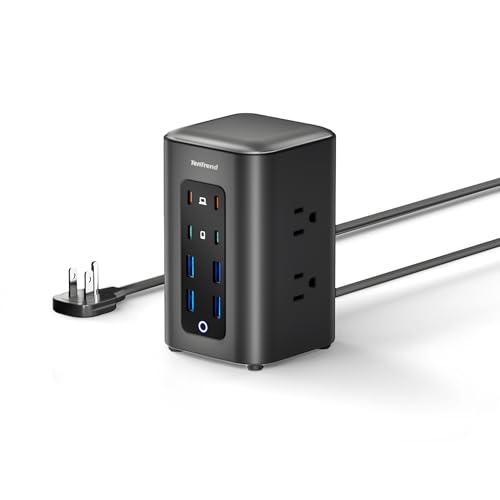
- 230W total with 14 power points
- Two USB-C ports support 65W max
- Compact tower keeps cords organized
Best For: Small desks needing lots of ports in a vertical layout
Compact Multi-Port Hub
6-Port USB C Charging Station with Phone Stand

- 6 ports with 1 PD20W USB-C fast-charge port
- Built-in stand for phone or tablet viewing
- 35W max output with 6FT AC cord
Best For: compact desks and nightstands
Power Strip + Charger
Anker 9-in-1 Desktop Charger with Surge Protection

- 3 AC outlets plus 6 USB ports
- USB-C1 and USB-C2 each support up to 100W individually
- 300J surge protection with 8-point safety system
Best For: compact desks that need AC and USB in one hub
Ultra-Compact Charging Hub
10-Port Desktop USB Charger with 5 Cables
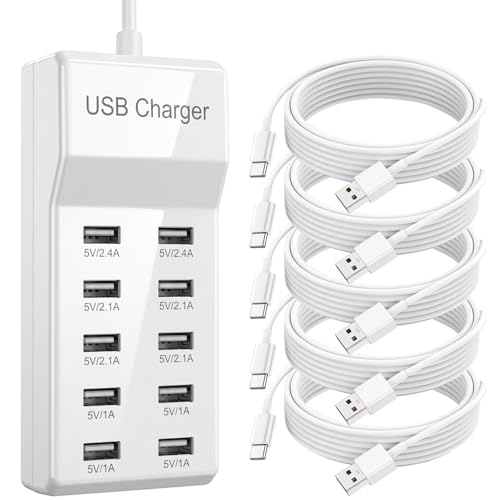
- Tiny 5.3" x 2.3" x 1.25" footprint
- 10 USB ports with two 5-port arrays
- Includes 5 reinforced USB-C cables
Best For: small desks, dorms, and bedside charging
Compact Desk Power Hub
Anker Nano Charging Station 100W

- 7-in-1 design with 3 AC outlets and 4 USB ports
- Two retractable USB-C cables help cut desk clutter
- Up to 100W from a single USB-C port with LCD status
Best For: Small desks that need built-in cables and AC outlets
Best Heavy-Duty Pick
UGREEN 100W 6-Port GaN Charger
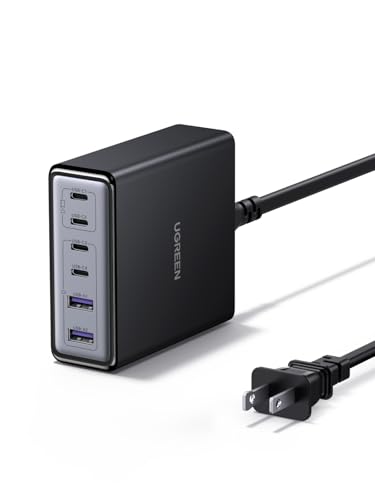
- Vertical compact body saves room on crowded desks
- 4 USB-C and 2 USB-A ports support up to 6 devices
- GaN design aims for better efficiency and less heat
Best For: People who want a compact vertical charger with flexible port mix
All-In-One Cable Tamer

- Four retractable cables help keep surfaces neat
- 8-in-1 layout supports multiple devices at once
- GaN design supports efficient, cooler charging
Best For: Cable-heavy users who want an organized, portable charging hub
Compact Multi-Port Pick – Anker 112W 6-Port Desktop Charger
If you want desktop charging stations for compact setups, this Anker desktop charger is a practical way to power a phone, tablet, earbuds, and even a laptop from one small hub. Its 6-port layout and included cable organizer help keep a tight desk tidy while still giving you enough flexibility for multiple everyday devices.
Best For: Small workspaces that need one compact charger for mixed USB-C and USB-A devices, including a MacBook Air.
Pros:
- 112W total output with 3 USB-C and 3 USB-A ports
- Up to 30W from a single USB-C port for faster charging needs
- Very compact footprint at 3.0 × 3.2 × 1.3 in
- Includes a silicone cable organizer to reduce desk clutter
Cons:
- USB-C charging cables are not included
- 30W charging is limited to the USB-C1 port
- Best suited to desk use rather than travel-focused packing
Overall, this is a strong pick if you want a small, organized charging hub that can handle several devices at once without taking over your workspace.
Travel-Safe Budget Option – One Beat 3-Outlet USB-C Power Strip
For desktop charging stations for compact setups that also need AC outlets, this One Beat power strip keeps the footprint simple while adding USB charging in one travel-friendly body. The 6ft braided cord and right-angle flat plug make it easier to fit into tight spots, whether you’re building a small office, dorm desk, or packing for a cruise.
Best For: Compact setups that need a small power strip with both AC outlets and USB charging, especially for travel or cruise use.
Pros:
- 3 AC outlets plus 4 USB ports for mixed charging needs
- USB-C supports up to 5V/3A for faster device charging
- No surge protection, which is useful for cruise ship requirements
- 6ft braided cord and low-profile angled plug help manage tight spaces
Cons:
- AC outlets are rated for 125V only
- Not intended for high-voltage regions like 220–240V power systems
- Lower USB output than larger desktop charging stations
This is a straightforward choice if you mainly want a compact power strip that can charge a few devices and fit neatly beside a desk or in a travel bag.
High-Output Desk Favorite – Anker Prime 200W 6-Port GaN Charger
If your desktop charging stations for compact setups need serious output in a small footprint, this Anker Prime charger is built for powering multiple demanding devices from one place. With 200W total output and a compact desk-oriented design, it suits users who want a tidy charging hub without giving up performance.
Best For: Desk setups that need high-wattage charging for multiple laptops and USB-C devices at once.
Pros:
- 200W total output across 6 ports
- Two USB-C ports can each provide up to 100W when used together
- Compact for a desk charger, with a stable 1.24 lb build
- Includes temperature-monitoring safety features
Cons:
- Not intended for travel
- Heavier than smaller compact chargers
- AC charging is not included, so it is USB-focused only
For users who prioritize power over portability, this is one of the strongest desk-first options here and makes sense when several high-demand devices need to charge together.
Vertical Space Saver – TenTrend 230W 14-in-1 Charging Tower
Among desktop charging stations for compact setups, this TenTrend tower stands out because it stacks a lot of power into a very small vertical footprint. It combines AC outlets and eight USB ports in a compact tower design, making it easier to keep a desk, nightstand, or corner setup organized.
Best For: Compact desks or rooms that need many charging ports in a space-saving tower layout.
Pros:
- 230W total charging with 8 USB ports and 6 AC outlets
- Two USB-C ports deliver up to 65W for faster laptop charging
- Very compact 3.15 × 3.15 × 5.12 in tower form
- Flat plug and 5ft cord help keep the setup neat
Cons:
- AC outlets are limited to 125V/10A
- Vertical tower design may not suit every desk layout
- More of a stationary organizer than a portable charger
This is a smart pick if you want maximum port count in minimal desk space, especially when you prefer a vertical charging station over a flat power strip.
Compact Multi-Port Hub – 6-Port USB C Charging Station with Phone Stand
If you want desktop charging stations for compact setups, this 6-port USB-C hub is built for simple everyday use without taking over your desk or nightstand. It combines a 35W max output, one PD20W USB-C fast-charge port, and a built-in phone stand, so it works well when you need a tidy spot to charge a few devices at once.
Best For: Small desks, bedside tables, and home office setups that need a compact charging hub with a viewing stand.
Pros:
- Charges up to 6 devices simultaneously with 2 USB-C and 3 USB-A normal charging ports plus 1 PD20W fast-charge USB-C port.
- Built-in stand supports a phone or tablet and gives a practical viewing angle for watching video.
- Includes a 6FT AC cord for flexible placement on a desk or nightstand.
- Flame-retardant ABS housing plus over-current, over-voltage, short-circuit, over-charge, and over-heat protection.
Cons:
- Fast charging is limited to one USB-C port; using two USB-C ports at once reduces charging speed to normal.
- 35W total output is modest if you need to power many high-demand devices.
Overall, this is a practical pick for users who want a compact desktop charger with a built-in stand and straightforward multi-device charging. It emphasizes convenience and safety more than raw power, which suits lighter desk and bedside use.
Power Strip + Charger – Anker 9-in-1 Desktop Charger with Surge Protection
Among desktop charging stations for compact setups, this Anker model stands out because it combines charging and power-strip functionality in one unit. With 3 AC outlets, 4 USB-C ports, and 2 USB-A ports, it is designed for a small workspace that still needs room for a laptop, accessories, and a few everyday devices.
Best For: Compact desks that need both AC outlets and USB charging in one stable hub.
Pros:
- 9-in-1 layout with 3 AC outlets, 4 USB-C ports, and 2 USB-A ports.
- USB-C1 and USB-C2 each support up to 100W when used individually.
- Includes a 300J surge protector and an 8-point safety system.
- Weighted design helps keep it stable on a desktop.
Cons:
- Heavier than a basic USB charging hub at 19.75 oz.
- Not as minimalist if you only need USB charging and no AC outlets.
This is the strongest all-in-one option here if your compact setup also needs actual outlets for a laptop or other gear. It is less about portability and more about consolidating power safely on a crowded desk.
Ultra-Compact Charging Hub – 10-Port Desktop USB Charger with 5 Cables
If your goal is to reduce clutter in a tight workspace, this 10-port desktop charger is designed to centralize charging in a very small footprint. It offers 50W total output, an extended 4.6ft AC cord, and five included USB-A to USB-C cables, making it a convenient option for compact setups where you want fewer loose accessories on the desk.
Best For: Small desks, dorms, and bedside charging where a compact hub and included cables save space.
Pros:
- Very small size at 5.3″ x 2.3″ x 1.25″, so it takes up less space than a smartphone.
- 10 USB ports with two 5-port arrays for organized multi-device charging.
- Includes five reinforced 3.3ft USB-A to USB-C cables with 20,000+ bend lifespan.
- UL94 V-0 flame-retardant PC shell and built-in protection against overcharging, overheating, and short circuits.
Cons:
- No fast-charging claim is provided, so it is better for steady overnight charging than speed-focused use.
- USB charging only, with no AC outlets for larger devices.
This charger makes sense when desk space is the priority and you mainly need a tidy overnight charging station for smaller electronics. The included cables and tiny footprint add real convenience for travel, dorm rooms, and minimalist workstations.
Compact Desk Power Hub – Anker Nano Charging Station 100W
For desktop charging stations for compact setups, this Anker Nano model is built to keep a small workspace tidy without giving up useful ports. It combines USB-C and USB-A charging with three AC outlets, plus two retractable USB-C cables that are sized for desktop use near an outlet, making it a practical all-in-one hub for laptops, phones, and everyday accessories.
Best For: Small desks that need built-in cables, AC outlets, and fast USB-C charging in one compact unit.
Pros:
- 7-in-1 layout with 4 USB ports and 3 AC outlets for mixed-device charging
- Two retractable USB-C cables help reduce cable clutter on a desk
- Up to 100W from any single USB-C port when used alone
- LCD display shows real-time charging status
Cons:
- Retractable cables extend to 2.3 ft, so placement needs to stay close to the outlet
- The main power cord is not retractable
Overall, this is a strong fit if you want desktop charging stations for compact setups and value a cleaner layout with fewer loose cables. The combination of built-in USB-C leads, AC outlets, and a small footprint makes it especially useful for organized home offices and bedside desks.
Best Heavy-Duty Pick – UGREEN 100W 6-Port GaN Charger
If you’re comparing desktop charging stations for compact setups, this UGREEN GaN charger focuses on saving space while powering a full lineup of devices. Its vertical layout and compact footprint make it easy to place on a crowded desk, and the mix of USB-C and USB-A ports supports everything from laptops to phones and earbuds.
Best For: Users who want a small, vertically oriented charger for a tight desk or travel bag.
Pros:
- 6-port design with 4 USB-C and 2 USB-A connections
- Compact vertical body helps preserve desk space
- Up to 100W total output with up to 65W from one USB-C port
- GaN technology is designed for improved efficiency and reduced heat
Cons:
- No built-in retractable cables
- Single-port USB-C output is lower than the total 100W rating
This model makes sense if your priority is a clean, space-saving charger rather than integrated cable management. It offers flexible charging for a multi-device desk while staying compact enough for office use or travel.
All-In-One Cable Tamer – 8-in-1 Retractable GaN Hub
For desktop charging stations for compact setups, this 8-in-1 retractable charger is aimed at people who want fewer loose cords and more built-in convenience. It combines four retractable cables with additional USB ports, so it can charge multiple devices while helping keep a desk, counter, or nightstand looking organized.
Best For: Multi-device users who want retractable cables and a portable charger for a neat workspace.
Pros:
- 8-in-1 setup supports charging multiple devices at once
- Four 31.5-in retractable cables help reduce cable tangles
- GaN construction is designed for better efficiency and heat dissipation
- Compact, portable design works for home, office, or travel
Cons:
- Total output is capped at 105W across all connected devices
- Compatibility notes are specific for some tablet and laptop models
This is a smart pick if you want one charger to replace a collection of adapters and cables. The built-in retractable leads make it especially appealing for small spaces where visible cable clutter is the main problem.
How We Picked the Best Desktop Charging Stations for Compact Setups
We focused on Desktop Charging Stations for Compact Setups that balance size, port variety, and real-world convenience. Priority went to models with enough output for modern USB-C devices, sensible layouts that reduce desk clutter, and features like retractable cables, stacked tower designs, or built-in surge protection.
We also considered how well each option fits typical small-space use cases: charging a laptop plus a phone, powering multiple accessories at once, or replacing several wall bricks with one cleaner solution.
Quick Comparison
Choose a higher-wattage GaN station if you want the best all-around performance for laptops and phones. Pick a slim power strip or tower if you need more outlets in a tight footprint. Retractable or cable-included models are ideal when you want the fastest path to a tidy desk.
Key Buying Factors for Desktop Charging Stations for Compact Setups
Power Output
Check total wattage first. Light-duty charging is fine for phones and earbuds, but compact workstations often need 65W to 100W or more if a laptop is part of the mix. Shared output matters too, since some stations reduce speed when multiple devices charge together.
Port Mix
Look for the right blend of USB-C and USB-A. USB-C is best for newer phones, tablets, and laptops, while USB-A still helps with older cables, accessories, and smaller devices. More ports are useful, but only if the layout stays easy to access.
Form Factor
For small desks, the physical design may matter as much as power. Tower styles use vertical space efficiently, flat bars fit behind monitors, and retractable cable stations can cut visual clutter dramatically.
Safety and Organization
Surge protection, smart power distribution, and a stable base help protect devices and keep the station usable day after day. If you work in a shared or high-traffic space, a tidy footprint and built-in cable management can be just as valuable as extra watts.
Who Should Buy Which Desktop Charging Stations for Compact Setups?
If you need the strongest single-device charging for a laptop-focused desk, choose a high-output USB-C GaN model. If your priority is charging several everyday devices at once, a multiport station with mixed USB-C and USB-A is the more flexible choice. If your workspace is extremely tight, tower and retractable designs usually offer the best fit for small surfaces.
For most buyers, the best Desktop Charging Stations for Compact Setups are the ones that match your device mix, desk size, and daily charging habits rather than simply offering the most ports on paper.