Clear speech can make a YouTube video easier to watch, whether you film tutorials at a desk, interviews outdoors, or Shorts on your phone. A wireless mic lets you move without relying on a camera or phone’s built-in microphone.
The right kit depends on what you record with, how many people speak, and whether you need a receiver that works with more than one device. These 10 selections cover simple phone clip-ons and more flexible two-transmitter systems.
Best 10 Wireless Microphones for Youtube Picks for 2026
Lightweight Pick

- Two 5 g transmitters
- App-adjustable noise cancellation
- Limiter and -12 dB safety track
Best For: Discreet USB-C phone interviews and vlogs
Plug-and-Play Pick
Mini Mic Pro with Charging Case

- USB-C and Lightning adapters
- Two microphones included
- Foam and furry wind covers
Best For: Quick recording across compatible phone connectors
Long-Session Pick
Hollyland LARK A2 with Charging Case
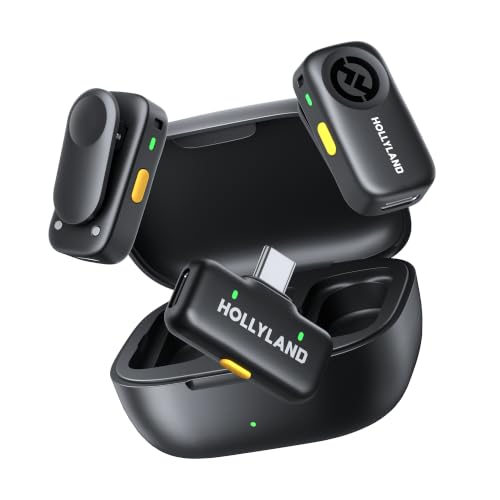
- Two-transmitter kit with case
- AI Auto-Limit and safety track
- Up to 42 hours with case
Best For: Longer interviews and mobile shoots
Compact Duo Pick

- Two transmitters and USB-C receiver
- AI Auto-Limit and safety track
- Two furry windshields included
Best For: Compact two-person USB-C recording
Best for Mixed Phone Ports
Mini Mic Pro USB-C and Lightning Kit

- Two clip-on microphones included
- USB-C and Lightning adapters
- Up to six hours per charge
Best For: Two-person phone videos across mixed connector types
Best for USB-C Phones
Mini Mic Pro USB-C Dual Mic Kit

- USB-C plug-and-play receiver
- Two clip-on microphones
- Foam and furry wind covers included
Best For: Vlogs and two-person videos on USB-C phones
Best for Long Shoot Days
Amazpro Dual Mic with Charging Case

- Two lightweight clip-on mics
- Claimed 30 hours with case
- Digital battery display
Best For: Mobile shoots with opportunities to recharge between takes
Most Versatile Kit

- Two transmitters and three receivers
- 9 g transmitters; 48 kHz/24-bit audio
- Up to 40 hours with charging case
Best For: Creators recording across cameras, phones, and computers
Mobile-First Pick

- Two discreet 10 g transmitters
- USB-C mobile receiver
- Up to 11.5 hours of operation
Best For: Phone-first interviews and mobile video
Best for Long Shoots
DJI Mic Mini Charging Case Kit

- Up to 48 hours with charging case
- Camera cable and USB-C phone adapter
- Two 10 g transmitters
Best For: Long camera or phone recording sessions
Lightweight Pick – BOYA mini 2 USB-C Duo
If you want wireless microphones for YouTube that stay discreet on camera, the BOYA mini 2 includes two 5 g transmitters and a USB-C receiver. Its app-adjustable noise cancellation and safety track give you useful control when recording in changing environments.
Best For: Phone-based interviews and vlogs where a barely noticeable mic matters.
Pros:
- Two lightweight transmitters and a charging case are included.
- Offers 48 kHz/24-bit audio, a limiter, and a -12 dB safety track.
- Charging case provides up to 30 hours of total battery life.
Cons:
- USB-C receiver is not a direct fit for Lightning-only phones.
- Camera compatibility is limited to the specified DJI models; it does not use Bluetooth.
The mini 2 makes particular sense for creators who value a low-profile clip-on setup. Check your device compatibility before buying, and remember that the advertised 328 ft range depends on a clear path without obstructing walls or buildings.
Plug-and-Play Pick – Mini Mic Pro with Charging Case
For creators comparing wireless microphones for YouTube across different phones, Mini Mic Pro includes both USB-C and Lightning adapters. It connects without an app or Bluetooth pairing, making it a straightforward option for quick phone interviews.
Best For: Creators switching between compatible USB-C and Lightning devices.
Pros:
- Includes two lavalier microphones and a charging case.
- Comes with foam and furry wind covers for outdoor recording.
- Runs for up to six hours per charge and allows device charging while in use.
Cons:
- Six-hour per-charge runtime may require a recharge on longer shoot days.
- The notes do not specify a wireless transmission range.
This is a convenient choice when fast setup and included phone adapters matter more than detailed audio controls. The receiver is stored in the charging box, so check there when unpacking.
Long-Session Pick – Hollyland LARK A2 with Charging Case
Among wireless microphones for YouTube, the Hollyland LARK A2 stands out for its included charging case and recording safeguards. The two-transmitter kit offers adjustable AI noise cancellation, AI Auto-Limit, and a -6 dB safety track for shoots with unpredictable volume.
Best For: Interviews and longer mobile shoots that benefit from backup headroom and extended battery life.
Pros:
- Records at 48 kHz/24-bit with app-based AI Voice Tuning.
- Each transmitter runs for up to seven hours, or up to nine with AI Power Saving; the case extends total runtime to 42 hours.
- Includes three noise-cancellation levels and a stated transmission range of up to 200 m.
Cons:
- The listed receiver uses USB-C, so check the connection required by your recording device.
- Voice tuning and other app settings add a step for creators who prefer no-app operation.
Choose this version if the charging case and audio-protection features justify a more involved setup. Its long stated range is useful for planning, but actual performance can vary with shooting conditions.
Compact Duo Pick – Hollyland LARK A2 Mini Duo
If you need wireless microphones for YouTube interviews recorded to a USB-C device, the Hollyland LARK A2 Mini Duo supplies two transmitters and a USB-C receiver. Its listed features include 48 kHz/24-bit audio, AI noise cancellation, AI Auto-Limit, and a safety track.
Best For: Two-person USB-C vlogs and interviews where a compact kit is preferable.
Pros:
- Includes two transmitters, a USB-C receiver, and two furry windshields.
- Offers AI noise cancellation, AI Auto-Limit, and a safety track.
- A five-minute USB-C charge is stated to provide up to one hour of recording.
Cons:
- The included-items list does not show a charging case, despite a battery-life bullet mentioning one.
- USB-C receiver may require a different setup for devices without a compatible USB-C connection.
The Mini Duo is the clearer fit when you want two clip-on mics without assuming a case is in the box. Because the supplied notes conflict on the charging case, verify the exact package contents before relying on the stated 42-hour case-assisted runtime.
Best for Mixed Phone Ports – Mini Mic Pro USB-C and Lightning Kit
If you switch between older Lightning iPhones and USB-C devices, this Mini Mic Pro kit is a flexible pick among wireless microphones for YouTube. It includes two clip-on microphones, a receiver, and both connector adapters, with no app or Bluetooth setup required.
Best For: Creators recording two-person videos across Lightning and USB-C phones.
Pros:
- Includes two microphones for interviews or co-hosted clips.
- USB-C and Lightning adapters broaden device compatibility.
- Includes foam and furry wind covers; rated for up to six hours per charge.
Cons:
- Six-hour battery rating may require a recharge for longer shoots.
- Single-channel listing may limit separate audio editing for two speakers.
The dual-connector kit is the main reason to choose this version. Check your recording device and audio-editing needs before relying on it for two-person interviews.
Best for USB-C Phones – Mini Mic Pro USB-C Dual Mic Kit
For creators using an iPhone 15 or newer or another USB-C device, this Mini Mic Pro kit keeps wireless microphones for YouTube straightforward: plug in the receiver and record without an app or Bluetooth pairing. The box includes two clip-on microphones and wind protection for mobile shoots.
Best For: USB-C phone users making vlogs, interviews, or two-person videos.
Pros:
- Plug-and-play USB-C receiver simplifies setup.
- Two microphones, clips, foam tips, and furry wind covers are included.
- Rated for up to six hours of continuous recording.
Cons:
- USB-C connector does not directly fit Lightning-only iPhones.
- Single-channel listing may not suit creators who need separate speaker tracks.
Pick this version when your recording devices use USB-C. If you also shoot on a Lightning iPhone, the dual-connector Mini Mic Pro kit is the more adaptable option.
Best for Long Shoot Days – Amazpro Dual Mic with Charging Case
The Amazpro dual lavalier kit stands out among wireless microphones for YouTube when you need a charging case for shoots away from an outlet. Its two 5 g clip-on microphones auto-pair with the receiver, and the case has a digital battery display.
Best For: Mobile creators filming interviews, vlogs, or streams over extended sessions.
Pros:
- Charging case provides a claimed 30 hours of total power.
- Includes Lightning and USB-C connectors for supported phones and tablets.
- Offers one-click noise cancellation and receiver pass-through phone charging.
Cons:
- The 30-hour figure includes the charging case, not one uninterrupted recording session.
- Supplied notes do not specify the microphones’ runtime per charge.
Its case and battery readout make this the most travel-oriented option here. Confirm the per-charge runtime if you plan to record long takes without breaks.
Most Versatile Kit – Hollyland Lark M2
For creators comparing wireless microphones for YouTube, the Hollyland Lark M2 offers a flexible two-person kit with receivers for cameras, phones, and computers. Each transmitter weighs just 9 g, making it discreet on camera.
Best For: Creators who switch between camera, smartphone, and computer recording.
Pros:
- Includes two transmitters, three receivers, and a charging case.
- Records 48 kHz/24-bit audio with one-button noise cancellation.
- Offers up to 10 hours per charge with noise cancellation off, or up to 40 hours with the case.
Cons:
- Mono/stereo switching is available only when the camera receiver connects through its 3.5 mm jack.
- The stated 300 m range requires line of sight.
The multiple receivers are the main reason to choose this kit: they let you change recording devices without buying a separate microphone system. Check your device connection before filming.
Mobile-First Pick – DJI Mic Mini Mobile RX Kit
If you shoot primarily on a phone, this DJI Mic Mini configuration keeps wireless microphones for YouTube simple: two 10 g transmitters pair with a plug-in USB-C mobile receiver for interviews and on-the-go videos.
Best For: Phone-first creators who want a compact two-person recording setup.
Pros:
- Two lightweight transmitters are discreet and comfortable to wear.
- Offers Basic and Strong noise-cancellation settings plus automatic limiting to help prevent clipping.
- Provides up to 11.5 hours of operation and a stated 300 m maximum transmission range.
Cons:
- The included receiver is USB-C mobile-focused; no camera receiver or charging case is listed.
- The stated maximum range may not reflect every shooting environment.
This is the more streamlined DJI option for phone-based interviews. If your workflow calls for the included camera receiver and charging case, the other Mic Mini kit is a better match.
Best for Long Shoots – DJI Mic Mini Charging Case Kit
For extended shoots, this DJI Mic Mini kit pairs two lightweight transmitters with a camera-compatible receiver and charging case. Among wireless microphones for YouTube, it suits creators who alternate between camera and phone recording and need power between takes.
Best For: Creators filming longer interviews, travel videos, or livestreams with a camera or phone.
Pros:
- Charging case extends stated total battery life to up to 48 hours.
- Includes a receiver, 3.5 mm camera cable, and USB-C phone adapter.
- Two noise-cancellation levels and automatic limiting help manage challenging audio.
Cons:
- The charging case and extra accessories add more pieces to carry than a mobile-receiver-only setup.
- The stated 400 m maximum range is not a guarantee in every location.
Choose this configuration when the included camera connection and charging case matter more than packing the lightest possible kit. Its 10 g transmitters still keep the on-camera setup discreet.
How We Picked These Wireless Microphones for Youtube
We focused on the practical differences in the selected kits: phone versus camera connections, one- or two-person recording, charging-case configurations, portability, and features intended to help keep voices intelligible. A product name alone cannot establish real-world sound quality, battery life, or reliability, so check current specifications and independent audio samples before buying. Several listings in this roundup are variations of the same product; compare the exact bundle contents rather than treating each listing as a different microphone.
Quick Comparison: Match the Kit to Your Setup
For phone-first videos, the BOYA mini 2, Mini Mic Pro listings, generic dual-lavalier kit, and phone-oriented Hollyland or DJI bundles are places to start. If you shoot with a camera or switch between devices, look closely at the receiver included with the Hollyland Lark M2 or the DJI Mic Mini kit with the standard receiver. For interviews, reaction videos, or co-hosted tutorials, prioritize a bundle with two transmitters. A charging case can make travel and frequent shooting simpler, but it adds cost and bulk.
Key Buying Factors for Wireless Microphones for Youtube
Connection and Compatibility
Match the receiver connector to your actual device: USB-C, Lightning, a camera audio input, or another supported connection. “Works with iPhone and Android” does not mean one included receiver fits every phone. Check your phone model, case clearance, camera input, and any adapter requirements. If you move between phone and camera, verify that the specific package supports both.
Recording Needs
One transmitter is enough for a solo presenter; two are more useful when both speakers need consistent audio. Check whether the receiver delivers separate tracks or combines voices, especially if you edit interviews. Noise reduction can help with steady background sounds, but it cannot reliably rescue audio from heavy wind, loud traffic, or poor mic placement. Use a windscreen outdoors and clip the mic where clothing will not rub against it.
Power and Workflow
Consider the runtime of both the transmitters and receiver, not just the case’s advertised total. For long sessions, check whether your setup can charge while recording. Confirm how you monitor audio, whether the camera or app recognizes the receiver, and how recordings are saved. A quick test before filming matters more than a long feature list.
Who Should Buy Which Wireless Microphones for Youtube?
Solo phone creators should choose a compact, compatible kit that is easy to connect and wear. Two-person creators should choose a two-transmitter bundle and confirm what arrives in the box. Camera users should favor a receiver that connects directly to their camera and allows practical level checks. If you film outdoors often, prioritize secure mounting, included wind protection, and reliable audio tests over headline range claims. Buy the simplest kit that fits your filming devices and routine.