A built-in ring light can brighten your face without adding another lamp to your desk. But lighting alone will not fix soft focus, choppy video, or a webcam that struggles in your room.
These 10 options span 1080p and 4K models for meetings, classes, and streaming. Use the buying guide below to narrow the field by your lighting, video needs, and budget.
Best 10 Webcams with Ring Light Picks for 2026
Best for Creator Lighting

- 1/2-inch sensor; 4K/30 fps
- Four adjustable light modes
- Portrait capture and privacy cover
Best For: Creators who want lighting controls and flexible framing
Best Remote-Controlled Pick

- RF remote and saved presets
- 4K/30 fps or 1080p/60 fps
- Three-color dimmable ring light
Best For: Presenters adjusting framing and light from their seat
Best for Hands-On Light Controls

- Touch-select three light tones
- Rotary brightness control
- ToF autofocus and privacy cover
Best For: Video callers who want physical controls and easy setup
Best for Everyday Video Calls
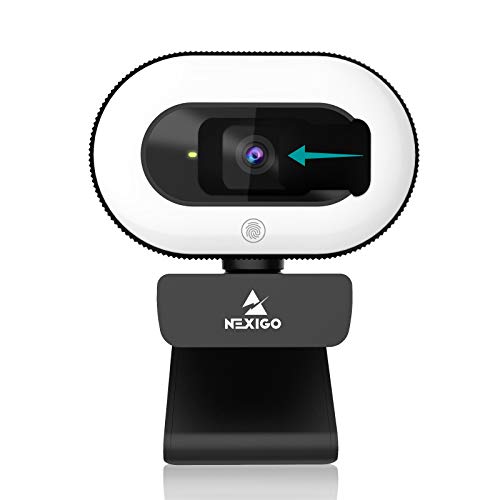
- 1080p/30 fps with autofocus
- Three touch-controlled light levels
- Privacy cover and USB setup
Best For: Meetings and classes that do not need 4K
Best Six-Mode Lighting
UGREEN 4K Webcam with Ring Light

- 4K/30fps or 1080p/60fps
- Six warm, cool, and mixed light settings
- PDAF autofocus and privacy cover
Best For: Adjustable face lighting for solo calls and streams
Best Dial-Controlled Light

- Sony 1/2.5-inch 4K sensor
- Three light tones with stepless brightness
- 80-degree view and tripod mount
Best For: Streamers seeking precise light and framing controls
Best Adjustable Framing
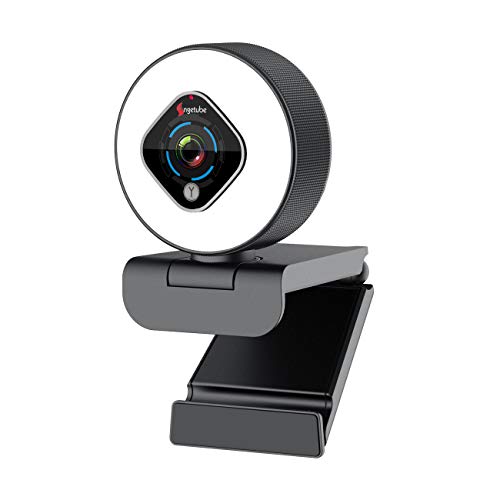
- Three touch-controlled light levels
- 360-degree horizontal base rotation
- 1080p/30fps with autofocus
Best For: Callers who frequently change camera angles
Smooth-Video Pick
NexiGo N960E 1080p 60fps Webcam

- 1080p video at up to 60fps
- Three light modes; adjustable brightness
- Autofocus and built-in privacy cover
Best For: Smoother video calls and streams with adjustable lighting
Flexible-Controls Pick

- Switch between 60fps and HDR modes
- Three-level light and 5x digital zoom
- USB-A and USB-C support via adapter
Best For: Streaming setups that benefit from mode and framing controls
Easy-Positioning Pick
Angetube 1080p Autofocus Webcam

- 1080p video at 30fps
- Adjustable light color and brightness
- 360-degree rotation and 100-degree tilt
Best For: Everyday calls needing flexible angles and face lighting
Best for Creator Lighting – EMEET S600L 4K
Among webcams with ring light, the EMEET S600L stands out for pairing a 1/2-inch sensor with lighting that coordinates with the camera’s exposure. It records at 4K/30 fps or 1080p/60 fps and offers four light modes for different setups.
Best For: Streamers and creators who want adjustable on-camera lighting and flexible framing.
Pros:
- Four lighting modes with dial and software controls.
- PDAF autofocus, portrait capture, and a rotating, tilting mount.
- Built-in privacy cover and dual microphones.
Cons:
- 4K capture tops out at 30 fps.
- More detailed appearance adjustments require EMEET STUDIO.
The sensor, lighting controls, and portrait option make this a strong fit for varied recording setups; choose 1080p when 60 fps matters more than resolution.
Best Remote-Controlled Pick – NexiGo N960E Plus 4K
The NexiGo N960E Plus is one of the more adjustable webcams with ring light here: its RF remote controls the on-screen settings menu, light, digital zoom, and saved positions. It supports 4K/30 fps and 1080p/60 fps, with ToF autofocus for changing subject distances.
Best For: Presenters and streamers who want to change camera settings from their seat.
Pros:
- RF remote offers 4X digital zoom, presets, and image controls.
- Three light colors with stepless brightness adjustment.
- Privacy cover, dual noise-canceling microphones, and tripod thread.
Cons:
- 4X zoom is digital, not optical.
- 4K video is limited to 30 fps.
Its remote and retained settings are the main reasons to pick it, especially if you frequently change framing or lighting during a session.
Best for Hands-On Light Controls – Galyimage 866MAX 4K
The Galyimage 866MAX gives shoppers comparing webcams with ring light direct control over illumination: tap to change between white, natural, and warm tones, then rotate the outer ring to adjust brightness. It supports 4K/30 fps or 1080p/60 fps and connects over USB without drivers.
Best For: Video callers who prefer simple, physical light controls and plug-and-play setup.
Pros:
- Three light tones with continuously adjustable brightness.
- ToF autofocus and dual noise-canceling microphones.
- Sliding privacy cover and Windows, macOS, and Linux compatibility.
Cons:
- 4K recording is capped at 30 fps.
- No remote or software-based light controls are listed.
This is a straightforward option if you would rather adjust the light on the webcam itself than manage settings through a remote or app.
Best for Everyday Video Calls – NexiGo N930E 1080p
For everyday calls, the NexiGo N930E keeps the choice among webcams with ring light uncomplicated. Its touch-controlled light has three brightness levels, while the camera captures 1080p video at 30 fps with autofocus.
Best For: Meetings, online classes, and casual streaming that do not require 4K.
Pros:
- Three touch-controlled light levels.
- Autofocus and a built-in noise-canceling microphone.
- Driver-free USB setup, privacy cover, and tripod support.
Cons:
- Limited to 1080p/30 fps.
- Light adjustment has three levels rather than continuous dimming.
Choose it for straightforward calls and convenient fill light; the 4K models above offer more resolution and higher-frame-rate 1080p capture.
Best Six-Mode Lighting – UGREEN 4K Webcam with Ring Light
Among webcams with ring light, this UGREEN model stands out for its six lighting settings: two cool, two warm, and two mixed modes. It records at 4K/30fps or 1080p/60fps, making it a flexible choice for calls and streaming.
Best For: People who want a choice of face-lighting tones alongside 4K video.
Pros:
- Six built-in ring-light settings help match different room lighting.
- PDAF autofocus, a noise-reducing microphone, and a sliding privacy cover cover everyday call needs.
- USB plug-and-play support spans Windows, macOS, Chrome OS, and Linux.
Cons:
- The ring light brightens faces but cannot replace the room’s main lighting.
- Its specified 68.5-degree viewing angle may be restrictive for group shots.
Choose this if lighting flexibility matters more than a wide frame. The 4K/30fps and 1080p/60fps options also let you prioritize detail or smoother motion.
Best Dial-Controlled Light – NexiGo N680E Pro 4K Webcam
If you’re comparing webcams with ring light for streaming, the NexiGo N680E Pro pairs a Sony 1/2.5-inch 4K sensor with three light tones and a rotating dial for stepless brightness adjustment. It also offers 1080p at 60fps when smooth motion is the priority.
Best For: Streamers who want fine-grained light control and flexible framing.
Pros:
- Three color-temperature modes and a brightness dial make lighting easy to adjust.
- PDAF autofocus and dual noise-reducing microphones support moving presenters.
- An 80-degree field of view, adjustable clip, and tripod mount offer setup options.
Cons:
- 4K output depends on the camera software being used.
- Its USB-A connection requires your own USB-C-to-USB-A adapter for the stated Switch 2 use.
The light controls are the main reason to pick this model over a simpler ring-light webcam. Check that your preferred recording or meeting software supports the resolution you intend to use.
Best Adjustable Framing – Angetube 962 1080p Webcam
The Angetube 962 is one of the webcams with ring light worth considering if you regularly reposition your camera. Its three-level touch-controlled light accompanies a manually adjustable base, autofocus, and 1080p/30fps video.
Best For: Video callers and streamers who want hands-on control over camera angle.
Pros:
- Three ring-light brightness levels adjust without opening software.
- The base rotates 360 degrees horizontally and 100 degrees vertically.
- Dual noise-canceling microphones and automatic low-light correction support calls in less-than-ideal rooms.
Cons:
- Digital zoom is not available at 1080p resolution.
- Video tops out at 1080p/30fps rather than offering a 4K mode.
This is a practical fit when physical angle adjustment matters more than maximum resolution. If zoom is central to your setup, note its resolution limitation before choosing it.
Smooth-Video Pick – NexiGo N960E 1080p 60fps Webcam
Among webcams with ring light, the NexiGo N960E is a practical choice if you want 1080p video at up to 60fps for calls or streaming. Its built-in light offers three modes and press-and-hold brightness adjustment.
Best For: People who want smoother 1080p video and an adjustable fill light in one webcam.
Pros:
- 1080p capture at up to 60fps with autofocus.
- Three light modes with stepless brightness adjustment.
- Built-in privacy cover and noise-reducing microphone.
Cons:
- Uses a USB-A connection; a USB-C adapter is not listed.
- Its stated 65-degree viewing angle may be limiting for group shots.
The N960E makes the most sense when smooth motion and easy lighting adjustments matter more than a wide frame. The privacy cover is a useful addition for a webcam that stays on your desk.
If you are comparing webcams with ring light for different streaming setups, the Angetube 967Pro offers a choice between 1080p at 60fps and HDR at 30fps. Its built-in light has three levels, while a rear button controls the stated 5x digital zoom.
Best For: Streamers and callers who want to switch between smoother video and HDR and adjust their framing.
Pros:
- Selectable 1080p/60fps or HDR 1080p/30fps modes.
- Three-level ring light and 5x digital zoom controls.
- Autofocus, dual noise-canceling microphones, and a privacy cover.
- Supports USB-A and USB-C using the included adapter.
Cons:
- HDR and 60fps are separate modes, not simultaneous features.
- Digital zoom may not retain the detail of an unzoomed 1080p image.
The 967Pro’s appeal is its range of on-camera controls: you can prioritize frame rate, HDR, or a tighter crop as your setup changes. Choose it for that flexibility rather than expecting all modes at once.
For buyers looking at webcams with ring light for everyday meetings, this Angetube model pairs 1080p/30fps video with a three-level light that lets you change color temperature and brightness. Its rotating, tilting base also helps you set your preferred camera angle.
Best For: Video calls where adjustable face lighting and flexible webcam positioning matter most.
Pros:
- Three light levels with color-temperature and brightness controls.
- Autofocus and automatic low-light correction.
- 360-degree rotation, 100-degree tilt, and a 78-degree field of view.
- Dual microphones, a privacy cover, and USB-A/USB-C compatibility.
Cons:
- Video is specified at 30fps, not 60fps.
- The built-in microphones may not replace a dedicated mic for more demanding audio needs.
This is the straightforward option of the three if positioning and light adjustment are your priorities. Its 30fps specification is worth keeping in mind if smoother motion is a deciding factor.
How We Picked These Webcams with Ring Light
We selected 10 light-equipped webcams covering 1080p and 4K options, along with differences in autofocus, frame-rate claims, privacy features, microphones, and controls. The aim is to show useful choices for everyday calls and streaming rather than treat resolution as the only measure of quality. Listed specifications are a starting point, not a guarantee of how a camera will look in your room.
Quick Comparison: Find Your Starting Point
For frequent movement or live streaming, start with models listing 1080p at 60 fps, then check whether that frame rate works at your preferred settings. If you crop your image or want more detail, consider a 4K model, provided your computer and calling or streaming software can use its higher-resolution output. For a simple meeting setup, a 1080p option with an adjustable light, reliable focus, and a privacy cover may be enough.
Key Buying Factors for Webcams with Ring Light
Light Output and Your Room
Look for adjustable brightness or lighting modes, especially if you switch between daylight and evening calls. A small built-in light works best as nearby fill light; it may not overcome a bright window behind you. Position the camera near eye level and face your main room light toward you for a more balanced image.
Resolution, Frame Rate, and Focus
1080p is practical for most video calls. A 4K feed can provide extra detail or room to crop, but many platforms compress video or limit call resolution. A 60 fps mode can make motion look smoother, though it may be available only at 1080p. Autofocus is useful if you move toward and away from the camera; check for focus hunting if you often hold objects up to the lens.
Controls, Audio, and Privacy
Brightness controls, software settings, or a remote can make adjustments easier without reaching over your monitor. Built-in microphones are convenient, but a separate headset or USB mic may be better in a noisy or echoing room. If you leave a webcam connected, a physical privacy cover is worth prioritizing. Confirm USB compatibility, mounting options, and any software requirements before buying.
Who Should Buy Which Webcams with Ring Light?
Choose a straightforward 1080p webcam for routine meetings and classes if you mainly need a clearer, better-lit face. Streamers and presenters should prioritize controllable light, steady autofocus, and a 60 fps mode if smooth motion matters. Consider 4K if you record video, crop your framing, or need extra detail beyond typical calls. If you share a workspace, put a privacy shutter and easy-to-use controls ahead of resolution you may rarely use.