Choosing the right monitor can make multicamera switching faster, clearer, and less stressful. The best options help you see every angle at once, judge exposure accurately, and keep your live workflow organized.
This roundup focuses on practical video production monitors for multicamera switching, from compact rackmount displays to large daylight-viewable director screens.
Best 10 Video Production Monitors for Multicamera Switching Picks for 2026
Ultra-Bright Multiview Director Pick
osee Mega 22S4 21.5" 1500nit 6-Source Monitor
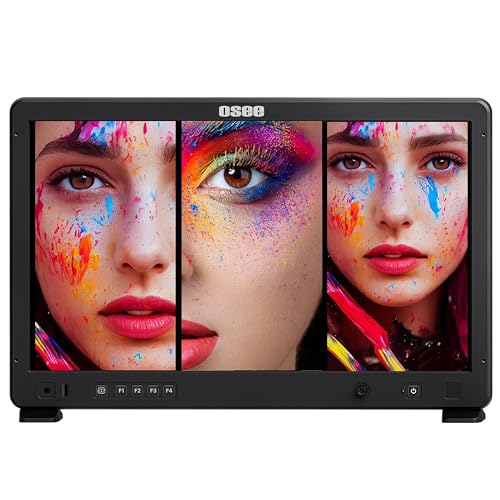
- 6-source HDMI/SDI multiview switching
- 1500-nit daylight-readable display
- Single to quad and PIP/PBP layouts
Best For: Outdoor multicam directing and source management
Rackmount Dual-Feed Studio Pick
Blackmagic Smartview Duo 2 Dual 8" Monitor

- Dual 8-inch rackmount monitoring
- Remote control software support
- Ethernet and USB connectivity
Best For: Rack-mounted control rooms and dual-feed monitoring
Budget-Friendly Quad-Split Option
FEELWORLD ATEM156 15.6" 4-Input Director Monitor

- 4 HDMI inputs with loop outputs
- Quad, dual, single, and PIP viewing
- 15.6-inch IPS with 1080p resolution
Best For: Affordable indoor live-switching and multiview setups
High-Brightness Rack Dual Display
LILLIPUT RM7026-12G Dual 7" 12G-SDI/HDMI Monitor

- Dual 7-inch rackmount screens
- 12G-SDI and HDMI 2.0 I/O
- Waveform and HDR monitoring tools
Best For: Fixed racks and 4K-capable dual-camera monitoring
Director Quad-View Monitor
ATEM156 15.6in HDMI Broadcast Display

- 4 HDMI inputs and output for multi-view monitoring
- 15.6-inch IPS panel, 1080p, 170° viewing angles
- Peaking Focus, False Color, and Pixel-to-Pixel tools
Best For: Small live-stream and studio setups needing quad-view monitoring
HDR Switcher Recorder
Sumo PRO-19 19in Multi-Camera Monitor

- Records four isolated camera feeds plus program output
- Quad-view live switching on a 19-inch 4K HDR screen
- 12G-SDI, HDMI, XLR audio, and NDI HX3 support
Best For: Production teams wanting monitoring, switching, and ISO recording in one unit
High-Bright Broadcast Monitor
FVM215 21.5in SDI HDMI Display

- 21.5-inch screen with 1000-nit brightness
- HDMI and 3G-SDI inputs for production gear
- Waveform, vector scope, focus assist, and 3D LUT support
Best For: Bright studio and live production setups needing a large pro monitor
Compact Live Switcher
FEELWORLD LIVEPRO L1 V1 4-Input HDMI Switcher

- 4 HDMI inputs with 1080p support
- USB 3.0 output for live streaming software
- 6-picture preview plus LAN remote control
Best For: Solo live streamers and compact multicamera setups
Carry-On Director Monitor
SEETEC ATEM156-CO 15.6-inch Quad HDMI Monitor

- 15.6-inch IPS display at 1920 x 1080
- 4 HDMI inputs and outputs with quad view
- Peaking, false color, and pixel-to-pixel tools
Best For: Portable director stations and studio multicamera monitoring
Quad-View Broadcast Monitor
SEETEC ATEM156 15.6-inch IPS Quad HDMI Monitor

- 15.6-inch IPS panel with 1080p resolution
- 4 HDMI inputs/outputs with quad, dual, and single view
- Shortcut keys plus peaking and false color tools
Best For: ATEM-based multicamera monitoring and fast source review
Ultra-Bright Multiview Director Pick – osee Mega 22S4 21.5" 1500nit 6-Source Monitor
If you need video production monitors for multicamera switching on bright sets, the osee Mega 22S4 is built for fast multiview monitoring and clean source management. Its 21.5-inch Full HD panel supports single, dual, triple, quad, and PIP/PBP layouts, while the 1500-nit screen and included sun hood help keep the image readable outdoors.
Best For: Outdoor directors and crews switching multiple HDMI/SDI camera feeds.
Pros:
- 3x HDMI and 3x 3G-SDI inputs support up to six sources.
- Flexible split-screen modes cover single, dual, triple, quad, and PIP/PBP viewing.
- 1500-nit brightness and included sun hood suit daylight shooting.
- Includes both V-Mount and Gold Mount battery plates for common power setups.
Cons:
- 1080p resolution may feel modest next to the large 21.5-inch panel.
- At 9.5 kg, it is heavier than small portable field monitors.
The Mega 22S4 stands out when visibility, source count, and flexible layouts matter more than compact size. It is a strong fit for directors who want one monitor to handle busy multicam workflows in studio or daylight locations.
Rackmount Dual-Feed Studio Pick – Blackmagic Smartview Duo 2 Dual 8" Monitor
Blackmagic Design SmartView Duo 2 Dual 8-inch Intelligent 6G-SDI Rack Monitors
Check Price On AmazonFor rack-based video production monitors for multicamera switching, the Blackmagic Design Smartview Duo 2 keeps two sources visible in a compact dual-screen layout. Its rackmount design and remote control software make it a practical choice when you want steady monitoring in a control room or equipment rack rather than on a cart or handheld rig.
Best For: Control rooms and rack setups that need two always-on camera views.
Pros:
- Dual 8-inch LCD screens show two feeds at once.
- Rackmount form factor fits studio and control-room installs.
- Remote control software adds convenient management.
- Ethernet and USB connectivity support system integration.
Cons:
- 800×480 native resolution is low for a monitor in this size class.
- 500:1 contrast is less robust than brighter director monitors.
This model makes sense when you want a simple two-up monitoring solution inside a rack, not a feature-heavy field display. It is best viewed as a dependable studio utility for keeping two camera feeds in sight.
Budget-Friendly Quad-Split Option – FEELWORLD ATEM156 15.6" 4-Input Director Monitor
If you want video production monitors for multicamera switching with a straightforward quad-view layout, the FEELWORLD ATEM156 gives you four HDMI inputs and loop outputs in a 15.6-inch package. It is designed to work with switchers and live-streaming setups, making it a practical monitor for showing multiple camera angles without a complicated setup.
Best For: Live streaming and switcher setups that need affordable quad monitoring.
Pros:
- 4x HDMI inputs and 4x loop outputs support quad viewing and pass-through.
- Supports quad split, dual view, single image, and picture-in-picture.
- 15.6-inch IPS panel offers 1080p resolution and 170-degree viewing angle.
- Aluminum housing helps with durability and heat dissipation.
Cons:
- 250 cd/m² brightness is much lower than daylight monitors.
- 30 Hz refresh rate is less ideal for some fast-moving production uses.
The ATEM156 is a solid value choice if your workflow is mostly indoors and centered on HDMI switchers. It offers useful multiview flexibility without pushing into the price or complexity of higher-end broadcast monitors.
High-Brightness Rack Dual Display – LILLIPUT RM7026-12G Dual 7" 12G-SDI/HDMI Monitor
Among video production monitors for multicamera switching, the LILLIPUT RM7026-12G is a strong rackmount option when you want two sources visible in a compact 3RU footprint. Its dual 7-inch high-brightness screens, 12G-SDI and HDMI 2.0 support, and loop output connectivity make it useful for monitoring or expanding a routing chain in a studio or mobile rack.
Best For: Rack systems needing bright dual monitoring for 4K-capable camera feeds.
Pros:
- Dual 7-inch high-brightness LTPS screens provide two-up monitoring.
- 12G-SDI and HDMI 2.0 inputs and outputs support up to 2160p 60Hz.
- 3RU rackmount design fits production racks cleanly.
- Waveform and HDR support add useful monitoring tools.
Cons:
- Dual-screen layout is less flexible than full multiview monitors.
- Rackmount design is not as portable as field director displays.
This model is a good fit when you want bright, rack-friendly monitoring with modern 4K signal support. It is especially appealing for facilities that prioritize fixed installation and reliable feed visibility over portable multiview layouts.
Director Quad-View Monitor – ATEM156 15.6in HDMI Broadcast Display
If you need a practical video production monitor for multicamera switching, the ATEM156 is built around that workflow. Its 4 HDMI inputs and output support multi-view preview with switchers like ATEM Mini, so you can keep an eye on each source while deciding what goes live.
Best For: Small live-stream and studio setups that need quad-view monitoring with basic focus tools.
Pros:
- 4 HDMI inputs and output for multi-view monitoring with switchers
- 15.6-inch IPS panel with 1920 x 1080 resolution and 170° viewing angles
- Includes Peaking Focus, False Color, and Pixel-to-Pixel assist tools
- V-mount battery plate and 12V DC power input add setup flexibility
Cons:
- 250 nits is modest for very bright environments
- Battery is not included in the package
- Focus and exposure tools are useful, but the feature set is more straightforward than higher-end broadcast models
For multicamera switching where visibility and simple control matter more than premium brightness, this monitor covers the essentials well. It is a sensible director-style display for previewing sources and keeping the switcher workflow organized.
HDR Switcher Recorder – Sumo PRO-19 19in Multi-Camera Monitor
For video production monitors for multicamera switching, the Sumo PRO-19 is the most feature-rich option here. It combines a 19-inch 4K HDR display with live switching, quad-view monitoring, and ISO recording, making it useful when you need to monitor, record, and route multiple camera feeds in one unit.
Best For: Production teams that want monitoring, switching, and ISO recording in a single 19-inch unit.
Pros:
- Records up to four isolated camera feeds plus a fifth program output
- Quad-view and multi-camera monitoring support live switching workflows
- Bright 1200-nit 4K HDR display for demanding production environments
- Includes 12G-SDI, 3G-SDI, HDMI, XLR audio, and NDI HX3 connectivity
Cons:
- At 24.3 pounds, it is the heaviest and least portable option in this group
- Likely more monitor than needed for simple small-stream setups
- Advanced features may be overkill if you only need basic source preview
This is the strongest pick when your switching station needs more than a preview screen. If you want a monitor that also handles recording, streaming-related networking, and deeper technical workflows, the Sumo PRO-19 stands out.
High-Bright Broadcast Monitor – FVM215 21.5in SDI HDMI Display
The FEELWORLD FVM215 is a strong fit for video production monitors for multicamera switching when you want a large, bright display with pro monitoring tools. Its 21.5-inch 1000-nit panel is designed to stay visible in brighter shooting conditions, while HDMI and 3G-SDI inputs make it easy to connect to production gear.
Best For: Bright studio, set, or live production environments that need a large monitor with waveform and LUT support.
Pros:
- 21.5-inch screen with 1000-nit brightness for better visibility in strong light
- HDMI and 3G-SDI connectivity for flexible production use
- Includes focus assist, false color, waveform, RGB parade, vector scope, and 3D LUT loading
- Factory color calibration via CALMAN software for accurate color reproduction
Cons:
- Only 1080p resolution on a large 21.5-inch panel
- Weight and size make it less convenient than smaller director monitors
- Viewing angle is listed at 89 degrees, which is narrower than some alternatives
If you need a bigger on-set monitor that is easier to see under bright lighting, this one delivers a useful balance of size, brightness, and analysis tools. It is especially appealing when your multicamera switching setup also depends on accurate exposure and color checking.
Compact Live Switcher – FEELWORLD LIVEPRO L1 V1 4-Input HDMI Switcher
If you need video production monitors for multicamera switching in a simple live workflow, the FEELWORLD LIVEPRO L1 V1 is built around speed and portability. It takes four HDMI inputs, supports 1080p across the chain, and sends USB 3.0 out to a computer so your switching can feed common streaming software in real time.
Best For: Solo creators and small live teams that want a compact switcher with preview, program, and remote control options.
Pros:
- Four HDMI inputs for switching between multiple camera angles
- USB 3.0 output works like a webcam for streaming software
- 6-picture monitoring view with PGM, PST, and audio display
- Compact design with tripod-mount screw hole and LAN remote operation
Cons:
- Built-in display is only 2 inches
- Best suited to 1080p workflows, not higher-resolution production chains
- Smaller control surface may feel limited for larger studios
Overall, this is a practical pick if you want a lightweight switcher that keeps multicamera production straightforward. It emphasizes quick live control rather than a large on-set monitor, which makes it useful when space and setup time are tight.
Carry-On Director Monitor – SEETEC ATEM156-CO 15.6-inch Quad HDMI Monitor
For video production monitors for multicamera switching, the SEETEC ATEM156-CO is aimed at directors who want a larger 15.6-inch display with four HDMI inputs and outputs. It supports quad-view monitoring, can loop signals to other devices, and adds focus-assist tools that help you judge shots while switching between cameras.
Best For: Studio and field productions that need a big quad-view monitor with practical focus tools.
Pros:
- 15.6-inch IPS panel with 1920 x 1080 resolution
- Four HDMI inputs and outputs for multi-camera monitoring and signal loop-through
- Focus-check tools including peaking focus, false color, and pixel-to-pixel
- Includes V-mount battery plate and carry-on suitcase for mobile use
Cons:
- 250 nit brightness is modest for very bright environments
- Battery is not included
- HDCP signals may require an HDMI splitter workaround
This monitor makes sense when your switching setup needs a larger reference screen and stronger visibility into focus and framing. It blends multicamera monitoring with field-ready power options, so it fits both studio and portable production work.
Quad-View Broadcast Monitor – SEETEC ATEM156 15.6-inch IPS Quad HDMI Monitor
If you’re comparing video production monitors for multicamera switching, the SEETEC ATEM156 is a straightforward 15.6-inch broadcast monitor built for ATEM-style setups. It offers four HDMI inputs and outputs, plus quad, dual, and single-view monitoring so you can keep multiple sources visible while making fast decisions.
Best For: ATEM users and small production teams that want flexible multi-view monitoring with quick input access.
Pros:
- 15.6-inch IPS LCD with 1920 x 1080 resolution
- Four 4K HDMI inputs and outputs for cameras or computers
- Quad, dual, and single-view monitoring modes
- Shortcut keys and focus/framing aids like peaking, false color, and center marker
Cons:
- 250 cd/m² brightness may be limiting outdoors or under harsh light
- Designed for monitoring, not as a dedicated switcher
- Field use may require an external battery, since it uses 12V DC plus a V-mount plate
For teams that need one display to keep tabs on several camera feeds, this monitor covers the essentials without overcomplicating the workflow. It is especially useful when you want fast source selection and built-in tools that help protect shot quality during live production.
How We Picked the Best Video Production Monitors for Multicamera Switching
For Video Production Monitors for Multicamera Switching, we prioritized screen size, brightness, multiview layout, input compatibility, and monitoring tools that matter in live production. We also looked for models that fit common switcher setups, whether you need HDMI-only convenience, SDI support, rackmount integration, or higher-end HDR and waveform features.
Quick Comparison
Smaller dual-screen and 7-inch rackmount models are best when space is tight and you need fast source confirmation. Mid-size 15.6-inch quad-view monitors are the most versatile choice for ATEM-style workflows. Larger 19- to 21.5-inch displays are easier to read from a distance and better for director stations, larger carts, and studio control rooms.
Key Buying Factors for Video Production Monitors for Multicamera Switching
Input and Output Support
Match the monitor to your switcher and cameras. HDMI is common for portable setups, while 3G-SDI or 12G-SDI is more reliable for longer runs and professional rigs. If you need a monitor to sit between sources and a switcher, make sure the I/O layout supports your workflow.
Screen Brightness and Viewing Environment
Brightness matters more than many buyers expect. Around 250 nits can work indoors, but higher-brightness models are much easier to use near windows, on location, or under studio lights. If your production moves outdoors, choose a daylight-viewable display whenever possible.
Multiview Layout and Monitoring Tools
Quad split, dual-view, waveform, false color, focus assist, HDR, and LUT support can all speed up decision-making. The best monitors show enough information at a glance without cluttering the screen, especially during live switching.
Size, Mounting, and Portability
Consider where the monitor will live. Rackmount options suit flypacks and control racks, while larger carry-on style monitors are better for mobile crews. If you switch from a desk, a cart, or a portable case, make sure the footprint and weight are practical for transport and setup.
Who Should Buy Which Video Production Monitors for Multicamera Switching?
If you need a simple confidence monitor for a compact live setup, choose a smaller dual-screen or quad-view display. If you run multicam shows regularly, a 15.6-inch class monitor offers the best balance of size, detail, and portability. For studio directors, rental kits, and bright field use, step up to a 19-inch or 21.5-inch model with stronger visibility and more advanced monitoring tools.
If your workflow includes recording, higher-end hybrid models can reduce gear count by combining monitoring, switching, and capture in one device. That makes them especially appealing for crews that want fewer boxes and faster setup times.