The best travel-friendly hard drive docking stations make it easier to access bare SATA drives, clone disks, and move data without installing a drive inside a computer. For mobile technicians, photographers, IT professionals, and home users, the right dock can turn spare drives into a practical portable storage toolkit.
This roundup compares 10 dual-bay, USB-C, USB 3.0, SATA, and NVMe-compatible options, with attention to portability, transfer speed, drive support, cloning features, and everyday convenience.
Best 10 Travel-Friendly Hard Drive Docking Stations Picks for 2026
Best USB-C Cloner

- Offline clones SATA drives without a computer
- Reads and writes two SATA drives at once
- USB-C, tool-free bays for 2.5-inch and 3.5-inch drives
Best For: Portable SATA cloning and dual-drive file access
Best Versatile 10Gbps Dock

- Supports NVMe and 2.5-inch or 3.5-inch SATA drives
- 10Gbps USB 3.2 Gen 2 transfers
- Clones between NVMe and SATA without a computer
Best For: Mixed-drive workflows and fast portable backups
Best Traditional Dual-Bay Dock

- Dual bays support 2.5-inch and 3.5-inch SATA drives
- Offline cloning without a computer
- Includes power supply and USB 3.0 cable
Best For: Simple SATA drive access and cloning
Best Single-Drive Travel Dock
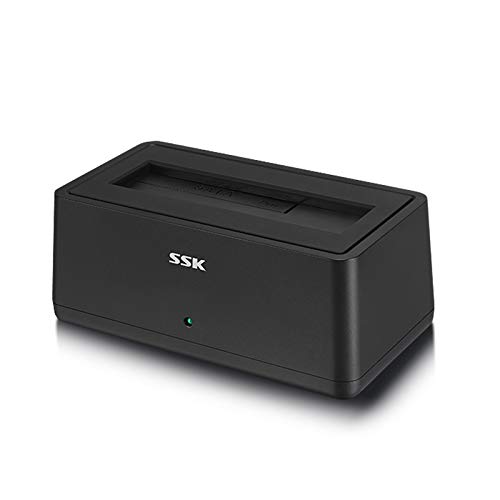
- Tool-free access to one 2.5-inch or 3.5-inch SATA drive
- USB 3.0 with UASP reaches up to 5Gbps
- Auto-sleep helps reduce idle drive activity
Best For: Portable single-drive file access and swapping
Best USB-C Single-Bay Pick
Sabrent DS-UC1B USB-C SATA Dock

- 10Gbps USB-C connectivity
- Supports 2.5- and 3.5-inch SATA drives
- Tool-free, hot-swappable single bay
Best For: Portable single-drive backups and transfers
Best Dual-Bay Cloning Station
UGREEN CM198 Dual-Bay SATA Dock

- Two bays for 2.5- and 3.5-inch SATA drives
- Offline drive cloning without a computer
- Supports up to 32TB per drive
Best For: Drive cloning and two-drive workflows
Best Budget USB-A Dock

- Tool-free single-bay SATA design
- Supports 2.5- and 3.5-inch drives
- Includes 12V adapter for 3.5-inch HDDs
Best For: Basic SATA drive access on USB-A computers
Best Dual-Bay Cloning Dock

- Dual-bay support for 2.5- and 3.5-inch drives
- PC-free offline cloning
- USB 3.1 Gen 1 with UASP up to 5Gbps
Best For: Drive cloning and two-drive backups
Best Large-Capacity Clone Station

- Dual-bay support for 2.5- and 3.5-inch drives
- Offline cloning with up to 22TB support
- USB-C and USB-A cable included
Best For: Cross-platform drive transfers and cloning
Best Portable Multi-Format Kit

- Includes SATA enclosure, dual dock, and M.2 NVMe enclosure
- USB 3.2 Gen 2 speeds up to 10Gbps
- Plug-and-play with no external power
Best For: Travelers handling multiple drive formats
Best USB-C Cloner – SABRENT Dual-Bay SATA Dock
For travel-friendly hard drive docking stations that combine dual-drive access with USB-C connectivity, the SABRENT EC-CH2B is a practical choice. It accepts bare 2.5-inch and 3.5-inch SATA drives, supports simultaneous read/write access, and can clone one SATA drive to another without a computer.
Best For: Travelers who need a compact dual-bay SATA dock and offline cloning for drive upgrades or backups.
Pros:
- Offline 1-to-1 cloning works without a connected computer.
- Two SATA drives can mount as separate drives over USB.
- Tool-free, hot-swappable bays fit 2.5-inch and 3.5-inch SATA HDDs and SSDs.
- USB-C connection supports transfer speeds up to 5Gbps.
Cons:
- Does not support IDE/PATA, M.2, or NVMe drives.
- Offline cloning runs at up to 60MBps, not the full USB 3.0 rate.
- The included cable is USB-C on the dock end, so USB-A computers need a separate cable.
Its 10-ounce build and included power adapter make it convenient to pack, while the SATA-only design keeps compatibility straightforward. Check your computer’s port and drive type before buying.
Best Versatile 10Gbps Dock – WAVLINK NVMe/SATA Cloner
The WAVLINK RapidFire U2C stands out among travel-friendly hard drive docking stations for its broad drive support and 10Gbps USB 3.2 Gen 2 interface. Its dual-bay layout accommodates M.2 NVMe drives alongside 2.5-inch or 3.5-inch SATA storage, making it useful for mixed-drive workflows.
Best For: Users traveling with NVMe and SATA drives who want fast transfers and cross-type offline cloning.
Pros:
- Supports M.2 NVMe sizes 2230, 2242, 2260, and 2280.
- Also accepts 2.5-inch and 3.5-inch SATA HDDs and SSDs.
- USB 3.2 Gen 2 provides transfer speeds up to 10Gbps.
- Offline cloning can copy between NVMe and SATA drives without a computer.
Cons:
- Actual speeds depend on the drives and connected system.
- Its wider compatibility may be unnecessary for users with SATA-only storage.
- The supplied notes do not specify a travel case or included power accessories.
The aluminum alloy shell adds durability and heat dissipation, while Windows, Mac, and Linux compatibility broadens its usefulness. It is the most flexible option here, though its capabilities may exceed a basic backup setup.
Best Traditional Dual-Bay Dock – SABRENT USB 3.0 Cloner
For straightforward travel-friendly hard drive docking stations built around standard SATA storage, the SABRENT EC-HD2B offers two bays, plug-and-play operation, and offline cloning. It supports both 2.5-inch and 3.5-inch SATA HDDs or SSDs without requiring drivers.
Best For: Travelers who need a simple dual-bay SATA dock for drive access, cloning, and storage upgrades.
Pros:
- Supports standard 2.5-inch and 3.5-inch SATA hard drives and SSDs.
- Offline cloning works without a computer at up to 60MBps.
- USB 3.0 transfer speeds reach up to 5Gbps with UASP support.
- Includes the dock, power supply, USB 3.0 cable, and manual.
Cons:
- Does not support M.2 or NVMe drives.
- Offline cloning is slower than the advertised USB transfer rate.
- At 1.2 pounds, it is heavier than the smaller SABRENT USB-C model.
This is a conventional, capable SATA dock for users who value a complete package and broad desktop-drive support. Its heavier design is worth considering if minimizing luggage weight is a priority.
Best Single-Drive Travel Dock – SSK USB 3.0 SATA Dock
The SSK DK102 is a compact single-drive option for travel-friendly hard drive docking stations. It provides tool-free access to one 2.5-inch or 3.5-inch SATA HDD or SSD, with USB 3.0 transfers up to 5Gbps, UASP support, and no driver installation.
Best For: Travelers who usually access one bare SATA drive at a time and want a simple plug-and-play setup.
Pros:
- Accepts both 2.5-inch and 3.5-inch SATA I/II/III drives.
- Tool-free insertion makes swapping drives quick.
- USB 3.0 and UASP support transfers up to 5Gbps.
- Auto-sleep activates after 10 minutes of inactivity.
Cons:
- Only one drive can be mounted at a time.
- It does not provide an offline cloning function.
- Requires its included 12V/2A power adapter for operation.
Its shockproof, vibration-resistant case and broad Windows, Mac, and Linux compatibility make it a practical companion for routine file transfers. Choose another model if you need dual-drive copying or offline cloning.
Best USB-C Single-Bay Pick – Sabrent DS-UC1B USB-C SATA Dock
For travel-friendly hard drive docking stations, the SABRENT DS-UC1B is a practical single-drive option with a compact footprint, USB-C connectivity, and support for both 2.5-inch and 3.5-inch SATA drives. Its tool-free bay makes swapping drives quick when backing up or transferring files.
Best For: Users who want a portable, fast single-bay dock for SATA SSDs and HDDs across Windows, macOS, or Linux.
Pros:
- USB 3.2 Gen 2 connection supports transfer rates up to 10Gbps.
- Works with 2.5-inch and 3.5-inch SATA drives, including capacities of 20TB and larger.
- Includes both USB-A and USB-C to USB-C cables, plus a power adapter for 3.5-inch drives.
- Tool-free, hot-swappable design with a retractable dust cover.
Cons:
- Supports only one drive at a time.
- Its plastic enclosure may be less rugged than a metal travel dock.
The DS-UC1B is a strong all-around choice when speed, broad SATA compatibility, and easy portability matter more than simultaneous drive access. The included cables also make it adaptable to newer USB-C and older USB-A computers.
Best Dual-Bay Cloning Station – UGREEN CM198 Dual-Bay SATA Dock
The UGREEN CM198 stands out among travel-friendly hard drive docking stations for handling two SATA drives at once. It supports offline cloning, broad drive capacities, and a supplied USB-C data cable, making it useful for migration and multi-drive workflows.
Best For: Users who need two-bay access or computer-free cloning of compatible SATA drives.
Pros:
- Dual bays accept 2.5-inch and 3.5-inch SATA I, II, and III drives.
- Offline cloning can copy one drive to another without a computer when the source and destination meet the required capacity order.
- Supports up to 32TB per drive and includes a 1-meter USB-B to USB-C cable.
- Surround cooling, a dust cover, and anti-slip feet support safer everyday use.
Cons:
- USB 3.0 limits transfer speeds to up to 5Gbps.
- The dual-bay design is larger and less minimal than a single-drive dock.
- Offline cloning requires the destination drive to have equal or greater capacity than the source.
Choose the CM198 if flexibility is more important than maximum USB speed. Its two-bay layout and offline cloning feature can reduce the equipment needed for drive upgrades, though the 5Gbps interface is slower than newer 10Gbps models.
Best Budget USB-A Dock – Sabrent EC-DFLT SATA Dock
The SABRENT EC-DFLT is a straightforward choice among travel-friendly hard drive docking stations, with a compact lay-flat design and tool-free access to one bare SATA drive. It is best suited to computers with a USB-A port and users who do not need newer USB-C connectivity or dual-bay features.
Best For: Travelers needing an uncomplicated, single-drive SATA dock for Windows, macOS, or Linux systems with USB-A connectivity.
Pros:
- Accepts both 2.5-inch and 3.5-inch SATA I, II, and III drives.
- Tool-free, plug-and-play design supports hot-swapping without a reboot.
- Includes the required 12V/2A adapter for 3.5-inch drives.
- UASP support and USB 3.0 provide up to 5Gbps interface speeds.
Cons:
- Uses a USB-A host cable rather than a built-in USB-C port; a USB-C adapter is needed for USB-C-only computers.
- Only one drive can be connected at a time.
- Does not support IDE/PATA, M.2 NVMe, M.2 SATA, or SAS drives.
The EC-DFLT is a sensible low-complexity pick for compatible USB-A laptops and desktops. Its limitations are clear, but the included power adapter and broad 2.5-/3.5-inch SATA support make it useful for basic recovery, backup, and file transfers.
Best Dual-Bay Cloning Dock – BENFEI USB-C Hard Drive Dock
For shoppers seeking travel-friendly hard drive docking stations, the BENFEI dual-bay dock offers a practical balance of portability and drive-management features. It supports both 2.5-inch and 3.5-inch HDDs and SSDs, with tool-free installation, USB-C connectivity, and offline cloning without a computer.
Best For: Users who need to clone, back up, or transfer data between two SATA drives.
Pros:
- Dual bays support simultaneous work with 2.5-inch and 3.5-inch HDDs or SSDs.
- Offline clone function copies a source drive without requiring a PC.
- USB 3.1 Gen 1 and UASP support provide transfer speeds up to 5Gbps.
- Dedicated 12V/2.5A power adapter supports two drives, including power-hungry 3.5-inch models.
Cons:
- Offline cloning requires the target drive to have capacity equal to or greater than the source.
- The dock uses a separate power adapter, which adds to travel gear.
The BENFEI is a strong choice for travelers who want a compact two-drive workflow and dependable power for desktop-sized drives. Its 18-month warranty adds useful purchase protection.
Best Large-Capacity Clone Station – ORICO USB-C Dual-Bay Dock
The ORICO is among the more flexible travel-friendly hard drive docking stations for users moving between computers and other devices. Its dual bays accept 2.5-inch and 3.5-inch drives, while the included USB-C-to-USB-A/C cable supports broad host compatibility.
Best For: Users who want dual-drive transfers, offline cloning, and compatibility across Windows, Mac, Linux, tablets, consoles, and smart devices.
Pros:
- Supports simultaneous transmission from two 2.5-inch or 3.5-inch HDDs or SSDs.
- Offline cloning works without a connected computer.
- UASP and TRIM support enable transfer rates up to 5Gbps.
- Supports drives up to 22TB and includes USB-C and USB-A connectivity.
Cons:
- Successful cloning requires the target disk capacity to exceed the source disk.
- The listed 1-year warranty is shorter than some competing coverage.
With its broad device compatibility, dust-resistant surface, non-slip base, and automatic sleep feature, the ORICO is a versatile pick for mobile workspaces. Its dual-bay design is especially useful when one dock needs to handle several storage tasks.
Best Portable Multi-Format Kit – Insignia USB-C Drive Dock
For travelers who need more than a single SATA connection, the Insignia kit combines a 2.5-inch SATA USB-C enclosure, a dual USB 3.0 hard drive dock, and an M.2 NVMe enclosure. That mix makes it one of the more adaptable travel-friendly hard drive docking stations for laptops, desktops, and MacBooks.
Best For: Users who work with 2.5-inch SATA drives, dual-drive setups, and M.2 NVMe SSDs.
Pros:
- Includes a 2.5-inch SATA-to-USB-C enclosure, dual-drive dock, and M.2 NVMe enclosure.
- USB 3.2 Gen 2 supports data transfer speeds up to 10Gbps.
- Plug-and-play operation requires no drivers or external power.
- Compact construction and LED indicators make it practical for travel and monitoring activity.
Cons:
- The dual dock uses USB 3.0 rather than the kit’s faster USB 3.2 Gen 2 connection.
- It is focused on 2.5-inch SATA and M.2 NVMe formats rather than 3.5-inch drives.
- The listed warranty is limited to 30 days.
The Insignia stands out when portability and format flexibility matter more than a dedicated offline cloning feature. Its no-driver, no-external-power setup can simplify short-term file access while traveling.
How We Picked These Travel-Friendly Hard Drive Docking Stations
We focused on docks and adapters that are practical to carry between workspaces while supporting common 2.5-inch and 3.5-inch SATA hard drives or SSDs. We also considered USB interface speed, USB-C compatibility, dual-bay flexibility, tool-free installation, offline cloning, and support for newer NVMe M.2 drives where applicable.
Because portability means more than small size, we also looked at setup simplicity, power requirements, drive capacity support, and whether each design suits occasional backups or repeated professional use.
Quick Comparison
| Best For | Features to Prioritize |
|---|---|
| Frequent travel | Compact single-bay design, USB-C, tool-free drive access |
| Drive cloning | Dual bays and offline clone support |
| Desktop backup work | 3.5-inch support, dedicated power supply, stable enclosure |
| Fast file transfers | USB 3.2 or 10Gbps connectivity and UASP |
| Mixed drive collections | 2.5/3.5-inch SATA compatibility and broad capacity support |
| NVMe users | M.2 NVMe compatibility, not just SATA support |
Key Buying Factors for Travel-Friendly Hard Drive Docking Stations
Drive Compatibility
Check whether the dock accepts 2.5-inch drives, 3.5-inch drives, or both. SATA HDDs and SSDs are not automatically compatible with NVMe M.2 drives, so NVMe users should choose a model that explicitly lists the correct M.2 interface and form factor.
Size, Power, and Portability
A compact single-bay adapter is easiest to pack, but 3.5-inch desktop drives generally require an external power brick. Dual-bay docks take more room yet can save time when cloning or comparing two drives. Consider the complete travel footprint, including the cable and power supply.
Speed and Connection Type
USB 3.0 or 5Gbps connections are adequate for many backups, while 10Gbps USB-C can reduce transfer times with compatible SSDs. Actual performance also depends on the drive, computer port, cable, and file type. UASP support can improve responsiveness with compatible systems.
Cloning and Safety Features
Offline cloning is useful when duplicating one drive directly to another without a computer, but the destination drive is normally overwritten. Confirm source and target positions carefully, and use software-based cloning when you need more control over partitions or a direct disk image.
Who Should Buy Which Travel-Friendly Hard Drive Docking Stations?
Choose a compact USB-C single-bay dock if you travel often and mainly access one 2.5-inch or 3.5-inch SATA drive at a time. A dual-bay model is better for technicians, data migration, and offline cloning. Users with large desktop HDDs should favor models with reliable external power and clear 3.5-inch support.
For modern high-speed workflows, select a 10Gbps USB-C option and pair it with an SSD. If your storage collection includes M.2 NVMe drives, choose the compatible NVMe/SATA model rather than assuming a standard SATA dock will work. Finally, prioritize a simple tool-free design for occasional use and stronger capacity, cloning, and connectivity features for regular backup work.