If you’re looking to impress the tech lovers in your life this holiday season, consider gifting one of the best Thunderbolt docks available. These devices not only enhance connectivity but also streamline workflows with their impressive features and extensive port options. Whether it’s for a professional setup or casual use, there’s a perfect dock for everyone. Let’s explore some top choices that could elevate their tech game.
OWC 11-Port Thunderbolt Dock

The OWC 11-Port Thunderbolt Dock is the perfect gift for tech-savvy professionals and creatives who need robust connectivity options. With its 96W charging capability, it powers your M1/M2 Macs, Thunderbolt 3 Macs, and Thunderbolt 4 PCs effortlessly. You’ll love the display support, which allows for a stunning 8K display or dual 5K displays, making multitasking a breeze. The dock features multiple ports including Thunderbolt 4, USB 3.2, Gigabit Ethernet, and more, ensuring you can connect all your devices seamlessly. Plus, with a 2-year warranty, you can trust in its quality and reliability for years to come.
Best For: Tech-savvy professionals and creatives who require extensive connectivity options and high-performance display support.
Pros:
- 96W charging capability ensures powerful support for laptops and multiple devices.
- Versatile display support allows for stunning visuals with options for 8K or dual 5K displays.
- Multiple port options including Thunderbolt 4 and USB 3.2 enable seamless connections for a variety of devices.
Cons:
- Power delivery may not support high-demand devices under heavy load or with multiple peripherals connected.
- Some features may not be fully compatible with older Thunderbolt/Thunderbolt 2 Mac models.
- The best performance is only achievable with the included certified Thunderbolt 4 cable, which may be a limitation for some users.
USB C to HDMI Multiport Adapter with Charging Port

If you’re looking for a versatile solution for connecting multiple devices, the USB C to HDMI Multiport Adapter with Charging Port is an excellent choice. This compact adapter lets you transfer data, charge, and output video, all from a single USB-C port. It supports 4K resolution for stunning displays and allows for both mirroring and extended modes. Plus, with a USB 3.0 port offering speeds up to 10Gbps, you can quickly connect your flash drives or hard drives. Weighing just 1.76 ounces, it’s perfect for on-the-go tech lovers who need seamless connectivity wherever they are.
Best For: Tech enthusiasts and professionals who need a compact and multifunctional adapter for seamless data transfer, charging, and video output.
Pros:
- Supports 4K video output, allowing for high-quality displays.
- Plug and play design requires no additional drivers or software.
- Lightweight and portable, making it ideal for travel.
Cons:
- Not compatible with Galaxy A series and other select devices.
- PD port only allows charging; it does not support data transfer.
- Limited to USB-C port devices, excluding older USB types.
USB C Docking Station, 15 in 1 Multiport Adapter for Laptops
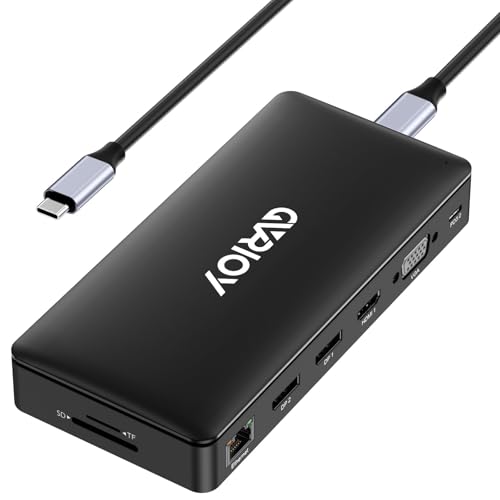
For anyone juggling multiple devices and needing seamless connectivity, the GVRIOY USB C Docking Station stands out as an ideal gift. This 15-in-1 multiport adapter works with laptops like MacBook, Dell, and HP, offering two Type-C ports, five USB A ports, and HDMI, VGA, and DP outputs. You can connect up to four displays with Ultra 4K output, making multitasking a breeze. With data transfer speeds up to 10Gbps and a Gigabit Ethernet port for stable internet, this dock guarantees you stay productive. Plus, it’s plug-and-play, requiring no drivers—just connect and enjoy enhanced functionality instantly.
Best For: Individuals who require versatile connectivity for multiple devices and enhanced productivity while working with laptops like MacBook, Dell, and HP.
Pros:
- Supports Ultra 4K output for up to 4 displays, enhancing multitasking capabilities.
- High-speed data transfer of up to 10Gbps with multiple USB ports for efficient file access.
- Plug-and-play design, eliminating the need for drivers and ensuring easy setup.
Cons:
- VGA output limited to 1080P@60HZ when used with other ports, which may restrict some users.
- Performance may vary based on the specific Type C port of the laptop, potentially leading to compatibility issues.
- 87W maximum output may not be sufficient for charging power-hungry devices while in use.
USB C to Dual HDMI Adapter, Multi Display Docking Station

Looking to enhance your workspace? The USB C to Dual HDMI Adapter, Multi Display Docking Station is your go-to solution. This compact, 7-in-1 device supports dual monitors through two HDMI ports and one DisplayPort, making multitasking a breeze. With video outputs reaching up to 4K@60Hz, you’ll enjoy stunning visuals. Plus, it features three USB 2.0 ports for connecting peripherals. Plug-and-play functionality guarantees easy setup, while the 100W power delivery keeps your devices charged. Weighing just 3.84 ounces, it’s portable enough for on-the-go professionals. With a 12-month warranty, this docking station is a smart investment for any tech lover.
Best For: Professionals and tech enthusiasts seeking a versatile and portable docking solution for dual monitor setups.
Pros:
- Supports up to 4K@60Hz video output for exceptional clarity and detail on multiple displays.
- Compact and lightweight design makes it easy to carry for on-the-go use.
- Plug-and-play functionality allows for quick and easy setup without the need for additional software.
Cons:
- Limited to USB 2.0 ports which may result in slower data transfer speeds compared to USB 3.0.
- Only compatible with devices that support USB-C and DisplayPort which may restrict usability for some users.
- Average customer rating of 3.9 out of 5 stars indicates mixed feedback about performance.
Fasgear USB C Extension Cable (1.6 ft, 10Gbps Data Sync)
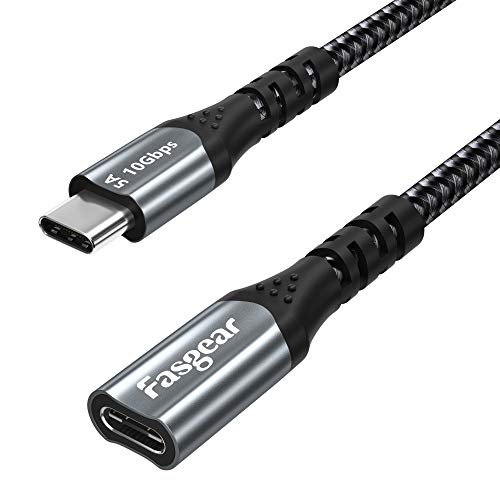
The Fasgear USB C Extension Cable is an essential accessory for anyone who frequently connects USB-C devices, offering a robust 10Gbps data transfer rate and fast charging capabilities. With a length of 1.6 feet, it extends your connection while protecting the USB Type-C female port from wear and tear. This cable supports 4K video and audio transmission at 60Hz, making it perfect for gamers and media enthusiasts. Compatible with a wide range of devices, including laptops and smartphones, it guarantees super-speed charging up to 100W. Plus, the braided nylon material adds durability, making it a practical gift for tech lovers.
Best For: The Fasgear USB C Extension Cable is best for gamers, media enthusiasts, and anyone who frequently connects USB-C devices needing fast data transfer and charging capabilities.
Pros:
- High-speed data transfer with a rate of 10Gbps, ensuring quick syncing of files.
- Supports 4K video and audio transmission at 60Hz, perfect for high-definition displays.
- Durable braided nylon material protects against wear and tear, enhancing longevity.
Cons:
- Limited to 10Gbps speed when used with Thunderbolt 3 devices, which may not utilize full potential.
- May require flipping the female end for compatibility with some multi-function USB C hubs.
- 1.6 ft length may not be suitable for all setups, limiting flexibility in placement.
Fasgear USB C Extension Cable (6ft, 10Gbps, 100W Fast Charging)
![Fasgear USB C Extension Cable [6ft] 10Gbps USB 3.2 Type C Male to Female Extender 100W 5A Fast Charging Nylon Briaded Compatible for PSVR2/MacBook Pro/iPad mini 6/Sam-Sung S23/USB-C Device (Red)](https://m.media-amazon.com/images/I/41H8YPzV0oL._SL500_.jpg)
If you need a reliable and versatile extension for your USB-C devices, the Fasgear USB C Extension Cable is a standout choice. At 6 feet long, it offers ample length for comfortable use while supporting data transfer speeds up to 10Gbps and 100W fast charging. This nylon braided cable guarantees durability and flexibility, ideal for extending connections between devices like your MacBook Pro, Nintendo Switch, or Samsung Galaxy. Plus, with 4.5-star ratings and responsive customer support, you can feel confident in your purchase. Whether for syncing data or video transmission, this extension cable won’t disappoint.
Best For: Those seeking a durable and high-speed USB-C extension for charging and data transfer between various devices.
Pros:
- High-speed data transfer up to 10Gbps and supports 100W fast charging.
- Versatile compatibility with a wide range of devices including laptops, gaming consoles, and smartphones.
- Durable nylon braided design ensures flexibility and longevity.
Cons:
- May require flipping the female end for compatibility with certain Apple devices.
- Limited to USB-C devices, which may not suit users with older USB types.
- A 6ft length might not be sufficient for some setups requiring longer cables.
Fasgear USB C Extension Cable (3ft, 10Gbps Data Sync)
For anyone needing to connect multiple USB-C devices seamlessly, the Fasgear USB C Extension Cable is an excellent choice. This 3ft cable supports 10Gbps data sync and 100W fast charging, making it ideal for devices like your MacBook Pro, PS5 Controller, and Switch. It easily extends connections, allowing you to access hard-to-reach ports without hassle. You’ll also enjoy 4K video and audio at 60Hz, enhancing your gaming or streaming experience. Plus, with an 18-month warranty and responsive customer service, you can feel confident in your purchase. This cable is a must-have for any tech lover’s setup!
Best For: Anyone looking to extend the connectivity of their USB-C devices while ensuring high-speed data transfer and charging capabilities.
Pros:
- Supports 10Gbps data sync and 100W fast charging for efficient performance.
- Compatible with a wide range of devices, including gaming consoles and laptops.
- Facilitates easy access to hard-to-reach ports and protects devices from wear.
Cons:
- Some Apple devices may require flipping the female end for optimal functionality.
- Limited to 10Gbps speed when used with Thunderbolt 3 devices.
- 3ft length may not be sufficient for all setups or spaces.
dockteck 12 in 1 USB C Hub Adapter

Looking for a versatile gift for tech-savvy friends or family? The dockteck 12 in 1 USB C Hub Adapter is a fantastic choice! This sleek space grey hub packs a punch with two 4K HDMI ports, a 1080P VGA port, and multiple USB ports for lightning-fast data transfers. It supports dual and triple monitor setups, making it perfect for multitaskers. Plus, the 100W Power Delivery charging keeps devices powered up. Weighing just 5.1 ounces, it’s portable and compatible with various devices, including MacBook, Dell, and iPad Pro. With a stellar 4.5-star rating, it’s sure to impress anyone on your list!
Best For: Tech-savvy individuals looking for a multifunctional hub to enhance their productivity with multiple device connections and high-speed data transfers.
Pros:
- Versatile connectivity: Offers two 4K HDMI ports, a VGA port, and various USB ports, accommodating multiple devices and display setups.
- Fast data transfer: USB 3.0 ports provide speeds up to 5Gbps, enabling quick file transfers.
- Power Delivery support: Charges devices with up to 100W, ensuring they stay powered during use.
Cons:
- Limited to Type-C devices: Compatibility is restricted to devices with USB Type-C ports, excluding older models.
- MacOS limitation: Dual and triple monitor support is only available in SST mode for MacOS laptops.
- Availability date: Scheduled for release on January 29, 2024, which may delay purchases for some customers.
Apple 2024 Mac mini Desktop Computer with M4 chip

The Apple 2024 Mac mini Desktop Computer with the M4 chip is a powerhouse for creative professionals and tech enthusiasts alike. With its 10-core CPU and GPU, it delivers supercharged performance for all your applications. Its compact 5×5-inch design fits perfectly next to your monitor, maximizing desk space. You’ll enjoy seamless connectivity with Thunderbolt, HDMI, and Gigabit Ethernet ports, plus front-facing USB-C ports for easy access. It integrates flawlessly with your Apple devices, allowing you to mirror your iPhone and share content effortlessly. Plus, it’s carbon neutral, reflecting Apple’s commitment to sustainability by 2030.
Best For: Creative professionals and tech enthusiasts seeking a compact, high-performance desktop that integrates seamlessly with other Apple devices.
Pros:
- Supercharged performance: The 10-core CPU and GPU provide exceptional speed and efficiency for demanding applications.
- Compact design: The small 5×5-inch footprint makes it easy to fit into any workspace without sacrificing power.
- Seamless integration: Works flawlessly with other Apple devices, allowing for easy content sharing and device mirroring.
Cons:
- Limited upgrade options: The unified memory and storage may not be user-upgradable, which could limit future enhancements.
- Price point: Higher cost compared to similar desktop options from other brands.
- Requires peripherals: Does not come with a monitor, keyboard, or mouse, which are needed for complete functionality.
2021 Apple 11-inch iPad Pro Wi-Fi + Cellular 256GB – Silver
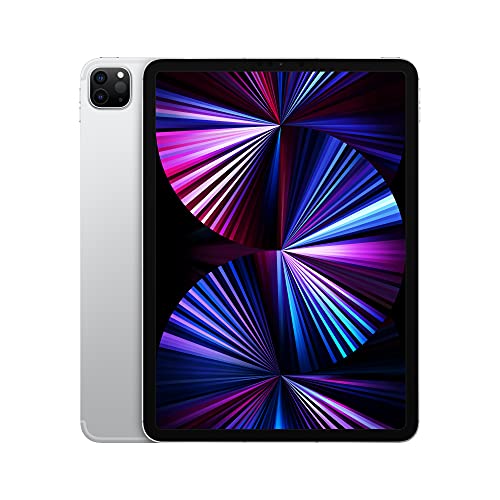
If you’re seeking a powerful tablet that combines performance and versatility, the 2021 Apple 11-inch iPad Pro Wi-Fi + Cellular 256GB in Silver is an exceptional choice. Featuring the Apple M1 chip, it delivers next-level performance for any task. The stunning 11-inch Liquid Retina display with ProMotion and True Tone guarantees vibrant visuals. Capture stunning photos with its 12MP Wide and 10MP Ultra Wide cameras, plus the LiDAR Scanner for immersive AR experiences. Enjoy superfast 5G connectivity, ultrafast Wi-Fi, and all-day battery life. With Thunderbolt support and Face ID, this iPad is perfect for tech lovers who need seamless functionality.
Best For: Those seeking a high-performance tablet ideal for creative professionals, students, and tech enthusiasts.
Pros:
- Exceptional Performance: Powered by the Apple M1 chip, ensuring smooth multitasking and high-speed processing.
- Stunning Display: The 11-inch Liquid Retina display features ProMotion and True Tone for vibrant visuals and fluid scrolling.
- Versatile Camera System: Includes a TrueDepth camera and dual rear cameras for high-quality photos and immersive augmented reality experiences.
Cons:
- Price Point: Higher cost compared to other tablets on the market, which may not be feasible for budget-conscious consumers.
- Limited Storage Options: While 256GB is substantial, higher storage options come at an even steeper price.
- Weight: Slightly heavier than other tablets, which may affect portability for some users.
Factors to Consider When Choosing Thunderbolt Docks to Gift
When selecting a Thunderbolt dock as a gift, think about the recipient’s devices and how compatible they are. Consider the number of ports, power delivery capacity, and display support options to make certain it meets their needs. Finally, don’t overlook the design and portability, especially if they’re always on the go.
Compatibility With Devices
Choosing a Thunderbolt dock that fits your devices is essential for ensuring a seamless experience. First, check compatibility with your specific connections—Thunderbolt 3, Thunderbolt 4, or USB-C—since some docks only support older USB standards. Also, make sure the dock works with your operating system; certain models are optimized for macOS or Windows, impacting overall performance. Don’t forget to verify the power delivery capabilities, as wattage varies and affects charging laptops and powering peripherals. If you rely on multiple monitors, look for display support options that offer high resolutions like 8K or dual 4K. Finally, consider backward compatibility with older devices, as some docks support legacy Thunderbolt or USB standards, broadening their usability.
Number of Ports
After confirming compatibility with your devices, the next step is to contemplate the number of ports on the Thunderbolt dock. More ports mean better connectivity, allowing you to connect multiple devices and peripherals simultaneously. Look for docks that offer a variety of port types, such as Thunderbolt, USB-A, USB-C, HDMI, and Ethernet, ensuring compatibility with all your gadgets. It’s also essential to check the data transfer speeds; USB 3.2 ports can provide up to 10Gbps, boosting file transfer efficiency. Additionally, evaluate the dock’s display support capabilities, including the maximum resolution and refresh rates for connecting multiple monitors. This way, you’ll find a dock that meets all your tech needs and enhances your workspace.
Power Delivery Capacity
Power delivery capacity is an important factor to take into account in a Thunderbolt dock, particularly if you plan to connect power-hungry devices. Most Thunderbolt docks can supply up to 100W of power, enabling fast charging for laptops and other high-demand gadgets. However, remember that the actual power delivered may vary based on the number of connected devices and their power requirements, especially under heavy load. If you’re using multiple peripherals simultaneously, opting for a dock with a higher power delivery capacity is vital. Also, check how much power your host device can accept to guarantee peak performance. This way, you can keep everything charged and running smoothly without interruptions.
Display Support Options
When it comes to Thunderbolt docks, display support options play an essential role in enhancing your overall experience. You’ll want to evaluate the maximum display resolution the dock supports—choices can range from single 8K displays to dual 5K displays, greatly impacting your multimedia enjoyment. If you’re into gaming or watching high-quality video content, look for docks that support high refresh rates, like 120Hz for 4K displays. Pay attention to the type and number of video output ports, such as HDMI or DisplayPort, for flexible display setups. Don’t forget to check if it supports extended desktop mode versus mirror mode, and verify compatibility with your computer’s specifications for peak performance.
Design and Portability
While display support options are essential for an enhanced multimedia experience, the design and portability of Thunderbolt docks also matter greatly, especially for those on the go. When choosing a dock, consider its dimensions and weight to guarantee it’s easy to transport between workspaces or while traveling. A sleek design that complements modern laptops and desktops can elevate the user experience, making it visually appealing. Look for a compact footprint to help declutter your workspace, creating a more organized environment. Features like durable aluminum housing not only enhance aesthetics but also improve heat dissipation and longevity. Finally, consider the port arrangement; a well-designed dock allows easy access to frequently used connections without obstructing others.