If you film tutorials, livestreams, training videos, or client presentations, the right teleprompter can make your delivery look polished without sounding robotic. The best teleprompter kits with remote help you stay on script, save time, and keep eye contact with your audience.
We focused on kits that are practical for solo creators, small studios, and mobile setups, with an emphasis on ease of use, compatibility, and remote control convenience.
Best 10 Teleprompter Kits with Remote Picks for 2026
Best for Remote-Controlled Setup
NEEWER X12 14-Inch Teleprompter Kit

- Included remote and app control for hands-free script changes
- Clear beam-splitter glass with up to 10 ft reading distance
- Portable aluminum alloy design with carry case
Best For: Creators and teachers who want an easy-to-control teleprompter kit for tablets and smartphones.
Best for Compact Desktop Setups
AMBITFUL 7.5'' Mini Teleprompter Kit

- 7.5-inch coated glass helps reduce ghosting
- Bluetooth remote and app controls simplify prompting
- Includes desktop tripod, phone clip, and adapter rings
Best For: Creators who want a lightweight teleprompter for desktop filming, phone setups, or DSLR recording.
Best for Small Tablets
Desview T3 Teleprompter for Camera & Smartphone

- Supports phones and tablets up to 10 inches
- Bluetooth remote with free app control
- Includes 9 lens adapter rings for cameras
Best For: Creators who need a compact teleprompter for camera or smartphone recording.
Best for Full-Size Camera Setups
GVM 18.5" Android Teleprompter Kit

- 18.5" screen improves readability for longer scripts
- Remote, app, and Android controls add flexibility
- Fits DSLRs, camcorders, and many studio cameras
Best For: Creators and educators who want a larger teleprompter setup for studio-style shooting.
Best for Easy Setup
NEEWER Basics X12B 12" Teleprompter

- No-assembly design for quick setup
- Bluetooth remote and app control included
- Foldable aluminum build with carry case
Best For: Creators who want a simple, portable teleprompter with remote control for streaming and tutorials.
Best for Big Displays

- 18.5-inch display improves readability at a glance
- Bluetooth remote plus app control for playback and text settings
- Compatible with DSLRs, camcorders, and similar cameras
Best For: Creators who want a large, easy-to-read teleprompter with remote control and app-based adjustments.
Best for App-Controlled Workflow
Bluetooth Remote for Teleprompter with APP

- Bundled TeleprompterPAD app adds pro-level script controls
- Works with iOS, Android, Windows, and Mac
- Silent buttons and auto Bluetooth re-pairing help on camera
Best For: Creators and presenters who want app-based teleprompter control across multiple devices.
Best with Extra Features
GVM 12" Collapsible Teleprompter Kit
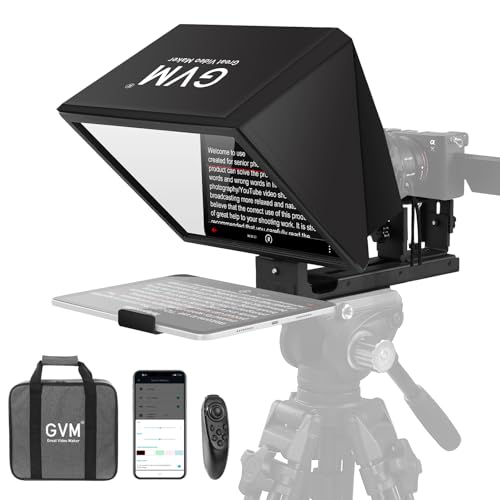
- Installation-free foldable build
- Remote + app scrolling control
- Fits phones, tablets, and DSLR cameras
Best For: Creators who need a portable teleprompter for fast setup and remote control.
Best for Remote Script Control
FEELWORLD TP2 Teleprompter Kit

- App and remote control make scrolling easy
- Supports smartphones, small tablets, and DSLR cameras
- Includes lens adapter rings for flexible mounting
Best For: Creators and presenters who want hands-on script control across multiple devices.
Best for Remote Control

- Bluetooth remote and app-based scrolling control
- 70/30 beamsplitter for clear, readable text
- Foldable design with carry case and wide device support
Best For: Creators and presenters who want hands-free scrolling and flexible camera compatibility.
Best for Remote-Controlled Setup – NEEWER X12 14-Inch Teleprompter Kit
If you want one of the more practical teleprompter kits with remote for teaching, livestreaming, or vlogging, the NEEWER X12 is built around simple control and broad tablet support. The included remote and app pairing let you pause, speed up, slow down, and flip pages without breaking eye contact, while the aluminum alloy frame and carry case make it easy to move between shoots.
Best For: Creators, online teachers, and live presenters who want app-based remote control and a portable teleprompter setup.
Pros:
- Remote and app control make script handling easy during recording
- 75% light-transmittance glass delivers clear text reflection
- Fits many smartphones and tablets up to 9.84″ x 8.68″
- Includes a carry case for easier transport and storage
Cons:
- Not compatible with wide-angle lenses
- Requires a camera lens longer than 28mm
- Does not fit iPad Pro 12″
Overall, the X12 is a strong pick if you want teleprompter kits with remote control that prioritize convenience over pro-level flexibility. It’s a good fit for straightforward studio workflows, but you’ll want to confirm your lens and tablet size before buying.
Best for Compact Desktop Setups – AMBITFUL 7.5'' Mini Teleprompter Kit
If you want teleprompter kits with remote that stay small, simple, and easy to move, the AMBITFUL Portable Teleprompter Kit is a practical pick. Its 7.5-inch coated glass gives a clear script reflection, while the Bluetooth remote and app controls help you manage scrolling without breaking eye contact.
Best For: Creators, streamers, interviewers, and educators who need a lightweight teleprompter for desktop filming, phone setups, or DSLR recording.
Pros:
- Clear 7.5-inch reflective glass helps reduce ghosting and keeps text readable.
- Bluetooth remote and app support make speed and pause controls easy during takes.
- Works with smartphones plus DSLR and mirrorless cameras using included adapter rings.
- Lightweight build and included desktop tripod make it quick to set up and transport.
Cons:
- Not compatible with tablet PCs.
- Best suited to compact setups rather than larger studio workflows.
- Camera use depends on matching the correct adapter ring and tripod thread.
Overall, this is a solid option if you need teleprompter kits with remote for fast mobile shooting and smaller filming spaces. It focuses on convenience over size, which makes it especially appealing for solo creators who want a ready-to-use kit without extra gear.
Best for Small Tablets – Desview T3 Teleprompter for Camera & Smartphone
If you want one of the more flexible teleprompter kits with remote for solo filming, the Desview T3 is built for both camera and smartphone workflows. It supports phones and compact tablets up to 10 inches, includes lens adapter rings for DSLR and mirrorless cameras, and adds Bluetooth remote control through the free app for easier script scrolling.
Best For: Creators who shoot YouTube, live streams, TikTok, or interviews and need a compact teleprompter that works with both a camera and a phone.
Pros:
- Supports smartphones and tablets up to 10 inches
- Includes 9 adapter rings for common DSLR/mirrorless lens threads
- Bluetooth remote and app control make script handling simple
- Wide-angle support helps avoid vignetting in the frame
Cons:
- Not ideal for larger 12.9-inch tablets
- Best results depend on using the right focal length
- Point-and-shoot cameras without filter threads may need a different model
The Desview T3 is a smart pick if you want a compact, adaptable setup without overcomplicating your rig. Among teleprompter kits with remote, it stands out for supporting both camera-based and phone-only recording while keeping setup straightforward for creators.
Best for Full-Size Camera Setups – GVM 18.5" Android Teleprompter Kit
If you want teleprompter kits with remote that feel more like a studio tool than a simple accessory, this GVM package stands out. The 18.5-inch display, Android all-in-one monitor, and 70/30 beam splitter make it easier to read scripts clearly while keeping your camera setup flexible for live streams, courses, interviews, and presentation work.
Best For: Creators, educators, and video teams who need a large-screen teleprompter for DSLRs, camcorders, or studio cameras.
Pros:
- Large 18.5″ monitor makes text easier to read from a comfortable distance
- Remote, app, and built-in Android control options add flexible operation
- Wide camera compatibility and adjustable mounting platform suit many rigs
- Carry case and foldable design help with storage and transport
Cons:
- Bulkier and heavier than compact teleprompter options
- Better suited to desktop or studio use than quick run-and-gun setups
- Higher upfront cost than basic teleprompter kits
This is a strong pick if you need teleprompter kits with remote that can handle serious production work and a wide range of cameras. The tradeoff is size, but the larger screen and integrated control system make it a practical choice for polished on-camera delivery.
Best for Easy Setup – NEEWER Basics X12B 12" Teleprompter
If you want one of the most straightforward teleprompter kits with remote for streaming, courses, or talking-head videos, the NEEWER Basics X12B keeps the setup simple without adding extra complexity. The no-assembly design, included Bluetooth remote, and app control make it a practical choice for creators who want to start recording quickly.
Best For: Creators, educators, and streamers who want a portable teleprompter with remote control and a fast, no-fuss setup.
Pros:
- No-assembly design saves time and makes it easy to get started right away.
- Included RT113 remote plus app control offers convenient playback and script adjustments.
- 12-inch beam-splitter glass provides clear readability for up to 10 ft.
- Foldable aluminum-alloy build is lightweight, durable, and travel-friendly.
Cons:
- Not compatible with phone shooting.
- Does not work as a monitor or provide direct self-viewing.
- Smaller 12-inch screen may feel limiting for some larger setups.
Overall, the X12B is a strong pick if you value simplicity, portability, and remote control over extra features. Among teleprompter kits with remote, it stands out as an easy-to-use option for everyday recording workflows.
Best for Big Displays – GVM 18.5" Teleprompter Kit
If you want teleprompter kits with remote that make script delivery easier on larger cameras, this GVM setup stands out with its 18.5-inch integrated display, Bluetooth remote, and app-based control. The aluminum construction and colorless beam splitter are aimed at creators who want a readable prompt without sacrificing image clarity.
Best For: Video creators, interviewers, teachers, and livestreamers who need a large, easy-to-read teleprompter with remote control and app adjustments.
Pros:
- 18.5-inch display is easier to read from a comfortable shooting distance
- Bluetooth remote and mobile app let you control speed, start/stop, and text settings
- Wide camera compatibility for DSLRs, camcorders, DV machines, and similar rigs
- Colorless beam splitter and wide-angle design help preserve a clean on-camera image
Cons:
- Larger footprint may be less convenient for tight desks or travel setups
- More advanced than basic teleprompters, so setup may take a little longer
This is a strong pick if you want teleprompter kits with remote that prioritize readability and control over ultra-compact portability. It makes the most sense for users who regularly record polished talking-head content and can benefit from the bigger screen and app features.
Best for App-Controlled Workflow – Bluetooth Remote for Teleprompter with APP
If you want teleprompter kits with remote that feel more like a professional broadcast setup than a basic accessory, this Bluetooth controller stands out for its bundled TeleprompterPAD app and wide device support. It’s a practical pick for creators who want quick setup, silent buttons, and reliable control over scrolling during recording or live delivery.
Best For: Creators, presenters, and educators who want an easy-to-use remote and companion app for mirror teleprompters, live streams, webinars, and multi-device workflows.
Pros:
- Includes the TeleprompterPAD app with scrolling, play/pause, speed, mirror mode, and formatting tools
- Compatible with iOS, Android, Windows, and Mac for flexible cross-platform use
- Silent buttons and automatic Bluetooth re-pairing make it dependable on camera
- Runs on 2 AAA batteries, so there’s no constant USB charging to manage
Cons:
- Full compatibility is guaranteed only with the official TeleprompterPAD app
- Not a full teleprompter kit on its own; it’s an add-on controller bundle
- Requires AAA batteries instead of a rechargeable built-in battery
Overall, this is a strong pick if you’re comparing teleprompter kits with remote and want the most seamless app-first control experience. It’s especially useful for users who value quiet operation, broad platform support, and a more polished workflow for recording or presenting.
Best with Extra Features – GVM 12" Collapsible Teleprompter Kit
If you want teleprompter kits with remote that are quick to deploy and simple to travel with, this GVM 12-inch model is built around convenience. The installation-free, foldable design, included carry case, and Bluetooth/App control make it a practical pick for solo creators, presenters, and small video teams.
Best For: Creators who want a portable, low-fuss teleprompter for iPad, tablet, phone, or DSLR recording.
Pros:
- Installation-free collapsible design saves setup time
- Includes remote control plus iOS/Android app support for scrolling control
- 12-inch optical glass offers clear reflection for presentations and video
- Works with phones, tablets up to 8.6 inches, and DSLR/mirrorless cameras
Cons:
- Bulkier than ultra-compact teleprompter options
- Tablet size limits may not fit larger iPads with thick cases
- Best results depend on using a compatible tripod and camera setup
This GVM model stands out if you value speed, portability, and simple controls over a more modular rig. For buyers comparing teleprompter kits with remote, it offers a strong mix of setup ease and cross-device compatibility.
Best for Remote Script Control – FEELWORLD TP2 Teleprompter Kit
If you want one of the more flexible teleprompter kits with remote for solo filming, the FEELWORLD TP2 is built to keep scripts readable while you stay centered on camera. It works with iOS and Android apps, includes a remote for quick playback control, and supports smartphones, tablets under 8 inches, and DSLR setups.
Best For: Creators, streamers, teachers, and interviewers who want app-based script control and broad device compatibility.
Pros:
- Remote control and app support make script changes fast during recording.
- Works with smartphones, small tablets, and DSLR cameras.
- Beam splitter glass helps keep the text clear without showing it on camera.
- Includes multiple lens adapter rings for easier camera mounting.
Cons:
- Best suited to smaller tablets, since support tops out below 8 inches.
- Smartphone and camera positioning may take a little setup time.
Overall, the TP2 is a practical pick if you want teleprompter kits with remote control and app-based scrolling without giving up camera versatility. It’s especially appealing for live streams, online classes, and quick-turn video production.
Best for Remote Control – GVM 12" Teleprompter Kit
If you want one of the more convenient teleprompter kits with remote, this GVM 12-inch setup is built for hands-free script control, clear reading, and flexible mounting for phones, tablets, and DSLR-style cameras. The collapsible body and included carry case make it easier to move between home studios, interviews, live streams, and on-location shoots.
Best For: Creators, presenters, and educators who want remote-controlled scrolling plus a sturdy, travel-friendly teleprompter for video recording and livestreams.
Pros:
- Bluetooth remote and app support let you start, stop, and adjust scrolling without touching the screen.
- 70/30 beamsplitter glass is designed for clear text readability with minimal ghosting.
- Foldable build, carry bag, and adjustable brackets make setup and transport more practical.
- Works with iPad, tablet, phone, DSLR, and mirrorless camera setups.
Cons:
- 12-inch size may feel bulky for very compact desk setups.
- Some users may need extra time to dial in camera and tablet positioning.
Overall, this is a solid pick if you want teleprompter kits with remote control that prioritize convenience and broad device compatibility over ultra-compact portability. It fits especially well for buyers who want smoother delivery without memorizing scripts.
How We Picked These Teleprompter Kits with Remote
We prioritized models that balance usability, build quality, and script control for real-world recording. That means solid compatibility with phones, tablets, and DSLRs, plus remote and app features that make scrolling simple during takes. We also looked at setup speed, portability, glass quality, and whether the kit makes sense for beginners as well as frequent users.
Quick Comparison
In general, compact 7.5-inch and 12-inch units are better for creators who need portability and quick setup, while larger 18.5-inch kits suit cameras, camcorders, and longer scripts. If you want the easiest travel-friendly option, choose a foldable or no-assembly design. If you record longer-form content, a larger hood and display area can make reading more comfortable.
Key Buying Factors for Teleprompter Kits with Remote
Screen Size and Device Compatibility
Check what devices the teleprompter supports before buying. Many Teleprompter Kits with Remote work with smartphones and tablets, but tablet size limits vary. Larger screens are easier to read from a distance, especially when using a DSLR or camcorder.
Remote and App Control
A reliable remote should let you start, stop, and adjust scroll speed without breaking eye line. App compatibility matters too, especially if you switch between iOS, Android, Windows, or Mac. Look for simple pairing and responsive controls rather than extra features you may never use.
Glass, Hood, and Viewing Angle
Beam splitter glass quality affects readability and camera clarity. Better glass helps reduce distortion and improves script visibility. A wider viewing angle is useful if you move around during recording or use wider lenses.
Portability and Setup
If you film on location, weight and assembly time matter. Collapsible frames, carry cases, and tool-free designs are strong advantages for creators who need to move quickly between shoots.
Who Should Buy Which Teleprompter Kits with Remote?
Beginners and mobile creators should lean toward smaller, easy-setup teleprompters with app-based control. Livestreamers and educators often benefit from mid-size kits that balance readability and portability. Studio users, agency teams, and presenters working with camcorders or longer scripts should consider larger Teleprompter Kits with Remote for better comfort and visibility over extended sessions.
If you want the simplest path, pick the kit that matches your largest device, your usual shooting distance, and how often you’ll travel with it. That keeps the setup practical and ensures the teleprompter actually improves your workflow.