A good Netflix streaming device should make it easy to find a show, start it quickly, and watch it in the best quality your TV and subscription support. The right choice also depends on whether you prefer a simple stick, a more capable box, or a particular streaming interface.
These 10 options span Roku, Fire TV, Google TV, and Android TV. Below, we’ll help you narrow them down by features that matter in everyday use—not just the longest spec sheet.
Best 10 Streaming Devices for Netflix Picks for 2026
Best Compact Pick
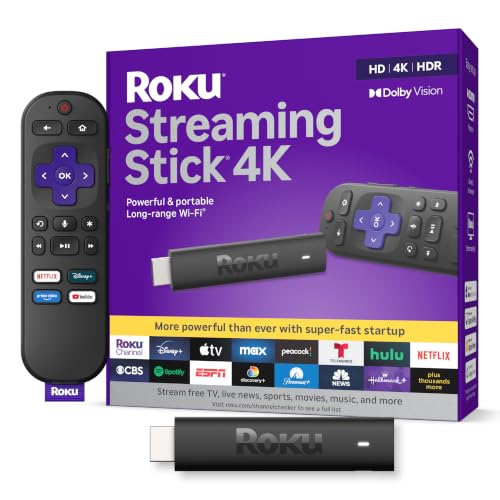
- 4K with Dolby Vision and HDR10+
- Long-range Wi-Fi receiver
- Slim stick with voice remote
Best For: Discreet Netflix streaming in rooms farther from the router
Best for Alexa Households
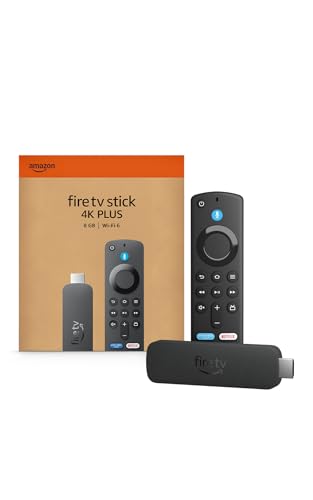
- Netflix access with 4K HDR formats
- Wi-Fi 6 connectivity
- Alexa search and smart-home controls
Best For: Netflix viewers who already use Alexa
Best Premium Roku

- 4K Dolby Vision and Dolby Atmos
- Wi-Fi 6 plus Ethernet
- Backlit rechargeable remote
Best For: Netflix viewing with wired networking and premium controls
Best Refurbished Fire TV Option

- Certified refurbished with limited warranty
- Netflix in 4K with Dolby Vision
- Wi-Fi 6 and Alexa Voice Remote
Best For: Buyers comfortable with a refurbished Netflix-capable stick
Best Compact TV Box

- Google TV with Netflix access
- 32GB storage and Google Cast
- 4K/60 with Dolby Vision and HDR10+
Best For: Google TV viewers who want more app storage
Best for Alexa Voice Search

- Alexa+ search across apps
- 16GB storage and Wi-Fi 6E
- 4K with Dolby Vision and HDR10+
Best For: Alexa users who want voice-led browsing
Best for Unified Browsing
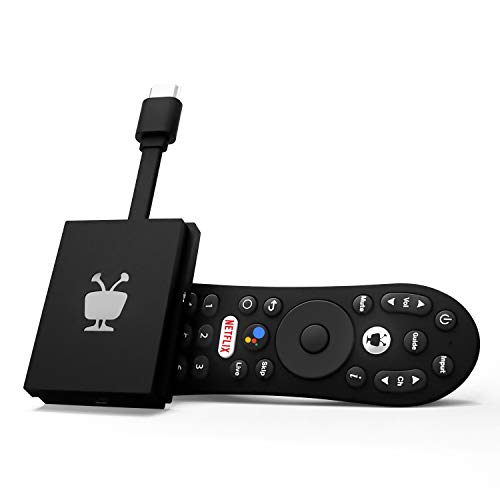
- Centralized browsing and watch lists
- Google Assistant voice control
- 4K with Dolby Vision and Atmos
Best For: Viewers who want one place to browse apps
Best for Personalized Picks
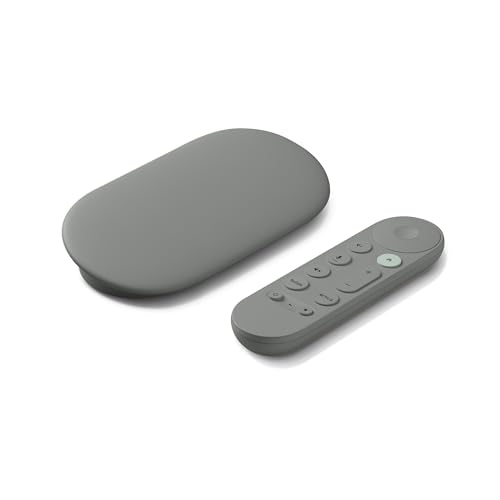
- Personalized Google TV recommendations
- 4K HDR with Dolby Vision
- 32 GB storage; Ethernet and Wi-Fi
Best For: Households seeking tailored recommendations and a shared watchlist
Best Roku Option

- 4K UHD with Dolby Vision
- Dual-band Wi-Fi
- Voice remote controls TV power and volume
Best For: Viewers seeking a Roku box with 4K playback and simple remote controls
Best for Connectivity Options

- Wi-Fi 6 plus Ethernet port
- 4K UHD with Dolby Vision and Atmos
- 32 GB storage and 3 GB RAM
Best For: Buyers who want flexible network connections and 4K support
Best Compact Pick – Roku Streaming Stick 4K
Among streaming devices for Netflix, the Roku Streaming Stick 4K is a practical choice when you want a compact player that stays hidden behind your TV. It supports 4K, Dolby Vision, and HDR10+, while its long-range Wi-Fi receiver is designed for rooms farther from your router.
Best For: Netflix viewers who want a discreet 4K stick with a straightforward remote and broad app support.
Pros:
- Supports Netflix and 4K playback with Dolby Vision and HDR10+.
- Long-range Wi-Fi receiver helps in rooms farther from the router.
- Slim design avoids blocking adjacent HDMI ports; voice remote includes TV controls.
Cons:
- No Ethernet connection is listed.
- Dolby Atmos support is not specified in the supplied details.
Choose this stick if a tidy setup and flexible placement matter more than wired connectivity or premium remote extras.
Best for Alexa Households – Fire TV Stick 4K Plus
For shoppers comparing streaming devices for Netflix, the Fire TV Stick 4K Plus pairs Netflix access with Wi-Fi 6, 4K video, and Alexa voice controls. Its updated Fire TV interface lets you pin favorite apps and browse personalized recommendations.
Best For: Households that want Netflix alongside Alexa-powered search and smart-home controls.
Pros:
- Supports 4K Ultra HD, Dolby Vision, HDR10+, and Dolby Atmos.
- Wi-Fi 6 helps when other devices share your router.
- Alexa Voice Remote handles content search, TV power, volume, and compatible smart-home devices.
Cons:
- Netflix and other subscription services may require separate fees.
- Cloud gaming requires additional services and a compatible controller.
This is a strong fit if voice search and Alexa integration are priorities; the gaming features are optional extras rather than a reason to buy it for Netflix alone.
Best Premium Roku – Roku Ultra
If you want a full-featured box among streaming devices for Netflix, Roku Ultra adds Wi-Fi 6 and Ethernet to its 4K, Dolby Vision, HDR10+, and Dolby Atmos support. Its rechargeable Voice Remote Pro has backlit buttons, hands-free voice control, and a lost-remote finder.
Best For: Netflix viewers who value wired networking, private headphone listening, and a feature-rich remote.
Pros:
- Supports Netflix with 4K, Dolby Vision, HDR10+, and Dolby Atmos.
- Offers both Wi-Fi 6 and Ethernet connections.
- Includes Bluetooth Headphone Mode and a rechargeable, backlit voice remote.
Cons:
- Its TV-box form factor is less discreet than a stick hidden behind the TV.
- The remote needs occasional recharging.
Roku Ultra makes the most sense when its Ethernet port, headphone pairing, and upgraded remote will see regular use.
Best Refurbished Fire TV Option – Like-New Fire TV Stick 4K
Among streaming devices for Netflix, this Like-New Fire TV Stick 4K offers the listed 4K, Wi-Fi 6, and Alexa features in a refurbished device. Amazon says it is tested and certified to look and work like new and includes the same limited warranty as a new device.
Best For: Buyers comfortable with a certified refurbished Fire TV stick who want Netflix and Alexa voice controls.
Pros:
- Supports Netflix, 4K Ultra HD, Dolby Vision, HDR10+, and Dolby Atmos.
- Wi-Fi 6 supports streaming when multiple devices use the router.
- Alexa Voice Remote can search for content and control TV power and volume.
Cons:
- It is refurbished rather than new and may arrive in generic Amazon-branded packaging.
- Netflix and other subscriptions may require separate fees.
Consider this model if its refurbished condition works for you; check the current listing price against a new Fire TV stick before deciding.
Best Compact TV Box – Xiaomi TV Box S 3rd Gen
Among streaming devices for Netflix, the Xiaomi TV Box S 3rd Gen is a compact choice if you also want Google TV recommendations, voice search, and room for more apps. It supports 4K at up to 60 fps, Dolby Vision, HDR10+, and Google Cast.
Best For: Viewers who want a small Google TV box with generous app storage and an HDMI cable included.
Pros:
- 32GB of storage provides space for apps and content.
- Supports Dolby Vision, HDR10+, and 4K/60 video.
- Includes a voice remote, power adapter, and HDMI cable.
Cons:
- Has 2GB of RAM.
- Its USB port is USB 2.0.
Pick this box if Google TV and storage matter more to you than a stick-sized design. Check your TV and audio equipment for compatibility with the supported video and sound formats.
Best for Alexa Voice Search – Fire TV Stick 4K Max
If you’re comparing streaming devices for Netflix and prefer voice-led browsing, the Fire TV Stick 4K Max pairs Alexa+ search with a redesigned Fire TV interface. It supports 4K Ultra HD, Dolby Vision, HDR10+, and Dolby Atmos.
Best For: Viewers who want Netflix alongside other apps, Alexa+ voice search, and Wi-Fi 6E support.
Pros:
- Alexa+ can help find shows across apps using natural voice requests.
- 16GB of storage accommodates apps, games, and downloads.
- Remote includes voice control, a recents button, and live-TV channel buttons.
Cons:
- Subscription fees may apply to streaming services.
- Its recommendations and voice features center on the Fire TV and Alexa+ experience.
This is the strongest fit here for shoppers who want to search by voice and keep their favorite apps close at hand. Choose it for those interface features rather than assuming every listed service is included at no cost.
Best for Unified Browsing – TiVo Stream 4K
The TiVo Stream 4K stands out among streaming devices for Netflix by bringing searching, browsing, and watch lists across apps into one interface. This Android TV stick also supports 4K video, Dolby Vision HDR, and Dolby Atmos sound.
Best For: Viewers who want to browse Netflix and other streaming apps from a centralized screen.
Pros:
- TiVo offers recommendations based on viewing interests across apps.
- Google Assistant supports voice searches and app launching.
- Supports Netflix, Prime Video, Disney+, Peacock, and more.
Cons:
- 8GB of storage is less than the other two devices in this roundup.
- The listed warranty is 90 days.
Choose TiVo if reducing app-to-app browsing is your priority. Its unified approach is the main draw; shoppers who prioritize storage should weigh its 8GB capacity.
Best for Personalized Picks – Google TV Streamer 4K
Among streaming devices for Netflix, the Google TV Streamer 4K is a practical choice if you want your services and personalized recommendations together on one home screen. It supports up to 4K HDR with Dolby Vision and includes a voice-search remote.
Best For: Households that want tailored viewing suggestions and a shared watchlist.
Pros:
- Shows content from your services on the Google TV home screen.
- Offers 32 GB of storage and both Ethernet and Wi-Fi connectivity.
- Supports Dolby Vision and can connect to Dolby Atmos-compatible speakers.
Cons:
- Requires an HDMI 2.1 cable, which is sold separately.
Choose this one for its discovery features and connection options, but remember to factor in the separate HDMI cable before setting it up.
Best Roku Option – Roku Ultra LT
If you prefer Roku OS while comparing streaming devices for Netflix, the Roku Ultra LT offers 4K playback with Dolby Vision and a voice remote. Its listed services also include Disney+, Apple TV+, Sling, and Hulu.
Best For: Viewers who want a Roku streaming box with 4K Dolby Vision and basic TV controls on the remote.
Pros:
- Supports 4K UHD and Dolby Vision.
- Dual-band Wi-Fi helps provide a steady wireless connection.
- Voice remote can control TV power and volume as well as the Roku device.
Cons:
- The supplied details list HDMI and Wi-Fi but do not specify an Ethernet connection.
This is a straightforward Roku pick for Netflix viewing, especially if remote-based TV control matters more to you than a documented wired-network option.
Best for Connectivity Options – onn 4K Pro Google TV
The onn 4K Pro is worth considering among streaming devices for Netflix if you want Google TV hardware with both Wi-Fi 6 and an Ethernet port. The supplied notes highlight 4K UHD, Dolby Vision, Dolby Atmos, 3 GB of RAM, and 32 GB of storage.
Best For: Buyers prioritizing wireless and wired connection options alongside 4K picture support.
Pros:
- Supports 4K UHD, Dolby Vision, and Dolby Atmos.
- Includes Wi-Fi 6 connectivity and an Ethernet port.
- Lists 32 GB of storage, 3 GB of RAM, and a backlit find-my-remote feature.
Cons:
- The supplied notes do not explicitly list Netflix among supported services; check the app listing if that is your deciding factor.
Its connection choices and listed memory make it a compelling Google TV option on paper, but confirm Netflix availability for this specific listing before buying.
How We Picked These Streaming Devices for Netflix
We focused on practical differences across the 10 selected devices: platform, 4K and HDR support, wireless connectivity, remote features, and value. We also considered whether a compact stick or a larger player makes more sense for different TVs and households. Device features can vary by model and region, so confirm current Netflix app availability and specifications before buying.
Quick Comparison
For a straightforward interface: Consider the Roku Streaming Stick 4K, Roku Ultra, or Roku Ultra LT. The Stick saves space; the Ultra models suit shoppers who prefer a set-top player.
For Fire TV users: Compare the Fire TV Stick 4K Plus, Fire TV Stick 4K Max, and Like-New Fire TV Stick 4K. The Max offers Wi-Fi 6E support, while the Like-New option may appeal to budget shoppers comfortable with a refurbished device.
For Google TV or Android TV: Look at the Google TV Streamer 4K, Xiaomi TV Box S 3rd Gen, onn 4K Pro, and TiVo Stream 4K. Check the specific model’s storage, connectivity, and software support rather than assuming these players work identically.
Key Buying Factors for Streaming Devices for Netflix
Picture and Sound Compatibility
For a 4K TV, choose a 4K-capable player and check which HDR formats both the device and TV support. Dolby Vision or HDR10+ matters only when your TV and the title support it. Dolby Atmos likewise requires compatible content, audio equipment, and settings. Netflix playback quality also depends on your plan and internet connection.
Platform and Remote
Roku, Fire TV, Google TV, and Android TV organize apps and recommendations differently. Pick an interface your household will find comfortable, especially if you switch between Netflix and other services. Voice search and TV power or volume controls can reduce remote juggling, but check the exact remote included with the listing.
Network, Ports, and Long-Term Value
Reliable Wi-Fi is more important than the newest Wi-Fi label. Wi-Fi 6 or 6E benefits depend on your router and home network; a wired connection can be useful where supported. Check HDMI compatibility, available power near the TV, and whether accessories are included. For marketplace or Like-New listings, verify the seller, return policy, and software-update status.
Who Should Buy Which Streaming Devices for Netflix?
Choose the Roku Streaming Stick 4K if you want a compact Roku setup, or compare the Ultra and Ultra LT if you prefer a separate player. Pick a Fire TV Stick if you already like Fire TV; consider the 4K Max when its Wi-Fi 6E support fits your network. Choose the Google TV Streamer 4K, Xiaomi TV Box S 3rd Gen, or onn 4K Pro if Google TV features appeal to you. The TiVo Stream 4K is another Android TV option worth comparing if you want streaming apps and live TV brought together. For most buyers, the best Streaming Devices for Netflix are the ones that match their TV, network, and preferred interface without charging extra for features they cannot use.