If you need a cleaner voice for meetings, webinars, and remote work, a good USB mic can make an immediate difference. Samson is especially popular for simple plug-and-play setups that improve speech clarity without extra gear.
Below, we’ve grouped standout options for different home office needs, from casual video calls to more serious recording and streaming.
Best 10 Samson USB Microphones for Home Office Picks for 2026
Best for Easy Setup
Samson Q2U USB/XLR Dynamic Mic Pack

- USB and XLR outputs for flexible use
- Dynamic pickup helps cut room noise
- Includes stand, windscreen, and cables
Best For: Home office users who want a simple plug-and-play microphone with room to upgrade.
Best For Small Desks
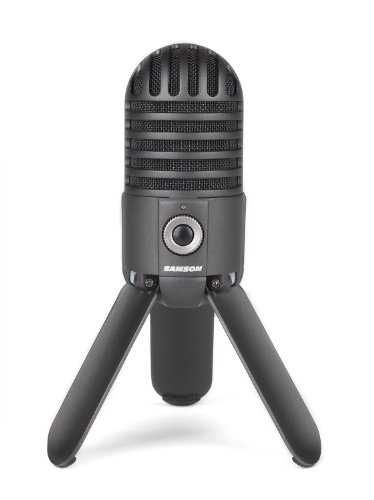
- 25 mm condenser for rich, clear audio
- Cardioid pattern helps isolate your voice
- Fold-back legs fit tight home office setups
Best For: People who want a compact USB mic for a tidy home office desk.
Best for Easy Laptop Clipping
Samson Go Mic Portable USB Microphone

- Clips to a laptop or rests on a desk
- No-driver plug-and-play setup on Mac or PC
- Good for calls, podcasts, and voice recognition
Best For: Remote workers and students who need a compact USB mic for quick home office setup.
Best for Group Calls
EMEET M1A Zoom Certified Speakerphone

- 360° dual-mic pickup for shared meetings
- Zoom-certified with broad app compatibility
- Plug-and-play USB-C/USB-A connection
Best For: Small teams and home offices that need a simple speakerphone for clear group calls.
Best for Easy Desktop Recording
Samson Meteor Mic USB Condenser

- Large 25mm diaphragm for fuller vocal capture
- USB plug-and-play setup with Mac and PC
- Headphone jack with volume control for monitoring
Best For: Remote workers and podcasters who want a simple desktop USB microphone for home office use.
Best for Stream-and-Record

- Built-in audio interface for simpler setup
- Voice and instrument input in one mic
- 24-bit/96 kHz recording with flexible pickup patterns
Best For: Home office buyers who also stream, podcast, or record music from the same mic.
Best for Wireless Mobility
NPTCL Mini Wireless USB Microphone

- AI noise canceling for cleaner voice capture
- 35-hour charging case for extended use
- USB-C, PC, laptop, iPhone, and Android compatibility
Best For: Creators and remote workers who want an easy wireless clip-on mic for flexible home office recording.
Best for Conference Calls

- 360° omnidirectional pickup for group conversations
- Plug-and-play USB setup on Windows and macOS
- Mute button and LED indicator simplify call control
Best For: Small meetings, video calls, and remote training in a home office.
Best for Mobile Recording

- AI noise cancellation for clearer speech
- Up to 35 hours with charging case
- USB-C and Lightning support for phones
Best For: Creators and remote workers who need a wireless clip-on mic for mobile recording.
Best for Easy Mute Control
CMTECK G009 USB Computer Microphone

- Cardioid pickup for clearer voice capture
- One-touch mute button with LED status light
- Compact, plug-and-play design for Windows and Mac
Best For: Home office users who want an affordable USB mic with quick mute control and an easy setup.
Best for Easy Setup – Samson Q2U USB/XLR Dynamic Mic Pack
If you want one of the most practical samson usb microphones for home office use, the Samson Q2U is an easy pick: it plugs in over USB for simple computer recording, but also gives you XLR output if you later upgrade to an audio interface or mixer. The included stand, windscreen, and cables make it a ready-to-go package for calls, meetings, and voice recording.
Best For: Home office buyers who want a flexible, beginner-friendly microphone that can grow with their setup.
Pros:
- USB and XLR connectivity adds flexibility for both simple and expanded setups
- Dynamic, unidirectional design helps focus on your voice and reduce room noise
- Includes useful accessories like a desktop stand, windscreen, and mic clip
- Lightweight build makes it easy to move between desks or workspaces
Cons:
- Renewed condition may not appeal to shoppers who want brand-new gear
- Dynamic design can sound less airy than a studio-style condenser mic
This is a strong value choice if you want straightforward recording quality without overcomplicating your desk setup. For samson usb microphones for home office, it stands out because it balances clean voice pickup with upgrade-friendly connectivity.
Best For Small Desks – SAMSON Meteor USB Microphone
If you want one of the more practical samson usb microphones for home office use, the Samson Meteor is a strong fit thanks to its compact fold-back leg design and simple USB connection. It aims for clear, natural voice capture without adding a lot of setup hassle, which makes it easy to drop into a work-from-home desk setup.
Best For: Remote workers, podcasters, and anyone who wants a compact desktop mic with straightforward plug-and-play use.
Pros:
- Large 25 mm condenser diaphragm delivers detailed voice pickup
- Cardioid pattern helps focus on your voice and reduce room noise
- Flat 20Hz–20kHz response supports a natural, balanced sound
- Fold-back legs make positioning easy on crowded desks
Cons:
- No included boom arm or shock mount
- Best suited to close-mic desktop use rather than larger spaces
- May pick up some room sound in untreated offices
Overall, the Meteor is a smart pick if you want a compact, easy-to-place mic that sounds cleaner than a typical headset. Among samson usb microphones for home office setups, it stands out for desk-friendly design and dependable voice capture.
Best for Easy Laptop Clipping – Samson Go Mic Portable USB Microphone
If you want one of the most flexible Samson USB microphones for home office use, the Samson Go Mic is a simple plug-and-play option that works well for calls, voice recognition, podcasting, and light recording. Its compact clip-on design makes it especially handy if you move between a laptop setup and a desk.
Best For: Remote workers, students, and creators who need a portable USB mic that sets up quickly on a laptop or desk.
Pros:
- Clips directly to a laptop or sits neatly on a desk
- Plug-and-play USB connection with no drivers required
- Works with Mac and PC for flexible home office use
- Good fit for calls, webcasting, podcasts, and voice recognition
Cons:
- Not as full-featured as larger studio-style microphones
- Best suited to single-speaker use rather than group meetings
For buyers comparing Samson USB microphones for home office setups, the Go Mic stands out for portability and convenience more than raw studio performance. It is a practical pick if you want a small mic that travels well, installs instantly, and covers everyday communication tasks without adding clutter.
Best for Group Calls – EMEET M1A Zoom Certified Speakerphone
If you’re comparing samson usb microphones for home office use, the EMEET M1A is a smart alternative when you need a USB speakerphone that can handle shared calls with multiple people. It’s built for meetings in Zoom, Teams, and similar apps, with plug-and-play setup, 360° voice pickup, and noise reduction that helps keep group conversations clear.
Best For: Small meeting rooms, hybrid teams, and home office users who want a simple all-in-one speakerphone for 5-8 people.
Pros:
- 360° dual-mic pickup helps capture voices around the table
- Zoom-certified and compatible with major meeting platforms
- USB-C to USB-A plug-and-play setup keeps installation simple
- Mute, echo cancellation, and voice amplification improve call clarity
Cons:
- More of a speakerphone than a traditional desktop microphone
- Best suited to group calls rather than solo voice recording
- Audio controls are practical, but not as flexible as pro conference systems
For buyers who want a straightforward meeting device instead of a classic mic, this model can make a strong home-office option. It won’t replace every style of samson usb microphones for home office, but it does a good job when the priority is clear group communication and fast setup.
Best for Easy Desktop Recording – Samson Meteor Mic USB Condenser
Samson Meteor Mic USB Condenser Podcasting Podcast Recording Desktop Microphone
Check Price On AmazonIf you want one of the more straightforward samson usb microphones for home office use, the Samson Meteor Mic is a simple plug-and-play option for calls, podcasts, and quick voice recordings. Its built-in USB connection and compact desktop design make it easy to set up on a computer without extra gear or drivers.
Best For: Remote workers, podcasters, and creators who want a desktop USB mic with easy setup and solid recording quality.
Pros:
- Large 25mm diaphragm helps capture fuller vocal detail
- USB plug-and-play setup works with most Mac and PC systems
- Headphone jack with volume control supports zero-latency monitoring
- Compact desktop format is convenient for small home office desks
Cons:
- No built-in boom arm or advanced mounting options
- Best suited to close-range voice work rather than room capture
- Apple mobile use requires an optional adapter
For buyers comparing samson usb microphones for home office setups, the Meteor Mic stands out for its easy deployment and dependable voice-focused performance. It is a practical choice if you want better sound than a laptop mic without moving into a more complex studio setup.
Best for Stream-and-Record – Samson G-Track Pro USB Mic
If you’re comparing samson usb microphones for home office use, the Samson G-Track Pro stands out because it combines a condenser mic, built-in audio interface, and instrument input in one plug-and-play package. That makes it a practical fit for people who want cleaner voice capture without adding extra gear or a complicated setup.
Best For: Home office users who also want to podcast, stream, or record vocals and instruments from a single desktop mic.
Pros:
- Built-in audio interface simplifies recording and monitoring
- Supports voice plus instrument input at the same time
- 24-bit/96 kHz recording for detailed, high-resolution audio
- Multiple polar patterns add flexibility for different setups
Cons:
- More features than a basic office-only USB mic, so it can be overkill for simple calls
- Requires some space on the desk compared with compact mics
For buyers who want one microphone that can handle meetings, content creation, and light recording, this is one of the more versatile samson usb microphones for home office setups. It is especially appealing if you want better sound quality now and the option to expand into creative work later.
Best for Wireless Mobility – NPTCL Mini Wireless USB Microphone
If you want a compact wireless option for recordings, this NPTCL lavalier is a practical alternative to many samson usb microphones for home office use cases, especially when you need more freedom to move around on camera. It focuses on simple plug-and-play setup, long battery life, and noise reduction rather than a desktop-heavy studio feel.
Best For: Remote workers, streamers, and creators who want a clip-on mic that works easily with PCs, laptops, and phones.
Pros:
- AI noise canceling helps reduce background distractions in voice recordings.
- Up to 35 hours of use with the charging case is handy for long filming sessions.
- Plug-and-play pairing keeps setup simple with no app or Bluetooth required.
- Compatible with USB-C devices, plus laptops, PCs, MacBooks, iPhone, and Android.
Cons:
- Wireless lavalier format is less ideal than a desktop USB mic for fixed home office setups.
- Audio control options are basic compared with more advanced creator mics.
- Best performance depends on using the right adapter and compatible device.
For buyers comparing samson usb microphones for home office, this model stands out if portability matters more than a traditional desk mic. It is a good fit when you record interviews, demos, or short-form content and want quick setup with fewer cables.
Best for Conference Calls – TONOR G11 USB Conference Mic
If you’re comparing samson usb microphones for home office use and want a simple, desktop-friendly option for calls and online meetings, the TONOR G11 is built around voice pickup and easy setup. Its omnidirectional pattern helps capture everyone around a small table, while plug-and-play USB compatibility keeps setup quick on Windows or macOS.
Best For: Small meetings, remote training, and everyday video calls where clear group voice pickup matters more than studio recording features.
Pros:
- 360° omnidirectional pickup is useful for meetings with multiple speakers.
- Plug-and-play USB connection works with Windows and macOS.
- Mute button and indicator light make it easy to control during calls.
- Metal build and anti-slip base help it stay put on a desk.
Cons:
- Not a speakerphone, so it’s only for capturing audio.
- Best suited to meetings and voice use, not higher-end podcast recording.
For home office buyers who care most about straightforward conference audio, this TONOR model is a practical alternative to many samson usb microphones for home office setups. It prioritizes ease of use, stable placement, and room pickup rather than advanced controls or pro-level recording detail.
Best for Mobile Recording – NPTCL Wireless Lavalier Mic
If you want a compact, easy-to-use microphone for quick voice capture, this NPTCL lavalier is a practical alternative to many samson usb microphones for home office setups that also need mobility. It focuses on simple plug-and-play operation, clear pickup, and enough battery life for longer recording sessions without extra software.
Best For: creators, presenters, and remote workers who need a wireless clip-on mic for phone-based recording, vlogging, and live content.
Pros:
- AI noise cancellation helps keep speech clear in noisier environments.
- Charging case extends total runtime up to 35 hours.
- Wireless range and auto-pairing make it easy to move around while recording.
- USB-C and Lightning compatibility adds flexibility across devices.
Cons:
- Designed mainly for phones, not as a traditional desktop USB microphone.
- Feature set is more creator-focused than office-conference focused.
For buyers comparing samson usb microphones for home office use, this model makes the most sense when portability matters more than a fixed desk setup. It’s a strong choice for quick recordings, but less ideal if you mainly want a stationary mic for laptop calls and meetings.
Best for Easy Mute Control – CMTECK G009 USB Computer Microphone
If you’re comparing samson usb microphones for home office use, the CMTECK G009 is a straightforward plug-and-play option that focuses on clear voice pickup and simple everyday controls. Its cardioid pattern, noise-reducing design, and compact desktop base make it a practical fit for calls, classes, and basic recording tasks.
Best For: Home office users who want an affordable USB mic with quick mute control and an easy setup.
Pros:
- Cardioid pickup helps isolate your voice for clearer chats and meetings
- Built-in mute button with LED indicator makes status easy to see
- Plug-and-play USB setup works with Windows and Mac
- Compact gooseneck design saves desk space and adjusts easily
Cons:
- Not designed for advanced studio-grade recording quality
- No support for Linux, Android, or Raspberry Pi
For shoppers focused on samson usb microphones for home office setups, the G009 stands out more for convenience than premium audio. It is a sensible pick if you want dependable voice clarity, a physical mute switch, and a small footprint without adding setup complexity.
How We Picked These Samson USB Microphones for Home Office Use
We focused on microphones that are easy to set up, suitable for everyday communication, and strong on voice clarity. For Samson USB Microphones for Home Office, that means prioritizing USB convenience, reliable pickup patterns, useful mute or gain controls, and build quality that fits desk-based work.
We also considered whether each mic is better for solo speaking, shared spaces, or flexible use across calls, content creation, and recording.
Quick Comparison
For most people, a dynamic USB/XLR mic is the most forgiving choice in a noisy room. Desktop condenser mics tend to sound a bit brighter and more detailed, while conference-style omnidirectional mics are better when multiple people speak around one table. Lavalier and portable options make sense if you move around or need a mic for mobile devices as well as a computer.
Key Buying Factors for Samson USB Microphones for Home Office
Sound Pickup and Room Noise
If your office has keyboard clicks, fans, or echo, choose a mic with tighter directional pickup or noise rejection. This helps your voice stay front and center.
Connection Type and Compatibility
USB is the easiest option for most buyers. USB-C support, included adapters, and plug-and-play operation are especially helpful if you switch between laptops, desktops, and mobile devices.
Controls and Workflow
Mute buttons, volume knobs, headphone monitoring, and gain control can save time during calls and recordings. These features matter more if you join meetings often or record content regularly.
Form Factor and Desk Space
Compact desktop mics suit small workstations, while clip-on or portable designs are better if you travel or work in different locations.
Use Case Fit
Choose a mic based on your main task. For one-person calls, a focused desktop mic usually works well. For group meetings or conference rooms, a wider pickup pattern may be better. For hybrid work and creator use, look for more flexibility.
Who Should Buy Which Samson USB Microphones for Home Office?
If you want the most practical all-around option, look for a Samson model with strong voice isolation and simple controls. If you’re in a quiet room and want a fuller, more detailed sound, a condenser mic may be the better fit. If you host team meetings, a conference-style microphone can be more useful than a traditional desk mic.
For buyers comparing Samson USB Microphones for Home Office, the best choice usually comes down to room noise, how often you speak on camera, and whether you need a mic only for work or for broader recording tasks too.