Choosing the right receipt printer can make iPad checkout faster, cleaner, and far less frustrating. The best portable models are easy to connect, quick to deploy, and dependable in busy service environments.
Below, we break down 10 strong options for different use cases, from compact 58mm units to rugged 80mm printers, so you can match the printer to your workflow.
Best 10 Portable Receipt Printers for IPad POS Picks for 2026
Compact iPad-Ready 2-Inch Ticket Printer
Star SM-S230i Bluetooth Receipt Printer
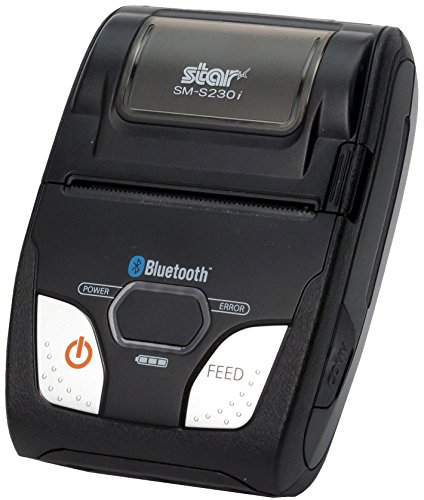
- Apple MFi certified for iPad use
- Bluetooth or USB with auto-detect pairing
- 2-inch clamshell loading and 80mm/s speed
Best For: iPad POS users who want a compact, easy-to-pair portable receipt printer
MFi-Certified Dual-Interface POS Printer
Star SM-S220i-DB40 Portable Receipt Printer

- Apple MFi certified for iOS support
- Bluetooth and serial connectivity
- Power supply included with tear bar design
Best For: Mobile POS teams needing a compact 2-inch printer with dual-interface support
Budget 58mm App-Based Receipt Printer
Sunydog Portable Mini Thermal Printer

- BT and USB connectivity for supported apps
- Not compatible with iOS system use or Square POS
- 1500mAh battery with 203dpi thermal printing
Best For: Android or Windows POS setups using supported third-party apps
Ultra-Rugged iPad-Friendly Option

- Apple MFi certified for iPad use
- Bluetooth support for iOS, Android, Windows
- Rugged body with tear bar and LCD battery display
Best For: iPad POS setups that need rugged, dependable mobile printing
Compact Budget Mobile Printer

- Bluetooth and USB connectivity
- Compact 80mm thermal printer
- Not compatible with iPad or Square
Best For: Android or Windows users needing a compact portable receipt printer
Non-iPad-Compatible Choice
MUNBYN P047 80mm Bluetooth Thermal Receipt Printer

- Supports Android, Windows, Mac, Linux, and ChromeOS
- Bluetooth plus USB, serial, and Ethernet connections
- Does not support iOS, iPad, or iPhone
Best For: multi-device POS setups that do not rely on iPad
Compact Mobile Pick
NETUM Portable 58mm Bluetooth Thermal Receipt Printer
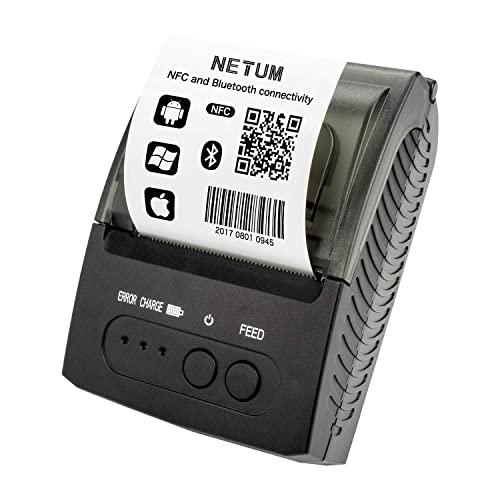
- Portable 58mm design with rechargeable battery
- Up to 7 days standby time
- App compatibility must be confirmed first
Best For: mobile printing when space and battery life are top priorities
Entry-Level POS Pick
MR.BOSS 58mm USB Bluetooth Thermal Receipt Printer

- USB and Bluetooth connectivity with cash drawer port
- Works with iOS only through supported 58mm apps
- Compact thermal design with low running costs
Best For: small counters needing a basic receipt printer with wireless support
Compact iPad-Ready 2-Inch Ticket Printer – Star SM-S230i Bluetooth Receipt Printer
If you’re comparing portable receipt printers for iPad POS, the Star Micronics SM-S230i is a compact 2-inch option built for mobile checkout. It supports Bluetooth and USB, is Apple MFi certified for iPhone and iPad use, and its auto-detect Bluetooth pairing is meant to reduce setup friction when switching devices.
Best For: iPad-based retail or hospitality teams that want a small, fast receipt printer with simple Bluetooth setup.
Pros:
- Apple MFi certified for iPad, iPhone, and iPod touch compatibility
- Bluetooth or USB connectivity with auto-detection for easier device switching
- Compact 2-inch design with clamshell “Drop-In and Print” paper loading
- 80mm/s print speed for quick checkout receipts
Cons:
- Uses 2-inch paper, so it may not suit wider receipt formats
- Included details list it as a print-only device with no advanced functions
The SM-S230i is a straightforward choice if your priority is dependable iPad POS printing in a tiny footprint. It leans more toward speed, portability, and compatibility than feature-heavy extras.
Battery-Powered 58mm Mobile Printer – ZOMEYLPO XGR-POS58 Portable Thermal Printer
For portable receipt printers for iPad POS where mobility matters more than a fixed counter setup, this 58mm thermal printer is designed for lightweight ticket and receipt printing. It supports BT and USB connections, uses inkless thermal printing, and includes a built-in rechargeable battery for on-the-go use.
Best For: Mobile sellers, small food-service setups, and retail counters that need a lightweight battery printer.
Pros:
- BT and USB connectivity for flexible use with compatible POS apps
- Built-in 1500mAh rechargeable battery for portable operation
- Inkless thermal printing lowers ongoing supply needs
- 58mm paper format with 203dpi output and up to 70mm/s speed
Cons:
- Notes only mention support for iOS and Windows, not broad device compatibility
- Smaller 58mm print width may be limiting for some receipt layouts
This model makes sense if you need a compact printer that can travel with your checkout workflow. It focuses on simple wireless/USB printing and battery-powered convenience rather than premium hardware extras.
MFi-Certified Dual-Interface POS Printer – Star SM-S220i-DB40 Portable Receipt Printer
The Star Micronics SM-S220i-DB40 is another portable option in the portable receipt printers for iPad POS category, with a 2-inch format and Apple MFi certification. It offers Bluetooth and serial connectivity, comes with a power supply, and is aimed at mobile POS use where a compact printer has to work across devices.
Best For: iPad, Android, or Windows teams that need a portable 2-inch receipt printer with dual-interface flexibility.
Pros:
- Apple MFi certified for iOS compatibility
- Dual Bluetooth/serial interface for flexible connections
- Compact portable thermal design with tear bar
- Power supply included in the box
Cons:
- Uses a 2-inch paper roll, which may be too narrow for some workflows
- Heavier than some ultra-compact portable models at 2.1 pounds
This printer is a solid fit when you want a proven mobile POS device with simple interfaces and iOS support. The included power supply is useful, but the smaller paper size keeps it geared toward compact receipts.
Budget 58mm App-Based Receipt Printer – Sunydog Portable Mini Thermal Printer
If you need portable receipt printers for iPad POS, note that this model is not built for iOS system support and is explicitly not compatible with Square POS. It is instead aimed at compatible apps such as Loyverse, iREAP, CasierStock, and Kyte, with BT and USB connectivity for Android and Windows use.
Best For: Android or Windows sellers using supported POS apps that don’t rely on Square or iOS system support.
Pros:
- Supports BT and USB connections for flexible setup
- Works with compatible apps like Loyverse, iREAP, CasierStock, and Kyte
- 203dpi resolution and up to 70mm/s print speed
- Built-in 1500mAh rechargeable battery for portable use
Cons:
- Not supported for iOS system use
- Not compatible with Square POS
- Requires compatible third-party apps to work as intended on smartphones
This is best treated as an app-specific thermal printer rather than a universal POS solution. If your setup matches the supported software list, it offers basic portability and no-ink printing at a practical price point.
Ultra-Rugged iPad-Friendly Option – Star Micronics SM-T400i
If you need portable receipt printers for iPad POS that can handle busy shifts and rugged use, the Star Micronics SM-T400i is built for mobility. It is Apple MFi certified for iPod touch, iPhone, and iPad, and it supports iOS, Android, and Windows through Bluetooth. The 80mm/s print speed, tear bar, and drop-in paper loading make it practical for fast checkout or on-the-go receipt printing.
Best For: iPad POS users who want a rugged Bluetooth receipt printer with broad mobile compatibility.
Pros:
- Apple MFi certified for iPhone, iPod touch, and iPad use
- Supports iOS, Android, and Windows
- Ultra-rugged build with tear bar and clamshell paper loading
- Long battery life with LCD battery and error display
Cons:
- Heavier than some mini portable models at 735 g
- Prints monochrome only
Overall, this is a strong pick if reliability matters more than ultra-light portability. The wider printable area also helps when you need more detail on service reports or receipts.
Compact Budget Mobile Printer – Rongta RPP300
For portable receipt printers for iPad POS, this Rongta model is only a fit if you are not using iPad. The notes explicitly say it does not support Square, iPad, or iOS-style tablet use, so it is better suited to Android or Windows workflows. If your setup matches its supported apps and connections, the compact 80mm printer format and Bluetooth plus USB options keep it flexible for mobile printing.
Best For: Android or Windows POS users who need a compact thermal receipt printer and do not need iPad support.
Pros:
- Bluetooth and USB connectivity
- Compact, non-slip portable design
- Supports 80mm paper and 203 dpi printing
- App support listed for several POS platforms
Cons:
- Not compatible with iPad or Square
- Not intended for computer/Android tablet use according to the notes
This printer makes sense only when your software and device match its compatibility list. For iPad POS buyers, the compatibility limits are the main reason to look elsewhere.
IPad-Incompatible Mini Printer – MUNBYN IMP001
If you are shopping for portable receipt printers for iPad POS, the MUNBYN IMP001 is not a fit because the notes clearly say it is not compatible with iOS, iPhone, iPad, Mac, DoorDash, Zettle POS, or Square. It is designed for Android and Windows workflows instead, with Bluetooth for Android and USB for Windows connection. Its mini 58mm format and removable battery make it useful for lightweight receipt printing in the right setup.
Best For: Android or Windows mobile businesses that need a small Bluetooth receipt printer and do not use iPad.
Pros:
- Compact 58mm portable thermal printer
- Bluetooth for Android and USB for Windows
- Removable 1500mAh battery with sleep and wake features
- Includes belt and accessories for mobile use
Cons:
- Not compatible with iPad or iOS devices
- Not compatible with Square or several popular POS systems
It is a practical small-format printer, but the compatibility restrictions rule it out for most iPad POS buyers. Only consider it if your checkout system is firmly on Android or Windows.
Non-iPad-Compatible Choice – MUNBYN P047 80mm Bluetooth Thermal Receipt Printer
If you’re shopping for portable receipt printers for iPad POS, this MUNBYN model is an important compatibility check: the supplied notes say it does not support iOS, iPad, or iPhone. It can still make sense for Android, Windows, Mac, Linux, and ChromeOS setups, especially if you need a compact 80mm thermal printer with Bluetooth plus USB/serial/Ethernet options.
Best For: Retail or restaurant teams that need a versatile thermal printer for non-iOS POS environments.
Pros:
- Works with Android, Windows, Mac, Linux, and ChromeOS systems.
- Offers Bluetooth plus USB, serial, and Ethernet connectivity.
- 80mm thermal format suits standard receipt printing.
- Can connect to a cash drawer for checkout workflows.
Cons:
- Not compatible with iOS, iPad, or iPhone.
- Notes say it does not support DoorDash, Grubhub, or Vagaro.
- No Wi-Fi support.
In practice, this is a strong multi-interface receipt printer, but it is not a fit if your iPad POS is the main requirement. For mixed-device operations, though, its broad platform support and wired connectivity give it useful flexibility.
Compact Mobile Pick – NETUM Portable 58mm Bluetooth Thermal Receipt Printer
For buyers comparing portable receipt printers for iPad POS, this NETUM model deserves a close look, but only if your app and workflow are supported. The notes list Android support prominently and say iOS is supported in the details, while also warning that many popular POS apps are not supported, so compatibility should be confirmed before purchase.
Best For: Mobile receipt printing where compact size and battery power matter, and the POS app is confirmed compatible.
Pros:
- Portable 58mm thermal printer with a small, lightweight design.
- Built-in 2000mAh rechargeable battery with up to 7 days standby.
- No ink or ribbon required, lowering running costs.
- Bluetooth 4.0 and auto sleep/awake features support mobile use.
Cons:
- Many listed POS platforms are not supported.
- Buyer is told to confirm app compatibility before ordering.
- Uses 58mm paper, which is smaller than standard 80mm receipts.
This is the most travel-friendly option in the group, but it is also the one that most depends on app-level compatibility. If your iPad POS software is confirmed to work, its battery life and compact footprint are appealing for on-the-go receipt printing.
Entry-Level POS Pick – MR.BOSS 58mm USB Bluetooth Thermal Receipt Printer
If you need portable receipt printers for iPad POS and want a low-friction setup, this MR.BOSS unit is worth considering because the notes say it can auto-search and work in Android or iOS when the app supports 58mm printers. It also adds USB plus Bluetooth connectivity and a cash-drawer port, making it useful for small checkout stations that need basic flexibility.
Best For: Small shops and service counters that want a compact 58mm printer with Bluetooth and cash-drawer support.
Pros:
- USB cable and Bluetooth connectivity.
- Includes a cash drawer port for checkout workflows.
- Small, lighter thermal printer design.
- Uses low-cost thermal paper with no ribbon or cartridge.
Cons:
- iOS works only if your app supports 58mm printers.
- Requires Bluetooth-capable devices for wireless use.
- Smaller 58mm paper width limits receipt size.
This model is a practical entry-level choice if your iPad POS app already supports 58mm thermal printing. It is not the most feature-rich printer here, but the combination of Bluetooth, USB, and cash-drawer support makes it adaptable for straightforward receipt workflows.
How We Picked the Best Portable Receipt Printers for IPad POS
We focused on Portable Receipt Printers for IPad POS that are practical for real-world mobile checkout: iOS compatibility, Bluetooth connectivity, battery-powered portability, paper size, print speed, and overall ease of setup. We also gave weight to interface options such as USB, serial, and Ethernet when they improve flexibility for multi-device workflows.
Quick Comparison
For a simple, lightweight setup, 58mm mini printers are usually the easiest to carry and pair with an iPad. If you print longer receipts or want a more traditional receipt format, 80mm models are the better fit. Rugged designs are worth considering for outdoor events, food trucks, and high-traffic counters, while compact Bluetooth printers are often the best value for pop-up retail and tableside service.
Key Buying Factors for Portable Receipt Printers for IPad POS
IPad and IOS Compatibility
Make sure the printer explicitly supports iOS or iPad POS use. Some printers work across Android and Windows but require extra steps, special apps, or limited driver support on iPad.
Connection Type
Bluetooth is the most important feature for wireless iPad setups. USB, serial, and Ethernet can be useful for backup connectivity or fixed stations, but they are less convenient for truly mobile use.
Paper Size and Receipt Length
58mm printers are compact and portable, while 80mm printers produce wider receipts that are easier to read and often preferred for retail and restaurant operations. Choose based on the format your POS system and customers expect.
Battery Life and Durability
Portable units should hold up through a full shift without constant recharging. If you work in delivery, catering, or outdoor sales, look for rugged construction and a dependable battery.
Setup and Maintenance
Simple paper loading, clear status indicators, and broad POS app support can save time. Thermal models are especially convenient because they do not require ink or ribbons.
Who Should Buy Which Portable Receipt Printers for IPad POS?
Small retailers, market vendors, and mobile service businesses should usually start with a compact Bluetooth 58mm printer. Restaurants and high-volume counters may prefer an 80mm model for better readability and faster customer handoff. If your environment is rougher than average, a rugged portable printer is the safest choice. For teams that want maximum flexibility across iPad and non-iPad systems, pick a model with multiple connection options and broad platform support.
In short, the best choice depends on how mobile your checkout needs to be, how wide you want your receipts, and how reliably the printer integrates with your iPad POS workflow.