Choosing the right video system can make Zoom Rooms feel smoother, clearer, and easier to manage. The best options balance camera quality, audio pickup, room size, and simple deployment.
This roundup of Poly Studio cameras for Zoom Rooms highlights versatile picks for huddle spaces, mid-size meeting rooms, and larger conference rooms, so you can match the right setup to your team’s needs.
Best 10 Poly Studio Cameras for Zoom Rooms Picks for 2026
Best for Small Rooms
Poly Studio R30 4K Video Conference System

- 4K video with auto-framing and presenter tracking
- Built-in speaker and 3-mic array for clear audio
- Plug-and-play setup for Zoom, Teams, and more
Best For: Small teams that need an easy-to-use Zoom room camera for huddle spaces.
Best for Built-In Lighting
EMEET S600L 4K Webcam with Ring Light

- Built-in ring light with 4 lighting modes
- 1/2.0" sensor with 4K/30fps and 1080p/60fps
- Fast autofocus and dual mics for daily calls
Best For: Streamers and remote workers who want brighter, flattering video from one compact webcam.
Best for Easy Setup
Poly Studio X50 with TC8 Touch Controller

- All-in-one camera, audio, and software bar
- Includes TC8 touch controller for simple meeting control
- Built-in Zoom Rooms and Teams support without a PC
Best For: Mid-size teams that want a simple, all-in-one Zoom Rooms setup.
Best for Large Rooms
Poly Studio E60 4K MPTZ Camera

- 12x optical zoom for larger meeting spaces
- 4K sensors improve image clarity and detail
- Auto tracking helps keep presenters in frame
Best For: Medium to large Zoom Rooms and presentation-heavy meeting spaces.
Best for Large Zoom Rooms
Poly Studio X70 + TC8 Touch Controller

- Dual 4K lenses with 20MP sensors
- Native Zoom and Teams support, no PC needed
- TC8 controller included for easy room control
Best For: Large conference rooms needing a premium native Zoom setup.
Best for Everyday Use

- 4K 20MP camera with 120-degree view
- Beamforming mics and noise cancellation
- PoE++ or AC power with Poly Lens management
Best For: Small rooms that need a Zoom-ready video bar with simple setup and strong image quality.
Best for Simple Zoom Calls

- 1080p HD with 80-degree framing
- Zoom and Teams certified
- Privacy shutter and flexible mounting
Best For: People who want an easy, portable webcam for dependable Zoom and Teams calls.
Best for Zoom-Ready All-in-One Audio
Poly Studio P15 Personal Video Bar
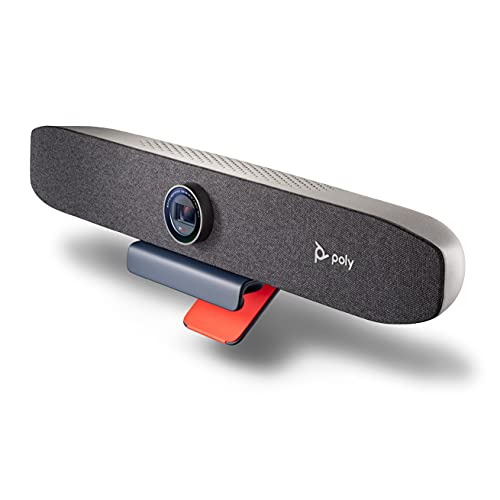
- 4K camera with auto-framing for a polished on-screen look
- Built-in speaker and multi-mic array simplify setup
- NoiseBlockAI helps reduce distracting background sounds
Best For: Remote workers and small-room users who want an all-in-one Zoom and Teams video bar.
Best for Small Conference Rooms
OLY Studio 4K USB Conference System

- All-in-one camera, mic, and speaker bar
- 4K video with Zoom and Teams certification
- Renewed value for small-room deployments
Best For: Small teams that want a tidy, certified video bar for Zoom meetings.
Best for Personal Zoom Calls
Poly Studio P15 Personal Video Bar

- 4K video with automatic framing
- Integrated speaker and multi-mic array
- NoiseBlockAI and Acoustic Fence reduce distractions
Best For: Remote workers and solo presenters who want an easy Zoom-ready personal video bar.
Best for Small Rooms – Poly Studio R30 4K Video Conference System
If you need poly studio cameras for zoom rooms that are simple to deploy and strong on audio, the Poly Studio R30 is a smart fit. It combines 4K video, automatic framing, and built-in noise suppression in a compact bar designed for huddle spaces and small conference rooms.
Best For: Small teams that want a plug-and-play Zoom room camera with solid video, clear pickup, and minimal setup.
Pros:
- DirectorAI auto-framing and presenter tracking help keep meetings focused.
- 4K video with a 120-degree field of view gives small rooms a polished look.
- NoiseBlockAI and Acoustic Fence reduce distracting background sounds.
- Plug-and-play USB setup works with Zoom, Teams, and most meeting apps.
Cons:
- Designed for small rooms, so it is not the best choice for larger spaces.
- Digital zoom is useful, but not a substitute for a dedicated PTZ system.
For teams comparing poly studio cameras for zoom rooms, this model stands out for its easy setup and all-in-one design. It is especially appealing when you want better video and audio without adding extra mics, speakers, or a complicated install.
Best for Built-In Lighting – EMEET S600L 4K Webcam with Ring Light
If you’re comparing poly studio cameras for zoom rooms and want a simpler all-in-one webcam for solo calls, the EMEET S600L stands out for its built-in ring light, fast autofocus, and sharp 4K image quality. It’s a practical pick for streaming, meetings, and creator setups where consistent lighting matters more than conference-room style hardware.
Best For: Streamers, presenters, and remote workers who want brighter, more flattering video without adding a separate light.
Pros:
- Integrated ring light with 4 lighting modes for quick, flattering fill light
- 1/2.0" sensor with 4K/30fps and 1080p/60fps support
- Fast 0.2s PDAF autofocus and dual mics for clearer calls
- Works with Windows, macOS, Zoom, OBS, Twitch, and YouTube
Cons:
- Not a true multi-participant room camera like dedicated Zoom Room systems
- Ring-light design may be more than some office users need
- Best suited to single-user framing rather than group meetings
For buyers who want an easier content-first alternative to poly studio cameras for zoom rooms, the S600L is compelling because it combines camera and lighting in one compact device. It’s more creator-focused than enterprise room gear, but that also makes it easier to set up and use every day.
Best for Easy Setup – Poly Studio X50 with TC8 Touch Controller
If you want one of the most straightforward poly studio cameras for zoom rooms, the Poly Studio X50 with TC8 is built for mid-size meeting spaces that need strong video, clear audio, and minimal IT friction. It combines the camera, microphones, speakers, and meeting software in a single bar, so teams can get up and running quickly.
Best For: Mid-size conference rooms that need an all-in-one Zoom Rooms system with simple operation and room-filling AV performance.
Pros:
- All-in-one bar includes camera, stereo speakers, microphones, and software
- TC8 touch controller makes meetings easy to start and manage
- Built-in Zoom and Microsoft Teams support with no PC required
- NoiseBlockAI helps reduce distracting background sounds
Cons:
- Designed for mid-size rooms, so it may be more than smaller huddle spaces need
- Higher upfront cost than basic webcam-style solutions
For buyers comparing poly studio cameras for zoom rooms, this model stands out for its plug-and-play simplicity, content-sharing flexibility, and dependable room coverage. It is a strong choice when you want a polished meeting experience without adding a separate PC or complicated setup.
Best for Large Rooms – Poly Studio E60 4K MPTZ Camera
If you need poly studio cameras for zoom rooms that can keep a presenter sharp while still showing the full team, the Poly Studio E60 is built for that job. Its 4K sensors and 12x optical zoom help it capture detail across larger conference spaces, while automatic tracking reduces the need for constant camera control during meetings.
Best For: Medium to large Zoom Rooms, executive meeting spaces, and presentation-heavy setups where the main speaker needs to stay in focus.
Pros:
- 12x optical zoom and 4K imaging deliver strong detail from farther away
- Automatic moderator tracking keeps the presenter centered without manual adjustments
- Designed to show both the speaker and the room clearly for hybrid meetings
- Simple setup and user-friendly operation for AV teams
Cons:
- More camera than many small huddle rooms need
- EU model may not be ideal for every region or procurement setup
- Higher-end features likely place it above basic budget options
For buyers comparing poly studio cameras for zoom rooms, this model stands out when clarity, reach, and presenter tracking matter more than low cost. It’s a strong fit for rooms where people move around, slides matter, and you want the camera to do more of the work automatically.
Best for Large Zoom Rooms – Poly Studio X70 + TC8 Touch Controller
If you need one of the most capable poly studio cameras for zoom rooms, the Poly Studio X70 is built for big spaces that demand strong framing, clear speech pickup, and simple join-from-the-room operation. Its dual 4K lenses, speaker tracking, and native Zoom support make it a solid fit for boardrooms where video quality and ease of use matter equally.
Best For: Large conference rooms that want a premium all-in-one Zoom setup with minimal IT friction.
Pros:
- Dual 4K lenses and 20MP sensors deliver sharp, life-like video.
- Built-in Zoom and Teams compatibility works without a PC or separate gateway.
- NoiseBlockAI and Acoustic Fence help cut distracting room noise.
- Includes the TC8 touch controller for simple in-room meetings.
Cons:
- Designed for larger rooms, so it may be overkill for small huddle spaces.
- POE is required, which can add a setup consideration.
- Premium pricing makes it a harder fit for tighter budgets.
For buyers comparing poly studio cameras for zoom rooms, this model stands out for its all-in-one design and room-filling audio-video performance. It is especially compelling when you want a polished, native Zoom experience in a large meeting space without adding extra hardware.
Best for Everyday Use – Poly Studio V12 USB Video Bar
If you’re comparing poly studio cameras for zoom rooms, the Poly Studio V12 is a strong fit for compact spaces that need better video, clear audio, and simple deployment. Its 4K 20MP camera, 120-degree view, and AI-assisted features help small meeting rooms look more polished without adding complexity.
Best For: Small conference rooms and huddle spaces that need an easy-to-manage Zoom-ready video bar with strong image quality.
Pros:
- 4K 20MP camera with a wide 120-degree field of view
- Beamforming mics, noise cancellation, and AI-enhanced video features
- Flexible PoE++ or AC power plus USB plug-and-play setup
- Poly Lens support for remote monitoring and device management
Cons:
- Designed mainly for small rooms, not larger conference spaces
- May offer more management features than very small teams need
For buyers focused on poly studio cameras for zoom rooms, this model stands out for combining straightforward setup with enterprise-friendly controls. It’s a practical choice when you want better meeting-room video and audio without moving up to a larger, more expensive system.
Best for Simple Zoom Calls – Poly Studio P5 1080p Webcam
If you want a straightforward camera from the poly studio cameras for zoom rooms family of gear, the Poly Studio P5 is a practical webcam pick for solo users, home offices, and lightweight meeting setups. It delivers 1080p video, an 80-degree field of view, and Zoom and Teams certification in a compact body that’s easy to mount and move.
Best For: Individuals or small teams who need a simple, portable webcam for crisp video calls, remote learning, and everyday Zoom use.
Pros:
- 1080p HD video with an 80-degree field of view for a clean, centered image
- Built-in directional microphone and low-light support improve call quality
- Privacy shutter, tripod support, and monitor clamp make it flexible and secure
- Zoom and Microsoft Teams certified for easy compatibility
Cons:
- More of a personal webcam than a true room camera for larger conference spaces
- Single-user framing may feel narrow if you need to capture a group
For buyers comparing poly studio cameras for zoom rooms, the P5 makes sense when the priority is simple setup and strong video quality rather than wide-room coverage. It’s a good fit for personal desks, hybrid workstations, and small meeting scenarios where ease of use matters most.
Best for Zoom-Ready All-in-One Audio – Poly Studio P15 Personal Video Bar
If you want a simple upgrade for poly studio cameras for zoom rooms, the Poly Studio P15 is a strong fit for personal workspaces, huddle areas, and home-office setups. It combines a 4K camera, auto-framing, built-in microphones, and a speaker into one USB device, so you can look and sound more polished without adding extra gear.
Best For: Remote workers and small-room users who want a certified Zoom and Teams video bar with strong audio and automatic framing.
Pros:
- 4K camera with automatic framing helps keep you centered and sharp on camera.
- Integrated speaker and multi-mic array reduce the need for separate audio accessories.
- NoiseBlockAI and Acoustic Fence help cut distracting background noise.
- Zoom and Microsoft Teams certified for smoother compatibility.
Cons:
- Renewed unit may not appeal to buyers who want brand-new hardware.
- Best suited to individual use or small spaces, not larger conference rooms.
- USB-A connection may require an adapter on some computers.
For buyers comparing poly studio cameras for zoom rooms, this model stands out for convenience more than scale: it is compact, quick to deploy, and designed to keep meetings looking and sounding consistent in focused spaces.
Best for Small Conference Rooms – OLY Studio 4K USB Conference System
If you want a simple all-in-one room setup, the OLY Studio 4K USB Video Conference System is a practical option to consider among poly studio cameras for zoom rooms. It combines the camera, microphone, and speaker bar in one unit, which helps keep small and medium meeting spaces tidy while supporting certified Zoom and Teams use.
Best For: Small to medium conference rooms that need an integrated, certified video bar for everyday Zoom meetings.
Pros:
- All-in-one design reduces cable clutter and simplifies room setup
- 4K camera helps deliver sharper video for meetings and presentations
- Zoom and Teams certification adds confidence for business deployment
- Renewed pricing can make it more accessible than new room systems
Cons:
- Renewed condition may not appeal to buyers wanting brand-new hardware
- Best suited to smaller rooms, not larger or more complex spaces
For teams comparing poly studio cameras for zoom rooms, this model stands out more for its integrated room-friendly design than for premium extras. It’s a sensible pick if you want a certified, tidy system that covers video, audio, and speaker needs in one bar.
Best for Personal Zoom Calls – Poly Studio P15 Personal Video Bar
If you want a simple upgrade among poly studio cameras for zoom rooms, the Poly Studio P15 is built for polished solo calls with sharp 4K video, automatic framing, and strong integrated audio. It’s a good fit when you need an all-in-one device that makes you look and sound better without adding a lot of setup complexity.
Best For: Remote workers, solo presenters, and small huddle spaces that need an easy-to-use personal video bar for Zoom and Teams.
Pros:
- 4K camera with automatic framing helps keep you centered and clearly visible.
- Built-in speaker and multi-mic array deliver solid one-device audio and video.
- NoiseBlockAI and Acoustic Fence reduce distracting background noise.
- Works with Zoom, Microsoft Teams, PC, and Mac.
Cons:
- Designed more for individuals than full-room conferencing.
- USB-C connection may require an adapter for some older laptops.
For buyers comparing poly studio cameras for zoom rooms, this model stands out as a personal, plug-and-play option rather than a shared meeting-room system. It’s especially appealing if you want better framing and cleaner audio in a compact setup.
How We Picked These Poly Studio Cameras for Zoom Rooms
We focused on models that fit real meeting-room use cases: consistent 4K video, dependable microphones and speakers, AI framing or presenter tracking, and straightforward Zoom Room compatibility. We also considered room size, installation flexibility, and whether a device is better as a USB peripheral or an all-in-one video bar system.
Quick Comparison: Which Type Fits Your Room?
For small huddle rooms, compact bars and personal video systems are usually the best value. Mid-size rooms typically benefit from integrated bars with stronger audio coverage and touch-controller support. Larger rooms need smarter optics, wider coverage, and more advanced tracking to keep speakers visible and engaging.
Key Buying Factors for Poly Studio Cameras for Zoom Rooms
Room Size and Coverage
Match the camera to the room first. A device that looks impressive on paper can underperform if its field of view or mic range does not suit the space. Small rooms often need simple all-in-one bars, while larger rooms may need optical zoom and smarter framing.
Video Quality and Framing
Look for 4K resolution, strong low-light performance, and framing features such as auto-framing or presenter tracking. These are especially helpful in Zoom Rooms where speakers move naturally and the camera should keep up without manual adjustments.
Audio Performance
Clear audio matters as much as sharp video. Noise suppression, beamforming microphones, and integrated speakers can reduce setup complexity and improve day-to-day meeting quality.
Deployment and Management
If your IT team manages multiple rooms, prioritize models with centralized device management and easier cable setup. USB bars are often simpler to install, while full conferencing systems can offer a more polished room experience.
Who Should Buy Which Poly Studio Cameras for Zoom Rooms?
Small teams and home-office users should lean toward compact camera bars or personal video bars. Mid-size rooms are best served by integrated systems with stronger audio and controller options. Larger conference rooms should consider higher-end Poly Studio models with better zoom, wider coverage, and advanced tracking.
If you want the most balanced choice, start with the room size and meeting style, then narrow down to the Poly Studio Cameras for Zoom Rooms that best fit your budget, setup preference, and audio needs.