If you’re looking to enhance your workspace, consider the benefits of monitor stands with wireless charging capabilities. These stands not only elevate your screen for better ergonomics but also keep your devices powered without the clutter of cables. With various options available, you can find one that fits your style and storage needs. Curious about which models stand out regarding functionality and design? Let’s explore the top contenders that can transform your setup.
Vaydeer All-in-One Dual Monitor Stand Riser with USB Ports and Wireless Charging Pad

If you’re looking for a versatile solution to elevate your workspace, the Vaydeer All-in-One Dual Monitor Stand Riser is perfect for you. This multifunctional stand features a dual monitor riser, 15W wireless charging pad, and 8 USB ports—4 for fast charging and 4 for data transfer. With its sturdy metal construction, it supports up to 50kg, making it reliable for all your devices. The built-in LED light strip enhances your workspace while reducing eye strain. Plus, the dual-tier storage and pull-out drawers keep your essentials organized, promoting a clutter-free environment that boosts your productivity and comfort.
Best For: Those seeking an organized and efficient workspace with enhanced connectivity and charging options.
Pros:
- Versatile Design: Combines a dual monitor riser with wireless charging and multiple USB ports for convenience.
- Durable Construction: Made from sturdy metal, supporting up to 50kg for reliable use with multiple devices.
- Organizational Features: Includes storage drawers and dual-tier design to keep office essentials neatly arranged.
Cons:
- Size Limitations: May take up significant desk space due to its dimensions (1000mm x 283mm x 140mm).
- Limited Wireless Charging Compatibility: Wireless charging may not work with all phone cases or devices.
- Higher Price Point: The multifunctionality comes at a potentially higher cost compared to basic monitor stands.
Vaydeer Wireless Charging Monitor Stand and Organizer
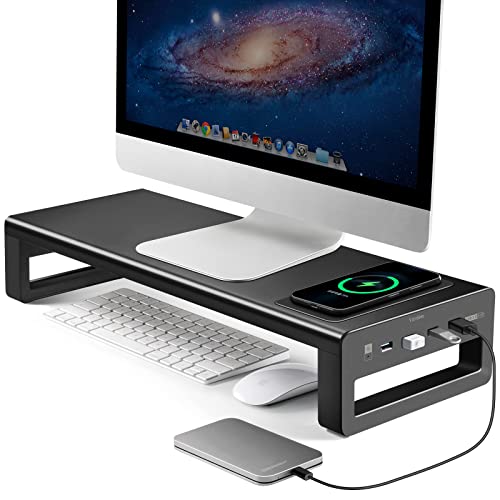
The Vaydeer Wireless Charging Monitor Stand and Organizer is an ideal choice for gamers and professionals seeking to streamline their workspaces. This heavy-duty stand supports monitors up to 27 inches and holds up to 66 pounds, making it perfect for gaming studios or offices. With a max 15W wireless charger, you can easily charge your phone by simply placing it on the designated area. Plus, it features four USB 3.0 ports for seamless connectivity with multiple devices. Its ergonomic design not only improves your posture but also creates additional desktop space, enhancing your overall productivity.
Best For: The Vaydeer Wireless Charging Monitor Stand and Organizer is best for gamers and professionals looking to enhance their workspace efficiency while charging devices conveniently.
Pros:
- Supports heavy monitors: Can hold monitors up to 27 inches and a weight capacity of 66 pounds.
- Convenient charging: Features a max 15W wireless charger for easy phone charging.
- Ergonomic design: Raises monitors to reduce neck and back strain while creating extra desktop space.
Cons:
- Limited wireless charging compatibility: Charging may require troubleshooting for certain devices.
- Size limitations: Designed specifically for monitors up to 27 inches, which may not suit larger setups.
- Requires proximity for charging: Phone must be placed directly on the charging area for it to work effectively.
meatanty 3 In 1 Monitor Stand Riser with USB Ports and Wireless Charging

Looking for a way to declutter your workspace while keeping your devices charged? The Meatanty 3 In 1 Monitor Stand Riser is your perfect solution. This multi-functional stand features two pull-out drawers for organizing office supplies, a wireless charging module, and four USB ports for seamless device connectivity. It supports monitors up to 27 inches, including iMacs, and boasts a sturdy design with a load capacity of 66 pounds. With no assembly required, you can upgrade your workspace instantly. Plus, it promotes better posture and spinal health, making it an excellent gift for yourself or anyone in need of a workspace upgrade.
Best For: Those seeking an organized and efficient workspace with the added benefits of charging capabilities and ergonomic support.
Pros:
- Multi-functional design combines monitor stand, desk organizer, and charging hub, maximizing workspace utility.
- Wireless charging capability allows for easy and convenient charging of compatible devices without messy cables.
- Two pull-out drawers provide practical storage for small office supplies, helping to maintain a tidy desk.
Cons:
- Limited to monitors up to 27 inches, which may not accommodate larger displays.
- Weight of 6.14 pounds might be considered heavy for some users, making it less portable.
- Wireless charging performance may vary depending on the device compatibility and case thickness.
Bostitch Office Wooden Monitor Stand with Wireless Charging Pad (STND-2408WH)
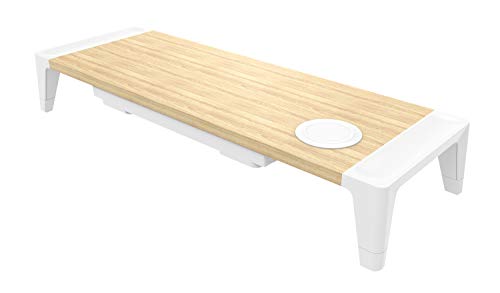
For those who value both functionality and style in their workspace, the Bostitch Office Wooden Monitor Stand with Wireless Charging Pad (STND-2408WH) is an ideal choice. This stand elevates your monitor to a comfortable eye level, helping reduce neck and eye strain. With two height options, you can customize it to suit your needs. The built-in wireless charging pad is perfect for your Qi-enabled devices, while the storage drawer keeps your cords and accessories organized. Durable and easy to assemble, it features non-slip rubber feet for stability. Plus, it comes with a three-year limited warranty for peace of mind.
Best For: Professionals and students seeking a stylish and functional monitor stand that enhances workspace organization and comfort.
Pros:
- Adjustable height options allow for personalized comfort and ergonomics.
- Built-in wireless charging pad conveniently charges Qi-enabled devices.
- Storage drawer helps keep cords and small accessories organized and out of sight.
Cons:
- Limited weight capacity of 33 lbs may not support heavier monitors.
- Assembly required, which may be a drawback for some users.
- Style may not suit all decor, as it features a specific wood grain and white design.
Anker 675 USB-C Docking Station (12-in-1)

Designed specifically for users of Lenovo ThinkPad and MacBook Pro M1/M2, the Anker 675 USB-C Docking Station (12-in-1) stands out with its impressive array of connectivity options and built-in wireless charging. You’ll appreciate the 10Gbps USB-C ports, a 4K@60Hz HDMI display, and a wireless charging pad that keeps your phone powered. With multiple ports—including 100W max USB-C upstream, 3 USB-A, and SD/microSD slots—it’s perfect for your peripherals. Plus, it raises your monitor for better posture, creating a tidy workspace by storing your keyboard and mouse underneath. This dock guarantees your workstation is both efficient and organized.
Best For: Users of Lenovo ThinkPad and MacBook Pro M1/M2 who seek an efficient and organized workstation with multiple connectivity options.
Pros:
- Supports high-speed data transfer with 10Gbps USB-C ports.
- Enables 4K@60Hz HDMI display for enhanced visuals.
- Functions as a monitor stand, promoting better posture and workspace organization.
Cons:
- HDMI port does not support display from USB-C ports.
- Limited to specific laptop models, reducing versatility.
- Wireless charging pad may not be compatible with all phone cases.
Monitor Stand with Wireless Charging and USB Ports for 3 Monitors

The EAXBUX Monitor Stand with Wireless Charging and USB Ports is ideal for professionals juggling multiple monitors, as it comfortably supports three screens while keeping your workspace organized. With dimensions of 56 x 18 x 3.5 inches, this sturdy steel stand holds up to 66 pounds and accommodates monitors up to 32 inches. Enjoy fast wireless charging for your devices, plus four USB 3.0 ports for seamless data transmission. Its rugged design guarantees durability, while the spacious area helps you declutter your desk. Assembly is a breeze, so you can enhance your productivity without the hassle.
Best For: Professionals and multitaskers who require a sturdy and organized workspace for multiple monitors.
Pros:
- Fast wireless charging for compatible devices eliminates the need for messy cables.
- Spacious design offers ample room for office supplies, helping to maintain an organized desk.
- Rugged construction ensures durability and support for heavier setups, accommodating dual monitor configurations and other equipment.
Cons:
- Weight of 10.98 pounds may make it less portable for users who frequently change workspaces.
- Limited to monitors up to 32 inches, which may not accommodate larger screens.
- Requires a fast-charging adapter for optimal wireless charging performance, which may not be included.
Monitor Stand Riser with 15W Fast Wireless Charging and USB Hub

Elevate your workspace with the Monitor Stand Riser, which not only supports your monitor but also features a 15W fast wireless charging pad and a 4-port USB hub. This multifunctional stand combines ergonomic design with practical storage, reducing neck and eye strain by up to 30%. With its Qi-certified charger, you’ll enjoy charging speeds three times faster than standard options, compatible with devices like the iPhone 15 and Samsung S23. Plus, the built-in RGB lighting enhances your gaming atmosphere. Crafted from high-quality materials, it supports monitors up to 55 lbs and requires no assembly. Upgrade your setup effortlessly!
Best For: The Monitor Stand Riser is best for gamers and office workers seeking to enhance their workspace with ergonomic support and multifunctional features.
Pros:
- Ergonomic design reduces neck and eye strain by up to 30%.
- 15W fast wireless charging provides three times the speed of standard chargers.
- Built-in RGB lighting creates an immersive atmosphere for gaming setups.
Cons:
- Limited load capacity of 22 pounds may not support heavier monitors.
- No assembly required, which might not appeal to those who prefer customizable setups.
- RGB lighting may be distracting for some users during work tasks.
Monitor Stand with Wireless Charging & Acrylic Legs
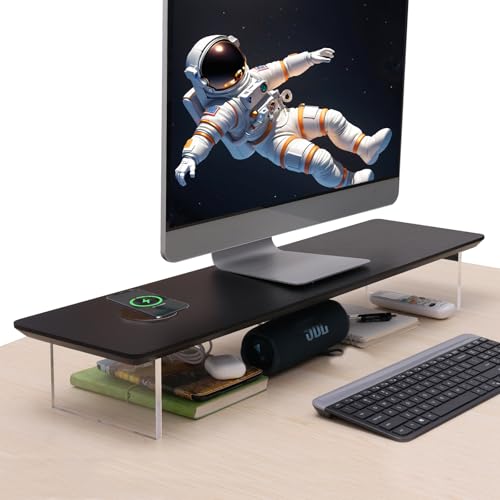
If you’re seeking a stylish way to enhance your workspace while enjoying the convenience of wireless charging, the Monitor Stand with Wireless Charging & Acrylic Legs is perfect for you. This 31.5-inch wood riser not only elevates your monitor to a comfortable height, reducing neck strain, but also features a sleek design with a solid wood top and transparent acrylic legs. With built-in 15W fast wireless charging, you can power your devices effortlessly. It supports up to 66 lbs, ensuring durability. Plus, the elevated design offers handy storage underneath for your keyboard and office supplies, making it a functional and aesthetic addition to any setup.
Best For: Individuals seeking a stylish and functional monitor riser that enhances workspace ergonomics while providing wireless charging capabilities.
Pros:
- Sleek and modern design with a solid wood top and transparent acrylic legs that adds elegance to any office or home decor.
- Built-in 15W fast wireless charging compatible with various devices, allowing for convenient power access without cluttering your workspace with cables.
- Elevated design creates additional storage space underneath for keyboards and office supplies, promoting a more organized work environment.
Cons:
- Limited weight support of 66 lbs may not accommodate larger or heavier monitors.
- Acrylic legs may be prone to scratches or scuffs, potentially affecting the aesthetic over time.
- Requires assembly which may not be ideal for those looking for a fully assembled product right out of the box.
OImatser Monitor Stand Riser with USB Hub and Adjustable Length
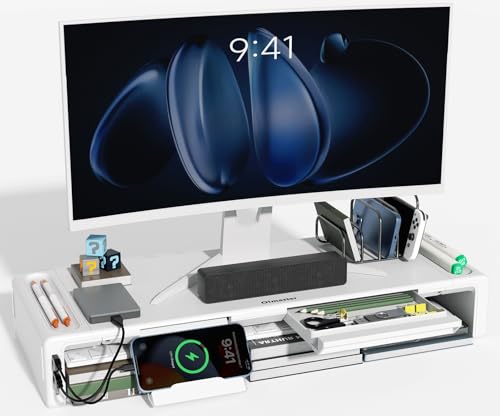
For those seeking a versatile and ergonomic workspace solution, the OImatser Monitor Stand Riser with USB Hub and Adjustable Length stands out. Its adjustable widths (16.5, 18.5, and 20.5 inches) let you customize the height for ideal viewing, reducing neck strain. Weighing just 3.69 pounds and supporting up to 50 pounds, it’s sturdy yet portable. The built-in USB hub and Type-C port enhance connectivity, while additional storage for your phone, pens, and small items keeps your workspace tidy. Use it as a monitor stand, printer riser, or even a TV stand—its design fits all your needs seamlessly.
Best For: Those looking for an ergonomic solution to improve their workspace efficiency while maintaining a clean and organized environment.
Pros:
- Adjustable Widths: Offers three customizable lengths to accommodate various monitor sizes and user preferences.
- Multi-functional Storage: Includes dedicated spaces for phones, pens, and other small items, promoting an organized workspace.
- Enhanced Connectivity: Features a built-in USB hub and Type-C port for easy connection of devices.
Cons:
- Weight Limit: Maximum load capacity of 50 pounds may not suit all users with heavier equipment.
- Limited Color Options: Available finishes may not appeal to everyone’s aesthetic preferences.
- Assembly Required: Some users may find setup time-consuming or challenging without included instructions.
HUANUO Dual Monitor Stand with USB Ports

The HUANUO Dual Monitor Stand with USB Ports is perfect for anyone juggling multiple screens or devices in a compact workspace. With its adjustable length and angle, it accommodates a single 35” monitor or up to three 24” monitors, supporting a weight capacity of 48.5 lbs. The built-in 3-in-1 power strip features 2 AC outlets and 2 USB 3.0 ports, ensuring you stay connected. Elevating your monitors by 3.9 inches enhances ergonomic viewing, reducing strain. Plus, integrated storage slots and cable management holes keep your workspace organized. Enjoy a more productive and comfortable setup with this versatile stand.
Best For: The HUANUO Dual Monitor Stand is best for professionals and students who need to efficiently manage multiple monitors and devices in a limited workspace.
Pros:
- Ergonomic design: Elevates monitors by 3.9 inches to reduce neck and shoulder strain.
- Versatile support: Accommodates various monitor setups, including a single 35″ or up to three 24″ monitors.
- Integrated storage: Features slots for organizing tablets, smartphones, and office supplies, along with cable management for a tidy workspace.
Cons:
- Weight capacity: Limited to a maximum of 48.5 lbs, which may not support heavier monitors.
- Size: The dimensions may not fit in all desk setups, especially smaller spaces.
- Power cord length: The 59″ power cord might be insufficient for some setups requiring longer reach.
Factors to Consider When Choosing Monitor Stands With Wireless Charging
When you’re choosing a monitor stand with wireless charging, contemplate several key factors. You’ll want to assess charging speed, design, and how well it fits your monitor’s requirements. Don’t forget to evaluate ergonomic features and storage options to enhance your workspace.
Charging Speed Considerations
As you explore monitor stands with wireless charging, it’s crucial to take into account charging speed, which can greatly affect your device’s efficiency. Most Qi-enabled devices typically charge at 5W, but many modern stands offer faster options, ranging from 10W to 15W. For peak performance, choose a stand that matches or exceeds your device’s maximum supported charging speed; for instance, a 15W charger works best for fast-charging devices. Remember, factors like battery health, case thickness, and proper alignment on the charging pad can also impact speed. Misalignment may cause slower charging or prevent it altogether. Additionally, consider the total power output if you plan to charge multiple devices simultaneously, as this can reduce effective charging speeds.
Design and Aesthetics
Choosing a monitor stand with wireless charging isn’t just about functionality; it also involves considering design and aesthetics to create an inviting workspace. Look for sleek, modern materials like wood, metal, or acrylic that match your decor style. Ergonomic features are essential; they’ll elevate your monitor to eye level, reducing neck strain while enhancing comfort. Many stands offer integrated storage solutions, helping you maintain a clutter-free environment without sacrificing visual appeal. Pay attention to color options and finishes—matte, gloss, or wood grain can add a stylish touch. Finally, consider the dimensions of the stand; whether you need a single or multiple monitor setup, the right size guarantees a balanced, proportionate look on your desk.
Monitor Compatibility Requirements
Selecting the right monitor stand with wireless charging involves several key compatibility factors. First, make certain the stand supports your monitor’s size and weight; most models accommodate screens up to 32 inches and weigh between 33 and 66 pounds. Next, check the wireless charging pad’s compatibility with your devices; it should support Qi-enabled gadgets like smartphones and earbuds. While adjustable height features are important for ergonomic positioning, verify the number and type of USB ports available to meet your connectivity needs for various devices. Finally, consider the materials and construction quality of the stand to guarantee it provides the stability and durability necessary to securely support your monitor.
Ergonomic Height Adjustment
When considering monitor stands with wireless charging, ergonomic height adjustment plays an essential role in your overall comfort and productivity. Elevating your monitor to eye level can reduce neck and back strain by up to 30%, making it vital for a healthier workspace. Aim for a viewing height that’s 3 to 5 inches above your desk surface for a comfortable line of sight. Adjustable stands let you tailor the height to your preferences, enhancing your comfort during long work hours. Plus, raising the monitor creates extra space underneath for keyboard storage, helping keep your workspace tidy. Many ergonomic stands also offer tilt and angle adjustments, further reducing eye strain and improving your overall experience.
Storage and Organization Features
To create an organized and efficient workspace, consider the storage and organization features of monitor stands with wireless charging. Many of these stands come with built-in storage solutions like drawers or compartments, perfect for keeping office essentials like pens and notepads neatly stored. Look for designs that include pull-out drawers or designated slots to store USB drives and mobile devices, promoting a clutter-free environment. The integration of USB ports not only allows for charging but also helps manage cables effectively. Adjustable heights and multi-tiered designs can maximize your desk’s vertical space, improving accessibility to supplies. Some stands even feature dedicated slots for tablets and smartphones, making sure your devices are easily reachable while maintaining a tidy workspace.
Material Durability and Stability
Durability and stability are essential factors to evaluate in monitor stands with wireless charging. Look for stands made from high-quality materials like metal or aluminum alloy, as they can support heavier monitors, often up to 66 pounds or more. Solid wood or high-density composites also provide aesthetic appeal while ensuring robust support and longevity. Stability is enhanced by features like non-slip rubber feet or a wide base design, preventing sliding or tipping during use. Additionally, consider the construction quality, which affects ergonomic height adjustments vital for reducing neck and back strain. Many durable stands incorporate integrated storage solutions and cable management, contributing to a tidy workspace while maintaining structural integrity. Choose wisely to create a reliable setup.
USB Port Availability
A monitor stand with wireless charging can greatly enhance your workspace, especially when it comes to USB port availability. You should consider the number of USB ports; more ports mean greater connectivity for your devices. Look for ports that support fast charging and data transfer to boost your productivity. Some stands offer a mix of USB 3.0 and Type-C ports, giving you versatility for various devices and faster data speeds. Evaluate the total power output, as higher wattage allows for quick charging of multiple devices at once. Additionally, make sure the USB ports are conveniently located for easy access, making your setup more user-friendly and efficient. This thoughtful selection can considerably streamline your workspace experience.
Assembly and Setup Ease
When selecting a monitor stand with wireless charging, ease of assembly and setup plays an essential role in your overall experience. Many stands come pre-assembled or require minimal effort, allowing you to set up quickly right out of the box. Look for models that provide illustrated instructions and the necessary tools for straightforward assembly. Some designs feature a one-piece construction, making it easy to attach legs or supports without complex steps. If you prefer adjustable options, many include mechanisms for height and length adjustments that don’t complicate the process. Additionally, checking user ratings and reviews can give you insights into the assembly experience, helping you avoid potential difficulties that others may have faced.