Choosing the right encoder can make or break a sports stream. The best models keep motion clean, latency low, and workflow simple when the action speeds up.
This roundup of live streaming encoders for sports events focuses on portable all-in-ones, rugged single-input units, and multi-channel options for more complex game-day setups.
Best 10 Live Streaming Encoders for Sports Events Picks for 2026
All-in-One 4K Studio Pick
YoloBox Ultra for Multi-Cam Sports

- Built-in switcher, encoder, recorder, and 8" touchscreen
- 4 HDMI inputs plus USB-C/USB-A for 10+ sources
- Scoreboards, instant replay, NDI, and SRT support
Best For: Portable sports crews wanting one device for switching, encoding, and replay
Portable Multicam Pick
YoloBox Pro for On-Site Sports Streaming

- All-in-one encoder, switcher, monitor, and recorder
- 3 HDMI inputs with USB and SD card support
- Instant replay, overlays, and auto-switching built in
Best For: Portable sports broadcasts that need multicam switching and replay
Pro SDI Encoder Pick
URayCoder for Custom Sports Feeds

- SDI-to-IP encoder with HEVC H.265/H.264 support
- Up to 4 simultaneous output streams
- RTMP(S), SRT, HLS, RTSP, and more
Best For: Technical broadcast rigs that need SDI encoding and multi-protocol output
Portable HDMI Contributor
Magewell Ultra Encode HDMI Plus

- 4K HDMI encoding with loop-through monitoring
- Streams to RTMP, SRT, NDI|HX, HLS, and UDP/RTP
- Streams and records at the same time
Best For: Single-camera sports streaming and mobile HDMI contributions
Multi-Channel Broadcast Hub
ORIVISION 4-Channel 4K Encoder

- Four HDMI inputs plus four external audio inputs
- Up to 16 simultaneous output feeds
- Built-in LCD screen for live status monitoring
Best For: Multi-camera sports events and high-output streaming setups
Rack-Mount Hybrid Encoder

- HDMI and SDI inputs with PiP or side-by-side mixing
- Streams to up to six destinations with 4K support
- Rack-mountable with PoE, Wi-Fi, and recording
Best For: Broadcast-style sports productions and mixed HDMI/SDI workflows
4K HDMI Streaming Workhorse
4K HDMI Encoder for Multi-Platform Live

- 4K UHD HDMI input with H.265/H.264 encoding
- Multiple streaming protocols and simultaneous outputs
- Text, logo, timestamp, and image adjustment tools
Best For: HDMI-based sports streams needing multi-platform output and branding
Broadcast-Ready SDI Streamer
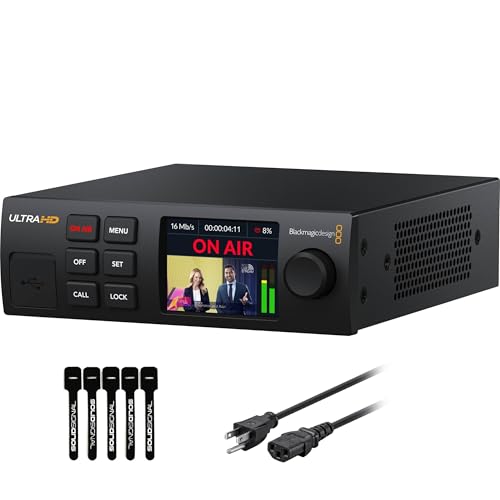
- Up to 2160p60 streaming with H.264/H.265
- 12G-SDI input, loop out, and standards conversion
- Ethernet plus mobile backup with auto-failover
Best For: Broadcast-style sports production with SDI and backup connectivity
Multi-Input Sports Encoder

- Supports up to 8 HDMI inputs
- Dual streams per input with multiple protocols
- Text, logo, time, crop, and rotation controls
Best For: Multi-camera sports venues needing multiple HDMI feeds
All-in-One 4K Studio Pick – YoloBox Ultra for Multi-Cam Sports
If you want live streaming encoders for sports events that can do nearly everything in one box, the YoloLiv YoloBox Ultra is built for fast, field-ready production. It combines a switcher, 4K encoder, recorder, and 8-inch touchscreen monitor, so you can start streaming without a laptop, capture card, or extra software. With support for multiple HDMI sources, overlays, scoreboards, instant replay, and ISO recording, it fits workflows where speed and replay control matter.
Best For: Teams and creators who need a portable all-in-one encoder for multi-camera sports streams.
Pros:
- All-in-one unit with switcher, encoder, recorder, and touchscreen monitor
- Supports 4 HDMI inputs plus USB-C/USB-A sources for 10+ source setups
- Built-in sports-friendly tools like scoreboards, instant replay, and auto-switching
- Cellular bonding support with NDI and SRT for low-latency remote production
Cons:
- Additional charges apply for cellular bonding and related network features
- More expensive than a basic single-purpose encoder
- Best value depends on whether you need the extra built-in production tools
For sports production, the YoloBox Ultra stands out because it reduces the number of separate devices you need to carry and manage. If your priority is a compact setup with replay and switching tools already included, it is a strong high-end option.
Wireless Camera Pick – Mevo Start for Simple Sports Coverage
For live streaming encoders for sports events where you want a compact camera-first setup, the Logitech for Creators Mevo Start is a flexible choice. It streams and records in 1080p HD, works over Wi-Fi or LTE hotspot, and can be controlled from a smartphone with Auto-Director features. Its small size and wireless design make it useful for covering games from different positions without building a large production rig.
Best For: Solo operators and small teams that want an app-controlled wireless camera for simpler sports streams.
Pros:
- Streams and records in 1080p HD with HDR support
- Works over Wi-Fi, Ethernet, or smartphone LTE hotspot
- App control with Auto-Director for easy operation from a phone
- Can connect up to three Mevo Start cameras for multicam setups
Cons:
- 1080p output is less flexible than 4K-focused systems
- Designed as a camera workflow, so it is less of an all-in-one production switcher
- Battery life is rated up to 6 hours, which may not suit every event
The Mevo Start is a practical pick when simplicity matters more than advanced switching hardware. It is especially appealing if you want wireless placement, phone-based control, and enough multicam support to cover smaller sports events cleanly.
Portable Multicam Pick – YoloBox Pro for On-Site Sports Streaming
The YoloLiv YoloBox Pro is a strong option if you want live streaming encoders for sports events in a portable all-in-one format. It combines a full HD encoder, switcher, monitor, and recorder with support for 4G LTE, Wi-Fi, Ethernet, and bonding. With 3 HDMI inputs, USB connections, SD card support, and built-in tools like instant replay and auto-switching, it is designed to handle live sports production without a laptop.
Best For: Portable sports broadcasters who want a compact multicam encoder with built-in production tools.
Pros:
- All-in-one device with encoder, switcher, monitor, and recorder
- 3 HDMI inputs plus USB and SD card support for flexible source setups
- Built-in instant replay, web URL overlay, and auto-switching
- Supports 4G LTE, Wi-Fi, Ethernet, and bonding for connectivity options
Cons:
- Streams up to 1080p60, not 4K
- Bonding requires additional charges
- Best suited to users who value integrated tools over modular hardware
For sports teams and creators, the YoloBox Pro balances portability and live-production features well. It is a smart middle ground if you need multicam switching, replay, and flexible internet options in one compact unit.
Pro SDI Encoder Pick – URayCoder for Custom Sports Feeds
If your live streaming encoders for sports events need to work with SDI-based video gear, the URayCoder HEVC H.265/H.264 SDI to IP encoder is built for that style of workflow. It supports broadcast-oriented protocols including HTTP, RTSP, RTMP(S), SRT, HLS, UDP, and more, and can output up to four video streams at once. The unit also allows text, logos, timing overlays, and detailed video adjustments, which makes it useful for custom sports feeds and distribution to multiple platforms.
Best For: Broadcast setups that need an SDI encoder with multiple streaming protocols and custom output control.
Pros:
- Supports SDI input for broadcast-style video sources
- Can output up to 4 streams simultaneously
- Wide protocol support including RTMP(S), SRT, HLS, UDP, and RTSP
- Offers overlay and image controls like text, logos, crop, rotate, and mirror
Cons:
- Single SDI port means it is less of a multi-input production switcher
- Requires SDI output gear, so it is not as plug-and-play as all-in-one units
- More technical than consumer-focused streaming devices
The URayCoder is best when your sports workflow already centers on SDI sources and you need a stable encoder for delivery rather than live switching. It is a practical fit for operators who want protocol flexibility and fine-grained control over outgoing streams.
Portable HDMI Contributor – Magewell Ultra Encode HDMI Plus
If you need live streaming encoders for sports events that can travel from venue to venue, the Magewell Ultra Encode HDMI Plus is built for straightforward HDMI-based workflows. It encodes up to 4K HDMI, offers loop-through for local monitoring or passthrough, and supports multi-protocol streaming plus simultaneous recording.
Best For: Mobile sports crews, single-camera event streams, and HDMI sources that need reliable streaming with local monitoring.
Pros:
- 4K HDMI encoding with HDMI loop-through for monitoring or pass-through
- Streams via RTMP, RTMPS, SRT, NDI|HX, HLS, and TS over UDP/RTP
- Can stream and record at the same time, including to internal, USB, or network storage
- Includes PoE, Wi-Fi, and support for 4G/5G USB modems for flexible deployment
Cons:
- Only one HDMI input, so it is better for single-source workflows
- 4K input is listed up to 4096×2160p30, which may be limiting for some higher-frame-rate needs
This is a strong pick if your priority is dependable contribution from an HDMI camera or switcher with modern IP streaming options. It leans practical rather than overly complex, which makes it useful for sports broadcasts that need simple setup and monitoring.
Multi-Channel Broadcast Hub – ORIVISION 4-Channel 4K Encoder
For live streaming encoders for sports events that need to handle multiple feeds at once, this ORIVISION model stands out with four HDMI inputs and support for up to 16 total platform outputs. It is designed for live broadcasting workflows, offers real-time status on its LCD screen, and supports common streaming protocols used for event delivery.
Best For: Multi-camera sports coverage, club tournaments, and event productions that need many simultaneous outputs.
Pros:
- Four HDMI inputs and four external audio inputs for multi-source workflows
- Can output up to 16 feeds at once across supported platforms and protocols
- Supports HTTP, RTSP, RTMP, RTMPS, SRT, RTP, UDP, HLS, and FLV
- LCD screen helps monitor status in real time during operation
Cons:
- Its maximum listed input is mixed, with up to 2 channels at 4K@30 and 2 channels at 1080p60
- It is more specialized for multi-channel IP broadcasting than simple plug-and-play use
This encoder makes the most sense when one device needs to serve several cameras and several destinations at the same time. If your sports event workflow is built around volume and multi-platform distribution, it offers a lot of output flexibility.
Rack-Mount Hybrid Encoder – Magewell Ultra Encode AIO
If your live streaming encoders for sports events need to handle both HDMI and SDI sources, the Magewell Ultra Encode AIO is the most flexible option in this group. It supports either input type, can combine them with picture-in-picture or side-by-side layouts, and adds 4K encoding, streaming, and recording in a rack-mountable form factor.
Best For: Broadcast-style sports setups, rack-based control rooms, and productions that switch between HDMI and SDI sources.
Pros:
- Accepts HDMI or SDI input, with picture-in-picture and side-by-side mixing
- Supports 4K encoding with H.264 or HEVC compression
- Streams to up to six destinations using RTMP, RTMPS, SRT, NDI|HX2/HX3, HLS, and more
- Records while streaming and includes PoE, Wi-Fi, 4G USB modem support, and web/API control
Cons:
- Rack-mount form factor is less portable than compact standalone encoders
- Designed for more advanced workflows, so it may be more than a simple single-camera stream needs
This model is a strong choice when your sports production needs both source flexibility and control-room integration. It is especially appealing if you want one encoder to handle contribution, mixing, and recording in a more permanent setup.
4K HDMI Streaming Workhorse – 4K HDMI Encoder for Multi-Platform Live
If you’re comparing live streaming encoders for sports events, this HDMI model is built for creators who need 4K input, flexible outputs, and easy multi-platform delivery. It supports H.265/H.264 encoding, up to 4K UHD at 30fps, and can push streams over protocols like RTMP, SRT, HLS, RTSP, and UDP to services such as YouTube, Facebook, Twitch, and Vimeo.
Best For: Event teams streaming from HDMI cameras or switchers that want one encoder for multi-platform output, overlays, and simple setup.
Pros:
- Supports 4K UHD HDMI input and up to 120fps at lower resolutions.
- Can output multiple streams with different protocols at the same time.
- Includes customization tools for text, scrolling captions, logos, timestamps, crop, rotate, flip, and mirror.
- Offers HDMI embedded audio plus line-in audio and real-time stream status via URL.
Cons:
- Uses HDMI input only, so it is not a fit for SDI-based workflows.
- Maximum 4K frame rate is 30fps, not 60fps.
- Advanced customization may be more than some simple single-stream users need.
Overall, this is a strong practical option if you want a flexible HDMI encoder with broad protocol support and branding controls for sports broadcasts.
Broadcast-Ready SDI Streamer – Blackmagic 4K SDI Encoder
For live streaming encoders for sports events, this Blackmagic unit is aimed at production crews that want a self-contained 4K workflow with SDI input and built-in reliability features. It supports H.264 and H.265 streaming up to 2160p60 over SRT or RTMP, and it can stream directly to platforms and production tools without needing an encoding PC.
Best For: Broadcast-style sports production using SDI cameras, confidence monitors, and backup internet connections.
Pros:
- Supports up to 2160p60 streaming in H.264 or H.265.
- 12G-SDI input with loop output and automatic standards conversion.
- Ethernet plus 5G/4G mobile connectivity with auto-failover.
- Includes closed caption embedding, timecode passthrough, REST API control, and webcam output.
Cons:
- Designed around SDI workflows, so it is less suitable for HDMI-only setups.
- More advanced than a basic plug-and-play encoder for casual use.
- Single-channel focus may not suit larger multi-input streaming rigs.
If you need a robust encoder for live sports coverage with SDI connectivity, failover internet support, and broadcast-oriented controls, this is the most production-ready option here.
Multi-Input Sports Encoder – 8-Channel HDMI Live Encoder
If your sports production needs to handle several HDMI sources at once, this encoder is built for high-capacity streaming rather than single-camera use. It supports eight HDMI signals and can output dual streams per input using protocols like SRT, RTSP, RTMP, HLS, UDP, RTP, MP4, FLV, and multicast, making it a flexible fit for more complex event coverage.
Best For: Multi-camera sports events and venue productions that need several HDMI inputs streamed at the same time.
Pros:
- Handles up to 8 HDMI inputs for larger event setups.
- Dual video streams per input with support for different protocols.
- Wide protocol compatibility, including SRT, RTMP(S), HLS, RTSP, and multicast.
- Includes stream customization for text, logos, time, crop, rotate, flip, and mirror.
Cons:
- HDMI-based design may not work for SDI-only production gear.
- Its capacity can be more than needed for smaller single-camera streams.
- No plug is included, so powering it requires checking your setup first.
For sports workflows that need to consolidate multiple HDMI sources into one streaming platform setup, this encoder offers the most input headroom of the group.
How We Picked the Best Live Streaming Encoders for Sports Events
We looked for encoders that suit real sports production needs: stable network output, support for common protocols like RTMP and SRT, reliable video handling for fast motion, and practical input options for solo crews and multi-camera teams. We also favored models that balance setup speed, mobility, and recording or backup features.
Quick Comparison
If you need the simplest setup, an all-in-one portable unit is usually the fastest path to going live. If your venue uses SDI cameras or longer cable runs, choose an encoder with SDI support. For larger events, multi-input encoders are better when you need to combine several angles, scoreboard feeds, or replays into one stream.
Key Buying Factors for Live Streaming Encoders for Sports Events
Input Type and Camera Workflow
Match the encoder to your cameras and production style. HDMI works well for compact rigs, while SDI is often the safer choice for larger fields, courts, and longer runs. If you plan to mix multiple angles, check how many inputs the unit supports and whether it can switch sources cleanly.
Resolution, Frame Rate, and Motion Handling
Sports demand smooth motion. Look for 1080p60 at minimum, and 4K if your broadcast platform or archive needs it. Fast action benefits from strong encoding efficiency and stable processing so the image does not break up during movement.
Connectivity and Streaming Protocols
Reliable streaming usually depends on having the right protocol support. RTMP remains common for platforms, while SRT can improve resilience on less predictable networks. Ethernet is preferred for venue installs, and mobile or Wi-Fi options are useful when you need backup connectivity.
Recording, Monitoring, and Redundancy
Built-in recording helps protect against stream failures and gives you post-event content for highlights. A clear onboard display or external monitoring output also makes it easier to confirm framing, audio, and stream status during live play.
Who Should Buy Which Live Streaming Encoders for Sports Events?
Solo creators and small teams should lean toward portable all-in-one encoders for fast setup and easy switching. Teams working with professional cameras or long cable runs should prioritize SDI-capable models. If you cover tournaments, leagues, or multi-game venues, a multi-channel encoder is the most efficient choice. For mobile or pop-up coverage, look for lightweight units with wireless or LTE-friendly workflows.
In short, the best Live Streaming Encoders for Sports Events are the ones that fit your camera setup, network conditions, and production scale without adding unnecessary complexity.