Keeping receipts organized is easier when your scanner is built for bookkeeping, not just general paperwork. The right model can speed up capture, improve OCR accuracy, and reduce time spent sorting expense records.
This roundup highlights the best document scanners for QuickBooks receipts in 2026, with a focus on speed, portability, duplex scanning, and software features that help turn paper stacks into usable digital records.
Best 10 Document Scanners for Quickbooks Receipts Picks for 2026
Best for QuickBooks Integration
Epson RapidReceipt RR-600W Scanner

- AI-powered receipt data extraction
- 100-page feeder with duplex scanning
- Wireless, PC-free scanning with touchscreen
Best For: Small businesses and bookkeepers who want QuickBooks-friendly receipt scanning with less manual entry.
Best For Mobile Scanning
Brother DS-640 Compact Mobile Scanner

- Ultra-compact at about 1.5 pounds
- USB-powered for on-the-go scanning
- Includes OCR and cloud scan destinations
Best For: Bookkeepers and small business owners who need a portable scanner for receipts and paperwork.
Best for QuickBooks Online
ScanSnap iX1600 Receipt Edition

- Scans receipts and invoices directly into QuickBooks Online
- Automatic data extraction reduces manual entry and errors
- Touchscreen profiles and Wi‑Fi make daily use flexible
Best For: Bookkeepers and small businesses that want a fast, QuickBooks-focused receipt scanning workflow.
Best for QuickBooks Exports
Epson RapidReceipt RR-60 Mobile Receipt Scanner

- Exports receipt data to QuickBooks-friendly formats
- Ultra-compact, USB-powered scanner under 10 oz
- Creates searchable PDFs and editable digital files
Best For: Freelancers and small businesses that want a portable scanner for receipt cleanup and accounting.
Best for QuickBooks Automation
ScanSnap iX2500 Receipt Edition
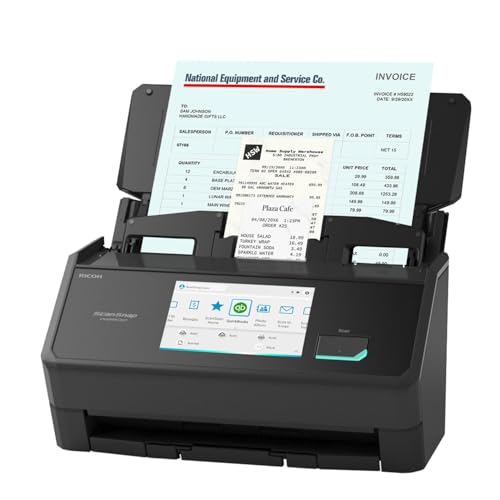
- Direct QuickBooks receipt and invoice capture
- 45ppm duplex scanning with 100-sheet feeder
- Wi‑Fi, USB-C, and cloud/mobile support
Best For: Businesses that want quick receipt-to-QuickBooks scanning with minimal manual entry.
Best for Fast Batch Receipt Scanning
ScanSnap iX2400 Receipt Scanner

- Up to 45 ppm duplex scanning
- 100-sheet feeder for bigger receipt batches
- One-touch workflow with ScanSnap Home
Best For: Busy QuickBooks users who need fast, reliable batch scanning for receipts and paperwork.
Best for High-Volume Receipts
ScanSnap iX2500 Wireless Receipt Scanner

- Fast 45 ppm duplex scanning
- Wi‑Fi 6, USB-C, and cloud support
- 100-sheet feeder with auto sorting
Best For: Busy small businesses and bookkeepers scanning lots of receipts into QuickBooks.
Best for Fast Cloud-Ready Scanning
ScanSnap iX2500 Wireless Scanner

- 45ppm duplex scanning with a 100-sheet feeder
- Wi‑Fi 6, USB-C, and cloud connectivity
- Touchscreen profiles and auto-organization tools
Best For: Small businesses and solo operators who scan receipts often and want fast cloud-ready workflows.
Best for Fast, High-Volume Receipt Scanning
ScanSnap iX2500 Wireless Document Scanner

- 45 ppm duplex scanning with 100-sheet feeder
- Wi-Fi 6, USB-C, and cloud connectivity
- Profiles and auto-optimization simplify receipt sorting
Best For: Bookkeepers and small businesses that scan lots of receipts and invoices.
Best for QuickBooks Integration – Epson RapidReceipt RR-600W Scanner
If you want document scanners for quickbooks receipts that do more than basic image capture, the Epson RapidReceipt RR-600W is built to turn piles of receipts and invoices into organized digital data. Its ScanSmart AI PRO software is designed to extract information and export it into financial apps, while the wireless design and touchscreen make it easy to use in a home office or small business workflow.
Best For: Small businesses and bookkeepers who want a receipt scanner that can feed QuickBooks-friendly data with minimal manual sorting.
Pros:
- ScanSmart AI PRO helps convert receipts into categorized digital data for QuickBooks and similar software.
- 100-page ADF and duplex scanning make it efficient for larger receipt and invoice stacks.
- Wireless scanning and a 4.3-inch touchscreen support PC-free use and flexible placement.
- Creates searchable, editable PDFs for cleaner recordkeeping.
Cons:
- More expensive than basic receipt-only scanners.
- Best results depend on using Epson’s software workflow, not just the hardware alone.
For buyers comparing document scanners for quickbooks receipts, the RR-600W stands out because it combines fast duplex scanning, a large feeder, and software aimed at turning paperwork into usable bookkeeping data. It is a strong fit if you care more about organization and exportability than the smallest possible scanner footprint.
Best For Mobile Scanning – Brother DS-640 Compact Mobile Scanner
If you need document scanners for quickbooks receipts that can travel with you, the Brother DS-640 is a smart lightweight pick. It scans at up to 16 ppm, runs off USB power from a laptop or PC, and stays compact enough for a bag, briefcase, or drawer.
Best For: Bookkeepers, freelancers, and small business owners who want a portable scanner for receipts, invoices, and other small stacks of paperwork.
Pros:
- Very portable at about 1.5 pounds and less than 12 inches long
- USB-powered design works well when an outlet isn’t nearby
- Includes scan-to-file, OCR, email, and cloud destination options
- Handles color and black-and-white scans at the same speed
Cons:
- Best suited to single-sheet scans rather than high-volume batches
- Some image optimization features require a PC connection
For document scanners for quickbooks receipts, the DS-640 stands out when portability matters more than speed or office-grade paper handling. It’s a practical choice if you mainly want to capture receipts accurately and move them into your bookkeeping workflow quickly.
Best for QuickBooks Online – ScanSnap iX1600 Receipt Edition
If you want document scanners for quickbooks receipts that do more than just capture paper, the ScanSnap iX1600 Receipt Edition is built for fast receipt and invoice workflows. It sends scans into QuickBooks Online from the touchscreen and uses intelligent data extraction to cut down on manual entry.
Best For: Bookkeepers, small-business owners, and home-office users who want a direct path from receipts and invoices into QuickBooks Online.
Pros:
- Direct QuickBooks Online scanning from the preconfigured touch panel
- Invoice and receipt processing helps extract reviewable, editable data
- 4.3-inch touchscreen with up to 30 customizable profiles
- Wi-Fi support allows flexible placement without a PC
Cons:
- Optimized for QuickBooks workflows, so it may be more specialized than general-purpose scanners
- Higher-cost option if you only need basic receipt capture
For buyers comparing document scanners for quickbooks receipts, this model stands out for convenience and workflow speed rather than sheer simplicity. It is a strong fit if you want accurate capture, editable fields, and less time spent sorting paperwork after every scan.
Best for QuickBooks Exports – Epson RapidReceipt RR-60 Mobile Receipt Scanner
If you want document scanners for quickbooks receipts that do more than just capture images, the Epson RapidReceipt RR-60 is built for fast receipt and invoice organization. It uses ScanSmart AI PRO to extract data, create searchable PDFs, and export organized details into financial software with less manual entry.
Best For: Freelancers, small businesses, and tax prep users who need a compact scanner for turning receipts into QuickBooks-ready records.
Pros:
- Exports receipt and invoice data to accounting software, including QuickBooks
- Compact, USB-powered design weighs under 10 oz for easy portability
- Scans up to 10 pages per minute in automatic feeding mode
- Includes PDF creation and editing software for Windows and Mac
Cons:
- Best suited to receipts and light document scanning, not high-volume office work
- No built-in wireless connectivity
- Automatic feeding speed is modest compared with larger desktop scanners
For buyers comparing document scanners for quickbooks receipts, the RR-60 stands out for its mix of portability, auto data extraction, and direct export features. It is a practical choice if you want to reduce bookkeeping cleanup without giving up a small footprint.
Best for QuickBooks Automation – ScanSnap iX2500 Receipt Edition
If you want document scanners for quickbooks receipts that cut down on manual entry, the ScanSnap iX2500 Receipt Edition is built around that workflow. It scans directly into QuickBooks, extracts receipt and invoice data, and gives you a fast way to handle bookkeeping without sorting every field by hand.
Best For: Small businesses, freelancers, and bookkeepers who want a fast scanner with QuickBooks-focused receipt capture and easy wireless use.
Pros:
- Direct QuickBooks integration with receipt and invoice data extraction
- Fast 45ppm duplex scanning with a 100-sheet automatic feeder
- Wi-Fi, USB-C, and cloud/mobile scanning options
- Touchscreen profiles make repeat workflows quick to start
Cons:
- Pricier than basic desktop receipt scanners
- Built more for productivity than occasional home use
This is a strong fit if your priority is turning piles of receipts into usable QuickBooks records with as little friction as possible. Among document scanners for quickbooks receipts, it stands out for speed, feeder capacity, and the convenience of one-touch workflow presets.
Best for QuickBooks Sync – Epson RapidReceipt RR-70W
If you want document scanners for quickbooks receipts that do more than just capture images, the Epson RapidReceipt RR-70W is built for turning paper piles into usable financial data. Its ScanSmart AI PRO software is designed to extract receipt and invoice details and export them into applications like QuickBooks, while the wireless, battery-capable design makes it easy to scan from almost anywhere.
Best For: Freelancers, small-business owners, and mobile workers who want a portable scanner that can feed receipt data into QuickBooks with minimal manual entry.
Pros:
- ScanSmart AI PRO helps convert receipts into categorized digital data for financial software
- Wireless scanning and USB/battery power make it highly portable
- Fast enough for everyday receipt batches at up to 15 pages per minute
- Creates searchable and editable PDFs for better recordkeeping
Cons:
- Single-sheet mobile design is less efficient for large stacks than a desktop feeder scanner
- Best software benefits depend on Epson’s workflow setup
For buyers comparing document scanners for quickbooks receipts, this model stands out for portability plus accounting-focused software rather than raw bulk-scanning capacity. It’s a smart fit when you need quick receipt capture, QuickBooks-friendly output, and the flexibility to scan from a laptop, phone, or cloud workflow.
Best for Fast Batch Receipt Scanning – ScanSnap iX2400 Receipt Scanner
If you want document scanners for quickbooks receipts that can keep up with a busy inbox of paper, the ScanSnap iX2400 is a strong fit. Its one-touch workflow, fast duplex scanning, and 100-sheet feeder make it easy to clear a stack of receipts, invoices, and business paperwork without a lot of setup or babysitting.
Best For: Small businesses, home offices, and QuickBooks users who need quick, reliable batch scanning for receipts and other everyday documents.
Pros:
- Scans up to 45 pages per minute for fast receipt and document capture
- 100-sheet auto document feeder handles larger batches with less interruption
- One-touch operation and ScanSnap Home simplify saving and organizing files
- Stable wired USB connection is dependable for daily desktop use
Cons:
- Wired-only design may feel less flexible than wireless scanners
- Higher than entry-level models if you only scan occasionally
For buyers comparing document scanners for quickbooks receipts, the iX2400 stands out for speed, consistency, and easy cleanup of mixed paper piles. It is a practical choice when you want to scan receipts quickly and move straight into bookkeeping instead of spending time correcting files afterward.
Best for High-Volume Receipts – ScanSnap iX2500 Wireless Receipt Scanner
If you want document scanners for quickbooks receipts that can keep up with a busy inbox, the ScanSnap iX2500 is a strong fit. It combines fast duplex scanning, a 100-sheet feeder, and automatic file optimization so you can move stacks of receipts into organized digital records with less manual cleanup.
Best For: Small businesses and bookkeepers who want a fast, wireless scanner for receipts, invoices, and mixed paperwork with minimal setup hassle.
Pros:
- 45 ppm double-sided scanning handles receipt batches quickly
- Wi‑Fi 6 and USB-C support make it flexible for Mac, PC, and mobile workflows
- Large touchscreen with customizable profiles simplifies repeat QuickBooks scanning tasks
- Auto optimize, name, and sort features reduce filing work
Cons:
- Higher price than basic receipt scanners
- Bulkier than simple portable options
- Advanced features may be more than casual users need
For buyers comparing document scanners for quickbooks receipts, this model stands out for speed, wireless convenience, and workflow automation. It is especially appealing if you scan often and want a premium device that helps keep receipts and business documents organized with less effort.
Best for Fast Cloud-Ready Scanning – ScanSnap iX2500 Wireless Scanner
If you want document scanners for quickbooks receipts that can move fast without making setup a chore, the ScanSnap iX2500 is a strong pick. It combines a 100-sheet feeder, 45ppm duplex scanning, Wi‑Fi 6, and USB-C connectivity, so you can capture stacks of receipts and send them where they need to go with minimal friction.
Best For: Small businesses and solo operators who need quick, reliable receipt scanning with easy cloud and desktop workflow support.
Pros:
- Fast 45ppm double-sided scanning helps clear receipt piles quickly
- Wi‑Fi 6, USB-C, and cloud support make it flexible for QuickBooks workflows
- Large touchscreen and user profiles simplify repeat scanning tasks
- Paper protection features help reduce jams and missed scans
Cons:
- Higher-end pricing than basic receipt scanners
- Physical footprint may be larger than compact desk models
This is a smart fit if you need document scanners for quickbooks receipts and care more about speed, automation, and shared workflows than bare-bones simplicity. It is especially appealing for anyone who scans often and wants a device that can keep receipts organized with less manual cleanup.
Best for Fast, High-Volume Receipt Scanning – ScanSnap iX2500 Wireless Document Scanner
The ScanSnap iX2500 is a strong pick for document scanners for quickbooks receipts if you want speed, a large feeder, and easy wireless scanning. It’s built to handle stacks of receipts, invoices, and supporting paperwork with less fuss, then send them straight to your computer or cloud workflow.
Best For: Bookkeepers, small businesses, and solo owners who want a fast scanner for receipt-heavy QuickBooks organization.
Pros:
- 45 ppm duplex scanning with a 100-sheet feeder for batch jobs
- Wi-Fi 6, USB-C, and cloud support for flexible QuickBooks workflows
- Touchscreen profiles make it easy to route scans to the right app or folder
- Automatic optimization helps clean up receipts, photos, and business cards
Cons:
- More expensive than basic receipt scanners
- Large size makes it less ideal for very tight desks
For buyers comparing document scanners for quickbooks receipts, the iX2500 stands out for speed, wireless convenience, and low-friction batch scanning. It makes sense if you process a lot of paper and want a premium scanner that can keep up with day-to-day bookkeeping.
How We Picked the Best Document Scanners for Quickbooks Receipts
We focused on Document Scanners for Quickbooks Receipts that balance scanning speed, image quality, receipt handling, and ease of use. Priority went to models with reliable duplex scanning, strong OCR or receipt-management software, wireless or USB flexibility, and enough feeder capacity for small-business workflows.
Quick Comparison
If you want the simplest setup, look for a desktop scanner with a large auto document feeder and one-touch operation. If portability matters, a compact mobile scanner is the better fit. For heavier monthly volume, premium wireless models with cloud support and receipt-focused software are the most efficient option.
Key Buying Factors for Document Scanners for Quickbooks Receipts
Receipt Capture and OCR
Receipts are often small, faded, or crumpled, so OCR quality matters as much as scan resolution. Look for software that can read vendor names, totals, dates, and line items accurately enough to reduce manual entry.
Duplex Scanning and Feeder Capacity
Duplex scanning saves time when you also handle invoices, statements, or multi-page packets. A larger automatic document feeder is helpful if you batch-scan receipts at the end of the week or month.
Connectivity and Workflow
Wireless scanning is convenient for shared offices, while USB models are often simpler and more dependable for a single workstation. If you use QuickBooks frequently, choose a scanner that supports an easy export or direct workflow to your accounting system.
Portability Vs. Desktop Speed
Mobile scanners are best for road warriors, field technicians, and anyone scanning from multiple locations. Desktop units are better for speed, higher volume, and less hands-on feeding.
Who Should Buy Which Document Scanners for Quickbooks Receipts?
Choose a compact mobile scanner if you need to scan receipts on the go or work in a tight space. Pick a wireless desktop model if you want a central bookkeeping station for a small office or home office. If your priority is the fastest, most streamlined workflow for Document Scanners for Quickbooks Receipts, a premium model with a touchscreen, cloud options, and a larger feeder is usually worth the upgrade.