The best digital desk clocks for professional studios do more than show the time. They help creators track sessions, monitor schedules, coordinate workflows, and add a polished visual accent without competing with monitors or equipment.
This roundup compares 10 options across smart connectivity, display readability, customization, alarms, timers, temperature readings, and studio-friendly design. Whether you need an always-on reference clock or a programmable pixel display, the right choice depends on how you work.
Best 10 Digital Desk Clocks for Professional Studios Picks for 2026
Precision WiFi Pick

- Custom or standard WiFi NTP synchronization
- Shows time, date, weekday, and seconds
- Silent, configurable green LED display
Best For: Studios, control rooms, and technical workspaces
Retro Atmosphere Pick

- Nixie-style simulated RGB display
- Includes alarm and 99-minute timer
- Custom colors and lighting modes
Best For: Creative studios and style-conscious desks
Visibility Pick

- Large display with time, date, weekday, and temperature
- Automatic dimming with four brightness levels
- Battery backup, USB charging, and Auto DST
Best For: Large shared workspaces and easy long-distance viewing
Workflow Pick

- Bluetooth-controlled custom text and animations
- Built-in Pomodoro timer and alarm
- Displays busy or custom status messages
Best For: Modern studios and productivity-focused desks
Design-Focused Pick
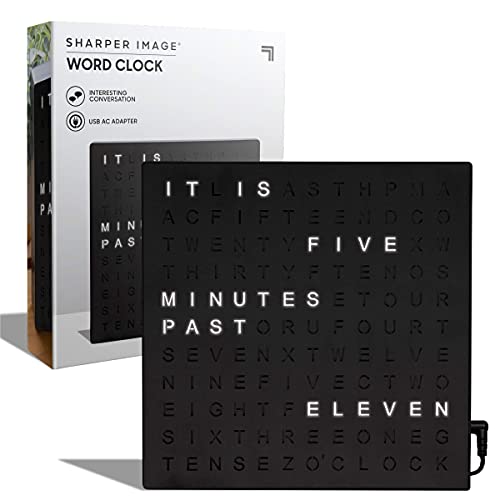
- Illuminated word display in five-minute increments
- Desk or wall mounting for flexible placement
- USB-powered modern black finish
Best For: Design-conscious studios and creative offices
Creator’s Smart Pick
ULANZI TC002 Pixbar Smart Pixel Clock

- Shows time, weather, scores, and follower counts
- Built-in Pomodoro and focus timer tools
- WiFi, pixel art, and portable battery dock
Best For: Streaming and content-creation studios
Practical Visibility Pick
Peakeep Large Display Digital Alarm Clock

- Large display includes time and full calendar details
- Dimmable screen with five alarm volume levels
- Plug-in power plus USB phone charging
Best For: Studios needing clear scheduling information
RGB Feature Pick

- Shows time, temperature, date, and weekday
- 15 display colors with 10 ambient-light options
- Dual alarms and five brightness levels
Best For: Studios wanting customizable color and at-a-glance information
Readability Pick

- Large white and sky-blue LED digits
- Auto and manual dimming options
- Displays calendar, seconds, temperature, and alarms
Best For: Studios prioritizing clear information and adaptable brightness
Light Housing Pick

- Large display with white and sky-blue digits
- Auto/manual dimming and display-off mode
- Dual alarms with calendar and temperature readouts
Best For: Modern studios preferring a white desk-clock finish
Precision WiFi Pick – Green Smart WiFi Clock
For professional studios needing dependable reference time, this digital desk clock for professional studios uses WiFi NTP synchronization and can display seconds, the date, and weekday. Its green LED matrix and quiet operation suit focused workspaces.
Best For: Studios, control rooms, labs, and offices that need customizable, network-synchronized time.
Pros:
- Automatically syncs through standard or custom WiFi NTP servers.
- Supports 12- or 24-hour formats, seconds, weekday, and full-date views.
- Lets users turn off the WiFi hotspot after setup.
- Operates without a buzzer for distraction-free use.
Cons:
- Requires corded electric power and initial WiFi setup.
- The green display may not suit every studio aesthetic.
This is the most precision-focused option in the group, especially where synchronized time and configurable information matter more than alarms or decorative features.
Retro Atmosphere Pick – Walnut Nixie-Style Clock
This walnut digital desk clock for professional studios combines a simulated Nixie-tube look with RGB lighting, making it a practical time display with a distinctive retro appearance. It also adds alarm and timer functions for studios or offices.
Best For: Creative studios and desks where visual character, alarms, and timer functions are useful.
Pros:
- Simulates a glowing Nixie-tube display with RGB lighting.
- Supports 12- and 24-hour formats, an alarm, and a timer up to 99 minutes.
- Offers customizable colors and multiple lighting modes.
- Uses a tabletop walnut and aluminum design.
Cons:
- Its decorative display may be less immediately readable than a large conventional clock.
- It requires corded electric power.
Choose this model when the clock should contribute to the studio’s visual atmosphere as well as provide everyday scheduling tools.
Visibility Pick – DreamSky Large Digital Clock
For studios or offices where quick readability is the priority, this large digital desk clock for professional studios displays time, date, weekday, and indoor temperature. Its dimming controls and battery backup add convenience for shared or continuously used spaces.
Best For: Workspaces needing a large, easy-to-read display with adjustable brightness and backup power.
Pros:
- Displays time, date, weekday, and indoor temperature.
- Provides four brightness levels and automatic day/night dimming.
- Battery backup helps preserve settings during power cuts.
- Includes adjustable alarm volume, Auto DST, and a USB charging port.
Cons:
- It includes an alarm, which may be unnecessary for studios that need a silent reference clock.
- The plastic construction is more utilitarian than decorative.
- Its larger footprint may require more desk space.
This is a strong practical choice for teams that need information visible from across a room, though it is less specialized for network synchronization than the WiFi model.
Workflow Pick – Programmable Pixel Desk Clock
This programmable digital desk clock for professional studios goes beyond timekeeping with Bluetooth app control, custom text, animations, and a busy-sign function. Its Pomodoro timer and plug-in design make it especially relevant to productivity-focused desks.
Best For: Modern studios and offices that want customizable status messaging alongside time and productivity tools.
Pros:
- Supports custom text, patterns, and animations through a Bluetooth app.
- Includes a Pomodoro timer and alarm.
- Can display a busy or custom status message.
- Plug-in power avoids regular battery replacement.
Cons:
- Bluetooth app control requires a compatible smartphone for full customization.
- The pixel-art presentation may be less traditional for formal control rooms.
- It does not list WiFi or NTP synchronization.
This model is best when the desk clock also needs to communicate availability and support focused work sessions, rather than serve only as a precise time reference.
Design-Focused Pick – Sharper Image LED Word Clock
For professional studios that value visual presentation, the Sharper Image LED Word Clock offers a distinctive alternative to numeric displays. Its illuminated five-minute word format, compact square design, and USB-powered setup make it a stylish option among digital desk clocks for professional studios.
Best For: Studios, offices, and creative workspaces where design and conversational appeal matter as much as basic time display.
Pros:
- Displays time in illuminated words in five-minute increments.
- Works on a desk or wall, fitting compact studio spaces.
- Includes a USB cable and power adapter for straightforward setup.
Cons:
- Does not include an alarm function.
- Word-based display is less precise than a conventional numeric clock.
- Requires corded electric power.
This is a strong choice when your studio clock should contribute to the room’s visual identity. Choose another model if you need alarms, timers, or an always-exact numeric readout.
Creator’s Smart Pick – ULANZI TC002 Pixbar Smart Pixel Clock
The ULANZI TC002 Pixbar is built for active creator and production environments, combining a 16×52 LED pixel display with WiFi-connected information. Among digital desk clocks for professional studios, it stands out for adding weather, schedules, scoreboards, follower counts, and focus tools to the desk.
Best For: Streaming studios, content-creation desks, and workspaces that benefit from timers, live social metrics, weather, and customizable pixel art.
Pros:
- Displays time, weather, scoreboards, and live follower counts.
- Includes a focus clock, Pomodoro timer, and world clock.
- Offers WiFi connectivity, pixel-art customization, and sound-reactive mode.
- Magnetic dock and 3600mAh battery support flexible placement.
Cons:
- Requires 2.4GHz WiFi and app setup for connected features.
- Its feature-rich design may be more than needed for simple timekeeping.
- The supplied specifications identify the display type as analog despite the LED pixel display description.
This is the most capable and studio-oriented option in the group for creators who want desk information and visual customization. It is less suitable if you prefer a quiet, minimal clock without connected features.
Practical Visibility Pick – Peakeep Large Display Digital Alarm Clock
The Peakeep Large Display Digital Alarm Clock prioritizes quick readability and dependable everyday operation. Its oversized screen shows time, date, and day of the week together, making it a practical choice among digital desk clocks for professional studios that need clear scheduling information at a glance.
Best For: Office-style studios, production rooms, and shared workspaces where large calendar information, adjustable brightness, and an alarm are useful.
Pros:
- Shows time, month, date, and day of the week simultaneously.
- Dimmable display supports comfortable viewing in different lighting.
- Provides five alarm volume levels and automatic DST adjustment.
- Includes a rear USB port for charging a phone.
Cons:
- Uses a plug-in electric connection rather than being fully cordless.
- Its plastic tabletop design is more utilitarian than decorative.
- AAA batteries are required for the backup function.
Choose the Peakeep when legibility, calendar details, and alarm flexibility matter more than creative styling. It is a straightforward studio clock with useful office-oriented extras, including brightness control and phone charging.
RGB Feature Pick – 15-Color Digital Desk Clock
For shoppers comparing digital desk clocks for professional studios, this RGB model stands out when quick-glance information and adjustable visual styling matter. Its display shows the time, temperature, date, and weekday, while five brightness levels help adapt it to different room conditions. Note that it requires corded power.
Best For: Studios, offices, and creative workspaces that want prominent information plus customizable RGB lighting.
Pros:
- Displays time, temperature, date, and weekday together.
- Offers 15 display colors and 10 ambient-lighting options.
- Includes dual alarms, four alarm modes, snooze, and manual DST adjustment.
- Five brightness levels support daytime and nighttime viewing.
Cons:
- Must remain plugged in to operate.
- Its colorful styling may be less suitable for minimalist studio setups.
This is a flexible choice if you want a clock that functions as both a practical information display and a visual accent. Its tabletop design and broad feature set make it especially useful where ambient lighting and scheduling controls are welcome.
Readability Pick – Black 6.7-Inch LED Desk Clock
For digital desk clocks for professional studios where readable scheduling information is the priority, this black KOSUMOSU model provides a large 6.7-inch LED display. It combines time, seconds, date, weekday, and temperature with automatic or manual dimming, making it practical for changing studio light levels.
Best For: Professional desks and control rooms that need a clear multi-function display with flexible dimming.
Pros:
- Large 6.7-inch display uses bright white and sky-blue digits.
- Shows time, seconds, date, weekday, and indoor temperature.
- Supports automatic sensor-based dimming and three manual brightness levels, plus display-off mode.
- Includes dual alarms, three alarm cycles, snooze, and a two-year warranty.
Cons:
- Requires a 5V/1A AC adapter, which is not included.
- The backup battery preserves time during outages but is not a continuous power source.
Its restrained black housing and large digits suit a functional studio environment better than a decorative clock. The dimming options are particularly useful when the workspace shifts between bright working conditions and darker monitoring sessions.
Light Housing Pick – White 6.7-Inch LED Desk Clock
This white KOSUMOSU model is a practical option for digital desk clocks for professional studios that benefit from a lighter desk accessory and a broad information display. Its 6.7-inch mirror-style screen shows the time, seconds, date, weekday, and temperature, with automatic and manual dimming for control over brightness.
Best For: Bright, modern studios or office desks that favor a white finish and large, easy-to-read digits.
Pros:
- Large 6.7-inch display uses white and sky-blue numbers.
- Provides time, seconds, date, weekday, and indoor temperature.
- Offers light-sensor auto dimming and manual brightness settings, including display-off mode.
- Includes dual alarms, three alarm cycles, snooze, and a two-year warranty.
Cons:
- 5V/1A AC adapter is required but not included.
- The included battery is intended for time retention during outages, not continuous operation.
Choose this version when the clock’s finish matters as much as its display functions. It delivers the same useful scheduling and monitoring features as a work-focused desk clock while its white housing can blend neatly into lighter studio décor.
How We Picked the Best Digital Desk Clocks for Professional Studios
We focused on features that matter in production rooms, editing suites, offices, and creative workspaces: time accuracy, at-a-glance readability, display flexibility, connectivity, controls, and physical design. The selection includes Wi-Fi and app-controlled clocks, programmable pixel displays, Nixie-style designs, large-format alarm clocks, and simple LED models.
We also considered whether each clock can function as more than decoration. Timers, seconds displays, date and weekday information, temperature readings, dual alarms, dimming, and 12/24-hour formats can all be useful during long sessions or tightly scheduled studio days.
Quick Comparison
| Best For | Features to Prioritize |
|---|---|
| Connected studios | Wi-Fi synchronization, NTP accuracy, and app control |
| Creative workspaces | Pixel art, custom text, patterns, and programmable displays |
| Recording and editing sessions | Seconds, timers, alarms, and clear viewing angles |
| Shared or dim studios | Adjustable brightness and readable large digits |
| Design-led setups | Retro Nixie tubes, word displays, or minimal LED styling |
Key Buying Factors for Studio Desk Clocks
Accuracy and Synchronization
If your studio runs on deadlines, choose a model with Wi-Fi time synchronization or another reliable accuracy feature. A basic clock can work well for casual use, but connected synchronization reduces manual resets and helps maintain consistent time.
Readability and Brightness
Check digit size, contrast, viewing angle, and dimming controls. Bright displays are useful in daylight, while adjustable brightness prevents glare during recording, video calls, or late-night editing. A clock that looks clear from across the room may be more useful than one with a longer feature list.
Controls, Timers, and Customization
Creators may benefit from seconds, countdown timers, Pomodoro functions, alarms, custom text, or programmable patterns. App control is convenient, but simple physical buttons can be preferable when phones are kept away from the workstation.
Power and Placement
Confirm whether the clock is plug-in, battery-powered, or both. Consider cable routing, desk depth, wall-mounting options, and whether the display will be blocked by speakers, monitors, or other equipment.
Who Should Buy Which Digital Desk Clocks for Professional Studios?
Choose a Wi-Fi or app-controlled model if accurate synchronization and remote customization are central to your workflow. Programmable pixel clocks suit studios that want visual alerts, custom messaging, or a more expressive desk aesthetic. Nixie-style and word-display clocks are better for design-conscious buyers who value visual character.
For straightforward timekeeping, large-display alarm clocks are practical, easy to read, and typically simpler to operate. Models with temperature, weekday, date, and dual-alarm functions make sense for workspaces that also serve as offices or bedrooms. Finally, prioritize dimming and display comfort if the clock will remain visible throughout long recording, mixing, or editing sessions.