Great 360 video is only half the story. If you want cleaner dialogue, better voice pickup, or a more polished workflow, choosing a camera with external microphone support can make a huge difference.
In this roundup, we focus on the best options for creators, travelers, and meeting rooms in 2026, with picks that balance image quality, audio flexibility, and real-world usability.
Best 10 360 Cameras with External Microphone Support Picks for 2026
Flagship 360 Action Pick
Insta360 X5 8K 360° Action Camera

- 8K30fps 360° capture with dual 1/1.28" sensors
- Triple AI chip design improves low-light performance
- 4-mic array with Wind Guard helps reduce wind noise
Best For: Creators wanting premium 360 video, stabilization, and strong onboard audio
Simple Mic Add-On
CYNOVA X3 External Mic Adapter

- Adds 3.5mm mic input for the Insta360 X3
- Can record and charge at the same time
- Compact design is meant to stay invisible in 360 shots
Best For: Insta360 X3 owners who want external mic support
High-Detail 360 Option
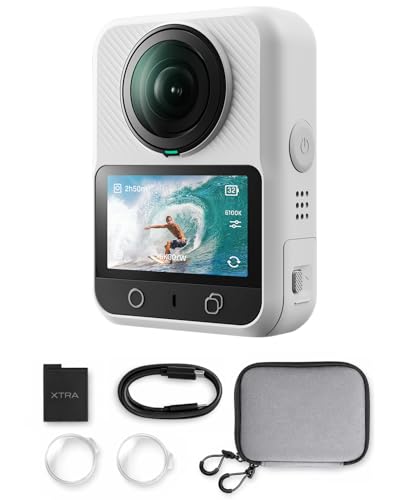
- True 8K video plus 100MP panoramic photos
- 1-inch sensor equivalent targets better low-light capture
- 105GB built-in storage reduces dependence on SD cards
Best For: Travel and outdoor creators who want high-resolution 360 capture
Conference Room Collaboration

- Dual-lens 360-degree room capture
- Omnidirectional mic array up to 20 feet
- USB-C plug-and-play for meetings
Best For: Hybrid meetings and conference rooms
Rugged Adventure Pick
Nikon KeyMission 360 4K Action Kit

- Dual-lens 360-degree video capture
- Electronic vibration reduction for motion
- Waterproof, shockproof body with kit extras
Best For: Travel and sports shooting in rough conditions
Premium Creator Choice

- 11K stills and 5.7K video capture
- HDR-DNG RAW support and touchscreen
- Swappable battery with expandable memory
Best For: Professional 360 creators and editors
Editor’s Choice
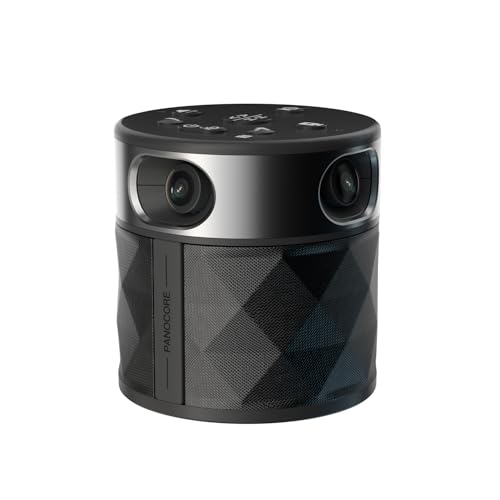
- 360° capture with dual 180° and speaker-focused modes
- Built-in speaker and 3-mic array with AI voice processing
- Local MicroSD recording and plug-and-play meeting app support
Best For: Small to medium meeting rooms needing an all-in-one conference camera
Budget Pick
j5create JVCU360 Meeting Webcam
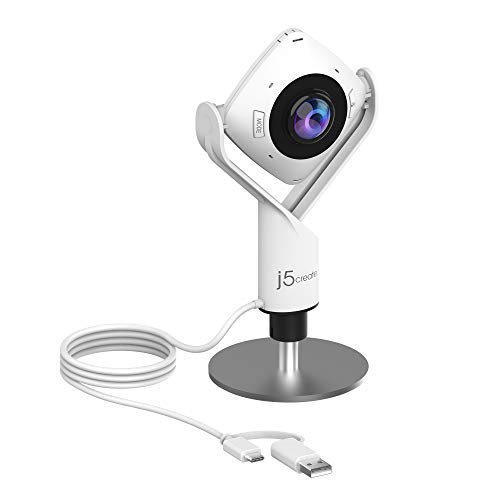
- 360° video conferencing camera with built-in omnidirectional mic
- Six display modes for flexible framing and participant views
- USB plug-and-play support for major meeting apps
Best For: Budget-friendly 360° webcam use for classes and collaborative calls
Room-Friendly Pick
TOUCAN SC360 Conference Camera
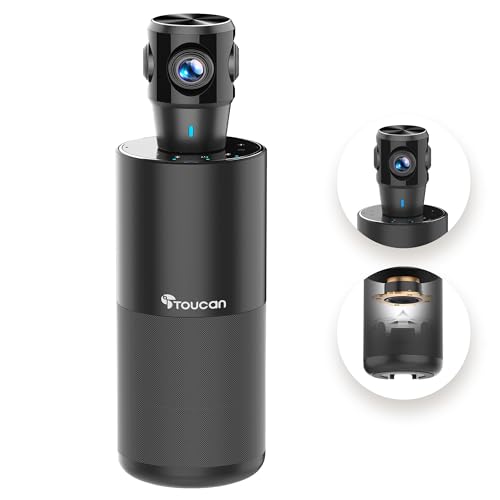
- 360° capture with AI tracking for room coverage
- Four noise-reduction mics plus built-in speaker
- USB plug-and-play compatibility across devices and apps
Best For: Conference rooms and hybrid setups that need integrated audio and video
Flagship 360 Action Pick – Insta360 X5 8K 360° Action Camera
If you’re comparing 360 cameras with external microphone support and want a rugged flagship, the Insta360 X5 is built for high-end 360 capture with strong low-light performance. It shoots up to 8K30fps with dual 1/1.28″ sensors, adds FlowState stabilization and Horizon Lock, and includes a new 4-mic array with Wind Guard for cleaner audio.
Best For: Action creators, travelers, and vloggers who want premium 360 video with improved onboard audio and durable, replaceable lenses.
Pros:
- 8K30fps 360° video with dual 1/1.28″ sensors for detailed footage.
- Triple AI chip design helps improve low-light image quality and noise reduction.
- Built-in 4-mic array with Wind Guard reduces wind noise for clearer voices.
- Replaceable lenses and waterproof build add extra peace of mind for active shooting.
Cons:
- Audio support is built in; the supplied notes do not mention a dedicated external mic input.
- Best features may be more than casual users need if they only shoot simple clips.
The X5 stands out if you want a top-tier 360 camera that balances image quality, stabilization, and usable onboard audio. It is especially compelling for creators who prioritize action-ready durability and polished results straight from the camera.
Simple Mic Add-On – CYNOVA X3 External Mic Adapter
For buyers focused specifically on 360 cameras with external microphone support, this CYNOVA adapter is the most direct way to add a 3.5mm mic to the Insta360 X3. It is designed to stay invisible in 360 shooting and lets you charge and record at the same time through its Type-C and audio ports.
Best For: Insta360 X3 owners who need a compact adapter for external microphones without losing charging capability.
Pros:
- Adds a 3.5mm audio input to the Insta360 X3.
- Supports recording and charging at the same time.
- Compact, lightweight design is meant to stay invisible in 360 footage.
- Buckle design helps keep the connection secure.
Cons:
- Designed only for the Insta360 X3.
- It is an accessory, not a standalone camera.
This adapter makes sense if you already own an X3 and want a straightforward way to improve audio with an external mic. It is a niche but practical add-on for creators who need better voice capture without changing their camera setup.
High-Detail 360 Option – Xtra 8K 1-Inch Sensor Camera
The Xtra 360 camera is aimed at buyers who want a high-resolution 360 option with strong low-light performance. It offers true 8K video, 100MP panoramic photos, and a 1-inch sensor equivalent design, but the supplied notes focus on image quality and storage rather than dedicated external microphone support.
Best For: Travelers and creators who value 8K detail, built-in storage, and rugged waterproof use.
Pros:
- True 8K 360° video and 100MP panoramic photos.
- 1-inch sensor equivalent is designed for better light gathering and dynamic range.
- 105GB built-in storage means no SD card is required.
- Waterproof, compact action-camera design suits travel and outdoor use.
Cons:
- The supplied notes do not mention external microphone support.
- Battery life is listed at about 1.5 hours, which may be limiting for longer shoots.
If your priority is high-end 360 image quality over audio expandability, this model is worth a close look. It is especially appealing for shooters who want strong resolution and built-in storage in a rugged body.
Wearable Vlog Camera – VOLAREON 5K Motorized Lens Camera
This wearable video camera is not a traditional 360 camera, but it does include external microphone support and is useful to consider if audio quality matters more than full spherical capture. It records up to 5K, includes a lavalier microphone, and adds face tracking plus a motorized rotating lens for flexible solo shooting.
Best For: Solo creators, travel vloggers, and body-cam style users who want external mic support with versatile framing.
Pros:
- Includes an external lavalier microphone for clearer voice pickup.
- Motorized 270° rotating lens and face tracking help with solo filming.
- Records 5K video or 4K/60fps for smoother motion.
- 64GB memory card and remote are included for immediate use.
Cons:
- Not a 360 camera, so it does not deliver spherical capture.
- It is listed as not water resistant.
If you need external mic support and a flexible wearable camera more than you need a true 360 rig, this model is a practical alternative. It is especially appealing for handheld, clipped-on, or travel recording setups.
Conference Room Collaboration – RICOH Meeting 360 AI Camera
If you need one of the more practical 360 cameras with external microphone support for meetings, the RICOH Meeting 360 is built around room capture rather than action shooting. It uses dual lenses for a full panoramic view, an omnidirectional microphone array that can pick up voices from up to 20 feet, and active speaker detection to keep the focus on whoever is talking.
Best For: Conference rooms, hybrid meetings, and plug-and-play group calls where clear audio pickup matters.
Pros:
- Dual lenses capture the entire meeting room in 360 degrees
- Omnidirectional microphone array detects voices from up to 20 feet
- Active speaker detection and focus help keep discussions organized
- USB-C bus-powered design makes setup simple with one cable
Cons:
- Designed for meetings, not for outdoor or action-style filming
- Built-in speakers are part of the room system, so it is not a compact travel camera
Overall, this is a strong choice when the priority is capturing the whole room and making sure voices are heard clearly without a complicated setup. It is especially appealing for teams that want a certified conferencing camera that works across major platforms.
Rugged Adventure Pick – Nikon KeyMission 360 4K Action Kit
Nikon KeyMission 4K 360 Action Camera Bundle | For Travel, Sports | Waterproof + More
Check Price On AmazonThe Nikon KeyMission 360 is aimed at creators who want immersive 360 cameras with external microphone support options through the broader accessory kit ecosystem, while keeping the camera itself focused on rugged capture. It records dual-lens 360-degree video, adds electronic vibration reduction for smoother motion, and uses a waterproof, shockproof body that is ready for rough conditions.
Best For: Travel, sports, and outdoor creators who want a rugged 360 action camera package.
Pros:
- True dual-lens 360-degree recording for immersive action footage
- Electronic vibration reduction helps reduce shake during movement
- Waterproof and shockproof body works without an external housing
- Includes a large 66-piece kit with batteries, charger, storage, and accessories
Cons:
- Supplied notes do not call out a built-in external mic input on the camera itself
- Best suited to action use rather than studio-style production
In practice, this model makes sense if you value durability and a complete starter kit more than advanced creator controls. It is a strong fit for fast-moving shooting situations where the camera needs to withstand the environment first.
Premium Creator Choice – Ricoh Theta X 11K 360 Camera
The Ricoh Theta X is the most feature-rich option here for creators comparing 360 cameras with external microphone support via a broader accessory workflow, while still emphasizing image quality and on-camera control. It captures 11K stills and 5.7K video, includes a large touchscreen, supports RAW shooting, and lets you swap the battery and memory card for longer sessions.
Best For: Professional creators who want high-resolution 360 capture, RAW workflow, and long shooting sessions.
Pros:
- 11K stills and 5.7K/30fps video for high-resolution capture
- HDR-DNG RAW support for more flexible editing
- Swappable battery and expandable memory help extend shooting time
- Large color touchscreen allows setup and review without a phone
Cons:
- No compatible mountings are listed in the supplied details
- External microphone support is not specified in the provided notes
If you want the most polished capture and the most serious post-production options, this is the one that stands out. It is better suited to deliberate content creation than to casual point-and-shoot use.
Editor’s Choice – PANOCORE360 Meeting Camera
If you’re comparing 360 cameras with external microphone support for hybrid meetings, the PANOCORE360 stands out for its all-in-one conference-room design. It combines 360° capture, a built-in mic array, and a speaker in a single unit, with AI voice isolation and auto speaker focus to keep calls clear and organized in small to medium rooms.
Best For: Small to medium meeting rooms that need a compact, driver-free 360° conference camera with integrated audio and local recording.
Pros:
- 360° camera design with dual vision modes for either active-speaker focus or a dual 180° room view.
- Built-in speaker and omnidirectional 3-mic array with AI voice processing for clearer conversations.
- Local recording to MicroSD plus plug-and-play compatibility with Zoom, Teams, Webex, and Google Meet.
- USB-powered operation with included splitter and power adapter for older or low-power computers.
Cons:
- Audio is integrated rather than using a separate external microphone input.
- Designed for rooms with up to about 12 participants, so it’s not aimed at larger spaces.
- 1080p output may be limiting if you want a higher-resolution meeting feed.
Overall, this is a strong pick if you want a single device to handle room video, speaker output, and mic pickup without extra setup. It’s especially practical when simplicity, local recording, and broad conferencing compatibility matter most.
Budget Pick – j5create JVCU360 Meeting Webcam
The j5create JVCU360 is a straightforward option if you want 360 cameras with external microphone support in a simple plug-and-play package. It records in Full HD 1080p and includes a built-in omnidirectional microphone, while its six display modes and touch bar give you some flexibility for different meeting layouts.
Best For: Budget-conscious users who want a basic 360° meeting webcam for video conferencing, online classes, and collaboration.
Pros:
- 360° conferencing camera with built-in omnidirectional microphone.
- Six display modes for more flexible viewing angles and participant framing.
- USB UVC/UAC plug-and-play connectivity makes setup simple.
- Works with popular platforms like Zoom, Teams, Google Meet, and Skype.
Cons:
- The notes mention that firmware updates may be needed for best functionality and resolution.
- Only 1080p video, so it’s not the most advanced image option.
- The microphone is built in, not a separate external mic input solution.
This model is best when you want dependable basics rather than premium room-camera features. It covers the essentials well and should suit smaller collaborative setups where ease of use matters most.
Room-Friendly Pick – TOUCAN SC360 Conference Camera
The TOUCAN SC360 is a practical choice if you’re evaluating 360 cameras with external microphone support for a room where audio clarity matters. It pairs 360° omni-directional shooting with four noise-reduction mics, a speaker, and AI tracking, making it a useful all-in-one option for conference rooms, home offices, and tablet-based setups.
Best For: Teams that want a room camera with built-in multi-mic audio, speaker output, and broad device compatibility.
Pros:
- 360° wide-angle video with AI tracking for more dynamic meeting coverage.
- Four noise-reduction microphones plus a built-in speaker for clearer communication.
- Plug-and-play USB setup keeps installation quick and simple.
- Compatible with PCs, Macs, laptops, tablets, and major conferencing platforms.
Cons:
- Audio is handled by the integrated mic system rather than a dedicated external microphone input.
- The product details emphasize 1080p output, not higher-resolution capture.
- At 1.28 kg, it is heavier than compact webcam-style units.
For buyers who want a meeting camera that covers both room video and room audio in one device, the SC360 is a solid fit. It’s especially appealing when you need easy setup and support across a wide mix of devices.
How We Picked the Best 360 Cameras with External Microphone Support
We prioritized cameras and meeting devices that make sense for different buyers, with an emphasis on audio expansion, video quality, ease of setup, and practical features like USB-C connectivity, battery life, and portability. For 360 Cameras with External Microphone Support, compatibility and workflow matter just as much as resolution.
Quick Comparison
Action-focused models are best for creators who need rugged bodies, waterproofing, and strong stabilization. Conference cameras are better for offices and hybrid meetings, especially when you want reliable speaker tracking and built-in mic arrays. If you need the most flexible audio setup, look for products that clearly support external mic input, adapters, or USB audio paths.
Key Buying Factors for 360 Cameras with External Microphone Support
Audio Input Options
Check whether the camera supports a 3.5mm mic jack, USB audio, or a dedicated adapter. Some cameras require brand-specific accessories, so confirm compatibility before buying.
Video Resolution and Lens Quality
Higher resolution helps preserve detail after reframing. That matters if you plan to crop, stabilize, or repurpose footage for social clips, presentations, or travel content.
Mounting and Portability
If you will record on the move, weight, grip, and accessory ecosystem matter. For office use, a stable desktop or tripod setup usually takes priority over compactness.
Battery, Storage, and Workflow
Long recording sessions benefit from replaceable batteries, internal storage, or reliable power-over-USB operation. Fast transfer options can also save time if you edit often.
Who Should Buy Which 360 Cameras with External Microphone Support?
Creators and vloggers should lean toward rugged 360 Cameras with External Microphone Support, strong low-light performance, and accessory flexibility. Teams and educators should choose conference cameras with clear voice pickup, speaker tracking, and simple USB-C connectivity. If you are mostly comparing video quality, focus on resolution and stabilization first; if audio is a priority, make sure the external mic path is truly supported in the way you plan to use it.
In short, the best choice depends on whether you need a production tool, a meeting device, or a hybrid camera that can do a bit of both.