Refillable ink can make frequent printing more affordable, while automatic duplexing saves paper without the hassle of flipping each sheet yourself. The right printer should do both reliably—and fit the way you print.
This roundup covers five selected listings. Because the Epson EcoTank ET-2985 appears twice, compare those offers for price and included supplies rather than treating them as different printers.
Best 5 Ink Tank Printers with Auto Duplex Picks for 2026
Small-Office Workhorse

- Automatic two-sided printing
- 35-sheet ADF and 250-sheet capacity
- Wi-Fi, USB, and wired LAN
Best For: Small offices handling frequent documents
Cloud-Ready Home Office
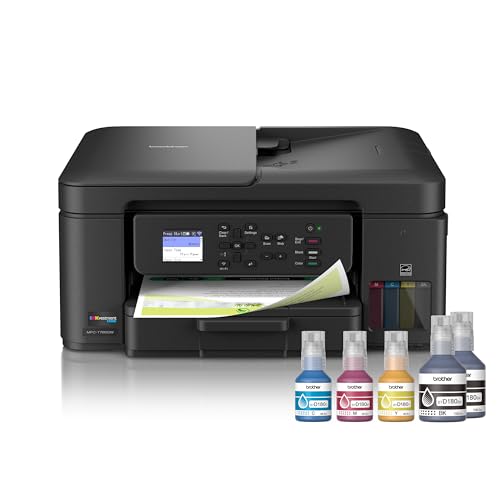
- Automatic two-sided printing
- Cloud apps and mobile controls
- 150-sheet tray; 20-page single-sided ADF
Best For: Home offices using cloud and mobile printing
Compact High-Yield Pick

- Automatic two-sided printing
- Up to 8,500 black/6,500 color pages from included ink
- Compact design with 100-sheet capacity
Best For: Home offices prioritizing ink yield and space
Best for Mobile Printing
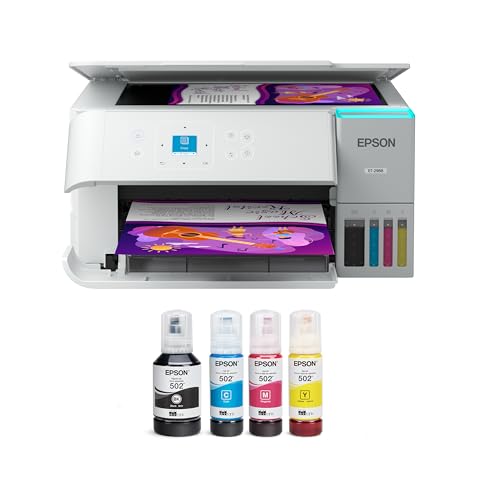
- Automatic duplex and flatbed scanning
- Ink rated for up to 6,600 black pages
- Smart Panel, AirPrint, and Mopria support
Best For: Households printing and scanning from phones
Best for High-Yield Ink
- Ink rated for up to 8,500 black pages
- Auto duplex with rear paper feed
- 90-day limited warranty
Best For: Home offices prioritizing included ink yield
Small-Office Workhorse – Canon MAXIFY GX2020
Among ink tank printers with auto duplex, the Canon MAXIFY GX2020 is a strong fit for a small office that also handles multi-page documents. It combines automatic two-sided printing with a 35-sheet automatic document feeder (ADF), fax capability, and a 250-sheet paper capacity.
Best For: Small offices that need refillable ink, duplex printing, and regular document scanning or faxing.
Pros:
- Included ink is rated for up to 3,000 black-and-white and 3,000 color pages.
- Offers a 2.7-inch color touchscreen plus Wi-Fi, USB, and wired LAN connectivity.
- 35-sheet ADF helps with multi-page scanning and copying.
Cons:
- At 17.8 pounds, it is less convenient to move than a lighter desktop model.
- Listed print speeds of 15 ppm black and 10 ppm color may be modest for a busy office.
Choose this model if paper handling and connection options matter more than a minimal footprint. Its auto duplex and ADF address different tasks: two-sided printing and feeding originals for scanning or copying.
The Brother INKvestment Tank 780 is worth considering among ink tank printers with auto duplex if you want refillable ink and convenient cloud access. It prints, copies, and scans, with automatic two-sided printing and a 150-sheet paper tray.
Best For: Home offices that print two-sided documents and use mobile or cloud printing.
Pros:
- Includes ink advertised as lasting up to three years, subject to the stated usage conditions.
- Supports cloud apps through its 1.8-inch color display and mobile controls through the Brother Mobile Connect app.
- Has a 20-page single-sided ADF and a one-sheet manual feed slot.
Cons:
- The ADF is specified as single-sided, so do not confuse automatic two-sided printing with automatic two-sided scanning.
- Its 150-sheet tray holds less paper than the Canon GX2020’s listed 250-sheet capacity.
This is a practical pick when cloud access and straightforward ink refills are priorities. The keyed bottle design helps prevent filling the wrong color tank, while the duplex feature saves you from manually flipping sheets when printing.
For shoppers comparing ink tank printers with auto duplex for everyday use, the Epson EcoTank ET-2985 pairs automatic two-sided printing with a compact, refillable design. Its included ink is rated for up to 8,500 black and 6,500 color pages under the stated test standard.
Best For: Home offices that want high included-ink yields without a large paper-handling setup.
Pros:
- Front-facing tanks and keyed EcoFit bottles help simplify refilling.
- Supports Wi-Fi, Wi-Fi Direct, Apple AirPrint, and the Epson Smart Panel app.
- At 11.5 pounds and 14.8 inches wide, it suits a relatively compact workspace.
Cons:
- The 100-sheet paper capacity calls for more frequent refills than larger trays.
- No automatic document feeder is listed, so multi-page originals require more hands-on scanning.
The ET-2985 favors ink yield and a smaller footprint over heavy-duty paper handling. Its rear feed and flatbed scanner should work well for routine home-office tasks, provided you do not need an ADF.
Best for Mobile Printing – Epson EcoTank ET-2988 Renewed
Among ink tank printers with auto duplex, the renewed Epson EcoTank ET-2988 is a practical choice for home printing when you also want wireless scanning and easy phone-based controls. Its refillable tanks, 100-sheet tray, and 1.44-inch color display cover everyday tasks without cartridges.
Best For: Households that print from phones and want automatic two-sided pages.
Pros:
- Automatic duplex printing and a built-in flatbed scanner.
- Includes ink rated for up to 6,600 black or 5,500 color pages.
- Supports Epson Smart Panel, Apple AirPrint, and Mopria printing.
Cons:
- 100-sheet tray may need frequent refilling for larger jobs.
- Renewed unit rather than a new printer.
The ET-2988 pairs straightforward mobile features with low-maintenance ink refills. Check the renewed condition if you prefer a new unit.
Best for High-Yield Ink – Epson EcoTank ET-2985 Renewed
For shoppers comparing ink tank printers with auto duplex, the renewed Epson EcoTank ET-2985 stands out for its included ink bottles, rated for up to 8,500 black and 6,500 color pages. It combines two-sided printing, copying, and scanning in a compact home-office printer.
Best For: Home offices seeking high stated ink yields and automatic two-sided printing.
Pros:
- Included ink bottles are rated for up to 8,500 black and 6,500 color pages.
- Automatic duplex printing, rear paper feed, and 100-sheet paper capacity.
- Wi-Fi, Wi-Fi Direct, Apple AirPrint, and Epson Smart Panel support.
Cons:
- Renewed unit with a 90-day limited warranty.
- 100-sheet capacity may be modest for frequent large print jobs.
The ET-2985 is appealing if the stated ink yield matters most, while its short limited warranty is worth weighing before purchase.
How We Picked These Ink Tank Printers with Auto Duplex
We focused on the selected printers’ refillable-ink or tank-style systems, advertised duplex capability, and practical all-in-one features. The list includes a duplicate Epson EcoTank ET-2985 listing, so it represents five offers but four named models. We did not independently test print quality, speed, ink yield, or reliability; confirm the current seller specifications before ordering.
Quick Comparison
The Canon MegaTank MAXIFY GX2020 is a compact refillable-tank all-in-one to consider for a document-focused workspace. The Brother INKvestment Tank 780 is an alternative for buyers who want an all-in-one and value the advertised in-box ink supply; its tank-style system differs from a conventional pour-in refillable tank, so check how replacement ink is supplied. The Epson EcoTank ET-2985 and ET-2988 are refillable-tank home-printer options. Compare their current prices, paper handling, and included ink rather than assuming the similar model numbers mean identical packages. The second ET-2985 listing is another offer for the same named model.
Key Buying Factors
Verify What “Auto Duplex” Covers
For Ink Tank Printers with Auto Duplex, look specifically for automatic two-sided printing. Duplex printing does not necessarily mean the printer can scan or copy both sides automatically. If you routinely digitize double-sided paperwork, check for a duplex-capable automatic document feeder separately.
Compare Running Costs, Not Just Box Claims
Estimate cost per page using the price and stated yield of replacement ink for the pages you actually print. Promotional claims such as “up to three years of ink” depend on usage assumptions and do not guarantee that every buyer will go three years without refilling. Also check which bottles or cartridges are included with the exact offer.
Match Paper Handling to Your Workload
Check input capacity, supported paper sizes, and how envelopes or photo paper feed. A rear feed can be useful for occasional specialty media, while a larger main tray is more convenient for frequent document runs. Published pages-per-minute figures are useful for comparisons but may not reflect two-sided color jobs.
Plan for Connectivity and Upkeep
Confirm compatibility with your computer, phone, and preferred wireless setup. Inkjet printers also benefit from regular use; if you print only rarely, consider the time and ink that maintenance cycles may consume.
Who Should Buy Which Ink Tank Printers with Auto Duplex?
Choose the Canon if a compact, document-oriented refillable all-in-one best matches your space. Compare the Brother if its included-ink offer is compelling and you are comfortable with its replacement-ink format. Start with the Epson ET-2985 or ET-2988 if you prefer a pour-in EcoTank for home use, then let verified features and total price decide. For the two ET-2985 offers, buy the better-value listing after checking the seller, warranty, and box contents.