If you’re looking to enhance your workspace, investing in a quality monitor arm can make a significant difference in comfort and productivity. With options catering to various monitor sizes and features like adjustable height and tilt, these arms can transform how you interact with your screens. Whether you’re working from home or in an office, the right monitor arm can lead to better posture and efficiency. Let’s explore the top choices available this year.
HUANUO Dual Monitor Stand – Adjustable Desk Mount for 13 to 32 Inch Screens

If you’re looking to enhance your workspace’s ergonomics, the HUANUO Dual Monitor Stand is an excellent choice, especially for those with monitors ranging from 13 to 32 inches. This full adjustable desk mount supports a weight range of 4.4 to 19.8 lbs, ensuring stability. Its improved structural design allows for easy installation using either a C-clamp or grommet base. Plus, the swivel, tilt, and rotation features let you customize your viewing angles. By raising your monitors to eye level, you’ll reduce neck and shoulder strain, boosting your productivity considerably. With a top customer rating, it’s a smart investment for any workspace.
Best For: Those seeking an ergonomic workspace solution with dual monitors sized between 13 to 32 inches.
Pros:
- Enhanced Ergonomics: Raises monitors to eye level, reducing neck and shoulder strain.
- Flexible Installation: Can be mounted using either C-clamp or grommet base for secure fixation.
- Full Motion Design: Features swivel, tilt, and rotation for customized viewing angles.
Cons:
- Limited Desk Compatibility: Only suitable for wooden desks with a thickness of 0.59 – 3.54 inches.
- VESA Compatibility Required: Requires monitors to have VESA holes of 75x75mm or 100x100mm.
- Weight Range Limitations: Only supports monitors weighing between 4.4 to 19.8 lbs.
HUANUO Single Monitor Mount (Fits 13 to 32 Inch Monitors)

The HUANUO Single Monitor Mount is an excellent choice for anyone seeking an ergonomic upgrade, especially if you have a monitor between 13 and 32 inches. With full adjustability, you can tilt, swivel, and rotate your screen for ideal viewing comfort. It lifts up to 39.6 cm from your desk with just one hand, ensuring stability at any angle. Constructed with automotive-grade components, it’s 80% sturdier than competitors and designed for long-term use. Installation is a breeze, taking only three minutes. Plus, with a 4.6 out of 5-star rating, it’s a trusted choice for enhancing your workspace.
Best For: Individuals looking to enhance their workspace ergonomics with a sturdy and adjustable monitor mount for screens between 13 and 32 inches.
Pros:
- Full adjustability allows for optimal viewing angles with tilt, swivel, and rotation features.
- Quick and easy installation process that can be completed in just three minutes.
- Durable construction using automotive-grade components, making it 80% sturdier than competitors.
Cons:
- Limited to monitors weighing between 4.4 to 19.8 lbs, which may exclude some heavier models.
- Installation options are primarily for wood tabletops, potentially limiting compatibility with other materials.
- Height adjustment may not suit all users, depending on desk height and personal preferences.
WALI Single Monitor Mount, Gas Spring Arm for 17-34 inch Screens

For those looking to enhance their workspace with a versatile and ergonomic solution, the WALI Single Monitor Mount stands out as an excellent choice. This gas spring arm accommodates 17 to 34-inch screens, supporting flat and curved displays with a maximum load of 26.4 lbs. Its full range of adjustability allows you to swivel, tilt, and rotate your monitor effortlessly, optimizing your viewing angle. Installation is a breeze with clamp and grommet options, and it includes all necessary hardware. Plus, US-based customer support is available seven days a week, ensuring you’ll have help whenever you need it.
Best For: Those seeking an ergonomic and adjustable monitor mount to improve workspace organization and comfort.
Pros:
- Versatile Compatibility: Supports a wide range of screen sizes (17-34 inches) and both flat and curved displays.
- Full Adjustability: Allows for easy swiveling, tilting, and rotating to achieve optimal viewing angles.
- Easy Installation: Comes with all necessary hardware and offers two installation methods for convenience.
Cons:
- Load Limitations: Maximum weight capacity may not support larger or heavier monitors beyond the stated limits.
- Desk Space Requirement: Requires sufficient desk space for installation, especially with the arm extending.
- Potential for Complexity: Initial setup may be challenging for those unfamiliar with monitor mounts.
HUANUO TitanLift Heavy Duty Monitor Arm for Ultrawide Screens

Designed specifically for ultrawide screens up to 49 inches, the HUANUO TitanLift Heavy Duty Monitor Arm is the perfect ergonomic upgrade for anyone seeking to enhance their workspace. With a sturdy aluminum alloy construction, it supports up to 40 lbs and features a reinforced VESA head for added stability. You’ll enjoy incredible adjustability, with tilt, swivel, and rotation options, plus height adjustments to suit your comfort. Installation is a breeze, thanks to the quick-install VESA head and organized cable management. With a 4.6-star rating and solid warranty options, you can trust this arm to improve your productivity and comfort.
Best For: Those seeking an ergonomic workspace upgrade with the capability to support ultrawide monitors up to 49 inches and 40 lbs.
Pros:
- Exceptional durability with high-strength aluminum alloy construction and rigorous testing.
- Versatile adjustability with tilt, swivel, rotation, and height options to enhance comfort.
- Easy installation and organized cable management for a clean workspace.
Cons:
- May be overkill for users with standard monitors or lighter setups.
- Limited compatibility for monitors without VESA mounting holes.
- Installation may require additional tools depending on the desk setup.
HUANUO Single Monitor Mount, Adjustable Gas Spring Monitor Arm

With its adjustable gas spring mechanism, the HUANUO Single Monitor Mount makes achieving the perfect ergonomic setup a breeze. It fits monitors ranging from 13 to 32 inches and can support up to 19.8 lbs. You’ll appreciate its extensive adjustability—tilting from -50° to +30°, swiveling ±90°, and rotating 360°. Installation takes just three minutes, and you can choose between a C-clamp or grommet base to save desk space. With a solid 4.6-star rating from nearly 15,000 users, it’s a reliable choice. Enjoy a more comfortable workspace while maximizing your desk’s potential with this efficient monitor arm.
Best For: Those seeking an ergonomic workspace solution that accommodates a range of monitor sizes while maximizing desk space.
Pros:
- Extensive Adjustability: Offers a wide tilt, swivel, and rotation range for optimal viewing angles.
- Quick Installation: Can be set up in just three minutes, making it user-friendly.
- Space-Saving Design: Utilizes C-clamp or grommet base to free up valuable desktop space.
Cons:
- Weight Limit: May not support heavier monitors beyond 19.8 lbs.
- Limited Compatibility: Only fits monitors with VESA patterns of 75x75mm and 100x100mm.
- Potential for Over-Adjustability: Some users might find the gas spring mechanism too sensitive when adjusting.
HUANUO Heavy Duty Monitor Arm for Ultrawide Screens

The HUANUO Heavy Duty Monitor Arm shines for those needing robust support for ultrawide screens up to 49 inches. It’s built from high-strength aluminum, holding up to 40 lbs, and is compatible with VESA mounting patterns. You’ll appreciate the heavy-duty C-clamps or grommet options, ensuring a sturdy grip on desks 0.8 to 3.5 inches thick. With a maximum height of 29.1 inches and full range of motion—tilt, swivel, and rotation—you can easily position your monitor for best viewing. Installation is a breeze with clear instructions, and side tension adjustments are simple with the included Allen key. Enjoy your ergonomic upgrade!
Best For: Professionals and gamers who require a sturdy and adjustable monitor arm for ultrawide screens up to 49 inches.
Pros:
- Supports heavy monitors: Holds up to 40 lbs, making it suitable for larger ultrawide screens.
- Versatile mounting options: Features heavy-duty C-clamps or grommet mounting for various desk thicknesses.
- Full range of motion: Offers tilt, swivel, and rotation capabilities for optimal viewing angles.
Cons:
- Limited VESA compatibility: Only compatible with monitors that have 75x75mm or 100x100mm VESA mounting patterns.
- Installation required: Some users may find the installation process challenging if they are not familiar with mounting hardware.
- Single monitor use: Designed for one monitor, may not be ideal for users needing multi-monitor setups.
VIVO Height Adjustable Monitor Desk Stand (STAND-V001O)

If you’re looking to enhance your workspace ergonomics, the VIVO Height Adjustable Monitor Desk Stand (STAND-V001O) is an excellent choice for anyone using monitors between 17 to 32 inches. This sturdy stand supports screens weighing 4.4 to 19.8 lbs and features tool-free setup for easy adjustments. You can tilt, swivel, and rotate your monitor for the perfect viewing angle, promoting comfort during long hours. Installation is a breeze with all necessary hardware included, and you have versatile mounting options. With a solid 4.4-star rating, it’s a top contender in monitor arms, ensuring your workspace is both functional and stylish.
Best For: Those seeking ergonomic solutions for their workspace with monitors sized 17 to 32 inches.
Pros:
- Tool-free setup allows for easy adjustments and quick installation.
- Wide range of articulation offers customizable viewing angles for enhanced comfort.
- Sturdy construction supports a variety of monitor sizes and weights, ensuring stability.
Cons:
- May not be suitable for heavier monitors exceeding 19.8 lbs.
- Limited to specific mounting patterns (VESA 75x75mm or 100x100mm).
- Some users may find the installation instructions unclear or challenging.
VIVO Ultrawide Monitor Arm Desk Mount (STAND-V001)

For those seeking an ergonomic workspace, the VIVO Ultrawide Monitor Arm Desk Mount (STAND-V001) stands out with its impressive weight capacity of 22 lbs, accommodating both standard and ultrawide monitors. It supports screens from 13 to 38 inches and features +90° to -90° tilt, 360° swivel, and rotation, allowing you to customize your viewing angle. The heavy-duty desk clamp easily attaches to desks up to 3.25 inches thick, with a tool-free setup. Plus, integrated cable management keeps your workspace tidy. Enjoy simple installation with the detachable VESA plate and included hardware, making it a solid choice for your ergonomic upgrade.
Best For: Those looking to enhance their ergonomic workspace with a versatile and adjustable monitor mount suitable for both standard and ultrawide screens.
Pros:
- Flexible Adjustments: Offers +90° to -90° tilt, 360° swivel, and rotation for optimal viewing angles.
- Easy Installation: Tool-free setup with a heavy-duty desk clamp, compatible with a variety of desk thicknesses.
- Cable Management: Integrated clips help keep cables organized and your workspace tidy.
Cons:
- Weight Limitations: Supports monitors only up to 22 lbs, which may limit compatibility with heavier models.
- VESA Compatibility: Requires verification of VESA mounting standards (75x75mm or 100x100mm) before purchase.
- Limited Desk Mounting Options: Primarily uses a desk clamp or grommet mount, which may not suit all desk configurations.
Heavy Duty Monitor Arm for Ultrawide Monitors up to 57

When you’re looking to maximize your workspace with an ultrawide monitor, the Heavy Duty Monitor Arm is a game changer. It supports monitors up to 57″ and 44 lbs, making it perfect for your sleek setup. With a quick-release VESA bracket, you can easily mount various screen sizes. Enjoy pneumatic height adjustment and multiple tilt and swivel options, allowing you to customize your viewing angle effortlessly. It fits various desktop thicknesses with both C-clamp and grommet mounting options. Plus, its modular design means you can upgrade to dual or triple monitor setups anytime. Elevate your workspace today!
Best For: Professionals and gamers looking for a robust and adjustable solution to mount ultrawide monitors up to 57 inches for an optimized workspace.
Pros:
- Pneumatic height adjustment and multiple tilt/swivel options for customizable viewing angles.
- Quick-release VESA bracket supports various monitor sizes, making installation easy.
- Modular design allows for future upgrades to dual or triple monitor setups.
Cons:
- May require more desk space due to its heavy-duty design and mounting options.
- Installation might be challenging for users unfamiliar with mounting hardware.
- Limited to supporting a maximum of 44 lbs, which may not accommodate some larger ultrawide monitors.
WALI Ultrawide Monitor Arm for 13 to 49 Inch Screens (GSM001XL)
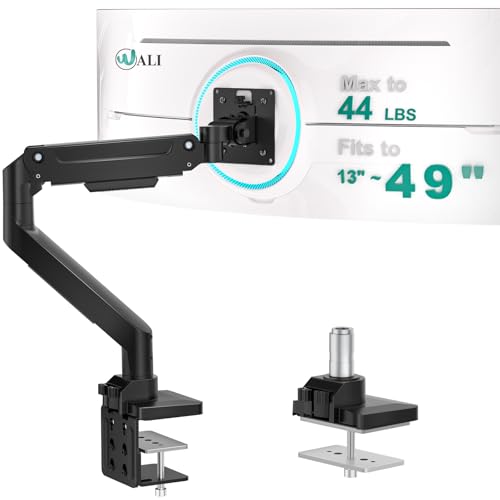
The WALI Ultrawide Monitor Arm (GSM001XL) is an ideal choice for professionals, students, and remote workers who use large screens, as it supports ultrawide monitors up to 49 inches. This sturdy mount holds up to 33 lbs and accommodates VESA patterns of 75x75mm and 100x100mm. You’ll appreciate its tilt, swivel, and rotation features, allowing you to adjust your screen for maximum ergonomics. Installation is a breeze with included C-clamp and grommet mounts, plus all necessary tools. Built-in cable management keeps your workspace tidy, while durable construction guarantees stability for years of use. Enjoy enhanced comfort and productivity!
Best For: The WALI Ultrawide Monitor Arm is best for professionals, students, and remote workers who need to support large ultrawide monitors for enhanced productivity and ergonomics.
Pros:
- Supports ultrawide monitors up to 49 inches and standard monitors up to 35 inches, accommodating a wide range of user needs.
- Offers multiple adjustment features including tilt, swivel, and rotation for personalized ergonomics and comfort.
- Durable construction ensures long-lasting stability and performance, withstanding over 20,000 fatigue tests.
Cons:
- Installation may require some technical skills, which could be challenging for complete beginners.
- Limited to VESA patterns of 75x75mm and 100x100mm, which may not be compatible with all monitors.
- The weight capacity of 33 lbs may not be sufficient for heavier or larger professional-grade monitors.
Factors to Consider When Choosing Monitor Arms to Gift
When you’re picking a monitor arm as a gift, think about the monitor size compatibility and weight capacity to guarantee it fits the recipient’s setup. Check the VESA mounting standards, as this will determine if the arm can be properly attached to the monitor. Finally, consider adjustability and installation methods, since a flexible design can enhance comfort and ease of use.
Monitor Size Compatibility
Choosing the right monitor arm is crucial for ensuring it fits your needs, especially regarding monitor size compatibility. When selecting, look for arms that support standard monitors ranging from 13 to 32 inches or ultrawide models up to 49 inches. It’s important to verify the VESA mounting compatibility, typically featuring patterns of 75x75mm and 100x100mm for proper attachment. Additionally, consider the arm’s adjustability features, such as tilt, swivel, and rotation, which enhance ergonomic positioning. Don’t forget to check the desk mounting options, like C-clamp or grommet mounts, ensuring they fit your desk’s thickness, usually between 0.59 and 3.54 inches. This attention to detail guarantees a comfortable and efficient workspace.
Weight Capacity Requirements
Understanding weight capacity requirements is vital for selecting the right monitor arm, especially if you’re gifting one. Monitor arms typically support weights ranging from 4.4 lbs to 40 lbs, so you’ll want to ascertain the arm can handle the monitor’s weight. Exceeding this capacity can cause instability and potential damage. Many arms accommodate a variety of screen sizes, like those supporting monitors between 4.4 lbs to 19.8 lbs. It’s also important to check for separate weight ratings for flat and curved monitors, as these can vary. By confirming that the monitor arm’s weight capacity aligns with your recipient’s monitor, you’ll provide a thoughtful gift that enhances their workspace without compromising safety or functionality.
VESA Mounting Standards
Before you decide on a monitor arm, it’s essential to evaluate VESA mounting standards, as they dictate the distances between the mounting holes on the back of monitors. Most monitors follow common VESA patterns, typically 75x75mm or 100x100mm, guaranteeing compatibility with a wide range of monitor arms. This compatibility allows you to easily attach your monitor without any modifications. When choosing a monitor arm, check for its support of various VESA patterns, as this helps accommodate different monitor sizes, typically ranging from 13 to 49 inches. Adhering to VESA standards not only enhances stability but also guarantees a secure installation, reducing the risk of your monitor falling or being improperly mounted. Always confirm your monitor’s VESA compatibility first.
Adjustability and Movement
When you’re looking for the perfect monitor arm to gift, prioritize adjustability and movement features that cater to the user’s needs. Look for arms with a tilt range of at least -50° to +85°, swivel capabilities of ±90°, and 360° rotation for ideal viewing angles. Height adjustments are vital, ideally lifting the screen up to 39.6 cm or more to enhance ergonomic posture. Consider models that extend up to 24 inches away from the desk, creating more usable space and reducing clutter. Stability is important, so choose arms that remain steady at any angle without frequent adjustments. These features guarantee an enjoyable and efficient experience during extended use, making your gift a thoughtful and practical choice.
Installation Methods Available
Choosing the right installation method for a monitor arm can greatly impact its functionality and ease of use. You’ll typically find two options: C-clamp and grommet mount. C-clamp mounts attach to the desk’s edge and fit thicknesses from 0.59 to 3.54 inches, providing a secure grip without any drilling. On the other hand, grommet mounts require a pre-drilled hole and work best for desks between 0.6 to 1.9 inches thick, ensuring stability. Most monitor arms come with all necessary hardware and user-friendly instructions, allowing you to finish installation in as little as three minutes. Don’t forget to reflect on your desk material, as some mounts are specifically designed for wood and may not be suitable for plastic or glass surfaces.
Ergonomic Design Features
After you’ve decided on the installation method, it’s time to contemplate the ergonomic design features that make monitor arms truly beneficial. Look for height adjustment capabilities that let you raise your screen to eye level, reducing neck and shoulder strain. Tilt and swivel adjustments are vital, allowing you to customize viewing angles and diminish discomfort during long hours. A full-motion monitor arm, with rotation and extension, enhances workspace organization while promoting better posture. Stability is important; guarantee the arm remains secure at any angle, so you won’t need constant adjustments. Additionally, many ergonomic designs come with cable management systems that keep wires organized and out of sight, contributing to a cleaner, more efficient workspace.
Material and Durability
Durability is an essential factor to take into account when selecting monitor arms, especially if you’re looking to gift one that will stand the test of time. Opt for monitor arms made from high-strength materials like aluminum alloy, which offer stability and can support various monitor sizes and weights. Look for models that have passed rigorous testing, like the 50,000 cycle motion tests, ensuring long-term reliability. Choose designs with reinforced components, thicker arms, and wider bases to securely hold heavier monitors, typically ranging from 19.8 lbs to 40 lbs. Additionally, consider the mounting options, such as C-clamps or grommet mounts, as they impact overall stability and compatibility with different desk materials, reinforcing the importance of durable solutions.