AR glasses can give students a portable screen for lessons, demonstrations, and focused study. But a large virtual display does not automatically mean interactive augmented reality—and the right choice depends on what you plan to teach.
This roundup covers 10 options, from display-focused glasses to setups with spatial tracking. Use the guide below to match features to your devices, software, and learning environment.
Best 10 Ar Glasses for Education Picks for 2026
Best for Language Learning
inmo GO3 Translation Smart Glasses

- Two-way translation in 98 languages
- Live captions and discreet teleprompter
- 8MP camera supports photo translation
Best For: Multilingual discussions and presentations
Best for Multitasking
Rokid Max2 and Station2 Spatial Bundle

- Three apps across three screens
- Reading and Multi-Screen modes
- Station2 rated for 3.5 hours
Best For: Portable multi-app study workspaces
Best for Spatial Exploration

- 1200p displays for readable text
- Supported Mac/Windows multi-screen use
- 6DoF needs the Pro Neckband
Best For: Reading and supported spatial workspaces
Best Plug-and-Play Pick

- Native 3DoF without app setup
- Up to 500-inch virtual screen
- Requires USB-C DisplayPort output
Best For: Portable reading, videos, and focused study
Best for Spatial Interaction

- Sharp 1200p virtual display
- 6DoF in SpaceWalker on Mac and Windows
- Gestures require Pro Neckband
Best For: Multiscreen study and supported spatial activities
Best Wide-View Display

- 171-inch screen and 57° field of view
- Built-in 3DoF screen tracking
- Two IPD size options
Best For: Wide-screen coursework on compatible devices
Best for Interactive Learning
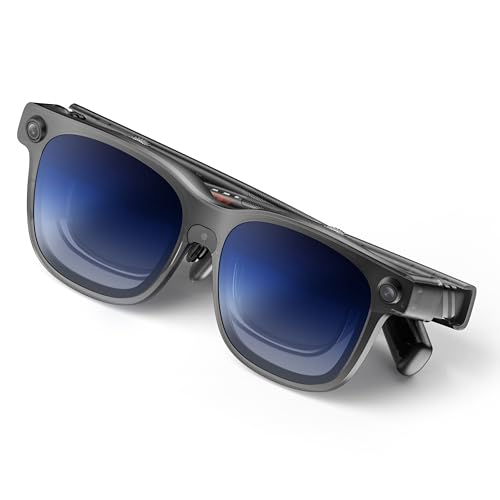
- Sharp 1200p virtual display
- Mac/Windows multi-screen support
- 6DoF and gestures require Pro Neckband
Best For: Display-focused study with optional spatial interaction
Best for Long Study Sessions

- 146-inch 1080p virtual screen
- 0 to -5.00D myopia adjustment
- 63 g with seven nose-pad sizes
Best For: Portable reading and study on compatible devices
Best for Video Lessons
RayNeo Air 3s Pro AR/XR Glasses

- 201-inch virtual image at 6 meters
- 1080p Micro-OLED display
- Prescription lenses require an optician
Best For: Personal viewing of lessons on compatible devices
Best for Language Learning – inmo GO3 Translation Smart Glasses
For shoppers comparing ar glasses for education, the inmo GO3 stands out for translated conversations and live captions rather than a large virtual display. Its in-eye text can help learners follow multilingual discussions while keeping their attention on the speaker.
Best For: Language practice, multilingual discussions, and presentations.
Pros:
- Real-time two-way translation supports 98 languages.
- Live captions and a discreet teleprompter offer communication and presentation aids.
- An 8MP camera supports photo translation of documents and signs.
Cons:
- Not water resistant.
- Translation and captions are more central to its design than a large-screen workspace.
Choose the GO3 when understanding speech or delivering a presentation matters more than viewing course materials on a virtual monitor. Its two included removable batteries and quick-swap design also suit extended sessions.
Best for Multitasking – Rokid Max2 and Station2 Spatial Bundle
Among ar glasses for education, this Rokid bundle is a practical pick for learners who want documents, a browser, and another app visible at once. The included Station2 spatial computer drives its three-screen setup, while Reading and Multi-Screen modes provide different ways to arrange content.
Best For: Learners who want a portable, multi-app virtual workspace.
Pros:
- Three-screen multitasking supports simultaneous use of three apps.
- Reading, Giant Screen, Sports, and Multi-Screen modes offer flexible viewing layouts.
- Adjustable myopia correction and automatic IPD adjustment with Station2 help tailor the fit and view.
Cons:
- Station2’s stated battery runtime is 3.5 hours.
- Three-screen use with Android phones requires DLNA; Miracast and Chromecast are limited to one screen.
This is the stronger choice here for arranging several study resources in view. Check your preferred apps and connection method first, since supported layouts and spatial behavior vary by mode.
Best Simple External Display – Rokid Max2 AR Glasses
If your approach to ar glasses for education is simply to enlarge lessons or reference material from a compatible device, the standalone Rokid Max2 keeps the setup straightforward. It mirrors a connected device over the included USB-C cable and draws power from that device rather than an internal battery.
Best For: Viewing mirrored course content from a compatible USB-C device.
Pros:
- Offers a claimed 215-inch virtual screen at a 6-meter distance, with a 50° field of view.
- Provides up to 120Hz refresh rate and adjustable brightness up to 600 nits.
- Has no internal battery to charge.
Cons:
- Requires a compatible device that can provide video and power over USB-C.
- Built-in adjustment does not support astigmatism or presbyopia.
Pick this model for a large mirrored view, not for standalone apps or the Station2 bundle’s three-screen workspace. Confirm that your particular phone, tablet, or laptop is compatible before buying.
Best for Spatial Exploration – VITURE Luma Ultra XR Glasses
For buyers exploring ar glasses for education beyond basic screen mirroring, the VITURE Luma Ultra offers sharp text and supported spatial-workspace features. Its 1200p Sony Micro-OLED displays suit reading, while SpaceWalker can place multiple virtual screens side by side on supported Mac and Windows setups.
Best For: Reading-intensive work and exploring supported spatial interfaces.
Pros:
- 1200p displays and a claimed 152-inch virtual screen prioritize readable content.
- SpaceWalker supports multi-screen workspaces on compatible Mac and Windows systems.
- With the VITURE Pro Neckband, the cameras enable full 6DoF tracking and hand gestures where supported.
Cons:
- 6DoF and gesture control require the Pro Neckband and supported software.
- Feature availability varies by device, app, and connection method.
The Luma Ultra is worth considering if crisp text and spatial interaction are priorities, but its advanced features are not universal plug-and-play capabilities. Verify the accessories and platform support your intended setup needs.
Best Plug-and-Play Pick – XREAL 1S
For shoppers comparing AR glasses for education, the XREAL 1S is a practical choice for viewing course materials on a large virtual screen from a compatible USB-C device. Its built-in X1 chip provides 3DoF screen anchoring without a separate app or setup.
Best For: Students who want a portable screen for reading, videos, and focused work.
Pros:
- Native 3DoF anchoring and multiple viewing modes, including ultrawide and side-view.
- Up to a 500-inch virtual screen with individually color-tuned visuals.
- TÜV Rheinland certifications include low blue light and flicker-free viewing.
Cons:
- Requires a USB-C device with DisplayPort video output.
- 6DoF anchoring requires the separate XREAL Eye accessory.
The straightforward connection and stable screen make this the easiest of the three to consider for everyday study; check device compatibility before buying.
Best for Spatial Interaction – VITURE Luma Ultra
Among AR glasses for education, the VITURE Luma Ultra is worth a look when sharp text, multiple virtual screens, and spatial interaction matter more than a simple external display. Its 1200p panels and SpaceWalker work modes suit screen-heavy tasks, while its cameras support more advanced tracking.
Best For: Learners and educators exploring multiscreen work and supported 6DoF spatial content.
Pros:
- 1200p display, 52° field of view, and up to 1500 nits peak brightness.
- SpaceWalker offers multiscreen work modes and 6DoF support on macOS and Windows.
- Front RGB and dual depth cameras enable spatial tracking.
Cons:
- Hand gesture recognition requires pairing with the VITURE Pro Neckband.
- Mobile 6DoF compatibility is listed as coming soon.
This is the most interaction-oriented option here, but buyers should match their planned activities to the currently supported devices and accessories.
Best Wide-View Display – XREAL One Pro
If a spacious display is your priority when choosing AR glasses for education, the XREAL One Pro offers a 171-inch virtual screen and a 57° field of view. Native 3DoF tracking keeps the screen stable for viewing lessons or working with material from a compatible video-output device.
Best For: Students who want a wide virtual screen and selectable fit for extended study setups.
Pros:
- 57° field of view, 171-inch virtual screen, and 120Hz refresh rate.
- X1 chip provides native 3DoF tracking with stated 3ms motion-to-photon latency.
- Two IPD size ranges plus adjustable arms and nose pads help tailor the fit.
Cons:
- Room-anchored 6DoF requires the optional XREAL Eye.
- HDMI sources may need an additional Beam or adapter.
The wider optics distinguish the One Pro for screen-based coursework; choose the correct IPD size and confirm your source-device connection before ordering.
Best for Interactive Learning – VITURE Luma Ultra XR Glasses
Among AR glasses for education, the VITURE Luma Ultra is worth considering if your lessons involve readable virtual screens and supported spatial apps. Its 1200p display, 52° field of view, and SpaceWalker multi-screen support can help with reading course materials alongside notes on a compatible computer.
Best For: Learners and educators who want a sharp personal display with the option to explore spatial interaction using compatible accessories and software.
Pros:
- 1200p Sony Micro-OLED display is designed for clear text.
- SpaceWalker supports multiple virtual screens on Mac and Windows.
- Front RGB and dual depth cameras enable spatial features when paired with supported software and hardware.
Cons:
- Full 6DoF and hand gesture control require the VITURE Pro Neckband.
- Feature availability varies by device, operating system, app, and connection method.
Choose this model for its display clarity and expansion potential, but check your planned classroom devices and apps before buying it specifically for 6DoF or gestures.
Best for Long Study Sessions – VITURE Pro 2 XR/AR Glasses
If you want AR glasses for education primarily as a portable study screen, the VITURE Pro 2 emphasizes readable text and fit. Its 146-inch virtual 1080p display connects to compatible USB-C video-output devices, while UltraClarity 3.0 optics are designed to keep documents sharp across the view.
Best For: Students who want a lightweight personal screen for documents, videos, and compatible multi-screen workflows.
Pros:
- Independent 0 to -5.00D myopia adjustment may eliminate the need for inserts for some nearsighted users.
- 63 g frame and seven included nose-pad sizes offer fit options for longer sessions.
- SpaceWalker supports multiple virtual screens on compatible platforms.
Cons:
- Requires a compatible video-output device; check your connection before purchase.
- Built-in adjustment covers myopia only within its stated 0 to -5.00D range.
This is the practical pick when comfort and text clarity matter more than spatial tracking. Confirm device compatibility and your vision needs before treating it as a replacement for a monitor or prescription lenses.
Best for Video Lessons – RayNeo Air 3s Pro AR/XR Glasses
For AR glasses for education centered on watching lectures or other visual content, the RayNeo Air 3s Pro offers a large personal screen. Its specified 201-inch virtual image at 6 meters, 1080p Micro-OLED display, and adjustable brightness make it a viewing-focused option rather than a documented spatial learning platform.
Best For: Learners who want a personal display for video lessons and other content from compatible devices.
Pros:
- 1080p Micro-OLED display with up to 120 Hz refresh rate.
- 20 brightness levels and TÜV SÜD low-blue-light and flicker-free certifications.
- Built-in speakers provide audio without a separate headset.
Cons:
- Nearsighted or astigmatic users may need prescription lenses made by an optician.
- Supplied notes do not establish multi-screen study tools or 6DoF learning features.
Consider this pair when video viewing is the priority. Check your source device and any needed prescription-lens setup before buying it for daily coursework.
How We Picked These Ar Glasses for Education
We compared the selected products by the features that matter in a learning setting: display readability, device compatibility, tracking capabilities, portability, and the accessories needed to make each setup work. We also separated glasses that mainly act as wearable screens from options that support spatial features. Neither category is universally better; a simple display may be easier to deploy for videos and coursework, while interactive lessons need compatible software and controls.
Listed screen sizes, brightness figures, and field-of-view specifications do not tell the whole story. Viewing conditions, fit, source-device output, and content design all affect the experience. Check the current product configuration before buying, especially where a bundle adds a separate computing device.
Quick Comparison: Match the Setup to the Lesson
- Video lessons and private study: Start with display-oriented options such as the RayNeo Air 3s Pro, Rokid Max2, or VITURE Pro 2. Prioritize a readable image, comfortable fit, and a dependable connection over the largest advertised virtual screen.
- Portable multitasking: Consider the XREAL 1S or XREAL One Pro if a stable virtual display is the goal. Confirm that your laptop or tablet supports the connection and the workspace features you need.
- Spatial demonstrations: Look at the VITURE Luma Ultra variants for their stated 6DoF support, or the Rokid Max2 and Station2 bundle for its spatial-computing setup. Verify which apps and accessories enable the specific lesson.
- Presenting and communication: The INMO GO3’s teleprompter, camera, and translation positioning may suit instructors more than student display use. Check recording policies before bringing camera-equipped glasses into class.
Key Buying Factors for Ar Glasses for Education
Compatibility and Total Setup Cost
Confirm support for your exact phone, tablet, computer, or dedicated computing unit—not just the operating system. Check video-output requirements, adapters, power needs, and whether essential tracking or controls require an additional purchase. For schools, test the full setup on managed devices before ordering multiple units.
Tracking Versus Screen Mirroring
A wearable screen is useful for watching a lesson or viewing reference material. Lessons that place content in the learner’s surroundings require more: suitable tracking, input methods, and compatible educational apps. A 3DoF display and a 6DoF experience serve different purposes, so choose based on the activity rather than the AR label.
Comfort, Visibility, and Classroom Rules
Have users try the glasses for a realistic session length. Fit, prescription options, text clarity, room lighting, and cable routing can matter more than headline display specifications. Establish rules for supervision, accessibility, sanitation, camera use, and when students should remove the glasses to re-engage with the room.
Who Should Buy Which Ar Glasses for Education?
Students and tutors who mainly need a portable lesson display should favor a compatible, comfortable display-first model. Educators building spatial activities should shortlist a 6DoF-capable setup only after confirming the teaching software works with it. Presenters may benefit from teleprompter features, subject to school privacy rules. School buyers should purchase one test unit, run a complete lesson, and assess support and accessibility before committing to a class set.