Watching Netflix on a projector should not require a streaming stick or a workaround. These 10 options advertise built-in Netflix or licensed access, with choices ranging from compact portable models to larger outdoor-focused projectors.
The right pick depends on more than the app logo. Brightness, power requirements, image setup, and sound will shape where and how comfortably you can watch.
Best 10 Projectors with Built in Netflix Picks for 2026
Best USB-C Powered Roku Pick
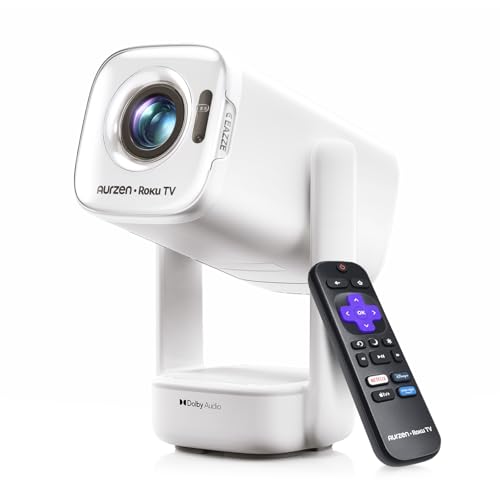
- Built-in Roku TV with Netflix
- Native 1080p; up to 300 ANSI lumens
- Runs from compatible 65W+ USB-C PD power
Best For: Flexible room-to-room and nighttime outdoor viewing
Best Short-Throw Option

- Built-in licensed Netflix app
- 80-inch image from about 1.4 meters
- Auto focus and 65W+ USB-C PD support
Best For: Compact rooms and portable setups with limited throw distance
Best Roku Home Theater Pick

- Roku TV with Netflix and free channels
- Native 1080p with auto image setup
- Dual 5W speakers with Dolby Audio
Best For: Regular home or backyard viewing near an AC outlet
Best Battery-Powered Pick

- Netflix-licensed Google TV
- Built-in battery: up to 2.5 hours in eco mode
- Native 1080p in a 1.8-pound body
Best For: Portable movie nights away from an outlet
Budget Streaming Pick

- Netflix, Prime Video, and YouTube preinstalled
- Native 720p; listed at 200 lumens
- Wi-Fi 6, HDMI, USB, and two-way Bluetooth
Best For: Casual streaming in a light-controlled room
Portable Premium Pick
XGIMI Halo+ Google TV Projector

- Licensed Netflix through Google TV
- Native 1080p and 700 ISO lumens
- Built-in battery rated for up to 2.5 hours
Best For: Portable streaming and easy setup
Flexible Placement Pick
VISSPL Smart Outdoor Projector

- 360° rotating, 180° tilting stand
- Native 1080p with stated 4K HDR support
- Verify Netflix licensing and brightness claims
Best For: Flexible positioning and built-in audio
Best for Small Spaces

- Licensed Netflix via Google TV
- Native 1080p; 400 ISO lumens
- 88° gimbal and 8W speaker
Best For: Compact bedroom and ceiling viewing
Most Flexible Placement

- Officially licensed Netflix app
- Native 1080p with 4K decoding
- 360° stand and automatic image setup
Best For: Moving movie nights between rooms and outdoor spaces
Best for Adjustable Image Size

- Licensed Netflix and streaming apps
- Native 1080p with 4K decoding
- Auto setup, zoom, and 270° bracket
Best For: Fixed-position home theater and ceiling viewing
Best USB-C Powered Roku Pick – Aurzen D1R air
Among projectors with built in netflix, the Aurzen D1R air stands out for combining Roku TV streaming with flexible USB-C power. Netflix and other popular apps are available without an extra streaming stick, and its rotating gimbal makes wall or ceiling placement straightforward.
Best For: Room-to-room viewing and outdoor movie nights where a compatible USB-C power source is available.
Pros:
- Built-in Roku TV offers Netflix and other apps without a separate dongle.
- Native 1080p resolution and up to 300 ANSI lumens suit dim rooms and nighttime use.
- Accepts 65W+ USB-C PD power; the gimbal and bottom-mounted power connection simplify repositioning.
Cons:
- Requires internet and a free Roku account for activation.
- Portable power requires a compatible 65W+ source and 5A E-Marker cable; the PowerBase Stand is sold separately.
Choose this model if power flexibility matters more than daytime brightness. Plan on a dark setting for the clearest picture.
Best Short-Throw Option – HP MC475
For shoppers comparing projectors with built in netflix for a small room, the HP MC475 pairs built-in licensed streaming apps with a 0.8:1 short-throw ratio. Its native 1080p picture, auto focus, and auto keystone correction help reduce setup work.
Best For: Dorms, apartments, and travel setups with limited distance between projector and wall.
Pros:
- Streams Netflix and other listed apps without an external device.
- Can produce an 80-inch image from about 1.4 meters.
- Supports 65W+ USB-C PD power banks and includes a travel bag.
Cons:
- Power banks below 65W cannot operate it.
- The remote needs two AAA batteries, which are not included.
Its short throw is the main reason to choose it over a conventional portable projector. The specified brightness is 200 ISO lumens, so account for room lighting when planning your setup.
Best Roku Home Theater Pick – Aurzen D1R
The Aurzen D1R is a straightforward choice among projectors with built in netflix if you want the familiar Roku TV interface on a large screen. It combines native 1080p resolution with automatic focus and keystone correction for easier movie-night setup.
Best For: Home or backyard viewing with access to an AC outlet and Wi-Fi.
Pros:
- Roku TV provides Netflix, other popular apps, and free channels without a dongle.
- Auto focus and auto keystone correction simplify alignment.
- Dual 5W speakers with Dolby Audio and a stated 60–150-inch screen range.
Cons:
- Requires an internet connection and a free Roku account for activation.
- Uses AC power and needs at least 20 cm of clearance on both sides and the rear.
This is better suited to a planned viewing spot than an outlet-free trip. Its Roku controls and automatic image adjustments make it appealing for regular movie nights.
Best Battery-Powered Pick – NEBULA Capsule 3
Few projectors with built in netflix are as easy to take along as the NEBULA Capsule 3. This Netflix-licensed Google TV model has a built-in battery, a compact 1.8-pound body, and a native 1080p display.
Best For: Movie nights away from an outlet, where portability matters more than high brightness.
Pros:
- Netflix-licensed Google TV requires no separate streaming stick.
- Built-in battery is rated for a 2.5-hour movie in eco mode.
- Auto focus, keystone correction, screen fit, and obstacle avoidance simplify setup.
Cons:
- At 200 lumens, it is better suited to darker viewing conditions.
- The manufacturer recommends a firmware update before first use for optimized performance.
Pick the Capsule 3 when cordless convenience is the priority. Its 120-inch maximum screen gives you room to go big, provided you can control ambient light.
Budget Streaming Pick – TMY 720p Mini Projector
Among projectors with built in netflix, this TMY model is a simple option for casual movie nights: the listing says Netflix, Prime Video, and YouTube are preinstalled. Its native resolution is 1280 × 720, so the “1080P” in the title should not be mistaken for native Full HD.
Best For: Casual streaming and flexible device connections on a modest setup.
Pros:
- Preinstalled streaming apps reduce the need for an external stick.
- Wi-Fi 6 and wireless mirroring support phone-based viewing.
- HDMI, USB, and two-way Bluetooth offer several connection options.
Cons:
- Native 720p resolution provides less detail than native 1080p models.
- The listed 200-lumen brightness makes light control important.
- A projector screen is not included.
Choose this for its straightforward app and connectivity mix, rather than for high brightness or Full HD sharpness.
Portable Premium Pick – XGIMI Halo+ Google TV Projector
If you want projectors with built in netflix for viewing away from an outlet, the XGIMI Halo+ pairs licensed Netflix access through Google TV with a built-in battery. It also offers native 1080p resolution and a stated 700 ISO lumens.
Best For: Portable movie nights where battery power and quick setup matter.
Pros:
- Google TV provides access to Netflix and other streaming apps.
- Built-in battery is rated for up to 2.5 hours of playtime.
- Auto focus, keystone correction, screen alignment, and obstacle avoidance simplify placement.
- Dual 5W Harman Kardon speakers provide built-in audio.
Cons:
- The stated 2.5-hour battery runtime may not cover a longer movie.
- Its 700 ISO-lumen rating still calls for attention to ambient light.
The Halo+ is the strongest fit here for viewers who prioritize portability without giving up native 1080p and licensed streaming.
Flexible Placement Pick – VISSPL Smart Outdoor Projector
This VISSPL model stands out among projectors with built in netflix for its rotating, tilting stand and stated 80W Dolby audio system. The title advertises Netflix, while the supplied feature bullets explicitly identify Prime Video and YouTube as officially licensed apps; confirm Netflix availability before buying if that is your main reason for choosing it.
Best For: Shoppers who want adjustable projection angles and substantial built-in audio.
Pros:
- Removable stand rotates 360° and tilts 180° for flexible placement.
- Stated 80W Dolby audio may reduce the need for separate speakers.
- TOF autofocus and automatic keystone correction support quicker setup.
- Native 1080p resolution with stated 4K HDR support.
Cons:
- The supplied bullets do not clearly confirm Netflix is officially licensed, despite the title.
- “4K support” does not mean native 4K projection.
- The unusually high claimed 6000 ANSI-lumen brightness is worth verifying against independent measurements.
Consider it for placement versatility and integrated sound, but verify its Netflix implementation and brightness claims before relying on either.
Best for Small Spaces – JMGO PicoPlay Mini Projector
Among projectors with built in netflix, the JMGO PicoPlay is a compact choice for bedroom viewing. It pairs licensed Netflix through Google TV with native 1080p resolution, a rotating gimbal, and a built-in speaker.
Best For: Viewers who want easy wall or ceiling projection in a small space.
Pros:
- Google TV provides access to Netflix and other streaming apps without a separate stick.
- 88° rotating gimbal and FlexiSmart auto-adjustment simplify placement.
- 8W Dolby Audio speaker, Bluetooth speaker mode, and optical-filter ambient light add versatility.
Cons:
- At 400 ISO lumens, it is better suited to controlled lighting than bright rooms.
- Power-bank support is listed, but no built-in battery is specified.
The PicoPlay makes the most sense if convenient streaming and flexible positioning matter more than high brightness.
Most Flexible Placement – 360° Gimbal Outdoor Projector
If you are comparing projectors with built in netflix for changing locations, this model combines an officially licensed Netflix app with a 360° rotatable stand. It has native 1080p resolution, supports 4K decoding, and is marketed for indoor and outdoor viewing.
Best For: Movie nights that move between a bedroom, living room, and backyard.
Pros:
- Streams Netflix directly, with other listed apps including Prime Video and Disney+.
- Auto focus, keystone correction, obstacle avoidance, and screen fit reduce setup work.
- 360° gimbal supports wall, ceiling, and other angled projections.
- WiFi 6 and Bluetooth 5.2 provide wireless connection options.
Cons:
- 4K support refers to decoding; the native image resolution is 1080p.
- The supplied notes do not specify its dimensions or weight, making portability harder to gauge.
Choose this one for its broad placement options and automated picture setup; judge its outdoor suitability against the lighting at your viewing spot.
Best for Adjustable Image Size – 270° Bracket Smart Projector
For shoppers seeking projectors with built in netflix, this smart model offers licensed streaming apps alongside native 1080p projection and 4K decoding. Its 270° bracket and digital zoom give you options when the projector must stay in one spot.
Best For: Home-theater setups that need ceiling projection or image-size adjustments without moving the unit.
Pros:
- Built-in Netflix and other listed streaming apps eliminate the need for a TV stick.
- Auto focus, keystone correction, and screen alignment streamline setup.
- 50%–100% zoom and image shift help adjust the frame from a fixed position.
- 270° bracket supports wall or ceiling projection.
Cons:
- 4K content is decoded but displayed at native 1080p, not 4K.
- The listed projection range tops out at 120 inches, less than some big-screen alternatives.
Its main appeal is setup control: the bracket, automatic adjustments, and zoom make it easier to fit the picture to your space.
How We Picked the Best Projectors with Built in Netflix
We focused on models that advertise onboard Netflix access, then compared the details that matter in everyday use: streaming platform, portability, power options, stated brightness, resolution, setup aids, and audio. Product listings do not always make clear whether Netflix is officially licensed or how brightness was measured, so treat unverified claims as questions to resolve before checkout. This is a buying comparison, not a claim that every model has been independently tested.
Quick Comparison: Which Type Fits Your Plans?
For travel or moving between rooms, start with compact options such as the NEBULA Capsule 3 or JMGO PicoPlay. The XGIMI Halo+ offers a portable format with a stated 700 ISO lumens. The two Aurzen Roku TV D1R listings emphasize a familiar Roku interface; check their exact configurations, especially power requirements, rather than assuming the listings are identical. The HP MC475 highlights USB-C power-bank compatibility, while the TMY mini projector offers another compact, Netflix-equipped option. The larger outdoor-oriented listings advertise higher brightness and more setup features, but their published figures need closer scrutiny before you plan a screen size or viewing time around them.
Key Buying Factors for Projectors with Built-In Netflix
Check How Netflix Works
“Built-in” can mean different things. Look for an officially licensed Netflix app or a clearly supported TV platform, and confirm that the app runs directly on the projector without sideloading, screen mirroring, or an external stick. App availability can change with software updates and region, so check the current listing and manufacturer support information.
Compare Brightness Carefully
ISO and ANSI lumens are defined measurement standards; a generic “brightness” number may not be directly comparable. Even a bright portable projector benefits from a dark room. For outdoor movies, plan to start after sunset, and expect ambient lights to reduce contrast. Do not choose solely by the largest advertised number.
Match Resolution, Power, and Setup to Your Space
Check native resolution separately from “4K supported,” which commonly describes the signal the projector accepts, not the pixels it displays. If you need cordless viewing, verify whether a battery is built in or whether a separate USB-C power bank can supply the required wattage. Auto focus and keystone correction can simplify setup, but placing the projector squarely in front of the screen generally gives the cleanest image. Also check throw distance, fan noise, speaker output, and Bluetooth audio support for your intended room or yard.
Who Should Buy Which Projectors with Built in Netflix?
Choose a small portable model if storage space and easy transport matter most. Consider a Roku TV or Google TV model if you prefer a familiar streaming interface and access to other apps. For backyard viewing, prioritize credible standardized brightness figures, suitable power access, and an image size that works after dark. If a listing promises exceptional brightness or “4K” at a tempting price, verify its measurement method and native resolution before buying. The best Projectors with Built in Netflix are the ones whose app support and real-world setup match how you actually watch.