A good PTZ joystick controller lets one operator frame shots, adjust movement speed, and switch between cameras without juggling software windows. The right choice depends less on screen size alone than on how it connects to your cameras and fits your production workflow.
These 10 options span compact analog keyboards and network controllers with preview screens, PoE, and NDI features. Use the buying guide below to narrow the field before checking each model’s exact specifications.
Best 10 Ptz Camera Joystick Controllers Picks for 2026
Best for Quad-View Monitoring
Tenveo KB500 NDI PTZ Controller

- 7-inch touchscreen with four-feed preview
- Camera-group calling for larger setups
- NDI|HX3 license, tally and video-only HDMI output
Best For: Live teams monitoring and grouping multiple camera angles
Best for Assignable Controls
PowerJoy / AVKANS Gen-2 Joystick

- Seven assignable VISCA-command keys
- 5-inch live preview up to 1080p
- PoE, serial and IP connections
Best For: Operators building a shortcut-driven camera workflow
Best for Touchscreen Setup
AVKANS Pro PTZ Joystick Controller

- 5-inch touchscreen for settings and preview
- 100 camera shortcuts across 10 groups
- NDI license included; PoE and serial support
Best For: Teams configuring and operating cameras from one touchscreen
Best for Low-Light Operation
FoMaKo KC608 Pro NDI Controller
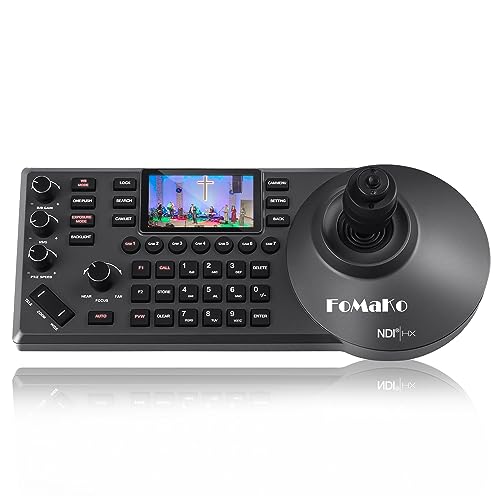
- Red and white backlit keys with wrist rest
- LCD preview and seven camera shortcuts
- Included NDI license; PoE and serial support
Best For: Operators working in dim booths during long events
Analog Pick
EVERSECU Mini RS485 PTZ Controller

- RS485 control for analog PTZ cameras
- Variable-speed joystick with twist zoom
- LCD displays protocol and camera address
Best For: Existing analog speed-dome setups
Live Production Pick
Tenveo KB200PRO NDI Controller

- 5-inch real-time camera preview
- NDI|HX2, VISCA, and Pelco-D/P support
- PoE networking and serial connections
Best For: Multi-camera live events and streaming
Surveillance Pick
PoE Network PTZ Controller with Preview

- ONVIF 2.8 and serial control options
- 5-inch local camera preview
- 99 presets plus patrol and pattern modes
Best For: Multi-camera surveillance desks
Flexible Connection Pick

- Ethernet and RS232/422/485 connections
- PoE and LCD preview
- Seven quick-select camera buttons
Best For: Mixed IP and serial PTZ setups
Preset-Movement Pick
Tenveo KB200MAX NDI Controller
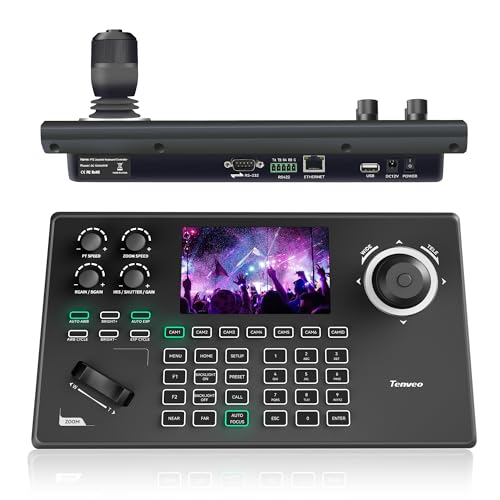
- Records and replays PTZ moves
- 5-inch preview and 4D joystick
- NDI license and PoE included
Best For: Repeatable moves in live productions
Quad-Preview Pick
Tenveo KB300PRO NDI Controller

- 7-inch, four-feed preview
- NDI, VISCA, ONVIF, and Pelco support
- PoE and seven quick-select keys
Best For: Four-camera monitoring during live events
Best for Quad-View Monitoring – Tenveo KB500 NDI PTZ Controller
Among ptz camera joystick controllers, the Tenveo KB500 stands out for its 7-inch touchscreen and quad-view preview, which let an operator check up to four camera feeds at once. Its 4D joystick and camera-group calling suit productions with many angles to manage.
Best For: Churches and event teams that need on-controller multiview and grouped camera control.
Pros:
- 7-inch touchscreen previews up to four feeds simultaneously.
- Group calling supports 26 groups, with up to 10 cameras per group.
- Includes an NDI|HX3 license and supports VISCA, ONVIF, Pelco-D/P, PoE and tally.
Cons:
- Quad-view preview is specified at up to 1080p60, rather than the main view’s stated 4K60.
- HDMI output carries video only, not audio.
The KB500 is a strong fit when seeing multiple shots at the controller matters as much as moving cameras. Check the preview and output limits against your production workflow before buying.
Best for Assignable Controls – PowerJoy / AVKANS Gen-2 Joystick
If you want ptz camera joystick controllers with dedicated shortcuts, this PowerJoy-listed AVKANS Gen-2 model offers seven assignable keys alongside a 4D joystick. Its 5-inch LCD provides live video preview, while PoE can power the controller through its network cable.
Best For: Operators who want customizable commands and quick access to frequently used cameras.
Pros:
- Seven assignable keys accept VISCA commands, plus six camera-selection shortcuts.
- 5-inch LCD preview is specified at up to 1080p.
- Supports Ethernet IP and RS232/RS422/RS485 connections; an NDI license is included.
Cons:
- NDI control does not cover iris, color, auto-tracking, menu or white balance, according to the supplied notes.
- Auto-tracking commands and custom-key functions depend on camera and protocol support.
This is a practical choice when physical shortcuts matter more than a touchscreen setup interface. Confirm the commands you need work with your cameras before relying on its NDI mode.
Best for Touchscreen Setup – AVKANS Pro PTZ Joystick Controller
The AVKANS Pro is one of the ptz camera joystick controllers aimed at simplifying setup at the console: its 5-inch touchscreen handles network settings, camera parameters and custom keys. It also provides live preview and a 4D joystick for hands-on operation.
Best For: Small production teams that want touchscreen configuration and camera preview in one controller.
Pros:
- 5-inch touchscreen supports setup and live preview via RTSP, NDI or ONVIF.
- Offers six custom keys and shortcuts for 100 cameras across 10 groups.
- Includes an NDI license and supports PoE, IP and RS232/RS422/RS485 connections.
Cons:
- Start/stop tracking is specified for VISCA-over-IP mode, so it should not be assumed to work through every protocol.
- The supplied notes do not specify a multiview preview.
Choose this model if adjusting settings directly on a touch display is a priority. Verify your camera’s supported protocol for any advanced control you plan to use.
Best for Low-Light Operation – FoMaKo KC608 Pro NDI Controller
For operators comparing ptz camera joystick controllers for dim production booths, the FoMaKo KC608 Pro pairs a built-in LCD preview with red and white key backlighting. Its wrist rest and 4D joystick are designed for extended hands-on camera control.
Best For: Church and event operators who want backlit keys and an ergonomic control surface.
Pros:
- Backlit keys, wrist rest and seven quick camera-selection shortcuts.
- Built-in LCD preview and an included NDI license.
- Supports PoE, Ethernet IP and RS232/RS422/RS485 connections, with control for up to 255 cameras.
Cons:
- The supplied notes do not state the LCD’s size or preview resolution.
- F1 and F2 shortcuts require commands to be set using the manual.
The KC608 Pro makes sense if booth ergonomics and fast camera selection are priorities. Check its display specifications separately if preview size is central to your decision.
Analog Pick – EVERSECU Mini RS485 PTZ Controller
Among ptz camera joystick controllers, the EVERSECU Mini is a compact choice for analog PTZ cameras that are awkward to operate through a DVR. It uses RS485 wiring and Pelco protocol rather than network-based control.
Best For: Existing analog speed-dome installations that need a dedicated, small-format controller.
Pros:
- Joystick offers variable-speed pan and tilt with twist zoom, plus focus and iris control.
- LCD shows protocol, baud rate, camera address, and control status.
- Supports control of up to 255 PTZ camera addresses over RS485.
Cons:
- Requires compatible RS485 cameras and protocol settings; it is not presented as an IP camera controller.
- Compact display shows settings and status, not a live video preview.
Choose this when straightforward wired control matters more than on-controller video monitoring. Check your camera’s RS485 and Pelco compatibility before buying.
Live Production Pick – Tenveo KB200PRO NDI Controller
For live events, the Tenveo KB200PRO is one of the more versatile ptz camera joystick controllers in this group. Its 5-inch screen provides a real-time camera preview, while the joystick and dedicated controls handle framing, focus, iris, presets, and camera selection.
Best For: Church, conference, and streaming teams running compatible network and serial PTZ cameras.
Pros:
- Supports NDI|HX2, VISCA variants, and Pelco-D/P for a range of camera setups.
- Offers RJ45 with PoE, plus RS232 and RS422/RS485 connections.
- Provides seven quick camera selections and control for up to 255 PTZ cameras.
- Can record and replay a camera movement sequence.
Cons:
- IP preview output is listed at up to 1080p at 30 fps.
- Controller-based AI auto-tracking toggles require firmware V5.4.6 or later; the IP Search Tool has additional Tenveo version requirements.
The built-in preview and mixed connection options make this a strong fit for operators who move between cameras during a production. Confirm protocol and firmware compatibility for the features you plan to use.
Surveillance Pick – PoE Network PTZ Controller with Preview
This model targets surveillance operators comparing ptz camera joystick controllers for larger camera systems. It combines a variable-speed 4D joystick, zoom knob, and local preview screen with network and serial control options.
Best For: Multi-camera surveillance desks that need local viewing and preset-based monitoring.
Pros:
- Supports ONVIF 2.8, RJ45 PoE, RS232, RS422, and RS485 connections.
- 5-inch 1280 × 720 screen provides local preview with listed H.264/H.265 decoding up to 1080p at 30 fps.
- Offers up to 99 presets, patrol routes, and pattern scans.
- Auto-search helps discover compatible network cameras on the same LAN.
Cons:
- Network auto-search depends on compatible cameras being on the same LAN.
- The listed operating temperature range is 10°C to 50°C, so check conditions at the installation site.
Its preview screen and automation controls suit repeated monitoring tasks. Before deployment, verify that your cameras support the stated protocols and the specific functions you need.
Flexible Connection Pick – FoMaKo KC600 PTZ Controller
Among ptz camera joystick controllers, the FoMaKo KC600 is a practical choice for productions that need both Ethernet and serial camera control. Its 4D joystick, LCD preview, and seven camera-selection shortcuts put common controls within reach during a live service or event.
Best For: Churches and production teams combining IP and serial PTZ cameras.
Pros:
- Supports VISCA, VISCA over IP, VISCA TCP, and Pelco-D/P, with RS232, RS422, RS485, and Ethernet connections.
- PoE can power the controller through its network connection, reducing cabling.
- Seven quick-select buttons and control for up to 255 PTZ cameras suit larger setups.
Cons:
- The seven direct-selection shortcuts do not cover every camera in a larger system.
- The supplied notes mix KC600 and KC608 Pro details, so confirm NDI-specific capabilities for the exact model before buying.
Choose this model for connection flexibility and hands-on camera switching, but verify the listing’s model-specific NDI features if they are central to your workflow.
Preset-Movement Pick – Tenveo KB200MAX NDI Controller
The Tenveo KB200MAX stands out among ptz camera joystick controllers for its record-and-playback camera movements. A 5-inch live-preview screen and variable-speed 4D joystick help an operator frame shots, while the included NDI license supports NDI camera control and preset calling.
Best For: Live-production operators who want repeatable camera moves and hands-on shot adjustments.
Pros:
- Records and replays PTZ movement sequences, including speed and dwell time.
- Provides OSD access plus controls for focus, iris, shutter, presets, and adjustable movement speeds.
- Offers PoE Ethernet and RS232/422/485 connections, with seven quick camera selections.
Cons:
- IP preview streaming is limited to 1080p at 30 fps according to the supplied notes.
- The IP Search Tool requires specified Tenveo camera and controller software versions.
This is the stronger fit when repeatable moves matter more than a larger multiview display. Check camera compatibility and software versions before building a workflow around its setup tools.
Quad-Preview Pick – Tenveo KB300PRO NDI Controller
For operators comparing ptz camera joystick controllers by on-device monitoring, the Tenveo KB300PRO offers a 7-inch screen that can preview up to four camera feeds at once. Its 4D joystick and camera-selection keys make it useful when shots need to be checked and adjusted during a live event.
Best For: Multi-camera church, conference, or event crews that want a four-feed preview at the controller.
Pros:
- Switches between a four-camera preview and an individual camera view.
- Supports NDI, VISCA, ONVIF, and Pelco-D/P, with Ethernet, RS232, and RS422/485 connections.
- Includes PoE, seven quick-select camera keys, and PTZ movement recording and playback.
Cons:
- Quad-screen preview supports up to 720p at 30 fps; the main view supports up to 1080p at 30 fps.
- Controller-based AI auto-tracking toggling requires firmware V5.4.6 or later.
The quad preview is its clearest advantage over single-view controllers. If monitoring detail or auto-tracking control is essential, account for the stated preview and firmware limits.
How We Picked These Ptz Camera Joystick Controllers
We prioritized distinctions that affect day-to-day operation: camera connection type, preview options, joystick controls, power requirements, and features for managing more than one camera. The selection includes an analog RS-485 keyboard, simpler IP controllers, and NDI-oriented models with built-in screens. Product listings can leave important compatibility details unclear, so treat advertised protocol support as a starting point—not a guarantee that every function will work with your cameras.
Quick Comparison
Start by matching the controller to your existing camera system. The EVERSECU Mini is the analog-focused option for an RS-485 setup; it is not a substitute for an IP or NDI controller. The more basic PoE network controller suits buyers who want physical pan, tilt, and zoom controls without paying primarily for a preview display. The 5- to 5.5-inch screen models from Tenveo and FoMaKo, along with the PowerJoy and Pro listings, are worth comparing when on-controller preview matters. Tenveo’s 7-inch quad-view models are the clearest fit on this list for operators who want to monitor multiple feeds at the desk. Compare their exact ports, licensing, and screen functions before choosing between them.
Key Buying Factors for Ptz Camera Joystick Controllers
Camera and Protocol Compatibility
Check both ends of the connection. IP control, RS-485, VISCA, Pelco, and NDI are not interchangeable labels. Confirm your camera’s supported control protocol, the controller’s matching implementation, and any setup requirements such as network addressing. If your workflow relies on NDI video preview, verify whether the specific model supports the NDI format your cameras output and whether any license is included.
Preview and Physical Controls
A built-in LCD can reduce the need for a separate monitor, but confirm whether it displays one camera, selectable feeds, or a simultaneous quad view. A 4D joystick typically combines pan, tilt, zoom, and an additional control axis; check the actual mapping rather than assuming every model behaves alike. Dedicated speed, preset, camera-selection, and zoom controls matter most when shots change quickly during a live event.
Power and Installation
PoE may simplify desk cabling if your network switch or injector supplies the required standard and power budget. Check whether an adapter is included or needed. For analog installations, confirm wiring, connector type, and termination requirements before buying.
Who Should Buy Which Ptz Camera Joystick Controllers?
Choose an RS-485 keyboard if you are keeping an existing analog speed-dome installation. Choose a straightforward IP joystick if your cameras are network-controlled and you already have reliable video monitoring. Step up to a screen-equipped controller for a compact church or livestream desk where local preview saves space. Consider a 7-inch quad-view model when one operator regularly manages several cameras and needs multiple feeds visible together. In every case, make confirmed camera compatibility your deciding factor before screen size or button count.