If your forearm hangs off the desk while you type or use a mouse, an add-on arm support can give it a place to rest. The right choice depends on your desk edge, available space, and whether you need a fixed surface or one that moves with your arm.
These 10 options include rotating elbow rests, paired clamp-on supports, and desk-extender trays. Use the buying guide below to narrow the field before checking each product’s dimensions and mounting requirements.
Best 10 Adjustable Arm Supports for Desk Picks for 2026
Padded Desk Extension

- 10.2-by-8.6-inch padded platform
- No-assembly clamp installation
- Requires a flat, straight desk edge
Best For: Flat desks needing a broad padded arm platform
Dual-Arm Setup
VIVO Adjustable Arm Rests, 2 Pack

- Two clamp-on support platforms
- 2.5-inch height adjustment
- Swivels aside; excludes beveled edges
Best For: Adjustable support for both arms
Fold-Away Tray
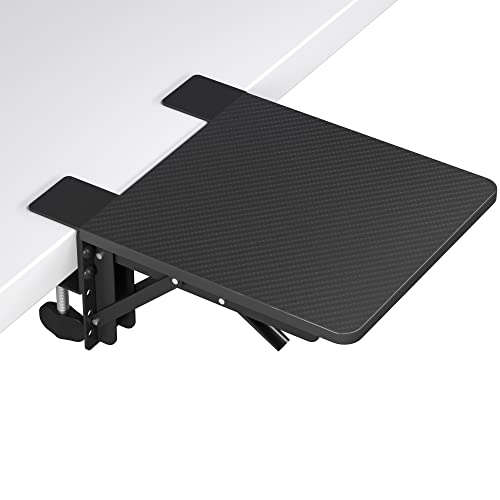
- Approximately 9.5-by-9.1-inch tray
- Folds 90 degrees for storage
- No listed height or swivel adjustment
Best For: A fold-away desk-edge support surface
Single-Arm Flexibility
VIVO Clamp-On Adjustable Arm Rest

- One clamp-on support platform
- 2.5-inch height adjustment
- 90-degree swivel and 360-degree rotation
Best For: Adjustable support on one side of a desk
Best for Easy Setup

- 11.8-by-5.9-inch multipurpose platform
- Fits desks up to 4.4 inches thick
- Folds through 90° for storage
Best For: Extra desk space that also supports an arm
Best for Flexible Movement

- Six height settings
- Swiveling rest and 360° joint motion
- Tool-free clamp fits desks up to 2 inches thick
Best For: Moving between keyboard and mouse
Best for Thick Desktops
JOY worker Adjustable Arm Rest

- Mounts on flat desks up to 3.7 inches thick
- Six height positions and 360° rotation
- Above- or below-desk mounting options
Best For: Thicker, flat desktops needing a rotating elbow rest
Foldaway Desk Extension

- Roughly 9.5-by-9.1-inch platform
- Folds 90° for storage
- No-drill knob clamp
Best For: Small workstations needing a foldaway support surface
Right-Side Mouse Support

- Listed right-side style
- 14-by-6-inch support area
- Steel material and cover
Best For: Right-side setups seeking a steel support surface
Multi-Angle Elbow Cradle

- Six height settings
- 360° rotation and 90° swivel
- Fits flat desks up to 3 inches thick
Best For: Users who reposition their elbow support throughout the day
Padded Desk Extension – Adjustable Clamp-On Arm Rest
For shoppers comparing adjustable arm supports for desk use, this single padded platform extends beyond the desktop to give an elbow and forearm more room to rest. Its leather-covered, sponge-filled surface measures 10.2 by 8.6 inches.
Best For: A flat, non-folding desk with a suitable straight edge and room for a larger padded support.
Pros:
- Broad padded surface offers space for an arm or mouse.
- Clamp-on installation requires no assembly.
- Steel and aluminum support structure is rated to hold up to 20 pounds.
Cons:
- Requires a flat desk edge longer than 2.36 inches and a desktop thickness of 0.39 to 3.35 inches.
- Underside supports may interfere with chair armrests.
Measure the desk before ordering: the generous support area is the draw here, but curved edges, drawers, and some chair-arm positions can rule it out.
Dual-Arm Setup – VIVO Adjustable Arm Rests, 2 Pack
Among adjustable arm supports for desk setups, this VIVO two-pack stands out when you want a platform on each side. Each steel armrest offers 2.5 inches of height adjustment, a 90-degree swivel, and 360-degree rotation.
Best For: Desks where both arms need adjustable elbow support that can swing aside when not in use.
Pros:
- Includes two armrests for left- and right-side placement.
- Height, swivel, and rotation adjustments offer positioning flexibility.
- Platforms swivel out of the way to free up workspace.
Cons:
- Clamps fit desktops up to 2.2 inches thick and are not compatible with beveled edges.
- Requires minor assembly.
This is the practical pick for bilateral support, provided both mounting spots have compatible desk edges and enough room for the clamps.
Fold-Away Tray – BONTEC Desk Extender Shelf
If your search for adjustable arm supports for desk use is really about adding a resting surface at the desk edge, the BONTEC tray is a space-saving alternative. Its approximately 9.5-by-9.1-inch MDF-and-steel platform folds 90 degrees when you do not need it.
Best For: A workspace that needs a fold-away extension surface for an arm or small desk accessories.
Pros:
- Foldable design helps clear space between uses.
- Knob-operated, no-hole installation avoids drilling into the desk.
- Tray is rated to hold up to 33 pounds.
Cons:
- Supplied specifications do not list height, swivel, or rotation adjustment.
- One tray provides a single support surface rather than a pair of armrests.
Choose this for extra surface area that tucks away, not for the multi-axis positioning offered by articulated armrests.
Single-Arm Flexibility – VIVO Clamp-On Adjustable Arm Rest
For a one-sided setup, this VIVO model brings multi-jointed positioning to adjustable arm supports for desk use. Its single clamp-on platform has 2.5 inches of height adjustment, a 90-degree swivel, and 360-degree rotation.
Best For: Someone who needs adjustable elbow support on just one side of a desk.
Pros:
- Height, swivel, and rotation adjustments help position the support.
- Can be used on the right or left side.
- Swivels out of the way when desk space is needed.
Cons:
- Only one armrest is included.
- Requires minor assembly and a desk edge suitable for its clamp.
It offers the positioning range of VIVO’s two-pack in a single-support format, making it a more focused choice when only one arm needs a resting place.
Best for Easy Setup – BONTEC Desk Extender Tray
If you want adjustable arm supports for desk work that also add usable surface space, this BONTEC tray offers an 11.8-by-5.9-inch platform for an arm, mouse, or keyboard. Its foldable design makes it a practical choice when you need to clear the desk edge between sessions.
Best For: Anyone who wants a compact, clamp-on arm-support platform that can double as extra desk space.
Pros:
- Adjustable double C-clamp fits desks up to 4.4 inches thick without drilling.
- 90° foldable design lets you reposition or stow the tray.
- Supports up to 33 pounds and provides an 11.8-by-5.9-inch surface.
Cons:
- The broad tray may suit you less than a small, swiveling elbow pad if you move frequently between mouse and keyboard.
- Installation requires tightening four screws.
Choose this one for a stable, multipurpose extension rather than a jointed armrest. Check that you have room for its full platform at the desk edge.
Best for Flexible Movement – StarTech Adjustable Arm Rest
Among adjustable arm supports for desk setups, the StarTech stands out for movement: its padded rest swivels between mouse and keyboard positions, with six height settings and rotating joints. It arrives assembled and clamps onto a compatible desk without tools.
Best For: Computer users who want a padded armrest that moves with their arm as they switch tasks.
Pros:
- Six height levels span approximately 0.2 inches below to 2.7 inches above the desktop.
- Swivels from -90° to +90°, with 360° motion at the joints.
- Die-cast aluminum construction and a smooth foam pad; tool-free, no-drill mounting.
Cons:
- Fits wood or metal desks only up to 2 inches thick.
- Its 11-pound capacity is lower than the BONTEC tray’s stated capacity.
This is the more task-responsive option if you value arm movement over extra work surface. Measure your desktop thickness before ordering.
Best for Thick Desktops – JOY worker Adjustable Arm Rest
If desk thickness limits your choice of adjustable arm supports for desk use, the JOY worker rest accommodates flat desktops up to 3.7 inches thick in its stated mounting range. It offers six height positions, 360° rotation, and above- or below-desk mounting options.
Best For: Users with a thicker, flat desktop who want a rotating elbow rest rather than a wide tray.
Pros:
- Two mounting methods cover stated desk-thickness ranges of 0–3.1 inches and 0.7–3.7 inches.
- Six height positions extend from 1.2 inches below to 2.8 inches above the desktop.
- Arrives ready to clamp on without assembly or drilling and supports up to 11 pounds.
Cons:
- Not suitable for desks with a protruding edge or significant slope.
- The 3.7-inch maximum depends on using the appropriate mounting method.
This is worth considering when a standard 2-inch clamp will not fit. Check both your desktop thickness and edge shape against the mounting requirements.
Foldaway Desk Extension – BONTEC Clamp-On Arm Rest Tray
Among adjustable arm supports for desk use, this BONTEC tray suits shoppers who want an extra surface that can also support an elbow or forearm. Its roughly 9.5-by-9.1-inch MDF platform clamps to the desk and folds 90° when not needed.
Best For: Small workstations that need a foldaway surface for arm support or desk accessories.
Pros:
- Foldable design helps free space between work sessions.
- Tool-free knob clamp installs without drilling.
- Listed 33-pound capacity accommodates a range of desk items.
Cons:
- Tray-style support does not offer the height or rotational adjustments of a moving arm cradle.
- One platform supports one side at a time.
Choose this for a compact desk extension rather than a highly adjustable elbow pad; its main advantage is combining support and usable surface area.
Right-Side Mouse Support – Steel Desk Arm Rest
If you are comparing adjustable arm supports for desk setups, this steel arm rest is worth considering for its listed right-side configuration and 14-by-6-inch support surface. The supplied specifications identify it as an ergonomic computer desk extender compatible with mouse and keyboard use, but do not describe its adjustment mechanism.
Best For: Right-side desk setups needing a steel arm-support surface.
Pros:
- 14-by-6-inch dimensions provide a defined support area.
- Steel construction is specified for both the material and cover.
- Listed for mouse and keyboard compatibility.
Cons:
- Only a right-side style is specified.
- The supplied details do not establish height, swivel, or clamp adjustability.
This is a more straightforward option on paper. Check the listing’s mounting and adjustment details against your desk before buying, since those specifications are not provided here.
Multi-Angle Elbow Cradle – 360° Rotating Desk Arm Rest
For shoppers seeking adjustable arm supports for desk work, this clamp-on elbow cradle offers the clearest range of positioning options in this group. It has six height settings, a rotating cradle, a 90° swivel, and up to 13 inches of extension.
Best For: Working or gaming setups where the elbow support needs to follow changes in arm position.
Pros:
- Six height settings reach up to 3 inches above the desktop.
- 360° rotation and a 90° swivel allow varied positioning.
- One-piece design requires no assembly.
- No-drill, anti-slip clamp fits flat desks up to 3 inches thick.
Cons:
- Clamp is not compatible with sloped or raised desk edges.
- Elbow cradle does not double as a broad accessory tray.
This is the pick when movement and height adjustment matter more than added desktop space. Measure the desk edge first, as the clamp’s fit restrictions are specific.
How We Picked the Best Adjustable Arm Supports for Desk
We organized these 10 options around the differences that matter most when shopping: support style, stated adjustability, mounting method, and usable surface area. The selection includes single and paired arm rests, rotating supports, and wider extender trays. Product names alone cannot establish long-term comfort or durability, so confirm dimensions, clamp clearance, and load limits on the current listing before buying.
Quick Comparison: Which Style Fits Your Desk?
- Rotating arm rests: Worth considering if you move frequently between a keyboard and mouse. Check the rotation range and whether the support can be positioned at a comfortable height.
- Paired supports: A practical starting point if both forearms need support. Make sure your desk has enough unobstructed edge space for two mounts.
- Desk-extender trays: Offer a broader surface for an elbow, forearm, or mouse area. Measure both the tray footprint and the space it will occupy beside your chair.
- Foldable designs: Useful where the support needs to be tucked away, provided it can fold without hitting a drawer, chair arm, or adjacent furniture.
Key Buying Factors for Adjustable Arm Supports for Desk Setups
Desk-Edge Compatibility
Measure the desktop thickness at the exact mounting point. Look underneath for a frame rail, drawer, cable tray, or beveled edge that could prevent a clamp from gripping securely. A support that fits the stated thickness range may still be unsuitable if its clamp needs more flat clearance than your desk provides.
Height and Reach
Choose a support that lets your forearm rest near your working position without forcing your shoulder upward or your wrist into an awkward angle. Height-adjustable models offer more positioning flexibility; fixed-height trays depend more heavily on your desk and chair setup. Check how far a rotating rest or extender projects into the room so it does not interfere with getting in and out of your chair.
Surface, Stability, and Handedness
A compact elbow pad takes less space, while a wider tray may better suit users who want forearm support or extra mouse room. Consider padding, edge shape, and how easily the surface can be cleaned. If you plan to lean heavily on the support, check the manufacturer’s load guidance and mounting instructions. Also verify whether a single unit works on your preferred side and whether you need two units for a symmetrical setup.
Who Should Buy Which Adjustable Arm Supports for Desk?
For frequent mouse movement, start with a rotating arm rest and prioritize smooth positioning over maximum surface area. For both arms, consider a two-pack if your desk edge has room for both clamps. For extra workspace, compare the BONTEC-style extender trays by their stated dimensions and choose a footprint that fits your layout. For a cramped desk, look at compact or foldable options, but measure the full swing and folded clearance first.
Whichever style you choose, treat it as an addition to a sensible chair, desk, keyboard, and mouse setup—not a substitute for adjusting those basics.