In today’s fast-paced world, having the right overhead document scanner can enhance your workflow considerably. Whether you’re a student, a professional, or simply someone who values efficiency, these devices can make a difference. They combine high-resolution imaging with user-friendly features, catering to various needs. Curious about which models stand out in 2025? Let’s explore the top contenders that could streamline your scanning experience.
ScanSnap SV600 Overhead Book and Document Scanner, Black

If you’re looking for a scanner that preserves the integrity of your documents, the ScanSnap SV600 is a standout choice for 2025. This overhead scanner easily tackles newspapers, magazines, and books without damage. With Multi Document Detection, you can scan multiple items like business cards or photos in one go, automatically cropping and rotating images. The Auto Book Correction feature flattens curve distortion, while the Point Retouch function removes any fingers captured during scanning. Plus, Page Turning Detection initiates scanning as you turn pages, ensuring an efficient workflow. Its Time Mode allows you to set intervals for real-time scanning, making it incredibly user-friendly.
Best For: Individuals or businesses looking for an efficient and damage-free way to scan books, newspapers, and documents.
Pros:
- Easily scans a variety of document types without causing any damage.
- Multi Document Detection allows for simultaneous scanning of multiple items, saving time.
- Image correction features enhance the quality of scanned images, ensuring clarity and professionalism.
Cons:
- Overhead design may require more space compared to traditional flatbed scanners.
- Initial setup and learning curve might be challenging for some users.
- Higher price point compared to basic scanners.
CZUR ET24 Pro Professional Book Scanner
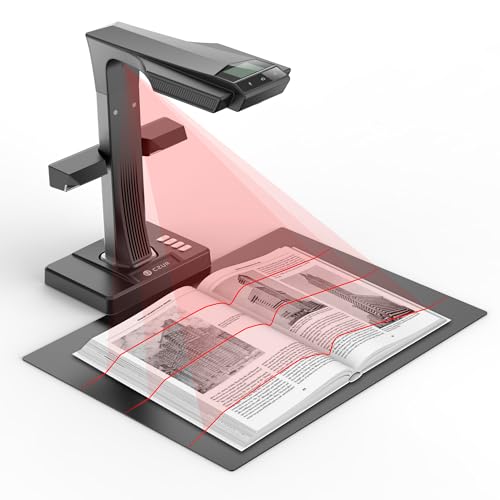
The CZUR ET24 Pro Professional Book Scanner stands out as an excellent choice for educators, researchers, and professionals needing high-quality digitization of books and documents. With its 24MP HD camera, you can capture images at 320 DPI, ensuring sharp and clear results. The advanced flattening technology effectively eliminates distortion from curved pages, giving you perfect scans every time. It’s compatible with various operating systems, including macOS and Windows, making it versatile for all users. Plus, ABBYY’s OCR technology allows you to convert JPG files into editable formats like PDF, Excel, and Word, supporting over 180 languages.
Best For: Educators, researchers, and professionals seeking high-quality digitization of books and documents.
Pros:
- High-resolution scanning with a 24MP HD camera and 320 DPI for sharp images.
- Advanced flattening technology eliminates distortion from curved pages.
- Versatile compatibility with various operating systems and ability to convert files into editable formats.
Cons:
- May require additional software for full functionality, especially for TIFF files.
- Bulky design may not be easily portable for users on the go.
- Higher price point compared to basic scanners, which may not be suitable for casual users.
X1 Portable Document Scanner (8MP HD Overhead Document Camera)

Ideal for educators and professionals, the X1 Portable Document Scanner‘s 8MP HD camera captures documents and objects up to A4 size with impressive clarity. You can scan at lightning speed—just 2 seconds per page—boosting your productivity. With six LED lights, it guarantees maximum brightness even in low-light conditions. Its real-time projection and video recording features make remote teaching a breeze. Plus, the advanced OCR technology recognizes over 100 languages and converts documents into various formats like PDF and Word. Lightweight and foldable, it’s designed for easy setup and convenient storage, making it a perfect companion for on-the-go scanning.
Best For: Educators and professionals seeking an efficient and portable solution for document scanning and remote teaching.
Pros:
- Fast scanning speed of just 2 seconds per page enhances productivity.
- High-quality 8MP camera captures documents and objects with impressive clarity.
- Advanced OCR technology supports over 100 languages and converts documents into multiple formats.
Cons:
- Compatibility limited to Windows systems, not suitable for Mac OS users.
- Requires USB connection for setup, which may limit mobility during use.
- Lightweight design may raise concerns about stability when scanning larger documents.
NetumScan 13MP Book Document Camera for Teachers

Teachers looking for an efficient way to enhance their classroom experience will find the NetumScan 13MP Book Document Camera a standout choice. This device offers smart one-key automatic correction for skewed images, enabling seamless scanning into various formats. Its high-quality 1300W sensor ensures clear images, even in different lighting conditions, thanks to the built-in LED light. You’ll appreciate the stepless dimming feature for customizable brightness. Plus, it supports live projection and video recording, perfect for online teaching. With a portable, foldable design, it’s easy to transport, making it ideal for any classroom setting. Just make certain it’s connected to a Windows system.
Best For: Teachers seeking an efficient and versatile document camera to enhance their classroom experience.
Pros:
- Supports smart one-key automatic correction for skewed images, simplifying the scanning process.
- High-quality 1300W sensor and built-in LED light ensure clear images in various lighting conditions.
- Portable and foldable design makes it easy to transport and adjust for different classroom settings.
Cons:
- Compatibility limited to Windows systems, requiring USB connection and software installation.
- May not be suitable for users who need a document camera for non-educational purposes.
- The reliance on a USB connection may limit usability in some classroom setups.
VIISAN Large Format Book & Document Scanner

For professionals and enthusiasts dealing with large formats, the VIISAN Large Format Book & Document Scanner (Model S21) stands out with its impressive capture size of A2/A3, making it perfect for everything from manuscripts to maps. You’ll appreciate the 26MP resolution, which enhances detail up to 600 DPI. The scanner’s intelligent software automatically flattens pages and removes fingerprints, ensuring clear results. Plus, it supports remote collaboration and video recording. It’s height adjustable and features built-in 3-level LED lighting, perfect for dark conditions. Compatible with both Windows and macOS, this scanner is backed by a one-year warranty and excellent tech support.
Best For: Professionals and enthusiasts who need to scan large format documents such as manuscripts, maps, and journals with high detail and clarity.
Pros:
- High-resolution scanning at 26MP with software enhancement up to 600 DPI for detailed images.
- Intelligent scanning software features automatic flattening, fingerprint removal, and file conversion to various formats.
- Adjustable height and built-in LED lighting ensure optimal usability in different lighting conditions.
Cons:
- Not suitable for bright light or glary papers, which may affect scanning quality.
- Limited compatibility with only Windows PCs and macOS, excluding ARM-based devices.
- One-year warranty may be shorter than some competing products offering extended coverage.
CZUR Aura Pro Portable Book Scanner

The CZUR Aura Pro Portable Book Scanner stands out for its innovative auto-flatten and fingerprint removal technologies, making it perfect for anyone who needs to digitize books and documents efficiently. With ultra-fast scanning at just 2 seconds per page, you can tackle both single and double-page materials swiftly. Its intelligent software detects page turns, so you won’t have to worry about manual triggering unless you prefer using the foot pedal. Plus, the multifunction desk lamp helps reduce eye fatigue while you work. Compatible with multiple operating systems, this scanner is a reliable choice for all your scanning needs.
Best For: The CZUR Aura Pro Portable Book Scanner is best for students, researchers, and professionals who need to digitize books and documents quickly and efficiently.
Pros:
- Ultra-fast scanning speed at just 2 seconds per page, ideal for high-volume scanning.
- Intelligent software that auto-detects page turns, allowing for hands-free operation.
- Multifunction desk lamp with adjustable color modes and brightness levels to reduce eye strain.
Cons:
- Performance of sound-controlled lamp may be impacted by environmental noise within 10 feet.
- Limited compatibility with older operating systems, as it requires macOS 10.13 or later and certain Windows versions.
- Foot pedal functionality may not be necessary for all users, potentially adding to the cost without added value for some.
D800 Portable Document Camera (High Definition 13MP)

Experience seamless online learning and presentations with the D800 Portable Document Camera, featuring a high-definition 13MP camera that captures documents up to A3 size. This compact and stylish device is perfect for video recording and real-time projecting during Zoom meetings or remote teaching sessions. With intelligent high-speed image shooting and multilingual OCR detection, it enhances your workflow effortlessly. The D800’s automatic features, like image segmentation and merging ID photo sides, simplify your tasks. Plus, its adjustable arm and heavy base guarantee stability. Just connect via USB, and you’re ready to go—accessories like a soft mat and USB flash drive are included!
Best For: The D800 Portable Document Camera is best for educators and professionals engaging in online teaching, presentations, and remote collaboration.
Pros:
- High-definition 13MP camera ensures clear document capture.
- Compact and portable design allows for easy transport and use in various settings.
- Automatic features like image segmentation streamline the scanning process.
Cons:
- Not compatible with Mac devices, limiting its usability for Mac users.
- Requires a USB connection, which may restrict mobility if a longer cable is not available.
- Limited to A3 document size, which may not be sufficient for larger documents or materials.
NetumScan 13MP Document Camera for Teachers

Teachers seeking an efficient and versatile tool for classroom instruction will find the NetumScan 13MP Document Camera particularly appealing. Weighing just 1.1 pounds, it’s portable and easy to set up. With high-quality image capture and built-in LED lights, you can project documents in real-time or record lessons for later use. The smart scanning feature automatically corrects image skew, while the advanced OCR technology converts images to editable text with over 98% accuracy. Compatible with multiple operating systems, this document camera enhances your teaching experience, making it an indispensable asset in today’s classroom.
Best For: Teachers looking for a portable and efficient document camera that enhances classroom instruction through real-time projection and advanced scanning capabilities.
Pros:
- High-quality image capture with a 1300W CMOS sensor and built-in LED lights for clear visibility.
- User-friendly design with smart scanning features that automatically correct image skew and convert images to editable text.
- Lightweight and foldable design makes it easy to transport and set up in various teaching environments.
Cons:
- Autofocus may occasionally fail, affecting image clarity during use.
- Lacks a power button, which may inconvenience users during operation.
- Some users report mixed experiences with OCR speed and effectiveness, particularly with complex layouts.
ScanSnap iX2500 Wireless Document Scanner

For professionals and busy individuals seeking efficiency, the ScanSnap iX2500 Wireless Document Scanner stands out with its impressive 45 pages per minute double-sided scanning capability. You’ll love its wireless and USB connectivity options, including built-in Wi-Fi 6 for fast, secure scanning directly to your smart devices or cloud services. The large 5-inch touchscreen allows you to customize profiles for easy access, and the Quick Menu makes scanning to various destinations a breeze. Plus, with advanced paper handling technology, you won’t have to worry about jams or data loss. Organizing your documents has never been simpler!
Best For: Professionals and busy individuals looking for an efficient, high-speed scanning solution that seamlessly integrates with smart devices and cloud services.
Pros:
- Fast double-sided scanning at 45 pages per minute enhances productivity.
- Built-in Wi-Fi 6 and USB-C connectivity provide versatile options for scanning.
- Advanced paper handling technology minimizes jams and ensures reliable performance.
Cons:
- The initial setup may require technical knowledge for wireless configuration.
- The large touchscreen, while useful, could be less responsive for some users.
- Limited scanning capabilities for very thick or non-standard-sized documents.
Document Camera (5MP USB, Blue)

The ZSEEWCAM Document Camera stands out with its impressive 5MP CMOS sensor, making it an ideal choice for educators and professionals seeking high-quality visuals during live demos or web conferencing. Its lightweight design and compact dimensions (5.12 x 6.69 x 3.15 inches) guarantee easy portability. You can capture images at 1920×1080 pixels for clear presentations or scanning. With manual focus and a built-in microphone, it adapts well to various setups. Although some users report issues with image stability and setup, its adjustable design and budget-friendly price make it a solid option for distance learning and remote teaching.
Best For: Educators and professionals looking for a budget-friendly document camera for effective live demonstrations and remote teaching.
Pros:
- Affordable option with good quality for budget use.
- Lightweight and compact design for easy portability.
- Manual focus and built-in microphone enhance usability in various settings.
Cons:
- Some users report issues with image quality and stability.
- Setup and operation can be challenging for certain users.
- Occasional lag and functionality problems experienced by some.
Factors to Consider When Choosing Overhead Document Scanners
When you’re choosing an overhead document scanner, you’ll want to take into account several key factors. Think about scanning speed, image quality, and how well it works with your operating system. Portability and advanced features can also make a big difference in your overall experience.
Scanning Speed Efficiency
Choosing the right overhead document scanner involves considering various factors, with scanning speed being one of the most critical. Some scanners can scan at ultra-fast rates, like 2 seconds per page, boosting your work efficiency. Keep in mind that higher DPI settings often slow down scanning, so find a balance that suits your needs. Look for models with automatic page detection, which start scanning as soon as a page is turned, cutting down on manual effort. Additionally, consider scanners that offer dual functionality for scanning and real-time projection, perfect for presentations. Finally, the ability to handle multiple documents in one scan, such as business cards or photos, can greatly streamline your scanning process.
Image Quality and Resolution
While selecting an overhead document scanner, image quality and resolution are essential factors that can significantly impact your scanning results. The scanner’s resolution, measured in megapixels (MP) or dots per inch (DPI), is vital; higher values typically mean finer detail. Scanners with 24MP or more capture intricate details, while 13MP scanners meet most standard needs effectively. Remember, better image quality enhances Optical Character Recognition (OCR) accuracy, helping you get precise text recognition and formatting. Advanced flattening technologies can also correct distortions from curved pages, ensuring fidelity to the original document. Finally, built-in lighting features like LED lights provide even illumination, reducing shadows and glare, further improving overall image quality.
Compatibility With Operating Systems
Making certain your overhead document scanner works seamlessly with your operating system is essential for a smooth scanning experience. When choosing a scanner, check its compatibility with your OS, as some models may only support Windows or specific versions of macOS and Linux. For example, the CZUR ET24 Pro is versatile, supporting macOS 10.13 or later and various Windows versions. In contrast, the X1 Portable Document Scanner is limited to Windows, which can be a drawback for Mac users. Remember, compatibility affects features like Optical Character Recognition (OCR), so verify that the scanner’s software aligns with your OS. This prevents compatibility issues during setup and guarantees you maximize the scanner’s functionality right from the start.
Portability and Design Features
Once you’ve confirmed your overhead document scanner is compatible with your operating system, it’s time to contemplate how its portability and design features can enhance your scanning experience. Look for foldable designs that make transporting and storing the scanner a breeze. A lightweight construction is vital if you plan to move it frequently. Adjustable height and angle features let you optimize your setup for different document sizes, improving your results. Built-in LED lighting guarantees consistent illumination for high-quality scans, even in dim conditions. Finally, a sturdy base is essential for stability, minimizing vibrations that could compromise scan quality. Consider these aspects to find a scanner that meets your needs and boosts your efficiency.
Advanced Scanning Technologies
When choosing an overhead document scanner, consider the advanced scanning technologies that can greatly enhance your workflow. Features like automatic page detection simplify your experience by starting scans as you turn pages, boosting efficiency. Look for models with Optical Character Recognition (OCR) technology, allowing you to convert scanned images into editable formats like PDF, Word, and Excel, supporting multiple languages. High-resolution cameras, such as 24MP or 13MP, guarantee clarity, especially for larger documents. Intelligent software capabilities, including automatic flattening and fingerprint removal, improve image quality while cutting down post-processing time. Finally, real-time projection and video recording functions make these scanners ideal for educational settings and remote presentations, adding versatility to your scanning needs.