Smart garage locks for remote access can make it easier to let in family, guests, contractors, or deliveries without handing out a physical key. The best options combine dependable connectivity with practical access controls, activity alerts, and a straightforward installation process.
This roundup includes connected garage door controllers, video keypads, smart deadbolts, and app-controlled lock boxes. Use the guide below to narrow the choices by compatibility, security features, power needs, and the type of garage access you want to manage.
Best 10 Smart Garage Locks for Remote Access Picks for 2026
Best Universal Garage Upgrade
eKyro Smart Garage Door Opener
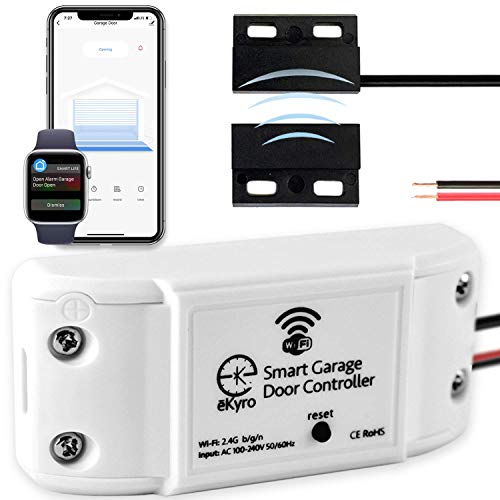
- Adds Wi-Fi control to compatible existing openers
- Works with major voice assistants
- No monthly fee for core features
Best For: Existing garage opener owners seeking app and voice access
Best Fingerprint Entry

- Built-in Wi-Fi enables remote app control
- Unlocks by fingerprint, code, app, or key
- Up to eight months of battery life
Best For: Garage entry doors needing biometric access
Best Garage Video Keypad
myQ Smart Garage Door Video Keypad

- Combines PIN access with smartphone control
- Adds 1080p video, motion alerts, and two-way audio
- Rechargeable and rated IP65 for outdoor use
Best For: Garage access with video verification
Best Connected Garage Entry Lock

- Remote Wi-Fi access through the Tapo app
- Supports up to 200 customizable codes
- Includes access logs, alerts, and auto-lock
Best For: Garage side doors needing managed user access
Video Access & PIN Control

- 1080p wide-angle camera with live app viewing
- Custom and time-limited PIN codes
- Motion alerts and two-way audio
Best For: Remote garage access with video monitoring
Key Safe Entry
Smart Bluetooth Garage Key Lock Box

- App, keypad, and temporary-code access
- IP65 weatherproof heavy-duty housing
- Type-C emergency power backup
Best For: Shared physical-key access for rentals and service visits
2K Video Entry
myQ Smart Garage Video Keypad 2K

- 2560×1440 wide-angle live video
- Scheduled PINs through the myQ app
- Motion alerts and two-way audio
Best For: Higher-resolution monitored garage access
Remote-Control Security Pick
Geevorks Hidden Electronic Deadbolt

- Four remotes with a stated 0–20 m range
- Digital conversation system for added access security
- About 16 months of battery life with four AA batteries
Best For: Users seeking dedicated remote access without smartphone controls
App-Enabled Access Pick
Smart Hidden Deadbolt with Remote Control

- Unlock with a remote or smartphone app
- Wi-Fi connectivity is listed
- Concealed design and corrosion-resistant metal construction
Best For: Buyers wanting app and remote access in one lock
Best Universal Garage Upgrade – eKyro Smart Garage Door Opener
If you want smart garage locks for remote access without replacing your existing opener, this eKyro controller is a practical option. It connects compatible garage door openers to Wi-Fi so you can monitor and control the door through a mobile device or voice assistant. It also supports door-left-open alerts, scheduling, and automatic closing without a required monthly fee.
Best For: Homeowners who want app and voice control for an existing garage door opener.
Pros:
- Works with Alexa, Google Home, Siri, iPhone, Android, and smart watches.
- Supports remote monitoring, scheduling, automatic closing, and open-door alerts.
- No subscription is required for core features.
- Multiple controllers can be paired for homes with more than one garage door.
Cons:
- Compatibility may require an additional adapter.
- It does not work with RYOBI openers.
- Each garage door requires its own controller.
This is the closest match in the group to a dedicated smart garage access upgrade. Confirm opener compatibility before buying, especially if you have a less common model.
Best Fingerprint Entry – WYZE Auto-Lock Bolt v2
The WYZE Auto-Lock Bolt v2 is a Wi-Fi smart deadbolt rather than a garage-door opener, but it can complement a garage entry door when you need smart garage locks for remote access. Built-in Wi-Fi enables remote management in the Wyze app, while fingerprint, keypad, app, and physical-key entry provide flexible ways to unlock.
Best For: A garage entry door or connecting door where biometric access and remote app control are priorities.
Pros:
- Fingerprint scanner can unlock the lock in about 0.5 seconds.
- Built-in Wi-Fi supports remote checking and management through the Wyze app.
- Offers fingerprint, app, code, and physical-key access.
- Includes up to eight months of battery life and USB-C emergency power.
Cons:
- It is a deadbolt for a door, not a controller for a garage-door opener.
- Its fingerprint and keypad features may be unnecessary for users who only need opener control.
Choose this model when your access point is a standard deadbolt-equipped garage or entry door. For overhead garage-door control, a dedicated opener controller will be a better fit.
Best Garage Video Keypad – myQ Smart Garage Door Video Keypad
The myQ Smart Garage Door Video Keypad combines smartphone-controlled garage access with outdoor video monitoring. For shoppers comparing smart garage locks for remote access, it adds customizable PIN codes, a wide-angle camera, motion alerts, two-way audio, and night vision. Compatibility is specified for Chamberlain, LiftMaster, and Craftsman openers.
Best For: Households that want keypad entry plus visual verification and activity monitoring around the garage.
Pros:
- Supports customizable PIN codes and smartphone control.
- 160-degree viewing angle, 1080p video, motion detection, and night vision.
- Includes two-way audio, built-in light, and a rechargeable battery.
- IP65 water resistance supports outdoor installation.
Cons:
- Advanced AI detection, recorded video history, and enhanced motion features require a subscription.
- Compatibility is focused on Chamberlain, LiftMaster, and Craftsman openers.
- The product is battery powered, so charging is part of ongoing maintenance.
This is a strong choice when access control and surveillance belong in the same device. Check opener compatibility and account for subscription costs if you want the premium video features.
Best Connected Garage Entry Lock – Tapo DL100 Smart Deadbolt
The Tapo DL100 is a smart deadbolt for a garage entry door or other standard door, offering remote Wi-Fi control through the Tapo app. It is worth considering alongside smart garage locks for remote access if you want code-based entry, access logs, alerts, and voice-assistant support rather than control of an overhead opener.
Best For: Standard garage side doors or home entry doors needing remote access and multiple user codes.
Pros:
- Supports app, Bluetooth, keypad, physical-key, and voice-command unlocking.
- Allows up to 200 customizable codes with profiles for family and guests.
- Provides remote status checks, alerts, activity timestamps, and auto-lock.
- Includes emergency USB-C power and IP54 weather resistance.
Cons:
- It is a standard deadbolt, not an overhead garage-door opener controller.
- Battery life varies by connection mode, with shorter life in Wi-Fi mode.
- Installation requires compatible standard door lock-hole dimensions.
The DL100 offers a broad access-management feature set for a garage entry door. Verify the existing door dimensions and decide whether Wi-Fi remote control or longer Bluetooth battery life matters more for your installation.
Video Access & PIN Control – myQ Smart Garage Video Keypad
For homeowners comparing smart garage locks for remote access, the myQ Video Keypad combines app-controlled entry with a wide-angle 1080p camera. It supports personalized and time-limited PINs, live viewing, motion alerts, and two-way audio, but compatibility is limited to one qualifying Chamberlain, LiftMaster, or Craftsman opener.
Best For: Families and service providers who need remote PIN management plus visual monitoring.
Pros:
- Create unique, scheduled PIN codes for guests, family, and contractors.
- View live 1080p video and receive motion notifications through the myQ app.
- Two-way audio and a wide-angle camera help monitor and communicate around the garage.
- Wireless DIY installation and battery operation simplify setup.
Cons:
- Controls only one compatible opener manufactured after 1993.
- Advanced AI detection and recorded video history require a myQ subscription.
- Battery operation may require charging or replacement unless paired with the optional power adapter kit.
This is a strong choice when remote entry and camera visibility matter equally. Confirm opener compatibility and account for optional subscription and power-adapter costs before buying.
Key Safe Entry – Smart Bluetooth Garage Key Lock Box
If you need smart garage locks for remote access without replacing a garage-door opener, this wall-mounted key box offers a practical alternative. Bluetooth app control, keypad entry, and temporary codes let you share physical keys or cards with guests, while IP65 weather resistance supports outdoor installation.
Best For: Airbnb hosts, property managers, and households sharing physical keys with guests or service providers.
Pros:
- Supports Smart Life/Tuya app access, keypad codes, and temporary dynamic codes.
- Stores multiple keys, car fobs, and access cards in its 18-cubic-inch compartment.
- IP65 weatherproof construction and heavy-duty metal housing suit outdoor use.
- Type-C emergency power backup helps prevent lockouts after battery depletion.
Cons:
- Stores keys and cards rather than directly controlling a garage door.
- Bluetooth app control may not provide the same remote range as a Wi-Fi garage controller.
- Requires four AAA batteries and wall mounting.
This lock box is best viewed as a remotely managed key handoff solution, not a connected garage-door opener. Its temporary codes, weather protection, and emergency power feature make it useful for controlled property access.
2K Video Entry – myQ Smart Garage Video Keypad 2K
For shoppers seeking smart garage locks for remote access with sharper video, the myQ 2K Video Keypad adds app-managed PINs and 2560×1440 live viewing. It also provides motion alerts, two-way audio, and scheduled passes, provided your opener is a compatible Chamberlain, LiftMaster, or Craftsman model.
Best For: Homeowners who want higher-resolution garage monitoring alongside remote PIN-based entry.
Pros:
- 2K wide-angle video provides detailed live views through the myQ app.
- Generate personalized and time-specific PINs for household members and visitors.
- Motion notifications, two-way audio, and remote viewing support active monitoring.
- Includes battery power and mounting hardware for wireless installation.
Cons:
- Controls a single compatible opener only.
- AI detection and recorded video history require a myQ subscription.
- Battery operation may need maintenance unless upgraded with the optional power adapter kit.
The 2K model is the more video-focused option in this lineup, especially for users who want clearer driveway-to-doorway views. Verify opener compatibility and consider the ongoing requirements for premium features and battery-free operation.
Remote-Control Security Pick – Geevorks Hidden Electronic Deadbolt
For shoppers comparing smart garage locks for remote access, the Geevorks Remote Control Electronic Intelligent Door Lock offers keyless entry through a remote with a stated range of 0–20 meters. Its hidden deadbolt design and stainless steel construction suit garages, homes, offices, and other compatible doors.
Best For: Households and small offices wanting remote-only access with long battery life and multiple included remotes.
Pros:
- Includes four remote controls with a stated 0–20 m operating range.
- Uses a digital conversation system designed to resist decoding or duplication.
- Four AA batteries are rated for about 16 months of operation, excluding batteries.
- Stainless steel construction and a base plate support a stable installation.
Cons:
- No smartphone app or Wi-Fi control is listed.
- Batteries are not included.
- The product is described as suitable for garage doors, but door compatibility should be checked before installation.
This is a practical choice if you prefer dedicated remotes over app controls. Its extended stated range and battery estimate are useful for everyday access, while the lack of app connectivity may limit remote management from outside the listed range.
App-Enabled Access Pick – Smart Hidden Deadbolt with Remote Control
Electronic Deadbolt Anti-Theft Smart Hidden Door Lock with Remote Control and Smartphone App Access
Check Price On AmazonAmong smart garage locks for remote access, this electronic hidden deadbolt stands out for combining remote control with smartphone app access. Its concealed lock design, Wi-Fi connectivity, and stainless steel construction make it a flexible option for listed residential and commercial applications.
Best For: Users who want both handheld remote access and app-based unlocking for a home, office, warehouse, or basement.
Pros:
- Supports unlocking through both a remote control and smartphone app.
- Wi-Fi connectivity is listed for app-based control.
- Hidden design has no visible lock hole, according to the supplied product notes.
- Zinc alloy and stainless steel construction is described as rust-, corrosion-, and wear-resistant.
Cons:
- The supplied information does not specify app features, remote range, or battery life.
- Only one item is listed in the package details.
- Compatibility with a specific garage door setup should be confirmed despite the general standard-size compatibility claim.
This model is the strongest fit for buyers prioritizing phone access rather than relying solely on a physical remote. Before purchasing, verify the installation dimensions and the app’s requirements for your intended door.
Auto-Locking Value Pick – Remote-Control Intelligent Deadbolt
For shoppers evaluating smart garage locks for remote access, this wireless electronic deadbolt provides remote unlocking, a backup key option, and automatic locking three seconds after the door closes. It includes four remotes and is designed for listed home, office, hotel, wooden-door, and garage-door applications.
Best For: Users who want multiple remotes, automatic relocking, and a mechanical key backup for everyday access.
Pros:
- Automatically locks three seconds after the door closes.
- Includes four remote controls and supports key unlocking as a backup.
- Four AA batteries are rated for about one year of operation, excluding batteries.
- Stainless steel and zinc components, plus a stated 300,000 lock-operation service life.
Cons:
- The stated remote range is 0–10 meters, shorter than some alternatives.
- Batteries are not included.
- No smartphone app or Wi-Fi control is listed.
This lock is a sensible fit when automatic relocking matters more than long-range or app-based access. Its four remotes and key backup add flexibility, though the shorter stated range makes careful placement and approach distance important.
How We Picked the Best Smart Garage Locks for Remote Access
We evaluated these products by looking at the access method, remote-control features, connectivity, security functions, installation requirements, and likely day-to-day convenience. Products include Wi-Fi garage controllers, video keypads, smart deadbolts, electronic hidden locks, and key safes, so they serve different entry points rather than being direct substitutes.
We also considered compatibility with common ecosystems such as Alexa, Google Home, iPhone, Siri, and smartphone apps. Because garage doors and entry doors use different hardware, confirm the intended installation location before buying.
Quick Comparison
- Best for app-based garage control: A universal Wi-Fi garage controller.
- Best for camera-equipped entry: A myQ video keypad with smartphone control.
- Best for PIN access: A customizable video keypad or smart deadbolt.
- Best for biometric entry: A fingerprint-enabled smart deadbolt.
- Best for sharing a physical key: An app-controlled, wall-mounted key lock box.
- Best for concealed installation: A hidden electronic deadbolt with remote access.
Key Buying Factors for Smart Garage Locks for Remote Access
Garage Compatibility and Installation
A garage door controller usually works with an existing motor and wall button, while a deadbolt replaces or supplements a conventional door lock. Check the opener model, door type, wiring, mounting space, and included sensors. Some products require professional installation or a compatible hub.
Remote Connectivity
Wi-Fi models can typically be controlled from outside the home without a nearby phone, but they depend on a stable internet connection. Bluetooth locks may work well at close range but often need a hub for true remote access. Look for clear app permissions, reliable notifications, and a manual backup method.
Access Management and Security
Unique PINs, fingerprints, temporary codes, activity logs, and automatic locking can be more useful than a shared password. For video keypads, review camera placement, viewing angle, motion alerts, storage policies, and whether a subscription is required.
Power and Failure Protection
Battery-powered locks should provide low-battery warnings and an emergency entry option. Consider rechargeable versus replaceable batteries, backup keys, exterior power contacts, and what happens if Wi-Fi or electricity fails.
Who Should Buy Which Smart Garage Locks for Remote Access?
Choose a Wi-Fi garage controller if you want to operate an existing opener from a phone or voice assistant. Choose a video keypad if you want visible verification, custom codes, and a convenient exterior entry point. A fingerprint deadbolt suits households seeking fast keyless access, while a hidden electronic lock may work better for discreet installations.
An app-controlled key lock box is a practical choice for caregivers, cleaners, or guests who need access to a physical key. Before ordering, prioritize the access method you will use most, then verify compatibility, app support, battery life, and installation requirements.