Choosing a computer accessory as a Christmas gift can be practical and personal: start with how he works, plays, creates, or travels with his devices. Check the connections and desk setup before choosing gear that needs to fit.
Computer Accessory Christmas Gifts for Men
1. Anker Prime Thunderbolt 5 Docking Station
A Hub for a Full Laptop Setup
Anker Prime Thunderbolt 5 Docking Station

- Combines Thunderbolt 5, USB-C and USB-A ports with SD and TF card readers.
- Supports HDMI or DisplayPort and Thunderbolt video outputs for multiple displays.
- Includes a 3.3 ft Thunderbolt 5 cable and 6 ft AC power cable.
Best For: A laptop user connecting multiple displays and accessories
2. beyerdynamic DT 770 Pro 80 Ohm Headphones
For Focused Listening Sessions
beyerdynamic DT 770 Pro 80 Ohm Headphones

- Closed-back design provides passive sound isolation.
- Replaceable grey velour ear pads and a spring-steel headband.
- Includes a fixed 3 m straight cable and 1/4-inch adapter.
Best For: A music listener, gamer, or audio hobbyist
3. MOLENTS Ergonomic Mesh Office Chair
A More Adjustable Desk Seat
MOLENTS Ergonomic Mesh Office Chair

- Lumbar support adjusts up and down, forward and backward.
- 3D armrests and a backrest with three recline positions from 90° to 120°.
- Breathable mesh and an adjustable seat height.
Best For: A man who works or games at a desk for long stretches
4. MechLands Feker Alice98 Mechanical Keyboard
5. HUANUO FlowLift Dual Monitor Desk Mount
A Lift for a Two-Screen Desk
HUANUO FlowLift Dual Monitor Desk Mount

- Fits two 13–32 inch monitors, each weighing 4.4–19.8 lb, with specified VESA holes.
- Arms tilt, swivel, rotate, and raise screens up to 15.75 inches.
- Uses a C-clamp or grommet mount; desk and monitor fit must be checked.
Best For: A dual-monitor user seeking more desk space
6. EMEET NOVA 4K Webcam
For Clearer Video Calls

- Offers 4K video at 30 fps; video defaults to 1080p and requires a setting change for 4K.
- Includes PDAF autofocus, two built-in microphones, and a privacy cover.
- Connects through USB-A and has an adjustable stand with tripod thread.
Best For: A remote worker, streamer, or frequent video caller
7. Univivi 36-Inch Under-Desk Cable Tray
A Tidy-Up for Desk Cables
Univivi 36-Inch Under-Desk Cable Tray

- 36-inch fabric tray holds adapters, sockets, and cables beneath a table.
- Installs with clamps or screws and includes built-in ties.
- Measure the desk edge and clearance before choosing this tray.
Best For: Someone organizing a workstation with multiple cables
8. Yodoit 15.6-Inch Portable Monitor
A Second Screen for Travel
Yodoit 15.6-Inch Portable Monitor

- 15.6-inch FHD IPS screen with matte finish and built-in speakers.
- Connects by USB-C or mini HDMI with USB power, depending on the device.
- Includes a smart cover; check the laptop or device’s video output compatibility.
Best For: A laptop user who works away from a permanent desk
9. HUION Keydial Mini Programmable Keypad
Shortcuts at His Fingertips
HUION Keydial Mini Programmable Keypad

- Provides 18 programmable shortcut keys and a dial with up to three functions.
- Bluetooth connection and one-handed design support portable use.
- Custom shortcuts are set through the Huion driver and depend on software support.
Best For: A digital artist, editor, gamer, or shortcut-heavy professional
10. REWONDER 20,000mAh USB-C Power Bank
11. STREBITO 142-Piece Precision Screwdriver Set
Tools for Small Tech Repairs
STREBITO 142-Piece Precision Screwdriver Set
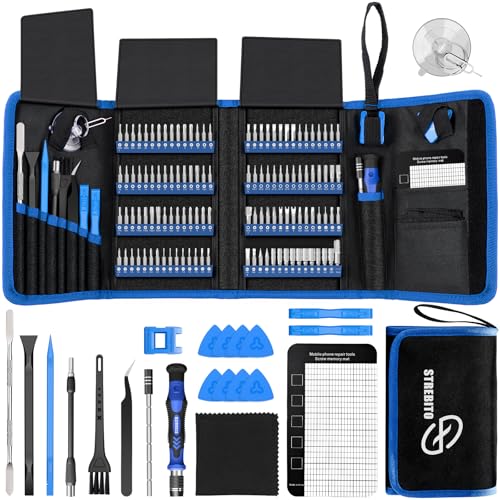
- Includes 120 driver bits and 22 accessories such as tweezers and a magnetic mat.
- Has a flexible extension shaft and a portable storage bag.
- Designed for electronics projects including computers, laptops, tablets, and consoles.
Best For: A computer enthusiast who builds, repairs, or maintains devices
12. RIWUCT Foldable Adjustable Laptop Stand
A Lift for His Laptop
RIWUCT Foldable Adjustable Laptop Stand
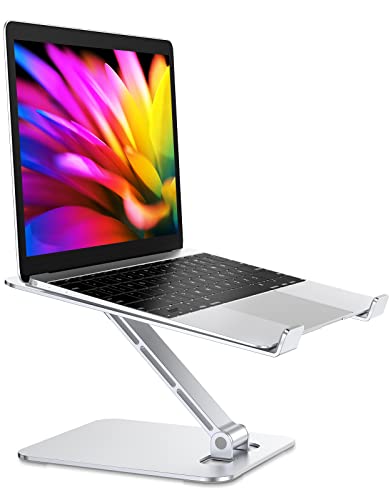
- Raises a laptop up to 7.48 inches and folds for storage or carrying.
- Aluminum alloy stand supports laptops up to 8.8 lb.
- Listed for laptops from 10 to 16 inches; an external keyboard is suggested for intense typing.
Best For: A laptop user who wants an adjustable desk setup
13. Redragon GS520 USB Desktop Speakers
Sound and Color for the Desk
Redragon GS520 USB Desktop Speakers
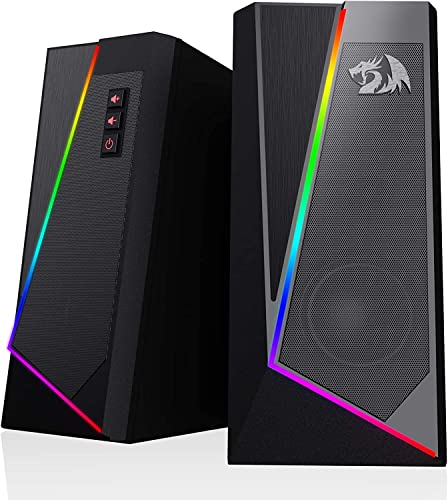
- Wired 2.0 stereo speakers connect with USB power and 3.5 mm audio.
- Touch controls cycle through six RGB lighting modes or switch the lights off.
- Separate volume-up and volume-down buttons provide easy access.
Best For: A PC gamer or music listener who wants desktop speakers
14. Redragon M810 PRO Wireless Gaming Mouse
Wireless Control for Work or Play
Redragon M810 PRO Wireless Gaming Mouse

- Connects wirelessly through a 2.4 GHz receiver and is rechargeable.
- Eight programmable buttons and five onboard DPI levels can be customized.
- Right-handed design includes adjustable RGB lighting.
Best For: A PC gamer or right-handed computer user who likes programmable controls
15. YEELIGHT Monitor Light Bar
A Lamp Above the Screen

- Clips onto flat or curved monitors 0.3–1.1 inches thick.
- Brightness dims continuously and color temperature adjusts from 2700K to 6500K.
- USB powered with a 1.5 m cable and a low-profile design intended to avoid blocking a webcam.
Best For: A desk worker or gamer who uses a monitor after dark
16. BENFEI 7-in-1 USB-C Hub
More Connections in a Small Hub

- Includes HDMI, two USB-A ports, USB-C data, charging pass-through, and SD/TF readers.
- Supports video up to 4K at 60 Hz; USB-C pass-through charging is up to 90W.
- Check that his device has compatible USB-C video and charging support.
Best For: A laptop owner who needs extra ports at home or on the move
17. SanDisk 2TB Extreme Portable SSD
Portable Space for Large Files
SanDisk 2TB Extreme Portable SSD

- Provides 2 TB of storage in a portable USB drive.
- Advertised read speeds are up to 1050 MB/s; actual performance depends on the host device and other factors.
- Features IP65 water and dust resistance, drop protection, and password protection with hardware encryption.
Best For: A photographer, gamer, or professional who moves large files
18. CyberPower CP1500PFCLCD Battery Backup
Backup for a Desktop Setup
CyberPower CP1500PFCLCD Battery Backup

- 1500VA/1000W sine-wave UPS provides battery backup and surge protection.
- Has 12 outlets: six with battery backup and surge protection, and six surge-protected outlets.
- LCD panel displays battery and power conditions; includes USB-A and USB-C charging ports.
Best For: A desktop computer owner seeking backup power for equipment
Choosing Computer Accessory Christmas Gifts for Men
Start with the recipient’s routine. A man who works from a fixed desk may appreciate a chair, monitor arm, laptop stand, or cable tray. For someone who moves between home, office, and travel, consider the portable monitor, compact USB-C hub, power bank, or SSD. Creative work points toward the programmable keypad, precision screwdriver set, webcam, or studio headphones. A gamer may make good use of the mouse, speakers, chair, or headset-style headphones. These computer accessory Christmas gift ideas for men work best when they solve a familiar task or improve a setup he already uses.
Look for clues before selecting a gift: number of monitors, laptop ports, whether he has a USB-C charger, the kinds of games or creative software he uses, and whether he already owns a dock. For a bigger desk item, available space and the recipient’s habits matter as much as features. If you cannot check directly, choose an accessory with a clear, flexible use case and avoid products that require a precise fit.
Set a Budget That Fits the Upgrade
A useful gift does not need to replace an entire setup. Smaller accessories such as a keypad, cable tray, laptop stand, speakers, or USB-C hub can refresh an existing workspace without requiring a full system change. A mouse or webcam can make daily computer use more convenient, while headphones or an SSD may suit a hobby or work need.
For larger purchases such as a chair, docking station, monitor mount, or battery backup, consider whether the recipient has room for it and whether it fits the equipment already in place. A larger gift is worthwhile when it addresses a real limitation, such as needing more display connections or a proper seat for long desk sessions. Think about the cost as part of a complete setup: a mount may also require compatible monitors and desk space, and a dock is useful only if his laptop supports its connections.
Check Compatibility and Personalization
Compatibility is often the deciding factor with computer accessories. Verify the laptop’s ports and video output before choosing a dock, hub, or portable monitor. USB-C describes a connector, but devices can differ in whether that port carries video or supports the needed charging. The hub’s HDMI output and the portable monitor’s USB-C connection both depend on device support. Also check whether the monitor arm matches screen size, weight, and VESA mounting holes, and whether the desk can accept its clamp or grommet base.
Personalization can be practical. The Alice98 keyboard and HUION keypad offer ways to customize keys, while the gaming mouse supports programmable buttons. These choices suit recipients who enjoy adjusting their setup; they may take configuration to get right. For headphones, consider how the recipient listens and connects: the DT 770 Pro is wired, closed-back, and 80 ohms, with the notes recommending an audio interface or headphone amp for best results. For a power bank, check the device’s maximum input and remember that its highest stated output applies to a single port at a time.
Timing and Last-Minute Decisions
For a last-minute decision, favor a gift with a straightforward fit and a purpose that is easy to confirm. A cable tray, screwdriver kit, speakers, or laptop stand may be simpler to match than a monitor mount, specialized dock, or chair. Still check measurements and ports: a quick look at the laptop model, monitor label, or desk edge can prevent a mismatch.
For gifts that need setup, leave time to confirm compatibility and arrange the workspace. A dual-monitor mount needs a suitable desk and compatible screens; a webcam may require switching a setting to use 4K; programmable controls need software setup. If the recipient is traveling, a portable monitor or power bank may make sense, but check the connections and charging needs of the devices he carries. When time is short, choose an accessory that complements something he already owns and can use in his normal routine. That makes a practical computer accessory feel considered for Christmas without requiring seasonal styling.