A home office gift can make work more comfortable, organized, or convenient long after Christmas. Consider how the recipient works each day: their desk setup, devices, and available space can help narrow the choice.
13 Home Office Gifts to Consider
1. INNOCN 34-Inch Ultrawide Monitor
A Wider View for Busy Workdays
INNOCN 34-Inch Ultrawide Monitor

- The 21:9 display offers room for side-by-side documents and creative timelines.
- Picture-in-picture and picture-by-picture modes can show two connected devices at once.
- The stand adjusts for height and tilt, with HDMI and DisplayPort connections.
Best For: Someone who regularly multitasks across documents, spreadsheets, or creative projects.
2. GOLDENMATE Lithium UPS Battery Backup
Power Protection for the Work Setup
GOLDENMATE Lithium UPS Battery Backup

- Eight outlets provide both battery backup and surge protection.
- The LCD panel displays battery and power conditions.
- A buzzer mute function is available when the unit switches to battery mode.
Best For: A remote worker whose computer and network devices depend on household power.
3. SHW Electric Standing Desk with Drawer
A Sit-Stand Workspace Upgrade
SHW Electric Standing Desk with Drawer

- The 55-by-28-inch desktop has room for monitors, a laptop, and office essentials.
- Its motorized lift adjusts from 28 to 45 inches.
- A drawer, cable tray, grommets, and two hooks help organize desk items and cords.
Best For: A home worker who wants to alternate between sitting and standing.
4. Anker Prime 14-in-1 Docking Station
One Hub for Laptop Connections
Anker Prime 14-in-1 Docking Station

- The dock provides 14-in-1 connectivity and up to 160W total output.
- Dual HDMI ports support two displays, with resolution depending on the laptop's DisplayPort version.
- It supports USB-C, USB4, and Thunderbolt connections; check the laptop and operating system requirements.
Best For: A laptop user who connects displays and peripherals at a home desk.
5. TRALT Ergonomic Mesh Office Chair
A More Adjustable Desk Chair
TRALT Ergonomic Mesh Office Chair

- The chair has an adjustable lumbar support mechanism and a breathable mesh backrest.
- Its seat uses high-resilience molded foam, according to the supplied product details.
- The seat height adjusts from 17.7 to 21.7 inches.
Best For: Someone who spends long workdays seated and would value adjustable lumbar support.
6. LEVOIT Eleva 300X HEPA Air Purifier
A Quieter Office Atmosphere
LEVOIT Eleva 300X HEPA Air Purifier

- The purifier has a HEPA system and a sensor that monitors PM1.0, PM2.5, and PM10.
- Sleep Mode is listed at 20 dB, and the screen can turn off in that mode.
- The VeSync app supports schedules, timers, air-quality monitoring, and filter-life tracking.
Best For: Someone who works for long stretches in a dedicated home office.
7. Adjustable LED Desk Lamp with Gooseneck
Flexible Light for the Desk
Adjustable LED Desk Lamp with Gooseneck

- Three light bars and adjustable arms direct light across a work area.
- Touch controls offer stepless dimming and color temperature from 2700K to 6500K.
- The lamp includes a weighted base and remembers the last lighting settings.
Best For: A home worker who reads, writes, or crafts at a desk after dark.
8. HUANUO Adjustable Dual Monitor Arm
More Room Beneath Two Screens
HUANUO Adjustable Dual Monitor Arm

- The mount fits two monitors from 13 to 32 inches when each meets its weight and VESA requirements.
- The arms allow tilt, swivel, rotation, and height adjustment.
- C-clamp or grommet mounting and built-in cable management are included.
Best For: A two-monitor desk user whose monitors and desk meet the mounting requirements.
9. EMEET C960 4K Webcam
A Clearer Camera for Video Calls

- The webcam has a 4K CMOS sensor, PDAF autofocus, and automatic light adjustment.
- Dual omnidirectional microphones and a privacy cover are built in.
- Video defaults to 1080p; switching to 4K requires camera software or a compatible app.
Best For: A remote worker who joins video meetings or records presentations.
10. Wireless Work Headset with ANC and Mic
Focus and Call Controls in One Headset
Wireless Work Headset with ANC and Mic

- The headset combines active noise cancellation with microphone noise cancellation.
- A USB-A dongle supports PC and Mac use, and Bluetooth allows connection to two devices.
- The microphone boom flips up to mute.
Best For: Someone who takes calls while working in a busy household.
11. Redragon K745 PRO Wireless Keyboard
A Customizable Typing Gift
Redragon K745 PRO Wireless Keyboard

- The full-size keyboard has 108 keys and four dedicated shortcut keys.
- It connects by USB-C, Bluetooth, or 2.4GHz wireless.
- Its RGB lighting, remappable hotkeys, and programmable macros allow customization.
Best For: A home office regular who enjoys a tactile, customizable keyboard.
12. Univivi 36-Inch Under-Desk Cable Tray
A Tidier Desk Underside
Univivi 36-Inch Under-Desk Cable Tray

- The 36-inch tray can hold adapters and power strips beneath a desk.
- It installs with clamps or screws and includes built-in ties for securing items.
- Check desk dimensions and clearance, including space for the clips.
Best For: Someone looking to organize cables and power strips under a crowded desk.
13. Woolsche 12-Sheet Cross-Cut Shredder
A Practical Paperwork Helper
Woolsche 12-Sheet Cross-Cut Shredder
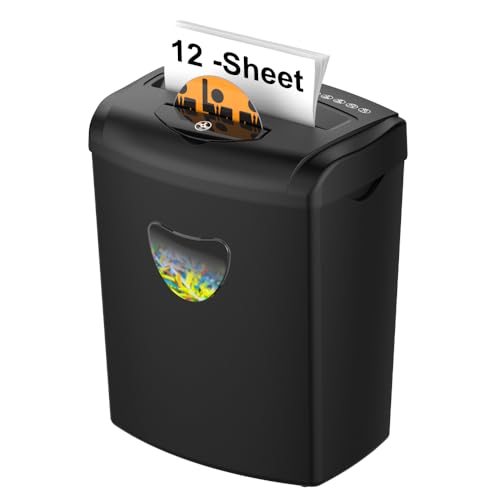
- The cross-cut shredder handles up to 12 sheets at a time, according to the supplied title and notes.
- It can shred paper, cards, CDs, staples, and clips.
- The 5.55-gallon basket and three-mode control are designed for home or office use.
Best For: A home worker who handles paperwork with personal or confidential information.
Choosing a Christmas Gift for a Home Office Worker
Start with the part of the workday the recipient most often mentions. If they struggle to arrange windows or keep two displays in a comfortable position, a monitor or monitor arm may be useful. A laptop user who regularly plugs and unplugs peripherals could appreciate a dock, while someone whose desk feels cramped may benefit from a standing desk or cable tray. For frequent video calls, a webcam or headset addresses a different need than a broad workspace upgrade.
Pay attention to the scale of the gift. A chair, desk, or large monitor can change the whole room, but these purchases need space and may be difficult to assemble or return. Smaller accessories such as a lamp, keyboard, headset, or cable organizer can improve a daily routine without requiring a full room redesign. If you are unsure, choose the item that fits an existing setup rather than assuming the recipient wants to replace it.
Set a Budget Around the Kind of Upgrade
A useful budget can be based on whether you want to give an everyday accessory or a major equipment upgrade. Lamps, cable trays, and keyboards are often easier to fit into a modest gift budget. A monitor, chair, desk, or UPS is a more substantial purchase and may be appropriate as a shared family gift. Compare the features that matter for the recipient’s use rather than paying for capabilities they will not use.
Remember that a large gift can involve related costs or practical needs: a desk takes floor space, a monitor may need a compatible cable or mount, and a shredder needs somewhere to sit and be emptied. A smaller, well-matched gift can be more considerate than an impressive item that does not suit the room.
Check Compatibility and Personalization
For computer accessories, confirm the recipient’s devices before choosing. The docking station needs a compatible USB-C, USB4, or Thunderbolt connection and supported display output; its dual-screen behavior varies by operating system and laptop capability. The monitor arm has size, weight, VESA-hole, and desk-mounting requirements, so check both screens and the desk. A webcam’s available resolution can depend on software settings, and the headset’s included USB-A dongle is intended for computers rather than landline or desk phones.
Physical dimensions matter too. Measure the desk and available floor area before selecting a large monitor, desk, purifier, or cable tray. For a chair, consider the recipient’s preferred seat height and whether adjustable lumbar support is a priority. Personalization can be as simple as matching a keyboard’s color to their workspace or choosing a lamp suited to evening reading. A discreetly asked question about their current setup can prevent a well-meant gift from becoming a compatibility puzzle.
Timing and Last-Minute Decisions
For a Christmas gift that needs fitting or installation, make the choice early enough to check measurements and connections. Desks, monitor mounts, and chairs may require assembly, and the recipient may need to clear space or coordinate a change to their work area. For a less involved last-minute option, consider a lamp, keyboard, or headset after checking the relevant device connection.
If you are deciding close to Christmas, focus on gifts whose usefulness is easy to understand and whose requirements you can verify quickly. Avoid promising a particular arrival date; check current ordering details directly. When compatibility is uncertain, include a gift receipt or agree on the exact model together. The best home office Christmas gift ideas are practical for the person’s real routines, fit the space they have, and make work a little easier when January begins.