Need more speed on your wired network? Multi-gigabit switches make it easier to connect fast PCs, NAS devices, access points, and game consoles without bottlenecking your internet or local transfers.
Below, we’ve focused on practical options for home labs, gaming setups, and small offices so you can choose the right port count, speed class, and feature set with confidence.
Best 10 Multi-Gigabit Network Switches Picks for 2026
Editor’s Choice
TP-Link TL-SG108S-M2 8-Port 2.5G Switch

- 8 x 2.5GbE ports with up to 40 Gbps switching capacity
- Auto-negotiation supports 100Mb, 1G, and 2.5G devices
- Fanless, plug-and-play design for silent use
Best For: Easy home or office 2.5G upgrades with quiet operation
Quiet Metal Pick
NETGEAR MS308 8-Port 2.5G Switch

- 8 x 2.5Gbps ports with auto-negotiation
- Fanless metal design for silent desktop or wall mounting
- Works with existing Cat5e or Cat6 cables
Best For: Silent, compact 2.5G networking with flexible mounting
Best Value
BrosTrend 5-Port 2.5G Unmanaged Switch

- Five 2.5Gbps RJ45 ports with up to 25 Gbps switching capacity
- Plug-and-play unmanaged setup
- Fanless design for quiet operation
Best For: Small 2.5G setups that want simple value and quiet use
Gigabit Baseline
NETGEAR GS308 8-Port Gigabit Switch
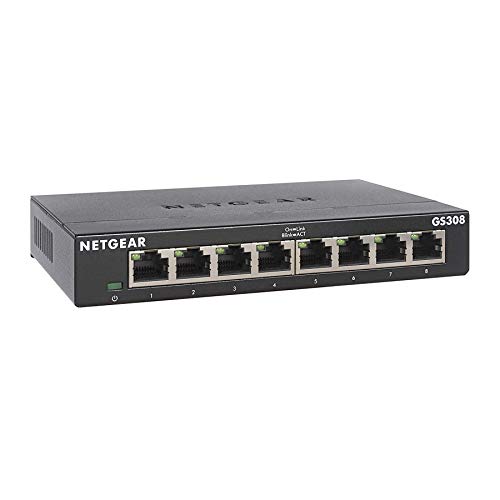
- 8 x 1.0Gbps Ethernet ports
- Plug-and-play unmanaged setup
- Fanless metal design with desktop or wall mounting
Best For: Standard gigabit networking when multi-gig speeds aren’t needed
5-Port 10G Performance
TP-Link TL-SX105 5-Port 10G Multi-Gig Switch

- Five 10G/Multi-Gig ports
- Auto-negotiates 100Mb through 10G
- Fanless metal desktop/wall design
Best For: Fast home or small office devices that need simple 10G connectivity
Simple Gigabit Value
NETGEAR GS305 5-Port Gigabit Switch

- Five 1Gbps Ethernet ports
- Silent fanless metal design
- Plug-and-play unmanaged setup
Best For: Basic network expansion where Gigabit speed is enough
Compact 5-Port Pick
UGREEN 2.5Gb Switch, 5-Port Ethernet Switch

- Five 2.5Gbps ports for a simple multi-gig upgrade
- Auto-negotiates 100M/1G/2.5G connections
- Fanless metal case with desktop or wall placement
Best For: Small setups that need quiet, plug-and-play 2.5G networking
Silent Desktop Upgrade
TP-Link TL-SG105S-M2 5-Port 2.5G Switch

- Five 2.5Gb ports with auto-negotiation up to 2.5G
- Fanless metal design for quiet operation
- Desktop or wall-mountable for flexible placement
Best For: Quiet, compact 2.5G upgrades for home and small office use
Best Port Count Value
BrosTrend 8-Port 2.5Gb Fanless Switch

- Eight 2.5Gbps ports for larger wired networks
- Up to 40Gbps switching capacity
- Fanless, plug-and-play unmanaged design
Best For: Larger home or gaming networks that need more 2.5G ports
Editor’s Choice – TP-Link TL-SG108S-M2 8-Port 2.5G Switch
If you want one of the simplest ways to step up to multi-gigabit network switches, the TP-Link TL-SG108S-M2 is built around 8 x 2.5GbE ports and up to 40 Gbps of switching capacity. It’s a practical fit for homes, small offices, LAN parties, and media-heavy setups where you want faster wired links without adding extra setup work.
Best For: Home users and small offices that want a silent, plug-and-play 2.5G upgrade with broad device compatibility.
Pros:
- 8 x 2.5G ports with up to 40 Gbps switching capacity
- Auto-negotiation supports 100Mb, 1G, and 2.5G devices
- Fanless design keeps operation silent
- Works with Cat6-free upgrades to 2.5 Gbps, reducing wiring hassle
Cons:
- Unmanaged design offers no advanced configuration options
- Desktop or wall-mount use may not suit rack-based installs
The combination of quiet operation, broad compatibility, and 2.5G ports makes this an easy pick for straightforward network upgrades. If you need faster wired performance without complicating the install, this TP-Link model covers the essentials well.
Quiet Metal Pick – NETGEAR MS308 8-Port 2.5G Switch
The NETGEAR MS308 is a straightforward choice among multi-gigabit network switches if you want 8 x 2.5Gbps ports in a compact, unmanaged format. It supports auto-negotiation and works with existing Cat5e or Cat6 cables, making it an easy path to faster wired connections without extra software or configuration.
Best For: Users who want a compact, silent 2.5G switch with metal construction and simple installation.
Pros:
- 8 x 2.5Gbps ports for multi-gig connectivity
- Auto-negotiating ports work with Cat5e or Cat6 cables
- Fanless operation keeps it silent
- Metal desktop or wall-mount design adds placement flexibility
Cons:
- Unmanaged switch with no setup or traffic controls
- Regional compatibility is limited to the U.S. and Canada
This is a sensible pick if you value quiet operation and a durable compact design over advanced features. It does the core job of delivering faster wired speeds with minimal effort.
Best Value – BrosTrend 5-Port 2.5G Unmanaged Switch
The BrosTrend 5-port model is a compact option in the multi-gigabit network switches category when you only need a handful of fast wired ports. It delivers 2.5 Gbps across all five RJ45 ports, offers up to 25 Gbps switching capacity, and is positioned for gaming PCs, consoles, NAS, servers, and home entertainment setups.
Best For: Small setups that need five fast 2.5G ports without paying for extra complexity.
Pros:
- Five 2.5Gbps RJ45 ports for multi-gig devices
- Up to 25 Gbps switching capacity
- Plug-and-play unmanaged setup
- Fanless design keeps operation quiet
Cons:
- Only 5 ports, so it may be too small for larger wired networks
- No SFP ports, which may matter for fiber-based plans
If you want a simple 2.5G switch for a few high-speed devices, this model keeps the value proposition focused. It trades expansion features for a clean, quiet, and easy upgrade path.
Gigabit Baseline – NETGEAR GS308 8-Port Gigabit Switch
The NETGEAR GS308 is not a multi-gigabit model, but it is a useful baseline if you’re comparing multi-gigabit network switches against a standard gigabit option. It offers 8 x 1.0Gbps Ethernet ports, plug-and-play setup, and a fanless metal design for simple wired expansion in homes and offices.
Best For: Buyers who only need reliable 1GbE switching and want a simple, quiet unmanaged setup.
Pros:
- 8 x 1.0Gbps Ethernet ports for standard wired networking
- Plug-and-play unmanaged operation with no software required
- Fanless metal design for silent use
- Supports desktop or wall-mount placement
Cons:
- Limited to 1Gbps, so it won’t deliver multi-gig speeds
- No advanced configuration features
This is a solid choice only if gigabit is enough for your devices. If your goal is faster-than-gigabit performance, you’ll want to step up to one of the 2.5G options instead.
5-Port 10G Performance – TP-Link TL-SX105 5-Port 10G Multi-Gig Switch
If you want one of the simplest ways to move into multi-gigabit network switches, the TP-Link TL-SX105 is built around five 10G/Multi-Gig ports and up to 100 Gbps of switching capacity. It is a strong fit when you need fast, automatic speed negotiation across devices like a 10G NAS, WiFi 6 access point, gaming PC, or 10G server without any setup work.
Best For: Users who want a compact, plug-and-play 10G switch for high-speed home or small office devices.
Pros:
- Five 10-Gigabit ports with up to 100 Gbps switching capacity
- Auto-negotiates across 100Mb, 1G, 2.5G, 5G, and 10G
- Fanless metal design for quiet operation
- Desktop or wall-mount setup with no software required
Cons:
- Only 5 ports, so expansion is limited
- Unmanaged design offers no advanced configuration options
Overall, this is a straightforward pick if your priority is maximum per-port speed and easy deployment. It suits fast storage, workstation, and WiFi 6 upgrades where quiet operation and simple compatibility matter most.
Simple Gigabit Value – NETGEAR GS305 5-Port Gigabit Switch
The NETGEAR GS305 is a basic unmanaged switch for adding five Gigabit Ethernet ports with a plug-and-play setup. It is not a multi-gigabit network switch, but it is a practical choice when you only need reliable 1Gbps connectivity over existing Cat5e or Cat6 cabling.
Best For: Buyers who only need a quiet, compact 1GbE switch for everyday network expansion.
Pros:
- Five auto-negotiating 1.0Gbps Ethernet ports
- Plug-and-play setup with no software to install
- Fanless design for silent operation
- Compact metal housing with desktop or wall-mount options
Cons:
- Limited to Gigabit speeds, so it does not support multi-gig performance
- Regional compatibility is restricted to the U.S. and Canada
This is the most straightforward option in the group for standard home or small office networking. Choose it if your devices do not need faster-than-gigabit speeds and you value simple, silent operation.
8-Port 2.5G Upgrade – TP-Link TL-SG108-M2 8-Port 2.5G Switch
The TP-Link TL-SG108-M2 is a strong fit if you are comparing multi-gigabit network switches and want more ports without jumping to 10G everywhere. Its eight 2.5-Gigabit ports and 40 Gbps switching capacity make it useful for faster WiFi 6 access points, 2.5G NAS devices, gaming PCs, and other bandwidth-hungry gear.
Best For: Users who want an easy 2.5G upgrade with more ports for a wired home or small office network.
Pros:
- Eight 2.5-Gigabit ports with up to 40 Gbps switching capacity
- Auto-negotiates at 100Mb, 1G, and 2.5G
- Fanless metal design for quiet, reliable operation
- Works with existing cabling and needs no configuration
Cons:
- Max speed is 2.5G, so it is not for full 10G deployments
- Unmanaged design does not include advanced network controls
For most users stepping up from standard Gigabit, this switch offers a practical balance of port count, speed, and simplicity. It is especially appealing when you want broader 2.5G coverage across multiple devices without extra setup.
Compact 5-Port Pick – UGREEN 2.5Gb Switch, 5-Port Ethernet Switch
If you want a simple way to move into multi-gigabit network switches, this UGREEN 5-port model is an easy starting point. It offers five 2.5GbE ports, auto-negotiation for 100M/1G/2.5G links, and a plug-and-play design that makes upgrading a home office, NAS setup, or gaming desk straightforward.
Best For: Small setups that need quiet, no-fuss 2.5G connectivity for a few key devices.
Pros:
- Five 2.5Gbps ports provide a fast upgrade over standard Gigabit switching.
- Auto-negotiation supports 100M/1G/2.5G devices for broad compatibility.
- Fanless metal design helps keep operation quiet and stable.
- Desktop or wall placement adds flexibility for tight spaces.
Cons:
- Only five ports, so it is not ideal for larger wired networks.
- Unmanaged design means there are no advanced configuration options.
- Best suited to 2.5G device upgrades rather than bigger expansion needs.
Overall, this UGREEN switch is a practical pick if you mainly want reliable 2.5GbE performance without setup hassle. Its quiet, metal build and compact size make it a good fit for everyday desktop networking.
Silent Desktop Upgrade – TP-Link TL-SG105S-M2 5-Port 2.5G Switch
The TP-Link TL-SG105S-M2 fits well into a buying guide for multi-gigabit network switches because it focuses on practical speed and easy deployment. With five 2.5Gb ports, auto-negotiation across 100Mb/1G/2.5G, and a fanless metal housing, it is designed to deliver fast wired networking in home, office, and entertainment setups.
Best For: Quiet, compact 2.5G upgrades for small offices, home labs, and entertainment spaces.
Pros:
- Five 2.5-Gigabit ports support fast connections for multi-gig devices.
- Auto-negotiation adapts between 100Mb, 1G, and 2.5G speeds.
- Fanless operation keeps noise out of workspaces and media rooms.
- Metal casing and desktop/wall-mount options add placement flexibility.
Cons:
- Unmanaged design offers no advanced traffic control features.
- Five ports may feel limiting if you plan to wire many devices.
- Best value comes when your devices can actually use 2.5G speeds.
This TP-Link model is a solid choice if you want a straightforward multi-gigabit upgrade without extra setup. It balances speed, silence, and flexibility in a compact form factor.
Best Port Count Value – BrosTrend 8-Port 2.5Gb Fanless Switch
Among multi-gigabit network switches, this BrosTrend model stands out for packing eight 2.5GbE ports into a fanless unmanaged design. It is a good fit when you need more wired connections for gaming, NAS access, workstations, or home entertainment without dealing with SFP ports or extra setup.
Best For: Users who want eight 2.5G ports for a larger wired setup with simple plug-and-play operation.
Pros:
- Eight 2.5Gbps ports give you more wired connections than smaller 5-port models.
- Up to 40Gbps switching capacity supports multiple high-speed devices.
- Fanless design keeps the switch whisper-quiet during use.
- Plug-and-play setup avoids software installation and configuration.
Cons:
- Unmanaged design means no advanced network controls.
- No SFP ports, so it is focused purely on RJ45 copper connections.
- Larger port count may be more than some small desks or simple setups need.
If you need more 2.5G ports rather than just a basic speed boost, this BrosTrend switch is the most expansion-friendly option here. It keeps the experience simple while giving you room for more devices.
How We Picked These Multi-Gigabit Network Switches
We prioritized real-world usefulness first: port count, 2.5G or 10G support, unmanaged simplicity, fanless design where possible, and solid value for home and small office use. Compatibility with common upgrades such as Wi-Fi 6/6E/7 access points, NAS enclosures, and modern motherboards also mattered.
We also looked for models that are easy to deploy right out of the box. For most buyers, Multi-Gigabit Network Switches should improve throughput without adding setup complexity, so plug-and-play operation and quiet operation were major pluses.
Quick Comparison
If you need the broadest compatibility and lower cost, a 2.5G unmanaged switch is the safest default. If your network includes a 10G NAS, workstation, or backbone link, one 10G-capable model can be worth the upgrade. Smaller 5-port options suit single-room setups, while 8-port models are better for expanding a whole desk, media center, or small office.
Key Buying Factors for Multi-Gigabit Network Switches
Speed Class
Most buyers should start with 2.5GbE. It offers a strong step up from gigabit without requiring premium cabling in many cases. 10GbE is better for heavy local transfers, but it costs more and may make sense only for advanced users.
Port Count
Choose the number of devices you need today, then add a little headroom for future gear. A 5-port switch works for a router uplink plus a few devices; an 8-port switch is usually more flexible for NAS, PCs, APs, and consoles.
Managed Vs. Unmanaged
Unmanaged models are best for buyers who want simple plug-and-play networking. Managed features are useful for VLANs, traffic control, and more advanced segmentation, but they are not necessary for most households.
Noise, Size, and Build
Fanless metal designs are ideal in living rooms, bedrooms, and desks. If the switch will sit in a rack or network closet, noise matters less, but cooling and durability still do.
Who Should Buy Which Multi-Gigabit Network Switches?
Choose a 5-port 2.5G switch if you only need to connect a router, a PC, and a NAS or console. Go with an 8-port 2.5G model if you’re building a more serious home network with multiple fast wired devices. Pick a 10G option if your workflow involves large file transfers, editing from network storage, or a faster backbone between key devices. If your needs are basic and speed upgrades are not a priority, a standard gigabit switch may still be enough.
In short, the best Multi-Gigabit Network Switches are the ones that match your current devices and leave room for the next upgrade. Focus on port count, speed, and noise level, and you’ll end up with a switch that solves today’s bottlenecks without overpaying for features you won’t use.